
Good accounting is the foundation of a healthy business. It keeps your finances organized, helps you understand where your money is going, and ensures you stay compliant with tax and reporting requirements. Accounting software has become essential, as it enables you to easily automate daily bookkeeping, track expenses, and generate reports that support better business decisions. Choosing the right accounting software can transform how your business operates. The right system saves time, reduces costly errors, and gives you a clear view of your financial performance. It also makes it easier to plan budgets, manage cash flow, and prepare for audits. On the other hand, using the wrong software can lead to confusion, reporting gaps, and wasted resources. Whether you operate a small startup or manage an established company, choosing the right software is about more than just meeting your immediate needs; it’s about planning for the future. The ideal software should align with your current business processes, size, and goals while also offering the flexibility to scale as your operations expand. As your customer base grows, data volumes increase, or new features become necessary, the software should be able to adapt without requiring a complete redesign. In this article, we will explore different types of accounting software, the features of accounting software, factors to consider when choosing accounting software, and the benefits of accounting software in a business. By the end of it, you will be able to easily select an accounting software that will be suitable for your business.
What Is Accounting Software?
Accounting software is a digital tool designed to help businesses efficiently manage, record, and analyze their financial transactions. It automates tasks such as tracking income and expenses, generating invoices, managing payroll, and producing financial reports, all in one place, as per Will (2025). By replacing manual bookkeeping and complex spreadsheets, accounting software minimizes errors, saves time, and provides real-time insights into a company’s financial health.
Beyond simple recordkeeping, modern accounting software often integrates with other business systems, such as inventory management, customer relationship management (CRM), and e-commerce platforms. This connectivity gives business owners a complete view of their operations, making it easier to monitor cash flow, manage taxes, and plan for growth.
Understanding Your Business Needs Before Selecting Accounting Software
Before choosing accounting software, it’s important to start with a clear understanding of your business needs. The right choice depends on your company’s size, complexity, industry, and growth plans. A careful assessment at this stage helps you avoid paying for features you don’t need or outgrowing your system too soon.
- Assess your business size and complexity.
Different businesses have different accounting needs. Microbusinesses with a small number of transactions may only need simple tools for invoicing, expense tracking, and bank reconciliation. On the other hand, growing businesses often require more advanced features such as multi-user access, payroll processing, inventory management, and multi-currency support. Large enterprises also typically need sophisticated systems with advanced reporting, role-based access control, high transaction capacity, and integration with enterprise resource planning (ERP) systems. Understanding your accounting needs will help you choose the best software that effectively meets them.
- Identify industry-specific requirements.
Understanding these industry-specific demands helps ensure that the software supports your core operations, complies with relevant standards, and improves overall efficiency. Different types of businesses will require other specific requirements, as highlighted below.
- Retail businesses benefit from software that includes point-of-sale (POS) integration and inventory costing methods such as FIFO, LIFO, or weighted average.
- Manufacturing companies need features such as job costing, bills of materials, and production accounting to manage their operations effectively.
- Service-based businesses depend on tools for project accounting, time tracking, and profitability analysis by client or project.
- Nonprofit organizations require fund accounting capabilities, restricted fund tracking, and detailed donor reporting to maintain transparency and compliance.
- Estimate transaction volume and plan for scalability.
Think about how many transactions your business processes daily, such as invoices, purchases, payroll, and bank feeds. A system that works well for 100 transactions a month may not perform efficiently with 10,000. Also, consider your growth plans for the next two to five years. The ideal software should scale easily to accommodate more users, product lines, or even new business entities as you expand.
Key Features to Look for in Accounting Software
When comparing accounting software options, focus on features that address your current business challenges and support future growth. The best system should handle day-to-day bookkeeping efficiently, simplify complex tasks as you scale, and integrate seamlessly with the other tools your business depends on. A study by CYGNET DIGITAL highlights the key features to consider when making your choice.
- Core Bookkeeping Functions
At the heart of every accounting system are the basic functions that keep your financial records accurate and up to date. These include managing accounts payable and receivable, creating invoices, recording vendor bills, and scheduling payments. The software should also support expense tracking and bank reconciliation through automated feeds and matching rules, reducing manual entry errors. Look for tools that enable customizable invoicing and the easy processing of incoming payments to streamline cash flow management.
- Inspect for Scalability
Many businesses choose software based solely on their current needs, overlooking future growth. This short-sighted approach often leads to costly and time-consuming migrations later. To avoid this, consider your long-term expansion plans and invest in software that can scale with your business. Opt for systems that offer multiple versions, such as an entry-level option for small operations and an advanced version for growing enterprises.
- User-Friendly Interface
A good accounting system should combine powerful functionality with ease of use. The software interface must be simple, intuitive, and free from unnecessary clutter, allowing professionals to focus on their core tasks. Before purchasing, ensure the software enhances efficiency rather than complicates daily operations.
- Automation and AI Capabilities
Modern accounting software increasingly relies on automation and artificial intelligence to save time and improve accuracy. Features such as automatic transaction categorization, predictive cash flow forecasting, and invoice scanning with optical character recognition (OCR) can drastically reduce manual workload. Workflow automation for tasks such as approvals, reminders, and recurring invoices ensures consistency and efficiency across your operations.
- Integration with Other Business Tools
Accounting doesn’t happen in isolation. The software you choose should integrate smoothly with your other systems, such as e-commerce stores, point-of-sale systems, payroll processors, and banking apps. Compatibility with Excel or Comma-separated values (CSV) import/export functions can also simplify data transfer. Ideally, the software should include open APIs or a broad ecosystem of third-party apps to give you flexibility as your business technology evolves.
Read Also: How Cloud Accounting Simplifies Financial Management
Comparing Popular Accounting Software Options
Choosing accounting software often comes down to comparing features in real‑world scenarios. Each platform has strengths and weaknesses, and understanding these differences helps narrow the field. Below are the common accounting software you can choose for your business.
I. QuickBooks Online
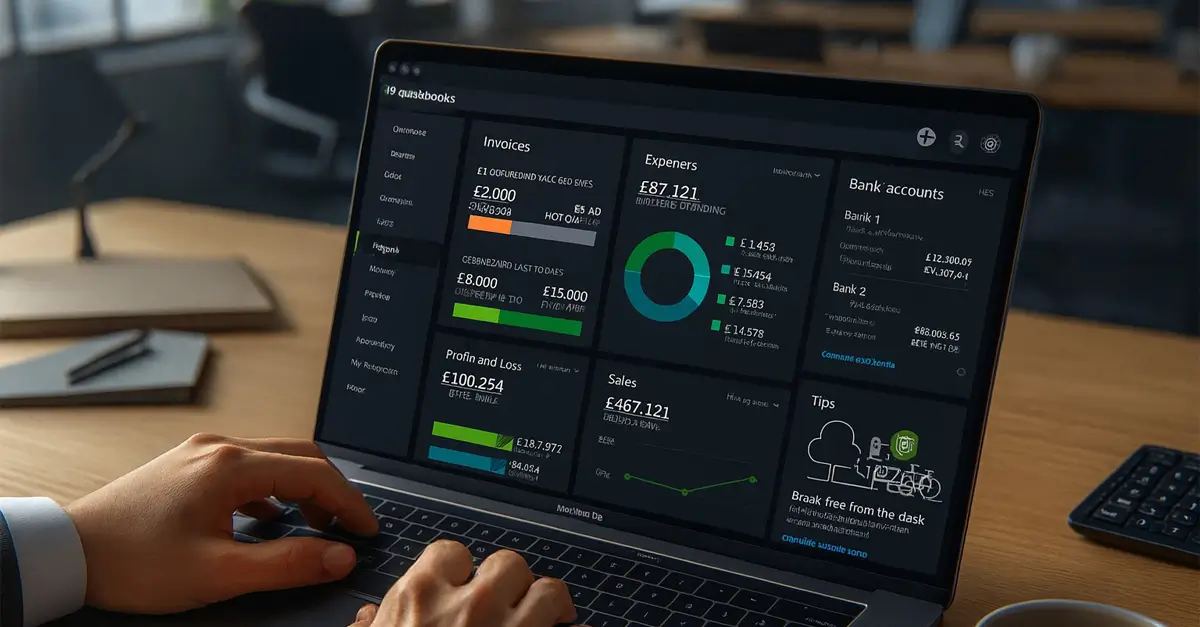
QuickBooks Online is one of the most popular accounting software solutions used by businesses worldwide. Designed to simplify financial management, it provides an all-in-one platform for efficiently handling everyday accounting tasks. Its cloud-based nature makes it a preferred choice for modern businesses seeking flexibility and convenience in managing their finances. The following are the key strengths of QuickBooks, as per Angela (2025)
Key Features and Strengths of QuickBooks Online
- Cloud-based access – this software enables you to manage accounts from anywhere with an internet connection, since your information is stored in the cloud.
- User-friendly interface – software is simple to navigate and understand, even for people without accounting knowledge. Its layout, menus, and features are user-friendly, allowing users to perform tasks such as recording expenses, generating invoices, and viewing reports without technical or accounting expertise.
- Automation: the software can automatically handle repetitive accounting tasks, such as creating and sending invoices, processing supplier payments, and matching transactions to bank records.
- Integrations – the software can connect with other business tools such as e-commerce, CRM, and payment processors to automatically share data. This ensures smooth operations, reduces duplicate entries, and enhances overall business efficiency.\
- Scalability – the software can easily adapt to your company’s changing needs. As your business expands, you can upgrade features, users, or storage without switching platforms, ensuring long-term efficiency and cost-effectiveness.
Businesses Best Suited for This Software
- Small & Medium Enterprises (SMEs) – Ideal for SMEs needing affordable, accessible accounting without heavy IT infrastructure.
- Freelancers & Sole Proprietors –sole proprietors and freelancers who need Simple invoicing, expense tracking, and tax prep tools. The software will best suit your needs.
- Growing Businesses – if your business is young and growing, you should consider QuickBooks, as you can easily subscribe to additional features like payroll, inventory, and advanced reporting as your business grows, making it a better fit.
- Remote and Distributed Teams – if your business supports hybrid workstations, where you can work remotely and in a physical office, the software is suitable for you due to its cloud-based access.
- Service-based businesses – the software is ideal for companies that offer services, as it simplifies billing, tracks client interactions, and manages payments efficiently. This helps improve cash flow and strengthen client relationships.
II. Net Suite
NetSuite is best known as a comprehensive Enterprise Resource Planning solution that goes beyond basic accounting. It combines advanced financial management, inventory control, customer relationship management (CRM), and e-Commerce capabilities into a single integrated platform.
Key features and strengths of NetSuite
- ERP-level functionality – this software goes beyond accounting solutions; it also includes supply chain, inventory, CRM, HR, and e-Commerce.
- Cloud-native- One of the first fully cloud-based ERP systems, accessible globally. The platform allows users to access business data, ERO systems, and other tools from anywhere in the world.
- Advanced automation– the software can automatically manage sophisticated tasks. A study by Garry (2024) highlights that NetSuite can automate data from multiple departments or companies, streamlining processes and maintaining accurate records across all business units. This saves time, reduces errors, and supports scalable growth.
- Scalability –the software can efficiently support both small and large organizations. It adapts to growing teams, increasing data, and expanding operations without performance issues.
- Customization: the software can be tailored to the unique processes and requirements of different industries. Users can adjust features, workflows, and reports to match their specific business operations, improving efficiency and relevance.
Businesses Best Suited for This Accounting Software
- Mid-sized companies – mainly with 50–200 employees. Less suitable for Freelancers, micro-businesses, or small SMEs as it is too complex and costly for their needs.
- Large enterprises with 200+ employees — The software is designed for big organizations that need seamless coordination across multiple departments, thanks to its integrated ERP.
- Multi-entity businesses → Companies with subsidiaries or international branches needing centralized financial management.
- Inventory-heavy industries are used in businesses that require tracking stock, managing orders, and optimizing supply chains to reduce shortages, minimize excess inventory, and improve overall operational efficiency.
- E-commerce businesses – these firms require software that connects directly with online stores, automating order processing, inventory updates, and payment tracking. This reduces manual work and ensures smooth, efficient online business management.
III. Sage
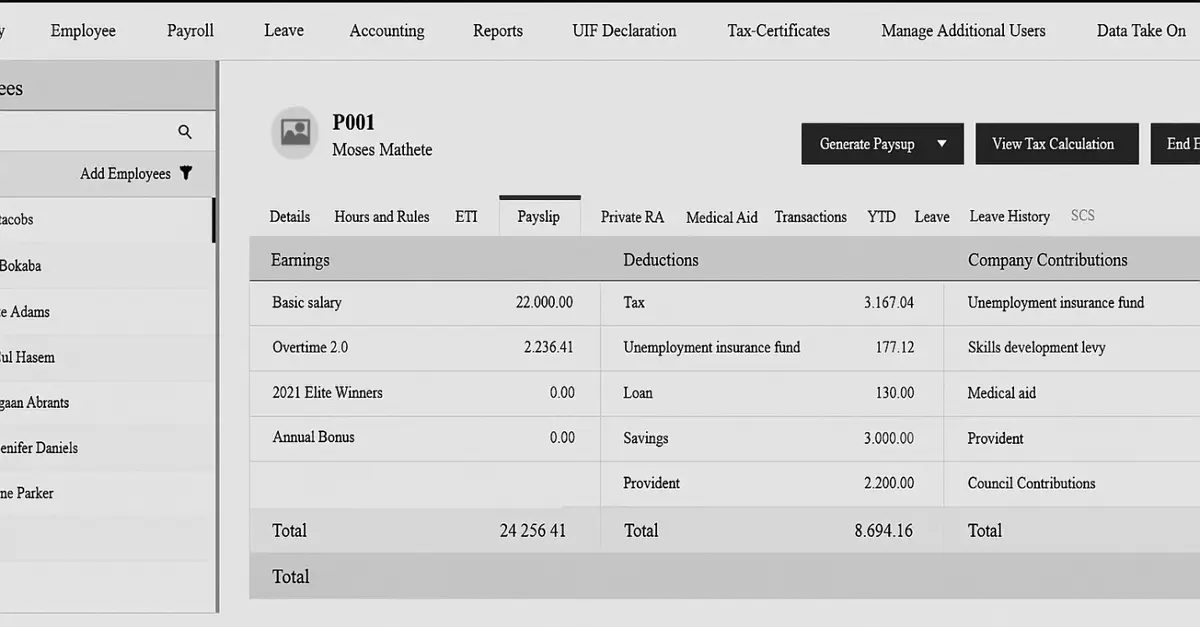
Sage Business Cloud Accounting distinguishes itself from other accounting software by offering stronger compliance features, such as integrated payroll, and greater scalability suited for mid-sized firms. Compared to other accounting software like QuickBooks, which focuses on simplicity, affordability, and ease of use, making it more ideal for small businesses and freelancers. A study done by Katherine (2025) emphasizes the following features of sage.
Key Features and Strengths
- Integrated Payroll & HR – Unlike QuickBooks, Sage has built-in payroll and HR modules that ensure compliance with tax and labor laws.
- Compliance Tools- Strong focus on statutory reporting, tax filing, and regulatory accuracy, making it ideal for businesses in regulated industries.
- Scalability – it is designed to grow with SMEs into mid-sized firms by offering advanced Forecasting, reporting, and multi-user support as the business expands its operations.
- AI-powered Forecasting –it can predict cash flow and financial trends, helping businesses plan strategically.
- Cloud-based Access users can access the software from anywhere with an internet connection. This allows teams to work together in real time, share data instantly, and manage finances without being tied to a physical office.
Businesses Best Suited for This Accounting Software
- Regulated industries – like Healthcare, manufacturing, and professional services benefit from Sage’s compliance features.
- Growing SMEs in Kenya—particularly useful for firms moving beyond basic bookkeeping into payroll and HR management.
- Mid-sized businesses – these businesses want efficient employee management by combining payroll processing with HR functions. This simplifies administrative tasks, ensures accurate payments, and supports efficient team management as the business grows.
- Small & Medium Enterprises (SMEs) – can also be used by small and medium businesses that require compliance support, which is available in Sage’s compliance features.
IV. Wave
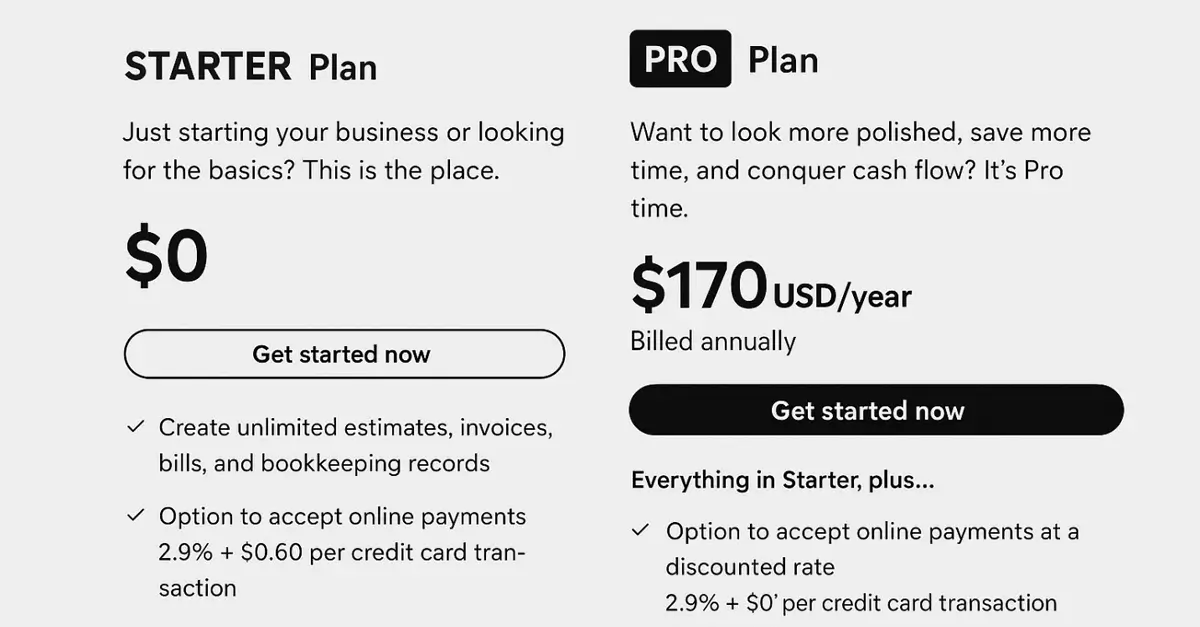
Wave Accounting is a cloud-based financial management platform designed to simplify bookkeeping for freelancers, entrepreneurs, and small businesses. Wave is known for its user-friendly interface and affordability. Wave offers essential tools, including invoicing, expense tracking, and financial reporting. While its Starter plan is free, businesses can upgrade to the Pro plan for advanced features. As provided by Eduardo (2025)
Key features.
- Free core features – this software offers a free version with unlimited invoicing, expense tracking, and bookkeeping.
- Simple interface — it’s primarily designed for non-accountants who are business owners and don’t have much accounting knowledge.
- Integrated payments- the software allows businesses to receive payments through multiple methods directly within the platform. This simplifies transactions, speeds up cash flow, and provides convenience for both businesses and customers.
- Receipts & scanning — the paid version adds automated bank feed processing and receipt scanning. This reduces manual entry, speeds up bookkeeping, and improves accuracy in financial records.
- Customizable invoices-the software lets businesses design invoices with logos, colors, and layouts that reflect their brand. This creates a polished, professional appearance and enhances brand recognition with clients.
Businesses Best Suited for This Accounting Software
- Freelancers & consultants -Ideal for independent professionals who need to track income, manage expenses, and send professional invoices without complex accounting tools.
- Micro-businesses- Perfect for very small operations; the free plan includes essential features like invoicing, expense tracking, and basic reports at no extra cost.
- Startups testing the waters – A great starting point for new businesses exploring digital accounting solutions before committing to higher-priced platforms.
- Service-based businesses – Well-suited for firms that rely on invoicing and client payments, offering smooth payment collection and precise tracking of billable hours or services.
Benefits of Accounting Software for Business Efficiency
When properly implemented, accounting software can do far more than just record transactions; it can transform accounting from a time-consuming administrative task into a strategic advantage. The right system helps your business work faster, make better decisions, and maintain stronger financial control. A study done by Jason (2025) highlights the following benefits of accounting software.
- Time Savings Through Automation- Automatic bank imports, recurring invoices, and payment reminders reduce manual work, freeing staff for higher-value tasks and saving time.
- Improved Accuracy and Reduced Human Error- Manual accounting processes are prone to mistakes that can lead to reporting errors and compliance risks. Accounting software minimizes these risks through validation rules, duplicate detection, and automated tax calculations.
- Better Decision-Making with Real-Time Insights: Real-time access to financial information —through dashboards and reports —empowers business leaders to make faster, more informed decisions.
- Investor and Lender Confidence- Consistent, accurate, and timely financial reporting enhances your credibility with external stakeholders. Investors and lenders rely on clear financial statements to assess stability and growth potential.
- Process Standardization and Internal Controls-accounting software strengthens governance by enforcing consistent workflows and internal controls.
Read Also: From Budget to Breakthrough: The Role of Financial Planning in Business Success
Conclusions
Choosing the right accounting software is an essential long-term investment for your business. There is a variety of accounting software you can choose from, including QuickBooks, Wave, Sage, and NetSuite. Before selecting any of the above accounting software, make sure it fits your daily operations, meets your security and compliance needs, and can grow as your business expands. The software above offers unique features you must consider before subscribing to any of them. One must ensure that features such as automation, a user-friendly interface, and integration with other business functions are available. Proper adoption of accounting software enables a business to achieve benefits such as better decision-making, improved accuracy, time savings, standardized processes, and stronger internal controls. Choose the right accounting software today to manage your business funds effectively.