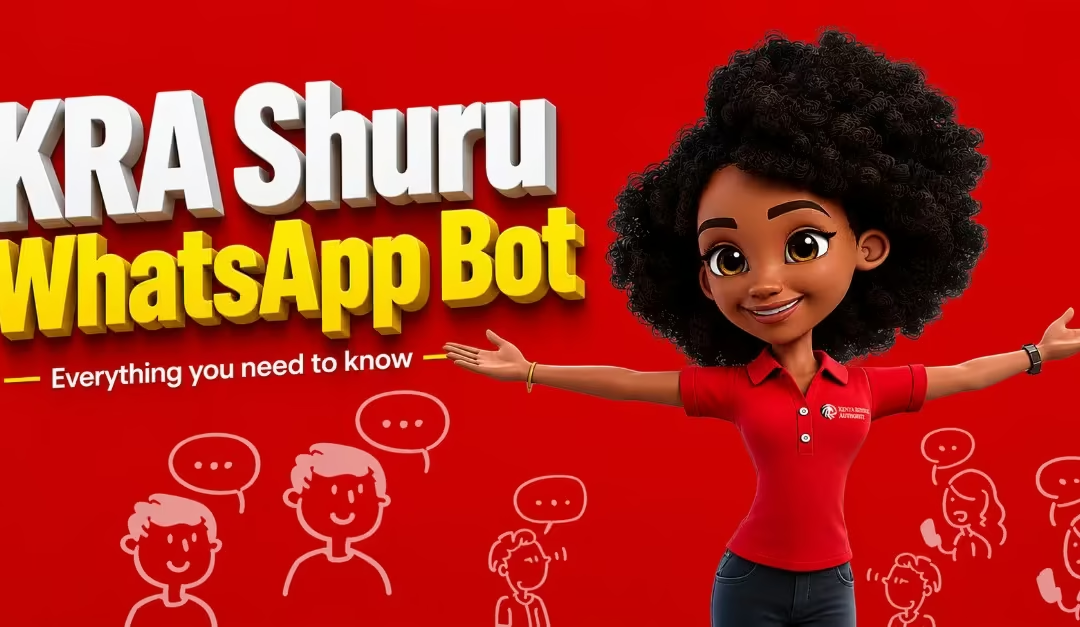
Filing taxes in Kenya is becoming simpler and more accessible than ever. The Kenya Revenue Authority has introduced Shuru, a chatbot available on WhatsApp, designed to help taxpayers access services and file returns directly from their phones, without the need to navigate complex online portals.
With a simple chat, users can follow clear, guided instructions to complete important parts of the tax filing process at any time and from any location. Whether you are at home, at work, or on the move, the platform provides a quicker and more convenient way to meet your tax obligations without unnecessary stress or delays. But how exactly can you use the Shuru chatbot on WhatsApp? Let’s look at the process step by step.
What Is the KRA Shuru Chatbot?
Shuru is the Kenya Revenue Authority’s official WhatsApp-based virtual assistant, accessible through the verified number 0711099999. It is a fully integrated digital assistant connected directly to KRA’s internal systems, including iTax and e-TIMS. The chatbot guides taxpayers through each step of the compliance process using a simple, conversational, menu-based format that does not require any technical skills.
At its core, Shuru is a digital assistant developed by the Kenya Revenue Authority and made available through WhatsApp to make interactions with taxpayers easier. The chatbot allows users to access important KRA services through a clear and well-organized menu, with some details already filled in to save time.
How KRA Shuru Chatbot Works
Getting started with Shuru is simple and designed to be easy for everyone, even those who are not familiar with digital tax systems. The entire process takes place on WhatsApp, so there is no need to install extra applications or navigate complex government websites. Once you understand how it works, using the service becomes almost as easy as having a normal chat. Below is a clear step-by-step guide to help you use the service effectively from beginning to end, as per Dealfish (2026)
a) Save the Official KRA Chatbot Number
This is the first core step; you must save the official KRA Shuru WhatsApp number for you to start chatting. The official Shuru WhatsApp number is “0711099999.” This is important because it helps you ensure that you are communicating with the genuine chatbot and not a fake or fraudulent account.
b) Initiate a Conversation
Open WhatsApp and send a simple message such as “Hi” or “Menu” to the saved number. The chatbot will reply automatically with a structured menu showing the services you can access.
c) Select Your Preferred Service
After receiving the menu, you will see different service options to choose from. These may include filing tax returns, making payments, checking your KRA PIN details, applying for a Tax Compliance Certificate, accessing e-TIMS services, or even speaking to a support agent. You only need to reply with the number that matches the service you want.
d) Confirm Your Identity
Next, the chatbot will ask you to verify your identity by entering details such as your National ID number or KRA PIN. After verifying your identity, a One-Time Password (OTP) will be sent to your registered mobile number, which you must enter to continue.
Quick Tip
- You will be required to enter either your KRA pin or ID number, NOT both.
- The OTP will only be sent to the number that you used to register your KRA pin.
e) Access Your Personal Tax Information
Once your identity is confirmed, the system will automatically fetch and display your tax information. Because some details are already filled in, you will spend less time entering information manually, making the process faster and more accurate.
f) Complete Your Requested Task
Finally, follow the step-by-step instructions provided by the chatbot. Whether you are filing a nil return, declaring income, downloading compliance documents, or completing other tax-related tasks, Shuru will guide you through each step until everything is successfully completed.
Services Offered by KRA Shuru WhatsApp Chatbot
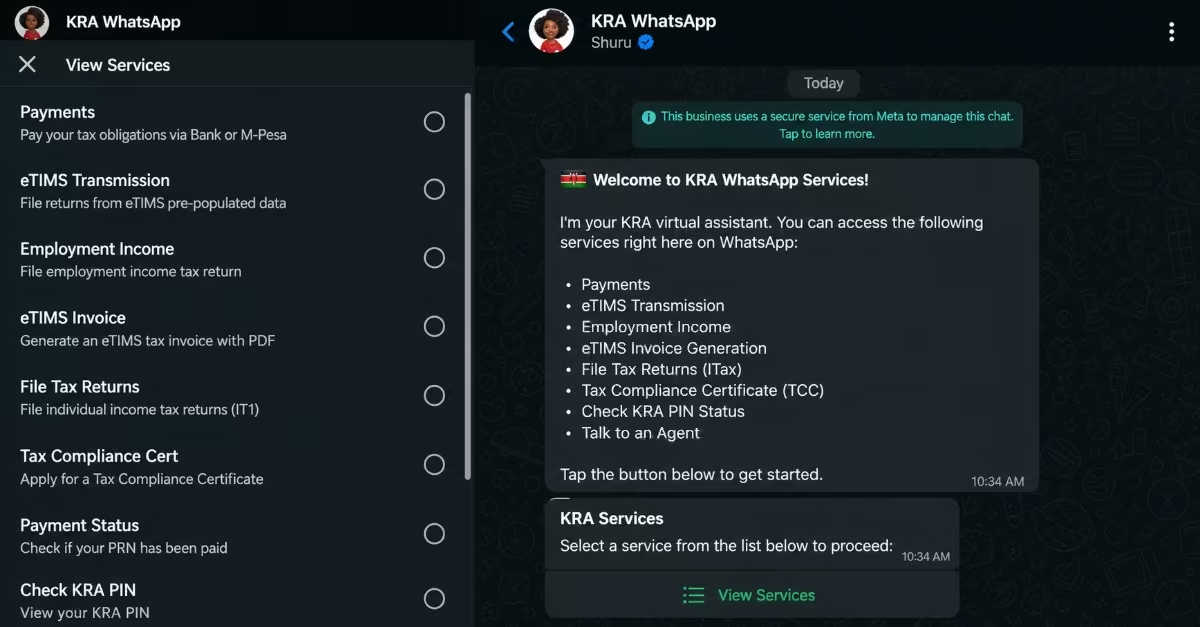
The Kenya Revenue Authority Shuru chatbot is built to bring together multiple taxpayer services into one convenient platform on WhatsApp. Below are the key services available through Shuru WhatsApp chatbot.
i. Filing Tax Returns
Shuru enables taxpayers to file their annual returns directly through WhatsApp in a guided and structured way. Rather than navigating the more technical iTax portal, the chatbot breaks the process into smaller, easy-to-follow steps. Each prompt is designed to help users input the correct information, reducing errors and making the filing process less overwhelming, especially for first-time users.
ii. Tax Payments
The chatbot simplifies the tax payment process by clearly outlining what needs to be paid and how to complete the payment. It provides the necessary payment instructions and references, helping users avoid confusion or mistakes that could lead to penalties. By guiding users through each step, Shuru ensures that payments are made accurately and on time.
iii. PIN Verification
Shuru allows users to instantly confirm the validity and status of their KRA PIN. This is particularly useful when applying for jobs, tenders, or financial services where PIN verification is required. The quick access to this information eliminates delays that would normally occur when using manual or office-based verification methods.
iv. Tax Compliance Certificate Application
Through Shuru, taxpayers can apply for a Tax Compliance Certificate and monitor the progress of their application in real time. This removes the need to follow up physically or through multiple platforms. The system keeps users informed, making the process more transparent and easier to manage from start to finish.
v. E-TIMS Services
For businesses, Shuru provides access to e-TIMS functions, such as electronic invoicing and compliance tracking. This helps business owners stay aligned with KRA requirements without needing to switch systems, improving efficiency and reducing administrative workload.
vi. Get Human Help
While Shuru is automated, it also recognizes that some issues require human support. In such cases, users can request assistance and be connected to a KRA support agent. This ensures that more complex or unique concerns are properly addressed, giving users confidence that help is available when needed.
Read Also: How to Apply for a Certificate of Good Conduct in Kenya (2026): Step-by-Step Online Guide
How to File KRA Nil Returns on WhatsApp in 2026 (Step-by-Step)
A nil return is a type of tax filing submitted to the Kenya Revenue Authority to show that you did not earn any taxable income during a specific year, as per Kevin (2026). It is a formal way of telling KRA that you had zero income for that period. It is important to understand that this is not a tax payment, but a declaration confirming your income status.
KRA requires all taxpayers with a registered PIN to file their returns every year, whether they earned income or not. This means that even if you were unemployed, a student, or not actively earning, you are still expected to submit a return. Failing to file or providing incorrect details can result in penalties and may affect your compliance status with KRA.
Using WhatsApp through the Shuru chatbot makes this process faster and easier compared to logging into the iTax portal, which many users find complicated and time-consuming. With Shuru, the process is simplified into guided steps, allowing taxpayers to complete their nil returns more efficiently and with less confusion.
Who Should File Nil Returns
You are required to file a nil return if you have a KRA PIN but did not earn any taxable income during the previous year. This means you had no salary, no business income, and no other form of taxable earnings. Even if you did not receive any income, the Kenya Revenue Authority still expects you to stay compliant by submitting your annual return.
This requirement applies to several categories of taxpayers. For example,
- Students who are not formally employed
- Individuals who are unemployed but looking for work
- Dependents without their own source of income is all expected to file nil returns.
- People who may be on a career break, like sabbatical leaves, or temporarily not engaged in any income-generating activity.
In all these situations, filing a nil return helps maintain an active and compliant tax record.
However, if you earned any income during the year, you should not file a nil return. This includes earnings from part-time work, freelancing, rental income, or business activities. In such cases, you are required to submit the correct income tax return that reflects your actual earnings, as filing a nil return instead could lead to penalties and compliance issues with KRA.
How to File Nil Returns on WhatsApp: A Step-by-Step Guide
The Kenya Revenue Authority WhatsApp chatbot allows you to complete the entire nil returns process within a few minutes, without needing to log into the iTax portal. This makes the process more convenient, especially for users who may find traditional online systems difficult to navigate.
Before you begin, make sure you have your KRA PIN or National ID number ready, as well as access to the mobile number registered with your KRA account. This is important because the system will send a One-Time Password (OTP) to that number for verification, ensuring that only the rightful account holder can complete the process.
Step 1 — Save the Number and Open a Chat
Save 0711 099 999 on your phone as “KRA Tax Services” or any name you will recognize. Open WhatsApp, find the contact, and send “Hi” or “Menu” to start the session. The bot is available 24 hours a day, 7 days a week. You can send “Menu” at any point during the session to go back to the main list.
Step 2 — Send a Greeting to Activate the Chatbot
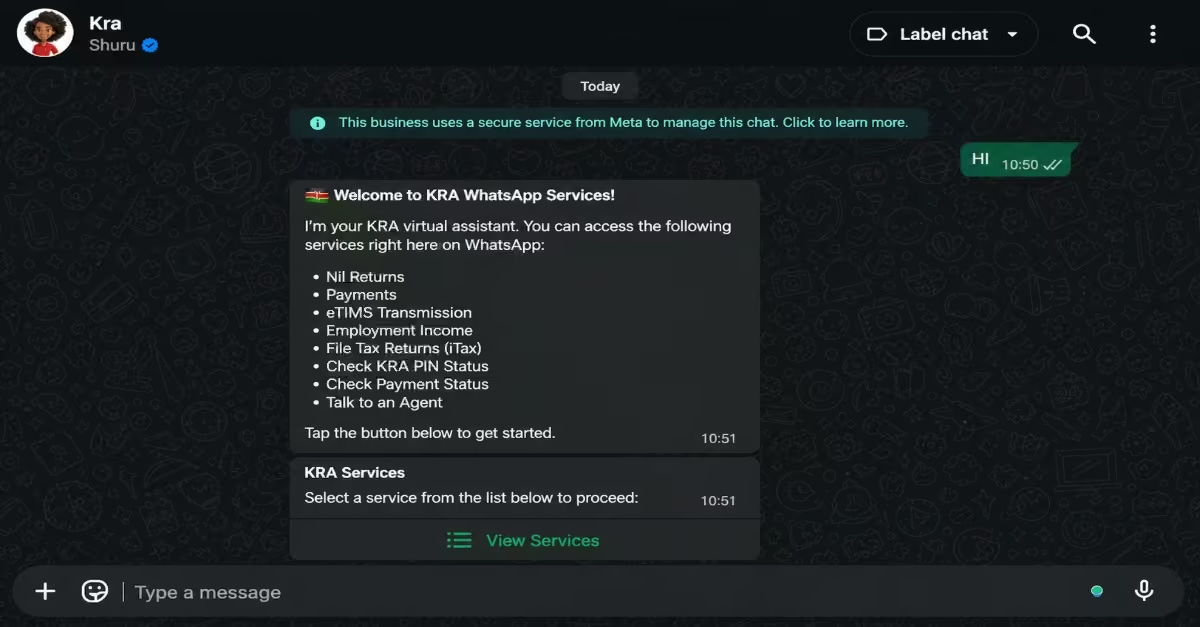
Type a simple message such as “Hi” or “Menu.” The chatbot will automatically respond with a welcome message and display a menu of available services.
Step 3 — Select “View Services”
From the menu provided, choose the “View Services” option to access the full list of services offered by the chatbot.
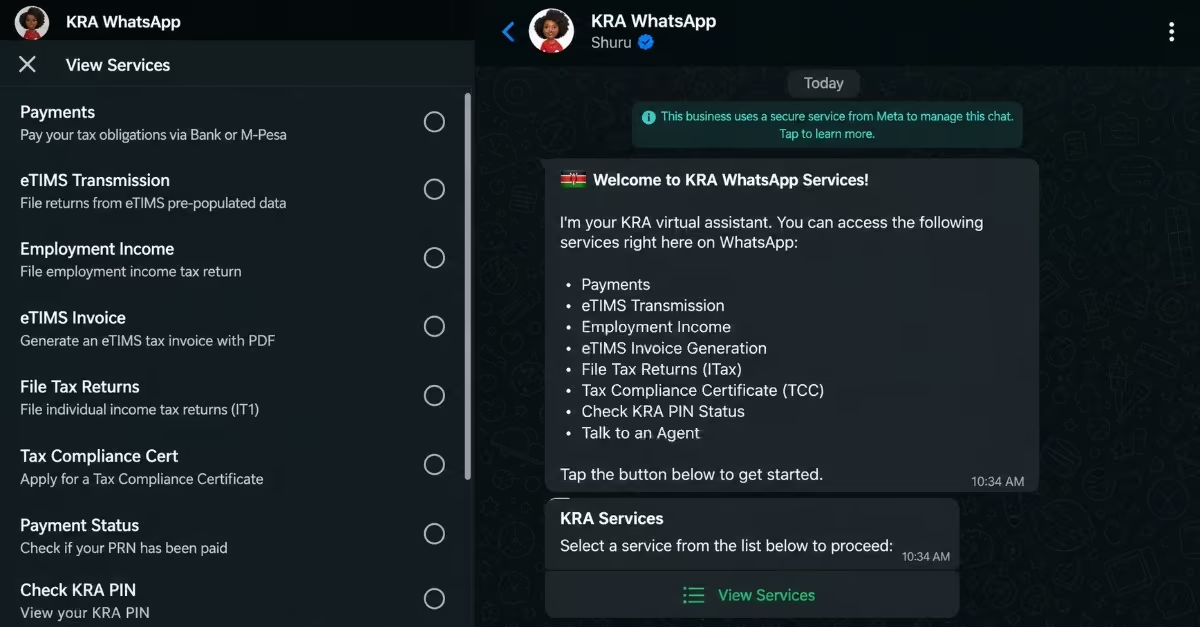
Step 4 — Select “Nil Returns”
From the list, choose the “Nil Returns” option. This is specifically for users who have no income. If you had employment or other income, you would need to select a different option instead.
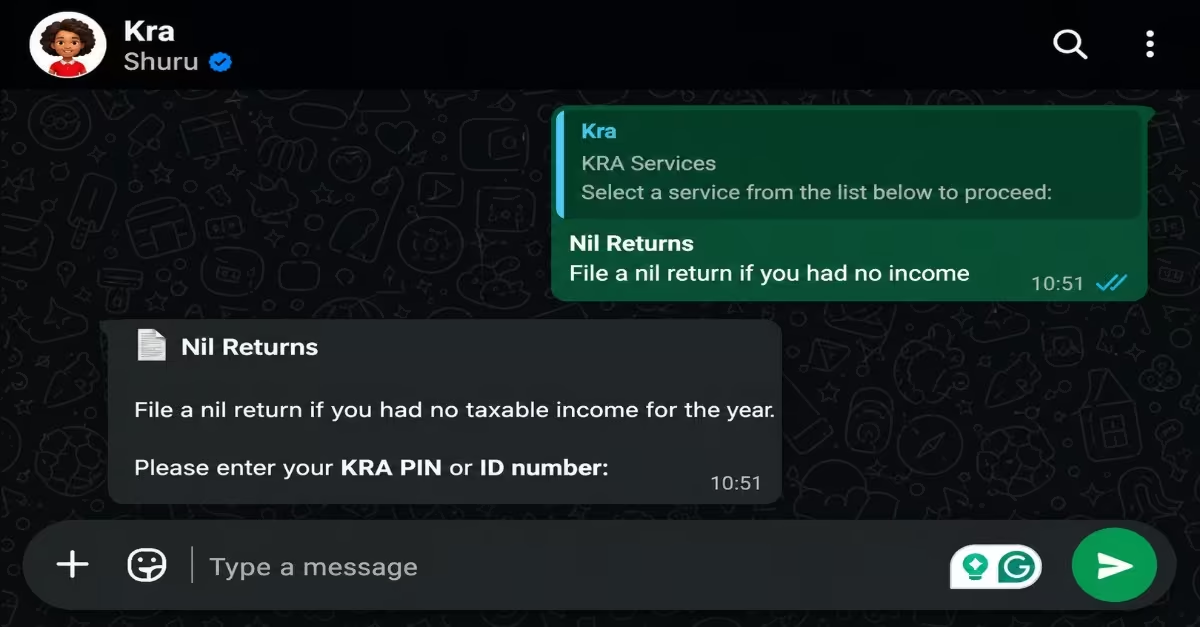
Step 5 — Enter Your National ID Number or KRA PIN
The chatbot will ask you to verify your identity. Enter either your National ID number or your KRA PIN so the system can retrieve your tax records.
Step 6 — Enter the OTP Sent to Your Phone
A One-Time Password (OTP) will be sent to the phone number linked to your KRA account. Enter this code in the chat to confirm your identity and continue.
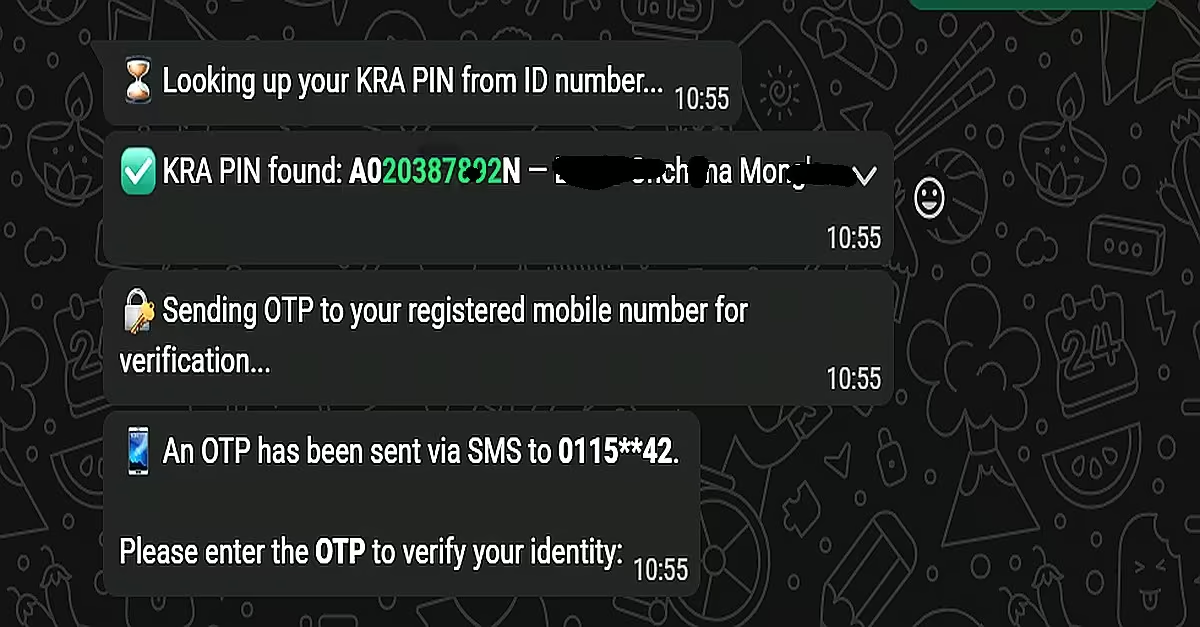
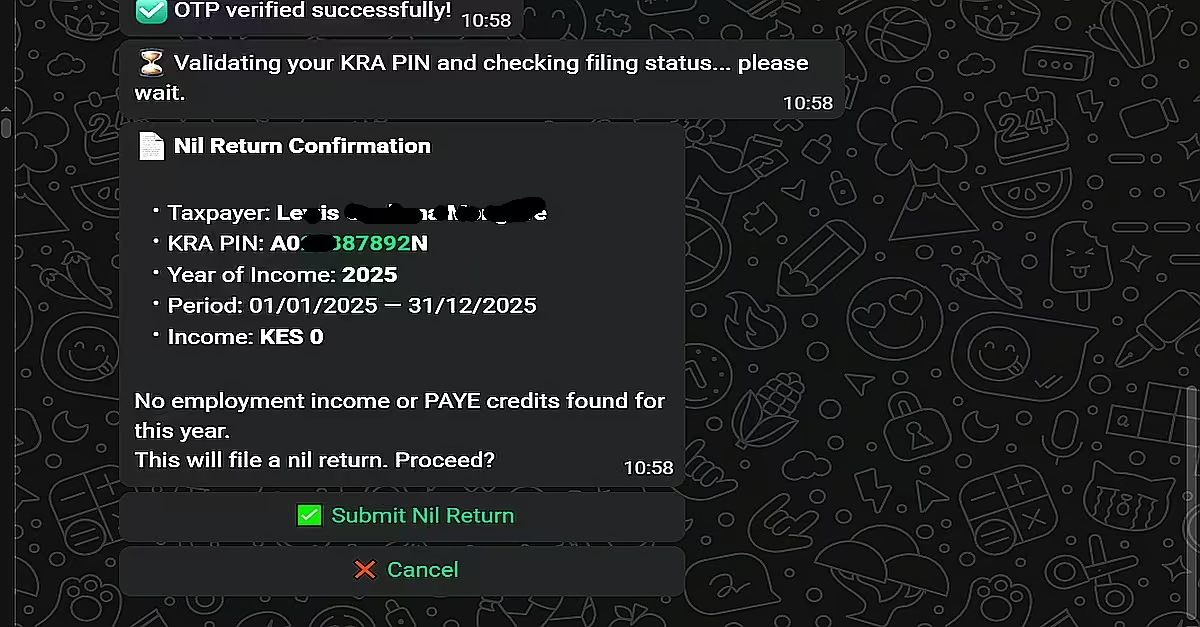
Step 7 — Review Your Details and Confirm Submission
The system will display your information for you to review. If everything is correct, confirm and submit your return. At this point, your nil return will be successfully filed.
Quick Tip: The filing deadline is 30th June 2026. It is advisable not to wait until the last days, as the system often experiences heavy traffic during that period, which can cause delays. Filing early takes only a few minutes and helps you avoid penalties. Missing the deadline may result in a fixed penalty of KES 2,000.
How to Generate KRA e TIMS Invoices on WhatsApp in 2026 (Step-by-Step)
If you run a business — whether you sell goods, offer services, or operate a small shop — KRA requires you to issue e TIMS-compliant invoices for every sale.
From January 2026, KRA validates all declared business expenses against e TIMS records, meaning any sale or expense without a transmitted invoice can be flagged or disallowed during return filing.
KRA’s Shuru WhatsApp bot lets you generate a fully compliant e TIMS invoice directly from your phone in under two minutes.
Before You Start, Make Sure You Have:
- A registered KRA PIN (already on the I-Tax system)
- Your buyer’s KRA PIN or their name
- The item or service you sold, the quantity, and the price
- KRA WhatsApp Number: 0711 099 999
Step 1 — Save The Number and Open a Chat
Save 0711 099 999 on your phone as “KRA Tax Services” or any name you will recognize. Open WhatsApp, find the contact, and send “Hi” or “Menu” to start the session. The bot is available 24 hours a day, 7 days a week. You can send “Menu” at any point during the session to go back to the main list.
Step 2 — Enter Your KRA PIN to Verify Your Identity
The bot will ask you to identify yourself. Type in your KRA PIN (for example, A012345678Z). The system checks it against the iTax database and confirms your registered business name. Every invoice generated from this point will be filed under your PIN in real time.
Step 3 — Select “e-TIMS Invoice” From the Menu
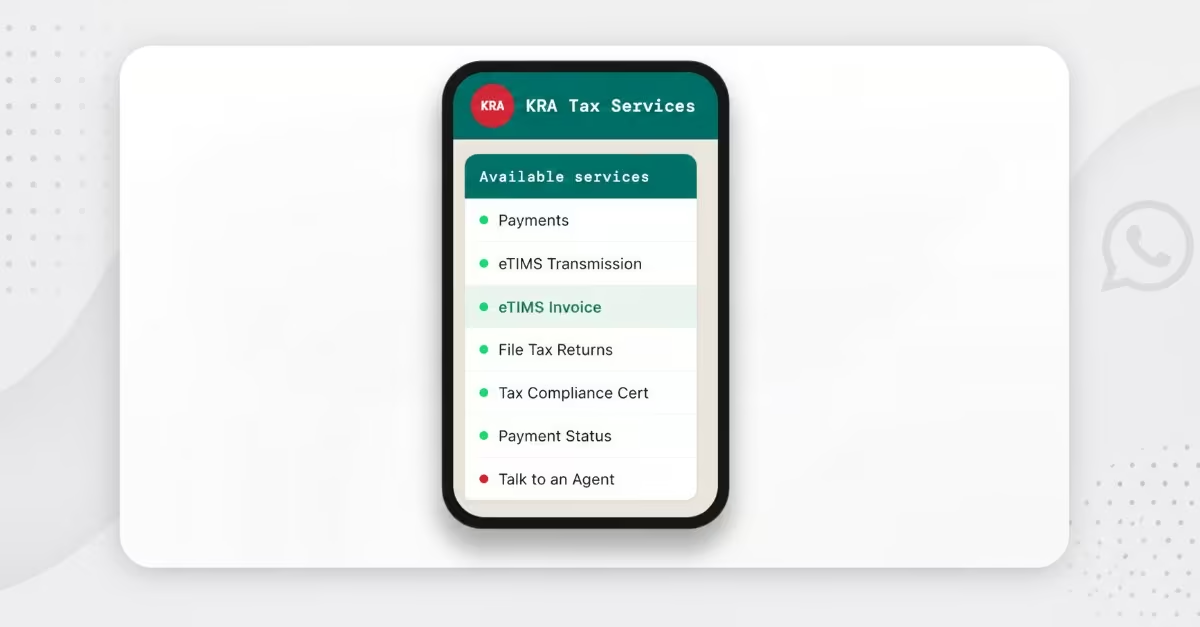
The bot will display a list of available services. Choose the e TIMS Invoice option. You will see other services like File Tax Returns, Tax Compliance Certificate, and Payments on the same menu — ignore those for now and pick e TIMS Invoice.
Step 4 — Enter Your Buyer’s Details
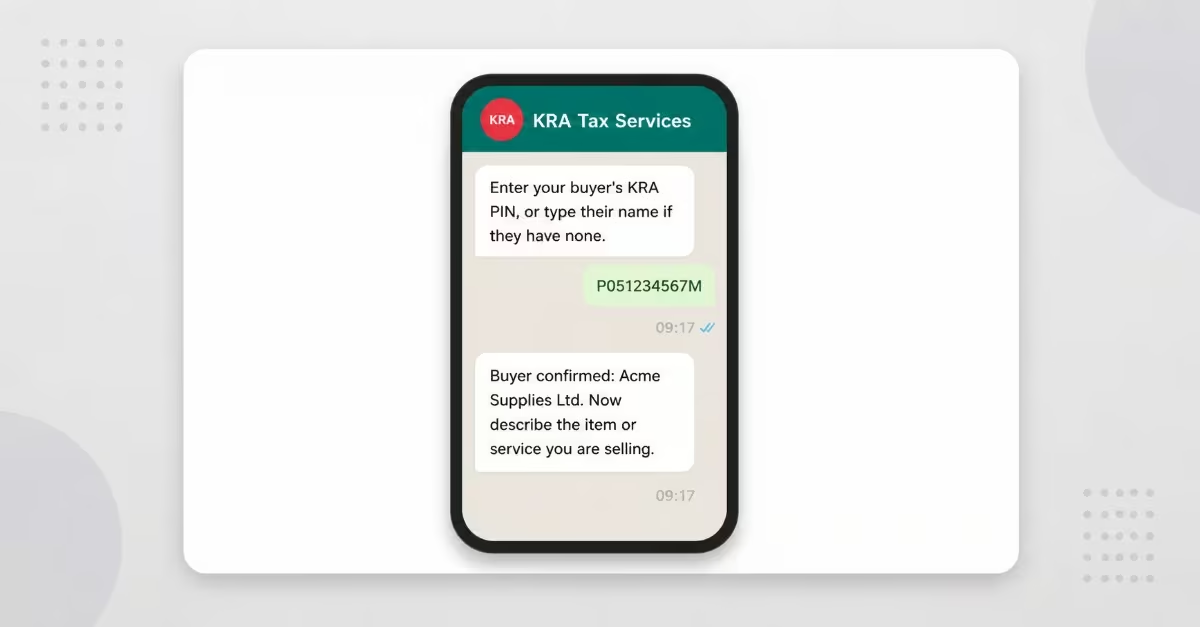
The bot will ask for your customer’s KRA PIN. Type it in, and the system will validate it instantly and show you their registered business name for you to confirm. If your buyer does not have a KRA PIN — which is common with individual or informal customers — you can enter their name manually instead.
The invoice will still be generated and submitted through the system, but without a valid buyer PIN, you will not be able to claim that transaction as a deductible expense when filing your return with the Kenya Revenue Authority. This means the expense may not be recognized for tax reduction purposes, which could affect your overall tax calculations.
For business-to-business transactions, it is important to always request your buyer’s KRA PIN before issuing an invoice. If the buyer’s PIN is missing, the expense may be flagged during return validation, which could lead to queries or delays when reviewing your tax records.
Step 5 — Describe What You Sold, The Quantity, And The Price
Type a plain description of the product or service you sold. Then enter the quantity and unit price when the bot prompts you. It will calculate the total automatically and apply the correct tax — standard 16% VAT if you are VAT-registered, or non-VAT if you are not.
Step 6 — Review the Summary Carefully And Confirm
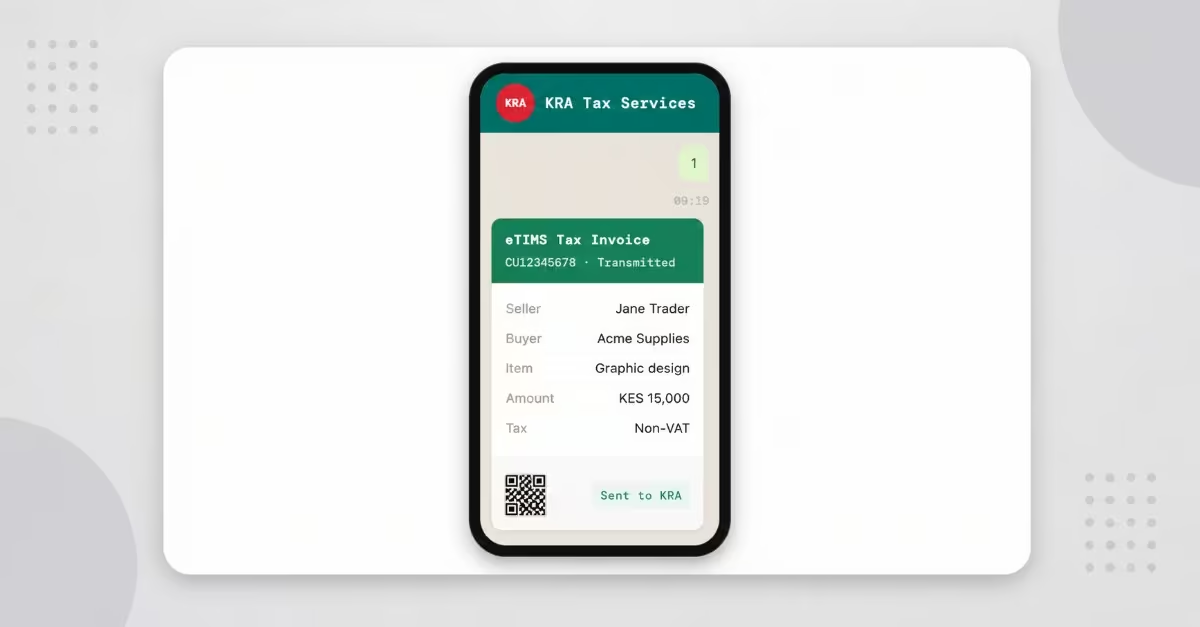
A summary of the invoice details will then be displayed. Take time to confirm that the buyer’s name, item description, and amount are all accurate before proceeding. Once the invoice is confirmed and submitted to the Kenya Revenue Authority system, it cannot be edited, meaning any mistakes cannot be corrected directly.
It is important to review this summary carefully before confirming. If an incorrect invoice is submitted, you will be required to issue a formal credit note to reverse the transaction. This adds extra steps and administrative work, so verifying the details in advance helps you avoid unnecessary corrections.
Step 7 — Receive Your Invoice PDF
After confirming by replying 1, the invoice is transmitted to KRA’s e TIMS system within seconds. You will receive an SMS with your invoice number and a link to download the PDF. The PDF contains a unique e TIMS Control Unit invoice number and a QR code. You can share it directly with your buyer via WhatsApp, email, or print it out. It is fully KRA-compliant from the moment it is generated. Save all your invoice PDFs in one folder — they form your paper trail when filing season arrives.
Read Also: How to Apply for Smart Driving Licence in Kenya 2026: Cost, Renewal & NTSA e-Citizen Guide
Quick Tip:
Every invoice you generate through WhatsApp is stored in KRA’s e TIMS database under your PIN. When you file your annual return, KRA’s system will already have all your transmitted invoices pre-loaded, making filing significantly faster and easier. The more consistently you generate invoices through WhatsApp throughout the year, the smoother your return filing will be in June.
Protecting Your Data – How Shuru Keeps You Safe
The Kenya Revenue Authority has put in place several security measures within the Shuru chatbot to ensure that taxpayers’ personal and financial information remains safe at all times. Because the platform handles sensitive tax data, these protections are designed not only to block unauthorized access but also to build trust among users when interacting through WhatsApp.
i. OTP Verification for Extra Security
One of the main security features is One-Time Password (OTP) verification. Whenever a user tries to access their account or complete certain actions, a unique code is sent to their registered mobile number. This step adds an extra layer of protection by confirming that the person using the service is the actual account owner, making it much harder for unauthorized users to gain access.
ii. PIN and ID Authentication
Shuru also requires users to confirm their identity using their KRA PIN and National ID details. This verification step ensures that access to personal tax records is limited only to the rightful taxpayer. By requiring this information, the system reduces the chances of impersonation and helps maintain the accuracy and security of taxpayer data.
iii. Continuous Security Monitoring
In addition to user verification, KRA runs internal monitoring systems in the background to track activity on the platform. These systems are designed to identify unusual or suspicious behavior early, allowing quick action to prevent potential security breaches and keep the platform secure.
Conclusions
The Kenya Revenue Authority Shuru chatbot simplifies tax compliance by delivering essential services directly through the KRA Shuru WhatsApp bot, making processes like filing nil returns faster, more accessible, and easier to follow even for users with limited technical knowledge, while eliminating the need for complex logins to the I tax website and allowing taxpayers to meet their obligations with minimal effort without compromising on security or efficiency.