The digitization of services by the Teachers Service Commission (TSC) has made it much easier for teachers to access important administrative services. Through the TSC online portal, teachers no longer need to visit physical offices to complete routine tasks. One of the most useful features available is the T-Pay system, also known as the TSC payslip, which allows teachers to easily view and download their payslips at any time using a phone or computer.
But how do you register and start using this service? In this article, I will explain:
- The application process for T-pay.
- How to log in to your T-pay
- How to change your password
- Requirements needed for registration
- How to access and download your payslip
- Mistakes to avoid during registration.
What is the TSC Payslip Portal?
The TSC Online payslip Portal, commonly known as the T-Pay Portal, is an online platform created by the Teachers Service Commission to help teachers easily access their salary details online. This system makes it simple for teachers to view and manage their payslips without needing advanced computer skills.
Through this digital platform, teachers can quickly view important financial information, including earnings, deductions, and allowances, in one place. By logging in with their TSC number and password, registered users can safely check and download their payslips on a phone, tablet, or computer without visiting TSC offices.
The service is completely free and is part of TSC’s wider goal to improve efficiency and make its services more accessible to all teachers across the country. Its key function is to simplify payroll access and eliminate the need for physical visits to TSC offices. The portal is available to all registered TSC teachers, who can log in with their TSC number and password.
Requirements for TSC Payslip Registration
To successfully register for the T-Pay system provided by the Teachers Service Commission, you need to provide accurate personal and employment details. These details are important because they help confirm your identity and connect your account to the TSC payroll system. The following are the details needed as per the HowKE Team.
- TSC Number – This is your unique number given by TSC to confirm that you are officially employed as a teacher. You must be a registered member of TSC to have this number.
- National ID Number – Your Kenyan ID number, which is used to verify your identity.
- KRA PIN – Your Kenya Revenue Authority PIN, used for tax identification purposes.
- Designation Code – A code that shows your job group or teaching position within TSC.
- Pay Station Code – This identifies the school or station where you work for payroll processing.
- Bank Account Number – The bank account where your salary is sent.
- Active Mobile Phone Number – A working phone number used for communication and verification during the registration process.
How to Register the TSC Payslip Portal (T-Pay)

Before you can access your payslip on the T-Pay portal, you must first be a registered teacher with a valid TSC number from the Teachers Service Commission. If you do not have one yet, you will need to complete the teacher registration process. This one is done online, and a detailed step-by-step guide on how to apply for a TSC number is available here: How to Apply for a TSC Number in Kenya (2026): Step-by-Step Guide.
Previously, teachers could complete the T-Pay registration process fully online through the TSC payslip portal. However, TSC has currently suspended online self-registration due to security concerns.
The newly registered teachers must now visit their nearest TSC County Office in person, present their original National ID and other required documents, and have a TSC officer assist in activating their T-Pay account as per the Editorial Team.
At the TSC county office, the following procedure is followed:
Once your account has been activated at the county office, you will be given a temporary password. You will use this password to log in to the portal for the first time, after which you will be required to create a new, secure password for your account.
How to Log in to Your T-pay (TSC Payslip)
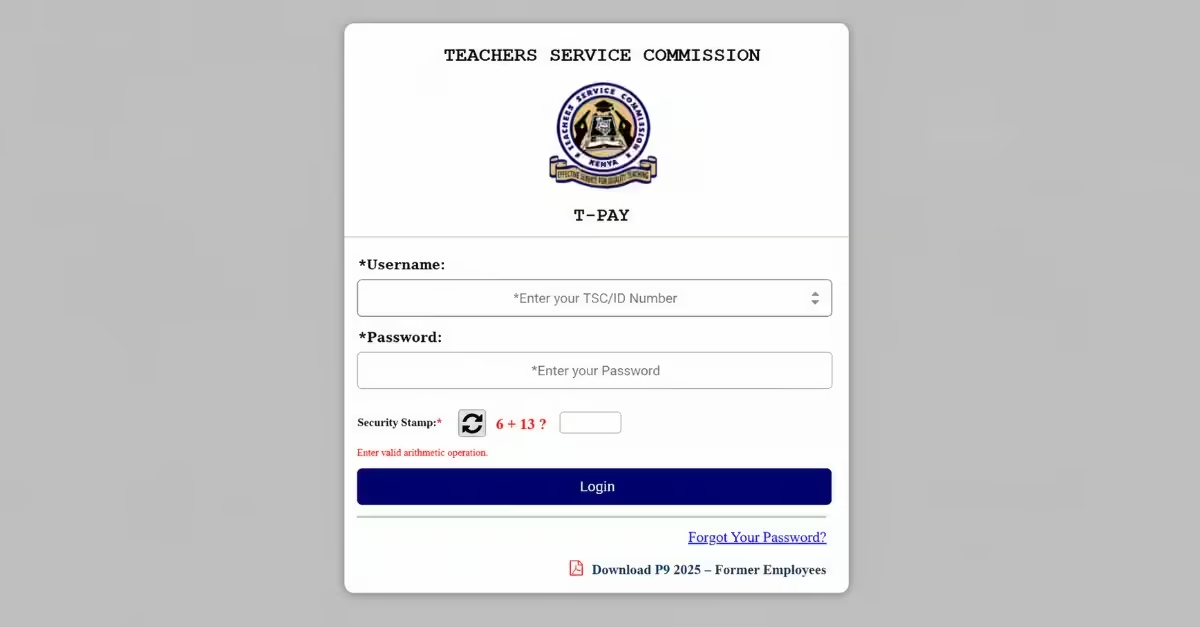
- After visiting any TSC office near you and having your account activated, you will be given a temporary password to get started.
- Go to the T-Pay website , enter your TSC or ID number as the username, and use the temporary password you received.
- When logging in for the first time, you will be asked to create a new password. You may also need to confirm your account using a one-time password (OTP) sent to your registered mobile number.
- After completing the setup, you will be able to view and download your latest payslip, P9 forms, and other salary-related records directly from your dashboard.
Navigating the TSC T-Pay Online Services Portal
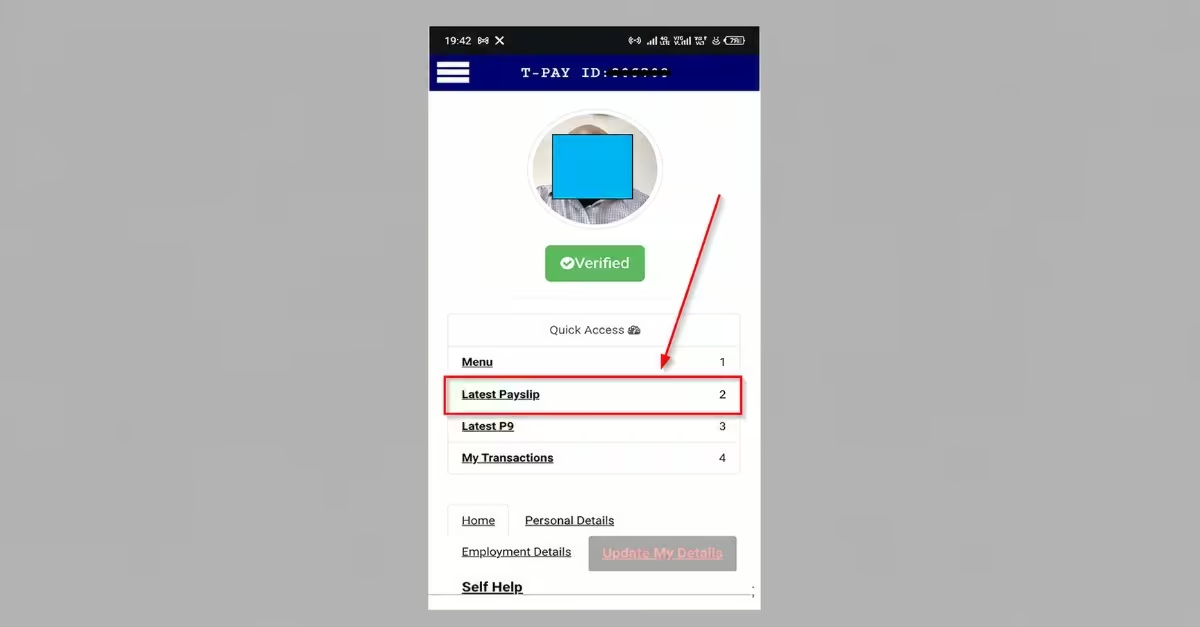
After logging in to the T-Pay system by the Teachers Service Commission, you’ll access a well-structured dashboard designed to help you manage your payroll information and related services efficiently. The portal provides quick access to key features.
- Menu – Acts as the main navigation panel, giving you access to different sections such as payslips, tax forms, transactions, and profile settings.
- Payslips – Enables you to view, download, and print both your latest and previous payslips for record-keeping or verification.
- P9 Forms – Allows you to access and download your P9 forms, which summarize your annual income and tax deductions for filing returns.
- Transactions – Displays detailed records of other financial activities, including loans, allowances, and deductions reflected in your payroll.
- Profile – Lets you view and update your personal and employment details, such as contact information, bank account, and next of kin.
Additionally, the portal includes a search function (usually at the top-right corner) that helps you quickly locate specific documents—for example, retrieving a particular month’s payslip without manually browsing through records.
How Do You Access and Download Your TSC Payslip Online?
Accessing your payslip through the Teachers Service Commission’s T-Pay system is straightforward and can be done on your phone or computer. Follow these steps to view and download your payslip securely.
Step 1: Visit the official T-Pay portal by entering tpay.tsc.go.ke in your browser.
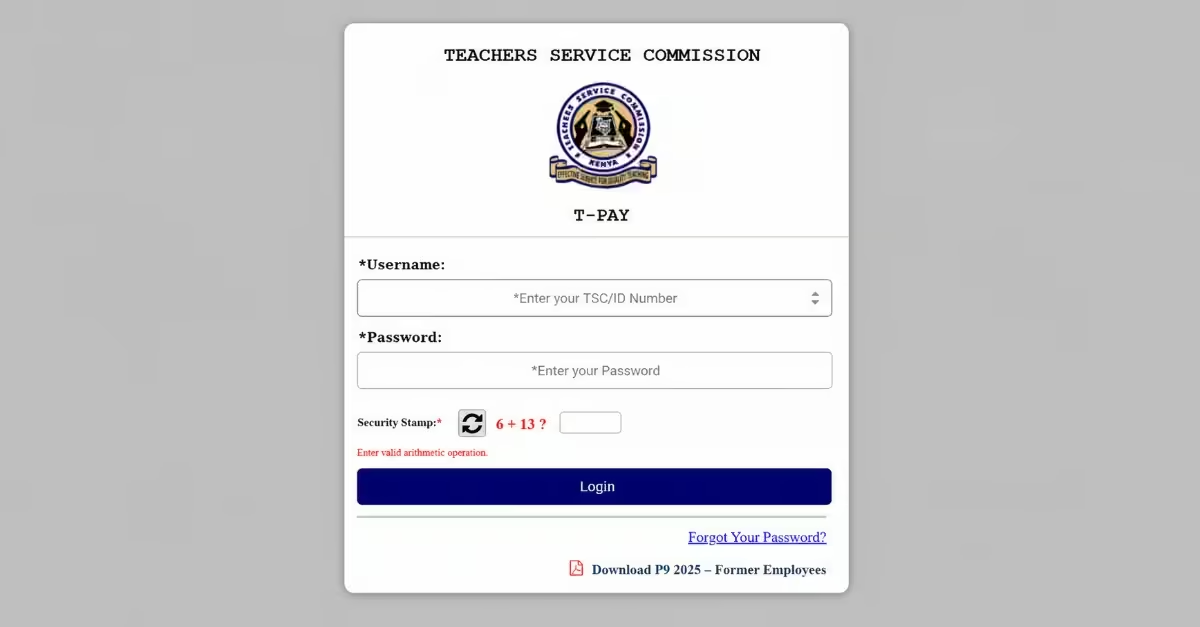
Step 2: Log in using your TSC Number or ID Number as the username, then enter your password and click Login.
Step 3: If you are a first-time user, you will be required to change your password, verify your mobile number and email via OTP, and upload a passport-sized photo
Step 4: Once logged in, navigate to the dashboard and click “Latest payslip” from the Quick Access menu on the left to view your most recent payslip.
Step 5: To access previous payslips, click the menu icon (☰) at the top right, select “View Payslips”, then choose the desired year and month.
Step 6: Click “Print” to download your payslip as a PDF or to print a hard copy.
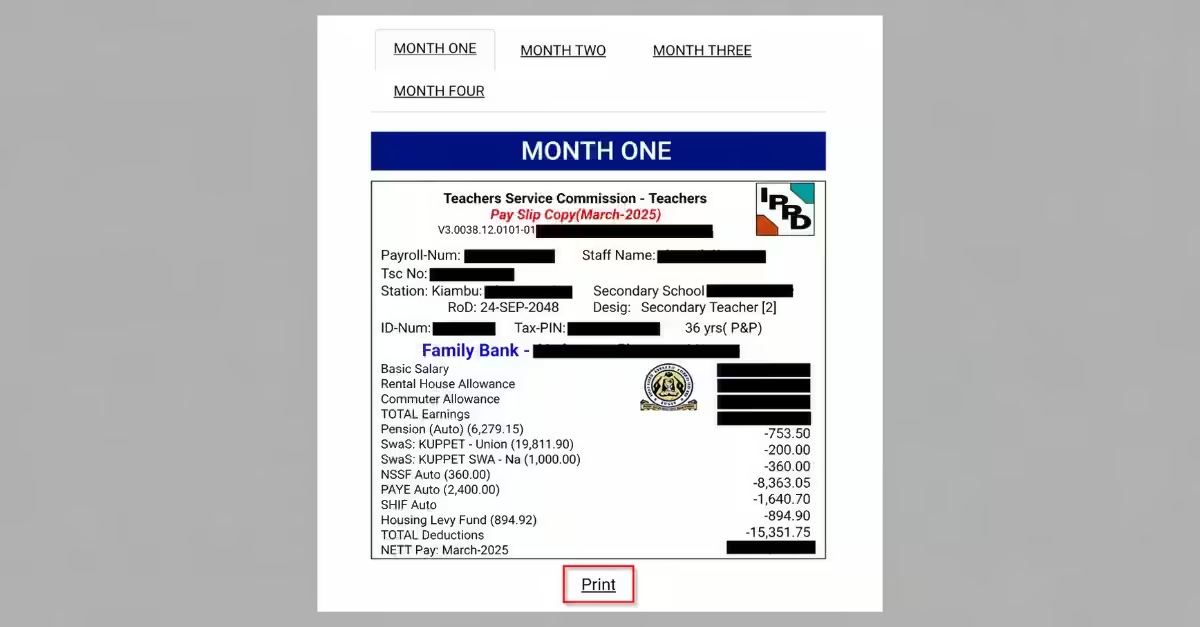
Quick tip: After completing your session, always log out to keep your account secure.
Understanding Your Payslip Details
Your Teachers Service Commission payslip provides a detailed breakdown of your salary structure, including earnings, deductions, and additional benefits. Understanding these components is essential for monitoring your income, verifying accuracy, and making informed financial decisions.
- Gross Pay/basic salary – The total amount you earn before any deductions are made, including your basic salary and all allowances.
- Deductions – These are statutory and personal reductions, such as taxes, pension contributions, insurance, or loan repayments, that are subtracted from your gross pay.
- Allowances – Additional payments provided on top of your basic salary, such as housing, medical, or commuter allowances, depending on your job terms.
- Net Pay – The actual amount credited to your bank account after all deductions have been applied to your gross pay.
By clearly understanding these elements, you can accurately track your earnings, identify any discrepancies, and maintain better control over your financial records.
How Do You Reset Your TSC Online Payslip Password?
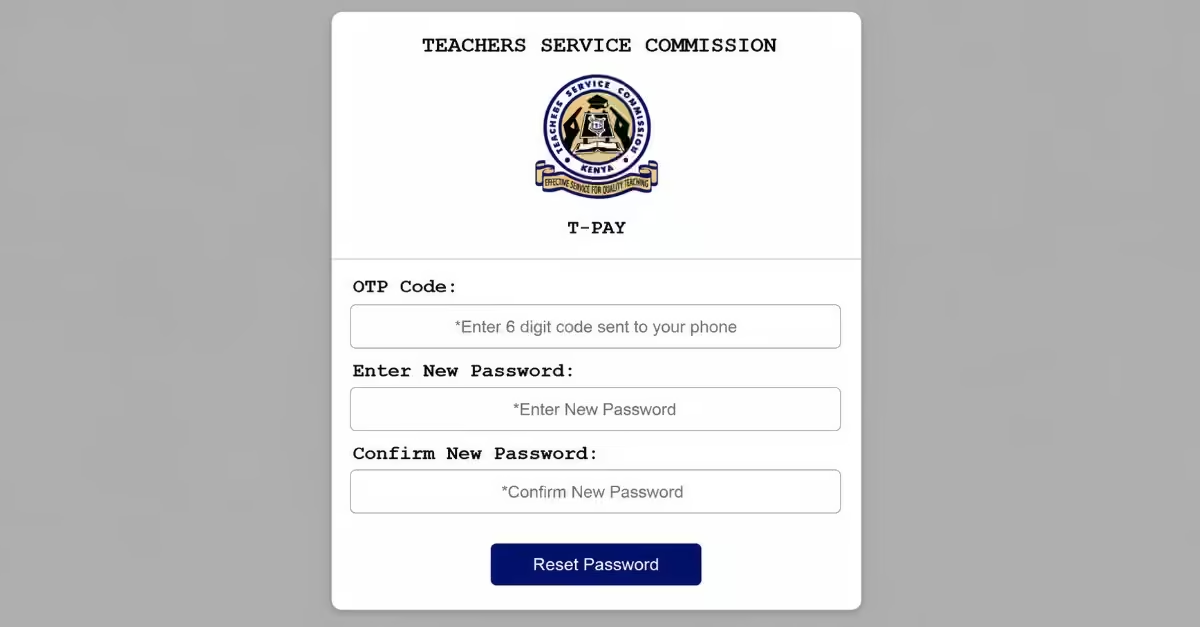
If you forget your T-Pay login credentials, the Teachers Service Commission provides a simple password reset process to help you regain access quickly. Follow these steps:
Step 1: Visit tpay.tsc.go.ke and click on the “Forgot Password” link at the bottom of the login page.
Step 2: On the reset page, enter your TSC Number and click “Reset Password.”
Step 3: You will receive a One-Time Password (OTP) on the phone number registered on the T-Pay portal.
Step 4: Enter the OTP in the space provided to verify your identity.
Step 5: Create a new password that includes a mix of uppercase and lowercase letters and numbers for better security.
Step 6: Confirm the new password, then click “Submit” to complete the reset process.
TSC Payslip Service Password Requirements
To improve the security of your account on the T-Pay system by the Teachers Service Commission, your password must meet the following conditions:
- At least 8 characters – This ensures your password is long enough and not easy for others to guess.
- One uppercase letter – Include at least one capital letter (A–Z) to make the password more secure.
- One lowercase letter – Use at least one small letter (a–z) to create a proper mix of characters.
- One number – Add at least one digit (0–9) to strengthen your password.
- One special character – Include symbols such as @, #, $, or % to further improve security and protect your account.
Common Mistakes to Avoid During TSC Pay Registration
Problems encountered during your TSC payslip registration are often caused by simple mistakes that can be easily avoided. By paying close attention to your details and carefully following the correct steps, you can complete the process smoothly on your first attempt. A study by Jackline (2026) highlights the following mistakes.
a) Entering Incorrect Login Details
Avoid using the wrong login information. Make sure your names are written correctly and follow the proper format (starting with a capital letter followed by lowercase letters) so they match your official records with the Teachers Service Commission.
b) Uploading Poorly Scanned Documents
Ensure that all required documents—such as academic certificates, professional certificates, a copy of your ID, and a passport photo—are clear and easy to read. Poor-quality scans may lead to rejection or delays in your registration.
c) Delaying Required Payments
If any payments are required, make sure you complete them on time using the provided bank or M-Pesa details. Delays can cause your registration to be cancelled or not processed.
d) Providing Wrong Bank Account Information
Always double-check your bank account details before submitting. Incorrect information can result in payment issues or your salary being sent to the wrong account.
e) Submitting False or Misleading Information
Provide only accurate and truthful details. Providing false information can lead to disqualification and the deactivation of your account.
f) Failing to Confirm Registration Status
After submitting your details, please check your registration status. This helps you confirm that everything was processed correctly and allows you to fix any errors early.
g) Using Unauthorized Agents or Middlemen
Avoid using unofficial agents or third parties who claim to assist with registration. They may misuse your personal information or expose you to scams, which can put your account and data at risk.
Benefits of Using the TSC T-Pay Portal
The T-Pay portal, developed by the Teachers Service Commission, is designed to simplify how teachers access and manage their payroll information. By digitizing payslip services, the platform improves efficiency, reduces paperwork, and gives users greater control over their financial records.
- Instant payslip access – Allows you to view and download your payslip in real time without waiting for manual processing.
- No paperwork required – Removes the need for printed documents, making the process faster and more convenient.
- Secure and centralized system – Stores all your payslip records in one protected platform, reducing the risk of loss or unauthorized access.
- Easy tax document retrieval – Enables quick access to pay stubs when preparing tax returns or verifying income details.
- Accessible anywhere in Kenya – You can log in from any location using a phone, tablet, or computer with an internet connection.
Read Also: How To Apply for KUCCPS Online 2026/27: Step-by-Step Guide (Courses, Requirements & Portal Login)
FAQs on How to Register for TSC Payslip Online
How do I log in for the TSC payslip online?
Visit the T-Pay portal on the Teachers Service Commission website, then log in with your TSC number. For first-time users, you’ll be required to reset your password and activate your account, sometimes through the TSC ICT office if necessary.
What is the TSC T-Pay portal?
The T-Pay portal is an online platform developed by the Teachers Service Commission that enables teachers to conveniently access payslips, P9 forms, and other payroll-related services.
Why can’t I access my TSC payslip?
This may be due to an inactivated account or incorrect login credentials. You can resolve this by resetting your password or contacting the TSC ICT office for assistance.
Can I download my TSC P9 form online?
Yes, once logged in to the T-Pay portal, navigate to the P9 section to view and download your tax form.
Is the TSC payslip portal free?
Yes, accessing your payslip through the portal is completely free. However, initial registration with the Teachers Service Commission involves a standard fee.
Conclusion
Registering for and using the Teachers Service Commission’s T-Pay portal is a straightforward process that gives teachers convenient, secure, and instant access to their payslips and payroll information. By following the correct registration steps, avoiding common mistakes, and understanding how to navigate the system, you can efficiently manage your financial records from anywhere.