With the increasing number of vehicle ownership disputes in Kenya, protecting your motor vehicle is very crucial. The increase in cases involving fake ownership transfers, logbook fraud, loan-related disagreements, and undisclosed ownership claims is becoming more common, exposing many vehicle owners to financial losses and long legal disputes.
One of the most effective ways to protect a vehicle from unauthorized transfer is to place a caveat on it. In this article, I will take you through the step-by-step process on how:
- How to register a vehicle caveat
- How to check the status of the Vehicle caveat via e-citizen
- How to lift the vehicle Caveat
- Documents required for registering a vehicle caveat
If you have been wondering how to stop your vehicle from being transferred, sold, or registered in another person’s name without your consent, this guide is for you.
What is a Vehicle Caveat?
A vehicle caveat is a legal restriction placed on a motor vehicle to prevent its ownership from being transferred without the knowledge and approval of the person who lodged the caveat. It works like a temporary “warning” or “restriction” on the vehicle’s records, helping protect it from unauthorized sales, ownership transfers, or suspicious transactions, as per Nairobi Online digital. This protection is especially useful in cases involving loan disputes, ownership conflicts, inheritance claims, or suspected fraud, as it ensures that no ownership transfer can occur until the issue is properly resolved.
Difference Between a Vehicle Caveat and a Logbook Loan
Many people often confuse a vehicle caveat with a logbook loan, yet the two are very different. A vehicle caveat is mainly a legal restriction placed on a motor vehicle to stop unauthorized ownership transfers or transactions. It is commonly used in cases involving :
- Ownership disputes
- Unpaid balances
- Inheritance disagreements
- Fraud prevention.
Once a caveat has been lodged, the vehicle cannot be transferred until the issue raised by the person who lodged the caveat is resolved or the caveat is officially removed.
A logbook loan, on the other hand, is a type of secured loan where a vehicle owner uses their car as collateral to borrow money from a lender. In such cases, the lender may restrict the vehicle until the loan has been fully repaid. The key difference is that “While a vehicle caveat is mainly intended to protect ownership rights and prevent transfers, a logbook loan is primarily a financial agreement between a borrower and a lending institution.”
Documents Needed to Place a Caveat on a Vehicle
Before applying for a vehicle caveat in Kenya, the following documents are required to help the National Transport and Safety Authority (NTSA) confirm vehicle ownership, verify the validity of the claim, and determine whether the caveat application meets the legal requirements. A study by Ravasco (2025) highlights the following documents needed.
- Request letter – a formal letter from the registered vehicle owner or the person requesting the caveat, explaining the reason for restricting the vehicle.
- Court order – Required in cases involving legal disputes, deceased owners, or situations where the registered owner is unwilling to cooperate.
- Copy of the logbook or proof of ownership – Used to confirm the vehicle’s registration details and ownership information.
- National ID or passport – A valid identification document is needed when submitting the application at the NTSA office. This is used to identify the person requesting the caveat.
- Police abstract – Important in situations involving suspected fraudulent transfers, theft, or ownership disputes.
Read Also: How to Apply for a Certificate of Good Conduct in Kenya (2026): Step-by-Step Online Guide
How to Register a Vehicle Caveat in Kenya (Step-by-Step)

Registering a car caveat in Kenya involves submitting a formal request, along with supporting documents, to the NTSA. Once the caveat is approved, it restricts ownership transfer or other vehicle transactions until the issue behind the caveat is resolved. The following procedure is being followed
Step 1: Prepare Your Request Letter
- Draft a formal request letter explaining the reason for placing the caveat on the vehicle. The letter should come from the current registered vehicle owner or the person requesting the caveat.
- Ensure the letter is clear and includes important details such as the vehicle registration number, your full name, and the reason for placing the caveat.
- If you are applying through a lawyer, the advocate may prepare or countersign the letter on your behalf.
Step 2: Gather Your Supporting Documents
- Collect all the required documents depending on your specific situation. These may include a court order, marriage certificate, letters of administration, or legal authorization from an advocate.
- Carry your original National ID or passport for identification purposes when visiting the NTSA office.
Step 3: Submit Documents to the NTSA Office
- Take your request letter, supporting documents, and identification documents to the nearest NTSA offices. Applications are only accepted on working days between 8:00 AM and 4:30 PM.
Step 4: Wait for Processing
- NTSA normally processes caveat applications within one working day (24 hours) after receiving the required documents.
- During this period, the authority will review your documents and assess the validity of your request.
Step 5: Receive Confirmation from NTSA
- Once the caveat has been approved and placed on the vehicle, NTSA will provide you with a confirmation.
- Keep this confirmation safely, as it serves as proof that the caveat has been officially registered against the vehicle.
How to Check Vehicle Caveat Status Online
Information on whether a vehicle has an active caveat is usually available in the Motor Vehicle Copy of Records (CoR). After completing the search and downloading the CoR document, you can check the “Vehicle Under Caveat” section to confirm whether the vehicle has any active restrictions or caveats registered against it.
Checking the status of a vehicle caveat in Kenya is done online through the eCitizen platform. This allows vehicle owners, buyers, and interested parties to confirm whether a vehicle has any restrictions that may prevent ownership transfer or other transactions. The process is simple, fast, and can be completed from anywhere using your phone or computer by following the procedure below.
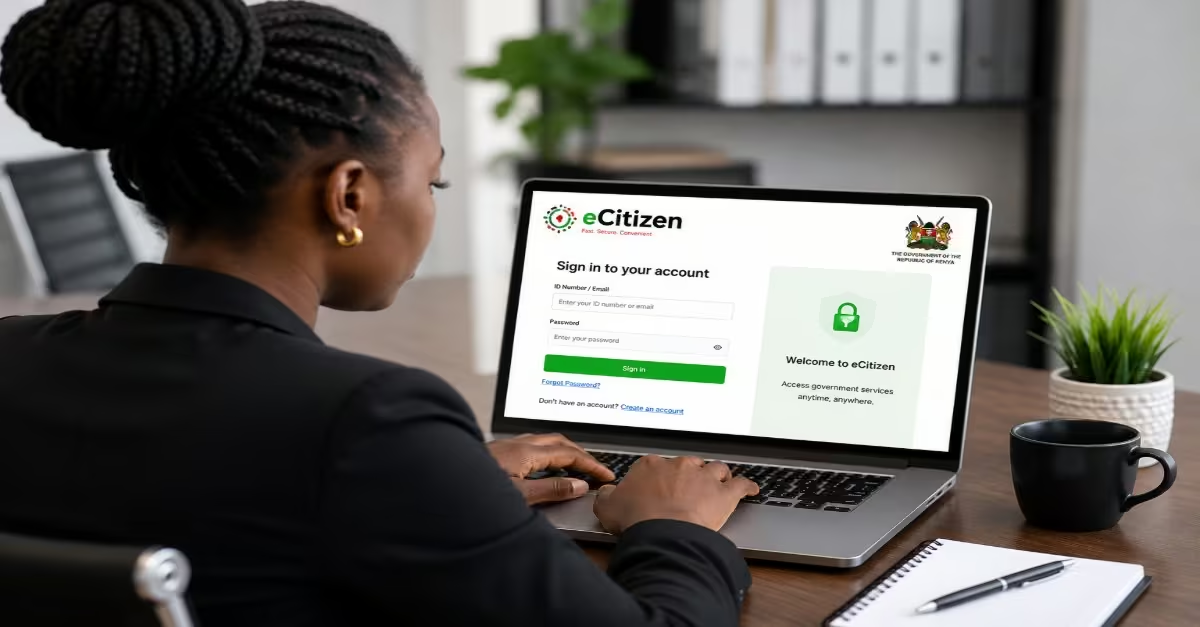
Step 1: Log In to Your eCitizen Account
- Open your browser and visit the eCitizen portal at accounts.
- Click “Sign In” and enter your registered username and password.
- After entering your login details, you will be required to complete OTP (One Time Password) verification.
- Choose whether to receive the six-character OTP via SMS or email, then enter it to complete the login process.
- If the OTP does not arrive through SMS, try using the email option instead.
Step 2: Navigate to NTSA Services
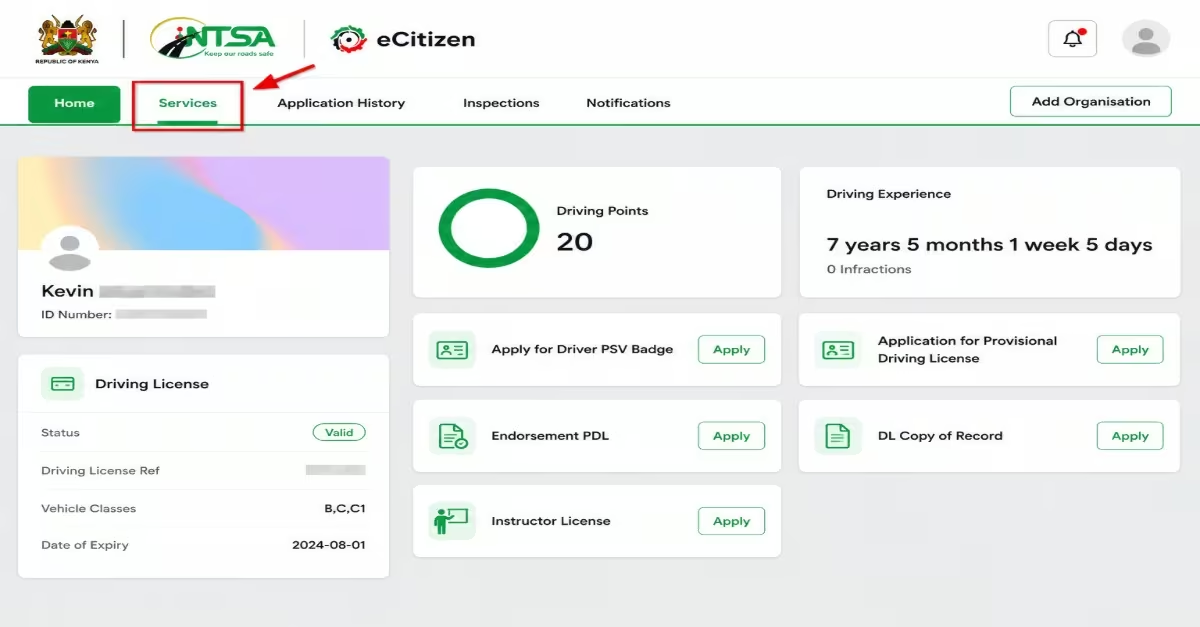
- After logging in, you will be directed to your eCitizen homepage, which displays services from different government agencies.
- Scroll down to the “Agencies” section and click on “National Transport and Safety Authority (NTSA).”
- This will open your NTSA dashboard on eCitizen.
- If it is your first time using the NTSA portal through eCitizen, you may be asked to update your password before continuing.
Step 3: Select Motor Vehicle Copy of Records
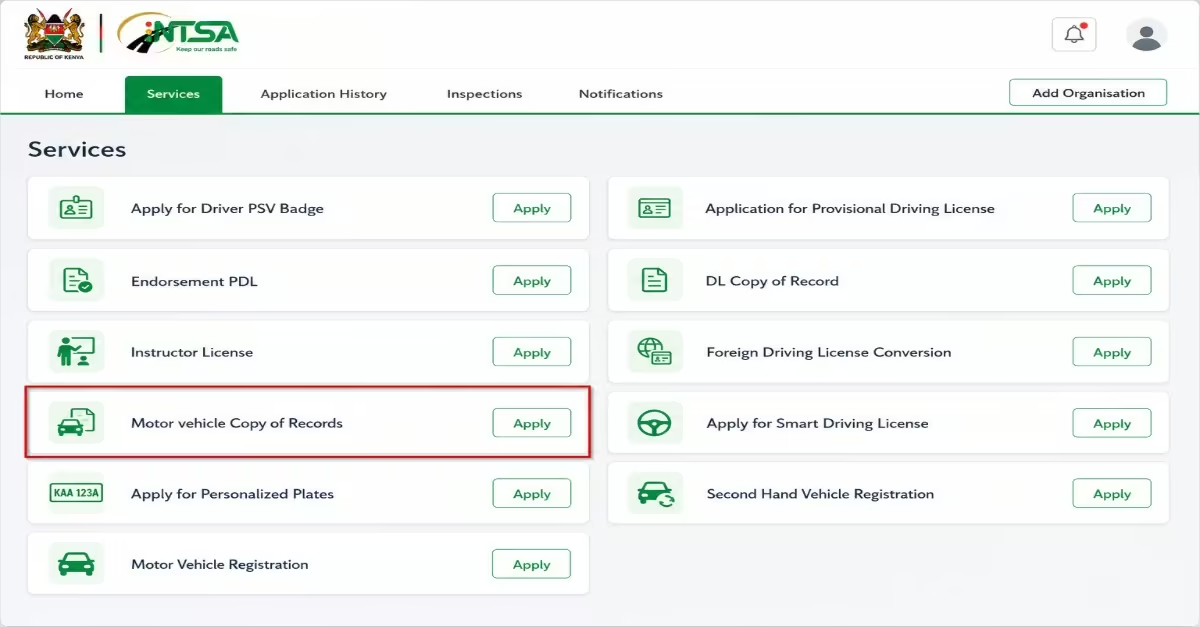
- On the NTSA dashboard, click on the “Services” tab located in the top menu.
- From the list of available services, locate “Motor Vehicle Copy of Records.”
- Click the “Apply” button next to the service to continue with the application.
Step 4: Enter the Vehicle Details
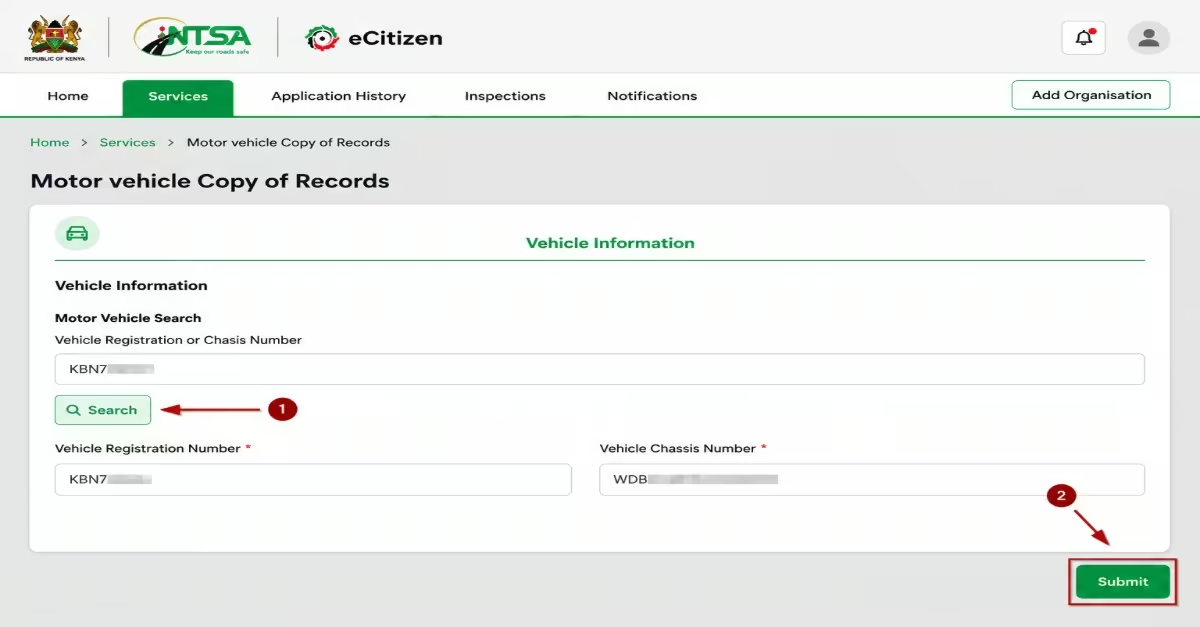
- A search form will appear on the screen.
- Enter the vehicle registration number (number plate) or chassis number in the provided field and click “Search.”
- The system will automatically display the vehicle details at the bottom of the page.
- Review the information carefully to confirm that you searched for the correct vehicle.
- Once satisfied, click “Submit” to proceed to the next step.
Step 5: Make Payment
- You will be redirected to the payment page, where the official search fee is KES 550.
- Choose your preferred payment method from the available options, including M-Pesa, debit or credit card, or bank transfer.
- If paying through M-Pesa, you will receive a payment prompt on your phone.
- Enter your M-Pesa PIN and confirm the transaction.
- Wait for the payment confirmation message before proceeding.
Step 6: Download Your Copy of Records
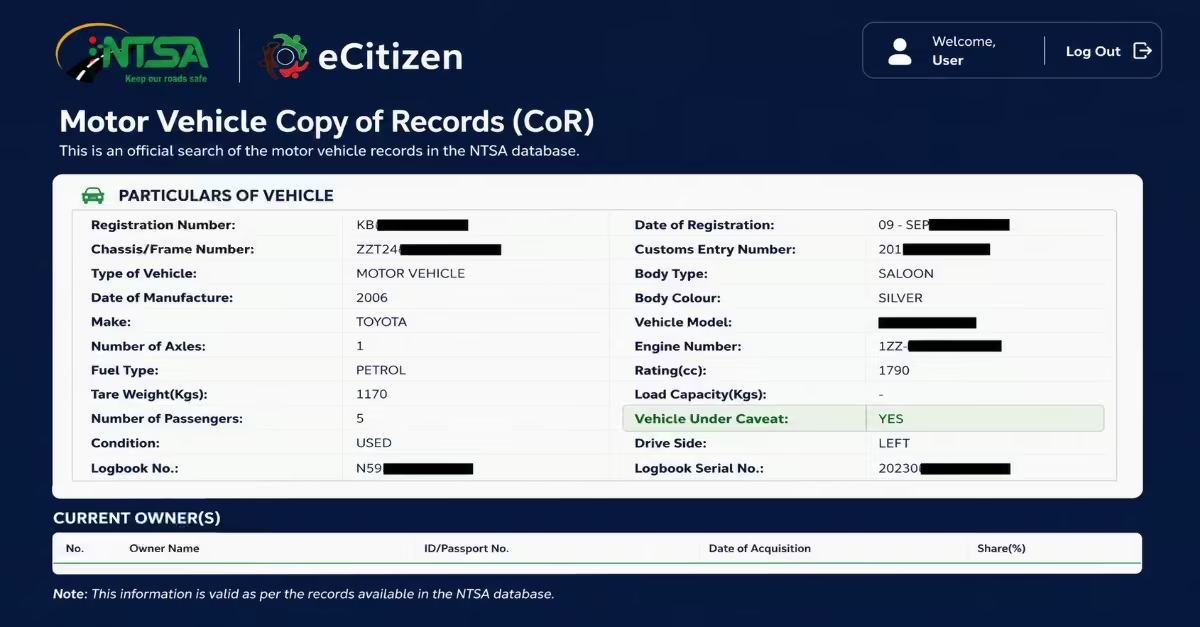
- Once the payment has been confirmed, go to the “Application History” section on your NTSA dashboard.
- Locate your recent application and click the “Download” button to access the Motor Vehicle Copy of Records (CoR) in PDF format.
- On the downloaded CoR, check the “Vehicle Under Caveat” section.
- If it displays “YES,” the vehicle has an active caveat and ownership transfer is currently restricted.
- If it displays “NO,” it means there is no active caveat on the vehicle.
- Save or print the CoR for future reference, as it serves as official proof of the vehicle’s status at the time of the search.
Lifting a Vehicle Caveat
Once a caveat has been placed on a vehicle, it remains active until NTSA officially removes it. While the caveat is in place, the vehicle cannot be transferred, sold, or have any changes made to its registration details.
Must read: Removing a caveat is free of charge, and the process generally follows procedures similar to those used when registering the caveat.
Who Can Lift a Caveat?
A caveat can only be removed by one of the following:
- The person or institution that originally placed the caveat, once the issue that led to the restriction has been resolved.
- A court, through a court order, instructed NTSA to remove the caveat. This is common when the person who placed the caveat refuses to remove it voluntarily.
Read Also: How to Use the KRA Shuru WhatsApp Chatbot (2026): A Step-by-Step Guide for Kenyan Taxpayers
Frequency Asked Questions
How Long Does It Take To Place A Vehicle Caveat In Kenya?
Once all required documents are submitted to NTSA, the caveat is processed and officially registered against the vehicle within about 1 working day (24 hours). It is important to note that applications are only received on working days between 8:00 AM and 4:30 PM. Any documents submitted outside these hours are processed on the next working day.
How Much Does It Cost To Place A Vehicle Caveat?
NTSA does not charge any fee to place a caveat on a motor vehicle — the service is free. However, you may incur additional costs if your situation requires legal steps, such as obtaining a court order, especially in disputes involving uncooperative owners or deceased persons.
How Much Does It Cost To Check If A Vehicle Is Under A Caveat?
You can confirm whether a vehicle has a caveat by conducting an official ownership search on the NTSA eCitizen portal. The process costs KES 550, after which you receive a Copy of Records (CoR). This document will clearly show whether the “Vehicle Under Caveat” field reads “YES” or “NO.”
How Long Does It Take To Lift A Vehicle Caveat?
Once NTSA receives a valid withdrawal request or a court order, the caveat is usually removed within two working days. After processing, the vehicle’s records are updated to reflect the change.
How Much Does It Cost To Lift A Vehicle Caveat?
Removing a vehicle caveat is completely free of charge. However, as with the application process, you may incur legal costs if a court order is required to enforce the removal, especially in disputed cases.
Can You Buy Or Sell A Vehicle That Is Under A Caveat?
No. Once a caveat is in place, the vehicle cannot be sold, transferred, or registered to a new owner until the restriction is lifted. Attempting to transfer such a vehicle can be complicated and may involve multiple parties, including financiers, lawyers, family members, or the courts. It is strongly recommended that buyers always conduct an NTSA vehicle search before purchasing a used vehicle to confirm its caveat status.
Conclusion
Placing a vehicle caveat in Kenya is a simple but powerful legal step that helps protect vehicle ownership from unauthorized transfers, fraud, and disputes. The process mainly involves preparing the required documents, submitting them to NTSA, and waiting for quick processing, which is usually completed within a short time and at no cost. The process is free of charge, as you are charged nothing; the same process applies to registering a vehicle and lifting the vehicle caveat. Finally, checking the status of the vehicle’s caveat is as simple as doing so online on the eCitizen platform. By following the procedure above carefully, you can easily check the status.