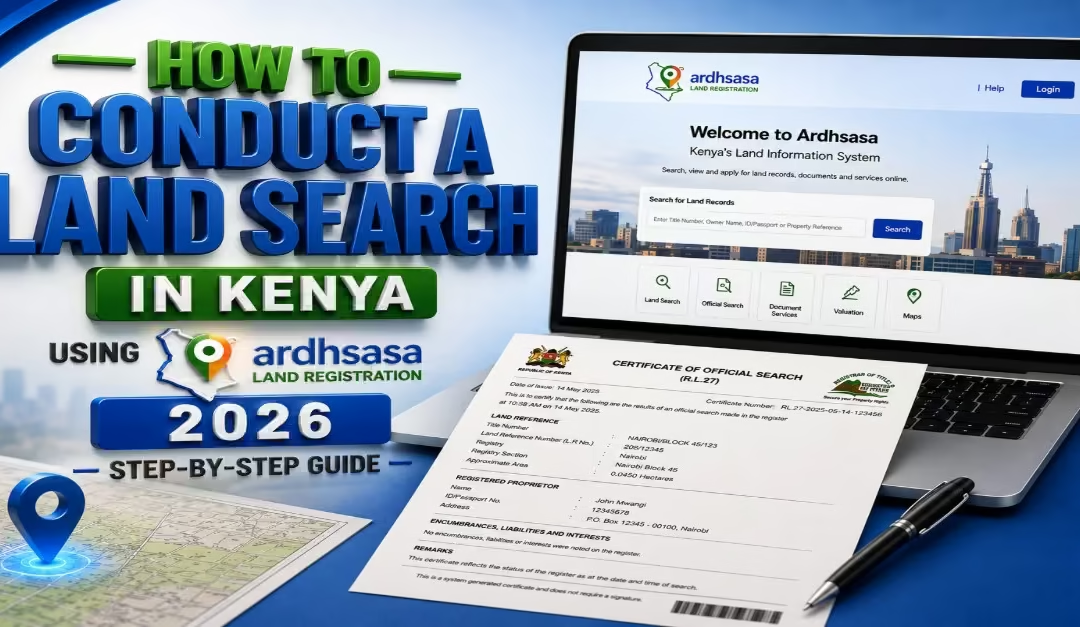
Conducting a land search in Kenya is an important step when buying, selling, transferring, or confirming ownership of a property. A land search helps you check key details about a parcel of land, including the registered owner, parcel information, cautions, charges, restrictions, and other interests that may affect the property.
Through the Ardhisasa platform, you can conduct a land search online without visiting a land registry in person. This makes it easier and more convenient for property owners, buyers, and other interested parties to access land information.
In this guide, we explain the:
- Step-by-step process of conducting a land search through Ardhisasa
- Requirements for searching the land via Ardhisasa
- The cost of making a land search
- An interpretation of the results
- Common red flags while conducting the land search.
Read Also: How to Conduct a Land Search on eCitizen in 2026: Step-by-Step Guide
Requirements for Conducting a Land Search via Ardhisasa
Before starting a land search, it is important to understand the requirements. When conducting your land search through Ardhisasa, you should prepare the following before you begin, as per the HowKE team.
- Title Deed Number or Parcel Number– This is the key reference used to locate land records in the system. It is found on the title deed and must be entered correctly, as even a small mistake can lead to incorrect results or rejection of the application.
- National ID– Your National ID is required to verify your identity when creating an account or logging in. It ensures that only authorized users can access land information through government systems.
- KRA PIN-Your Kenya Revenue Authority PIN may be required depending on the platform and the type of process you are completing. It is not always needed for a basic search, but it is advisable to have it ready in case it is requested.
- Active Phone Number– A working phone number registered in your name is needed for verification. Both platforms send a One-Time Password (OTP) to confirm your identity during login or transaction steps.
How to Register on Ardhisasa in Kenya: 2026 Step-by-Step Guide
Before you can carry out any land search on Ardhisasa, you must first create and fully set up your account. Registration is free if you have all your details ready. Follow the steps below carefully.
Step 1- Visit the Official Ardhisasa Portal
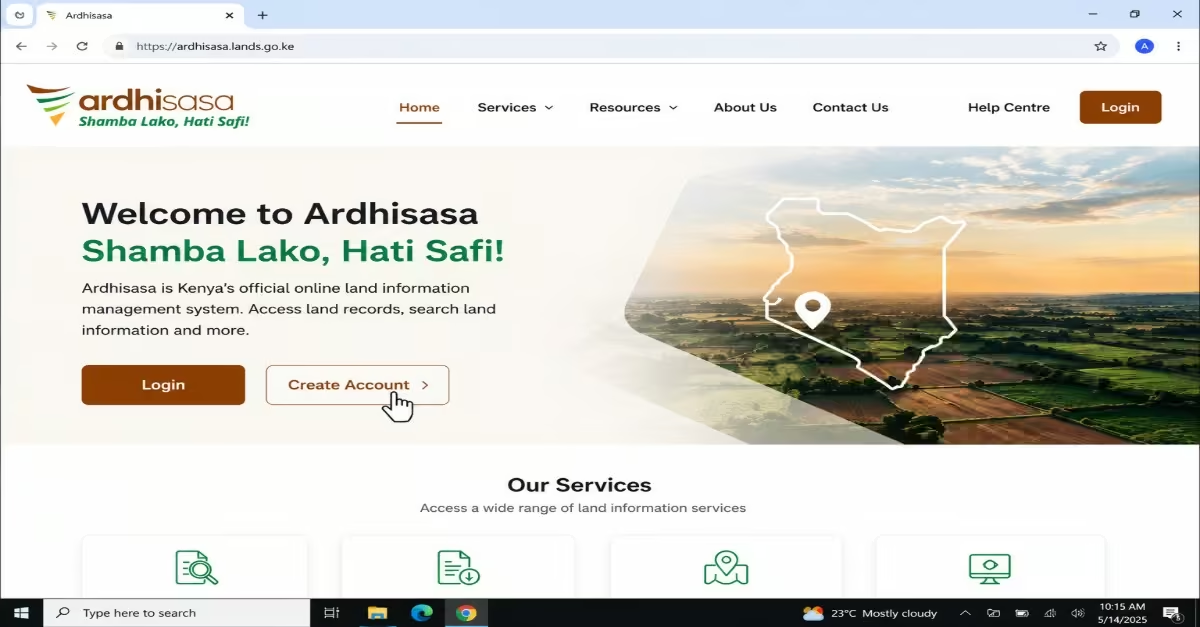
- Go to the official Ardhisasa website:. You will need to access the platform using a browser on your phone or computer.
- On the homepage, click on “Create Account” to begin the registration process.
Step 2 – Enter Your Personal Details
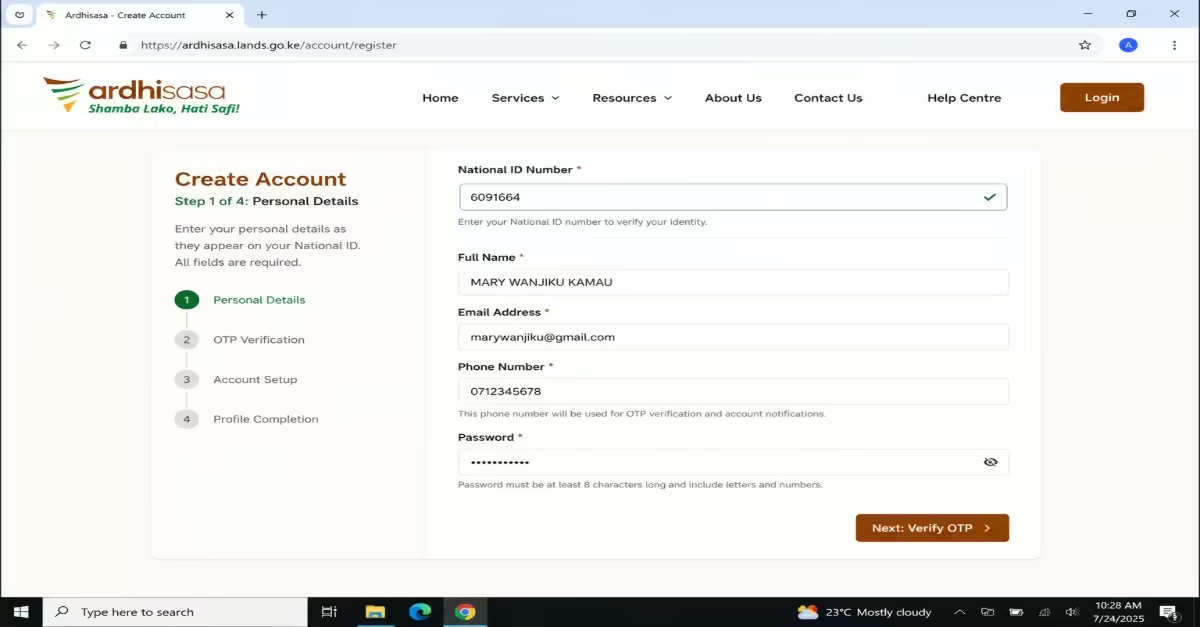
- Start by entering your National ID number. The system will automatically verify your identity using the government’s Integrated Population Registration System (IPRS).\
- Fill in your full name exactly as it appears on your National ID.
- Enter a valid email address and your active phone number. Keep in mind that one phone number can only be linked to one Ardhisasa account.
- Finally, create a strong password that you will use to access your account.
Step 3 – Complete OTP Verification
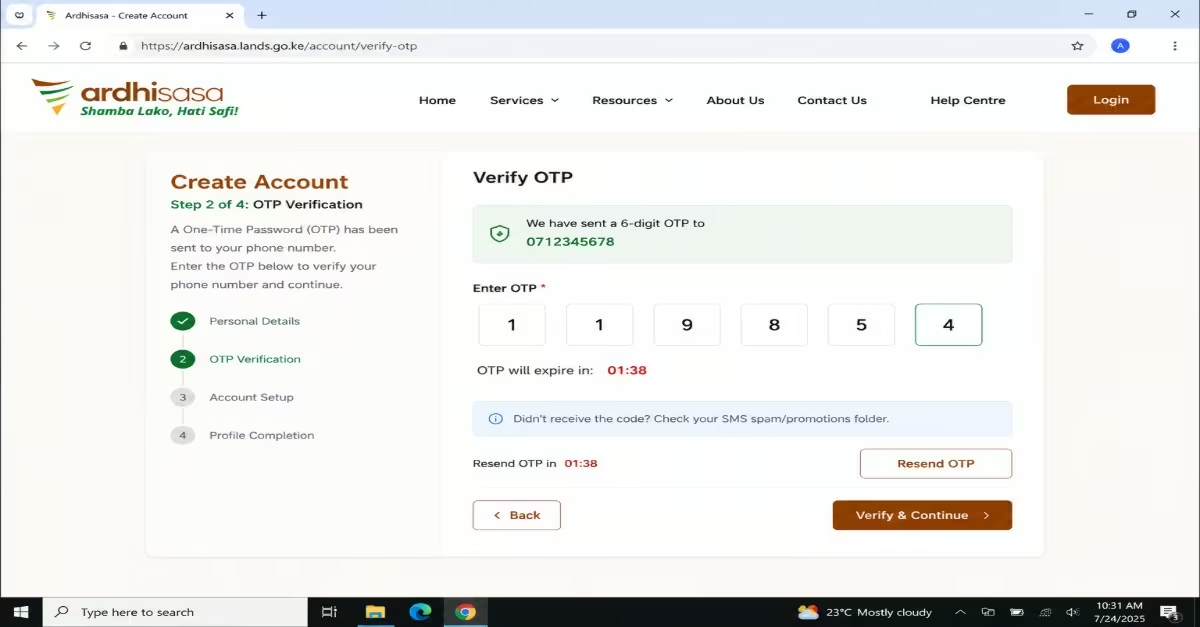
- A One-Time Password (OTP) will be sent to your registered phone number via SMS.
- Enter the OTP promptly, as it usually expires within 2 minutes
- If you do not receive the message, check your phone’s promotional or spam messages folder.
- If necessary, wait at least 2 minutes before requesting another OTP. Avoid requesting multiple codes too quickly, as this may temporarily block your account.
Step 4 – Log In for the First Time
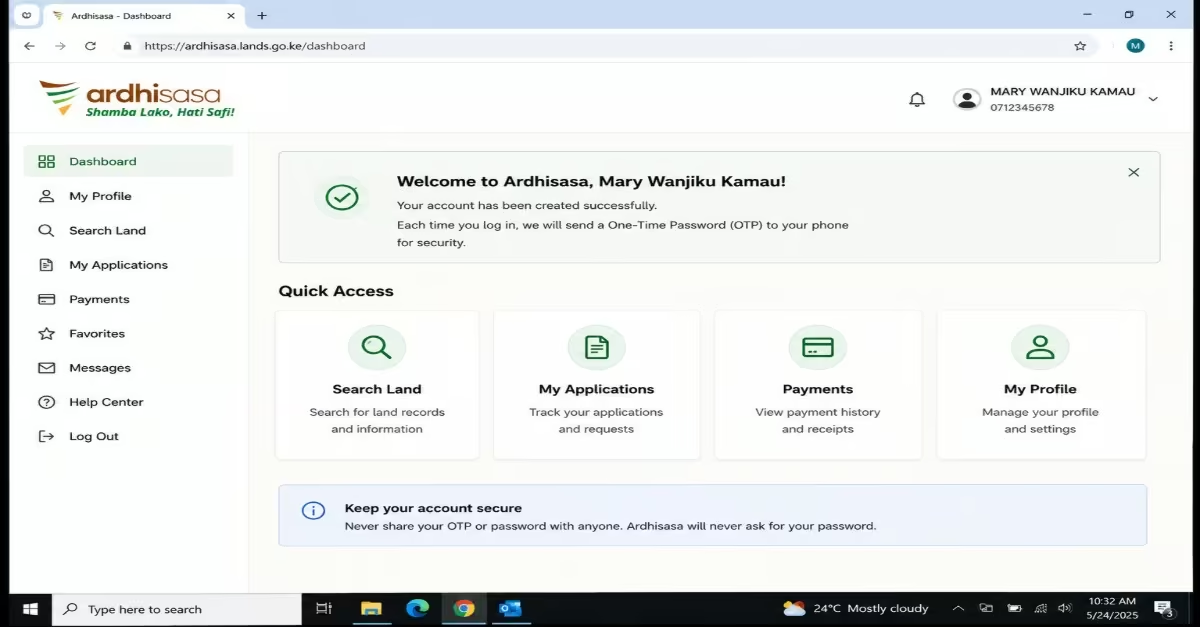
- Once your account is verified, log in using your phone number and password.
- Each time you log in, a new OTP will be sent to your phone for security purposes. Enter it to access your dashboard. At this point, your Ardhisasa account has been created successfully.
Step 5 – Complete Your Profile (Mandatory)
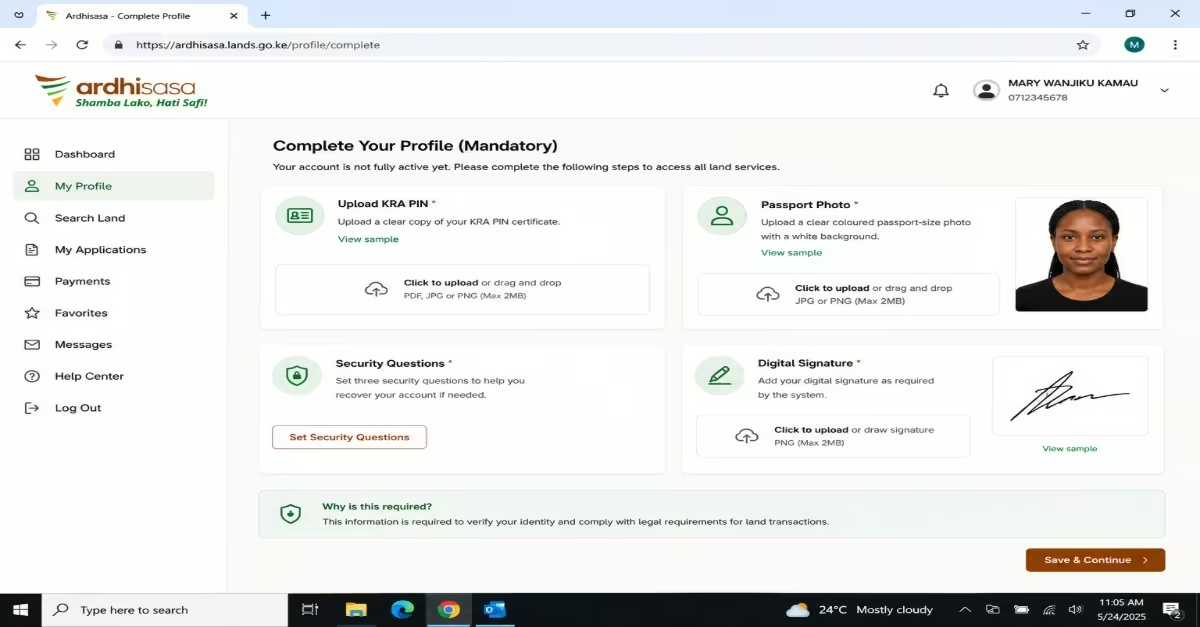
- Although your account is created, it will not be fully active until you complete your profile. This step is required before you can access any land services:
- Upload your KRA PIN, which is mandatory for land-related transactions
- Upload a clear coloured passport-size photo with a white background
- Set three security questions to help you recover your account if needed.
Add your digital signature as required by the system.
How to Conduct a Land Search Using Ardhisasa
Conducting a land search online in Kenya has become simple and secure with the introduction of the Ardhisasa platform. The process involves several important steps that must be followed carefully to ensure accurate results and avoid delays. The following are the steps you are required to follow as per the Afriqahome Team.
Step 1- Log In to Your Ardhisasa Account
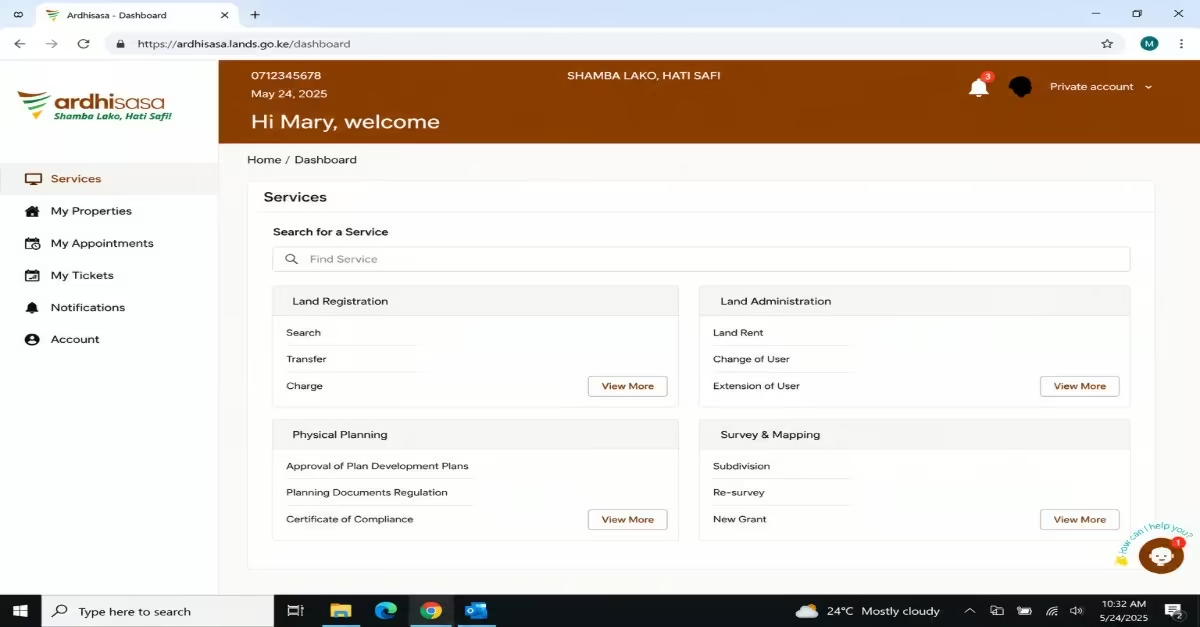
- Visit the official Ardhisasa portal
- Enter your registered phone number and password.
- A One-Time Password (OTP) will be sent to your phone via SMS—enter it immediately to complete your login.
- If you do not receive the OTP, check your promotional or spam messages folder before requesting a new one.
Step 2 – Navigate to Land Search
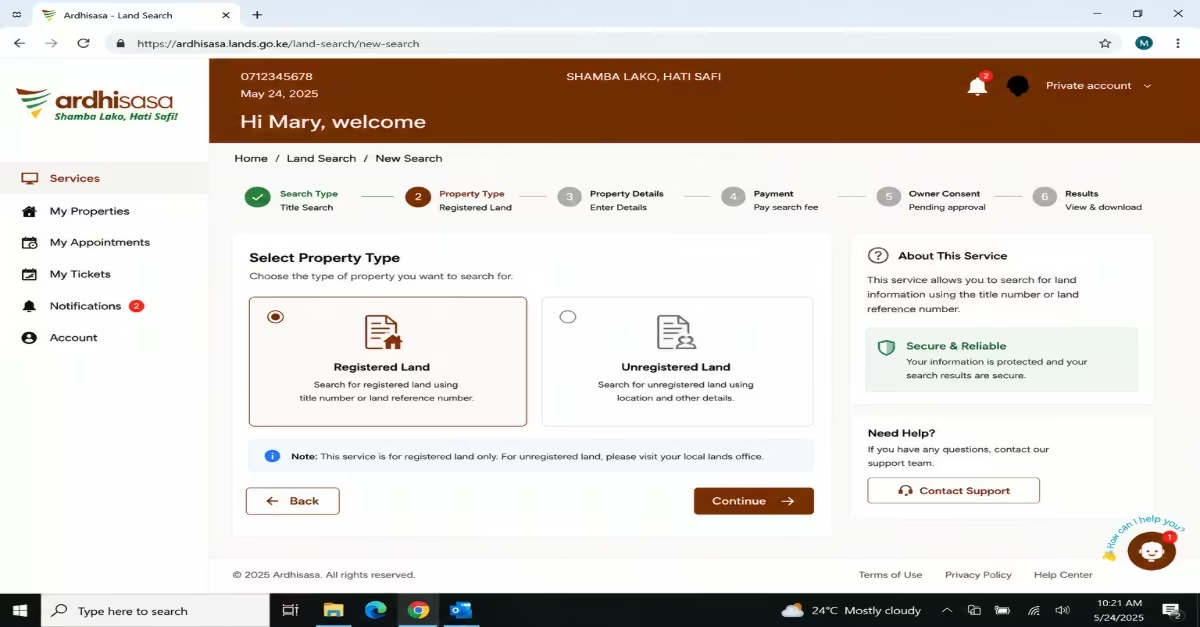
- Once logged in, locate the “Land Search” or “Title Search” option on your dashboard. This option may appear in the navigation menu or as a visible button on the main dashboard.
- Click on it to begin the search process.
Step 3 – Enter the Property Details
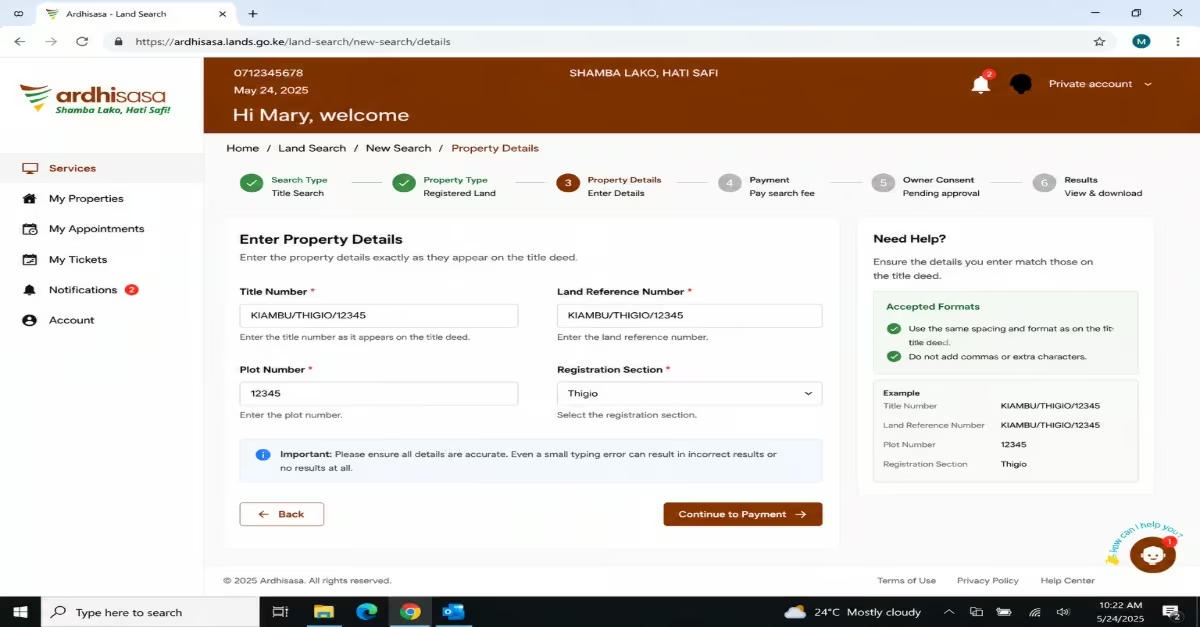
- Enter the property details exactly as they appear on the title deed provided by the seller—spacing and formatting are important.
- Depending on the type of property, you will be required to enter one of the following: Title Number, Land Reference Number, Plot Number, and Registration Section
- Carefully review all the information before submitting. Even a small typing error can result in incorrect results or no results at all.
Step 4 – Pay the Search Fee
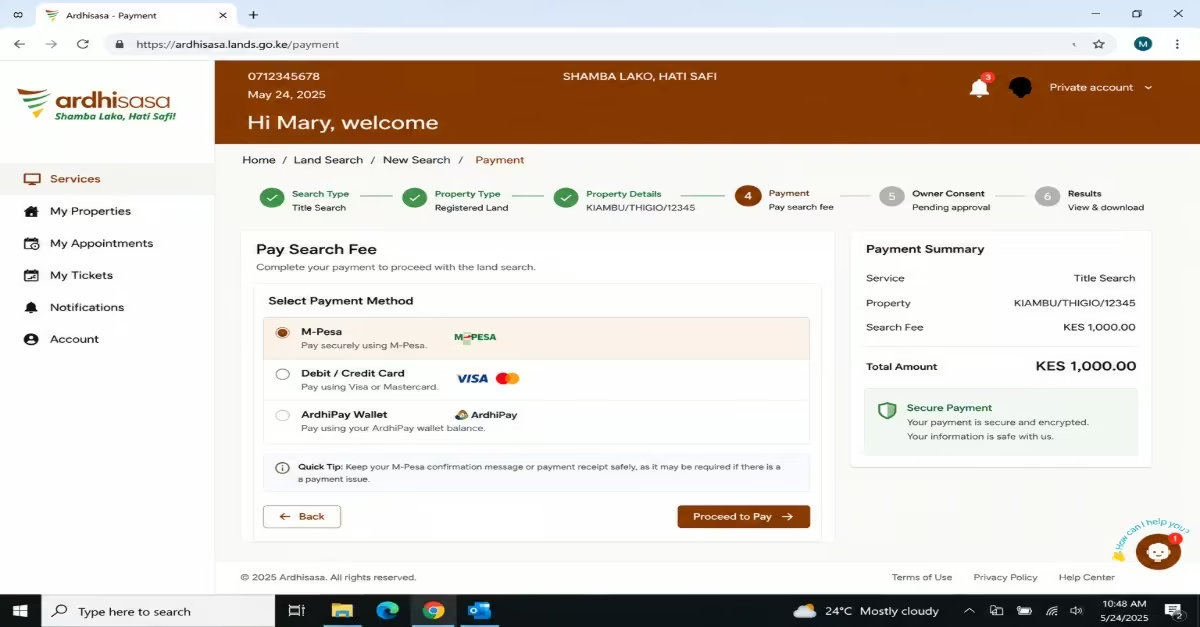
- The search fee typically ranges between KES 500 and KES 1,000 per parcel and is paid through ArdhiPay. Accepted payment options include M-Pesa, Debit card, Mastercard, Visa, or Mastercard
Quick Tip: Keep your M-Pesa confirmation message or payment receipt safely, as it may be required if there is a payment issue.
Step 5 – Wait for Owner Consent
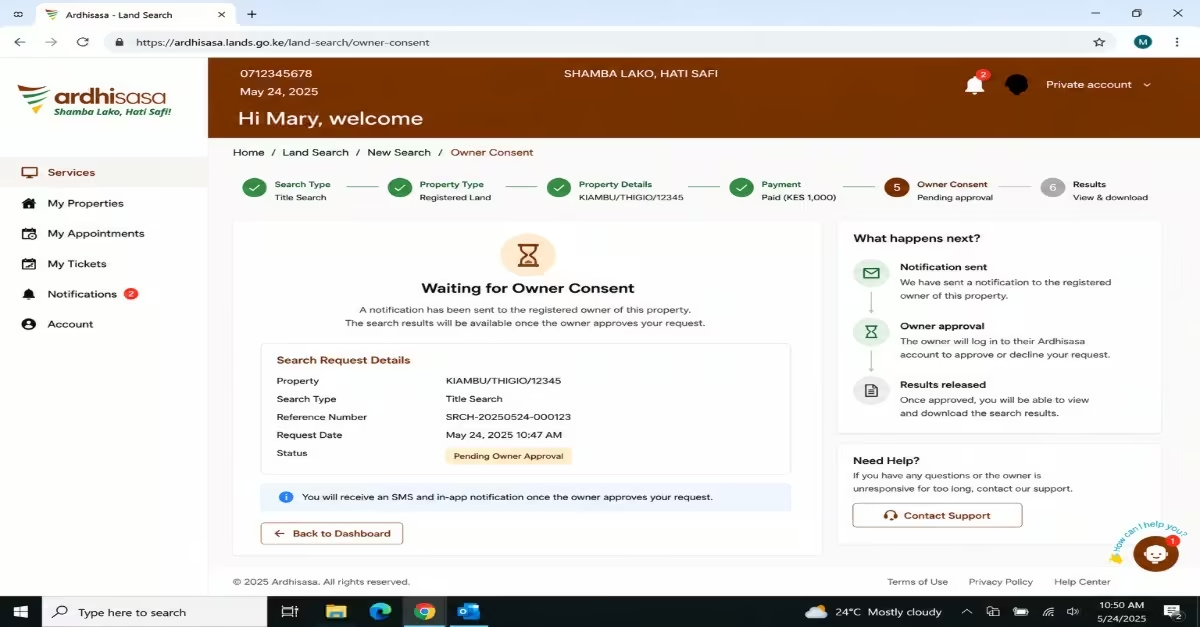
- After payment, the system automatically sends a notification to the registered property owner.
- The owner must log into their own Ardhisasa account and approve your request before the results are released. In a normal transaction, this should not be an issue, as a genuine seller will approve the request without delay. However, if the owner is unavailable, slow to respond, or if there is an ongoing dispute, this step may take longer.
Quick Tip: If a seller refuses to approve your search request or keeps delaying the process, treat this as a serious warning sign. A legitimate seller should have no reason to block or delay a land search.
Step 6 – View and Download Your Results
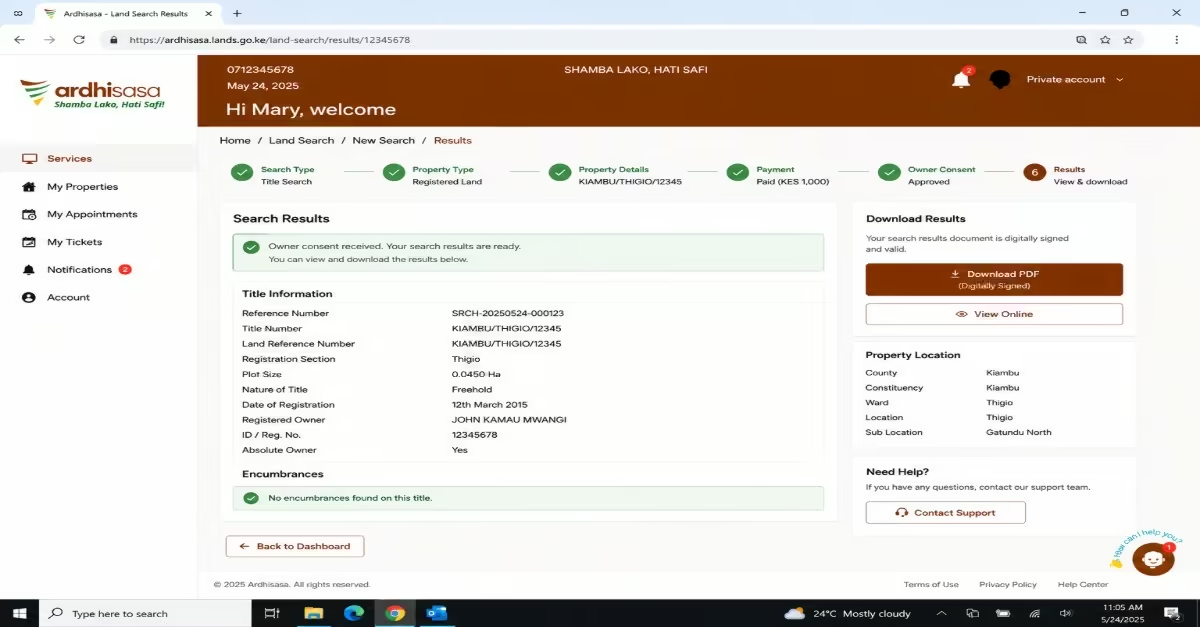
- Once the owner gives consent, your search results will be available in your Ardhisasa dashboard
- You can view them online and download a digitally signed PDF copy for your records
The results will typically include:
- Registered owner’s full name
- Land Reference Number and Title Number
- Plot size and area
- Type of ownership — freehold or leasehold
- Date of registration
- Any encumbrances, such as bank charges, cautions, caveats, or other restrictions
Limitations of Ardhisasa Land Search in Kenya
Although Ardhisasa makes land searches faster and more convenient, it is not yet available for land in all parts of Kenya. The availability of Ardhisasa services depends on whether the relevant land records and registry have been integrated into the platform. If the service is not available for a particular property or location, you may need to use another available method of conducting a land search.
How to Read Your Ardhisasa Land Search Results
After receiving your search results from Ardhisasa, it is equally important to understand how to interpret the information provided because each section of the search certificate contains specific details that help you determine whether the property is safe to proceed with. A study by AMCCO Properties Ltd highlights the following simple explanation of what each field means
a) Registered Owner
This shows the full name of the person or organization legally recognized as the owner of the property. Compare this name with the seller’s National ID; the names should match exactly. If the name on the search results is different from the person selling the land, pause and ask for clarification before proceeding.
b) Title or LR Number
This is the unique number assigned to the property in the land registry. Check that it matches the number on the title deed given to you by the seller. If there is any difference, the title deed may be fake or may belong to another property.
c) Land Reference or Parcel Number
This identifies the exact location of the land on the ground. Confirm this number using the Registry Index Map (RIM) from the Survey of Kenya to ensure the physical location matches what the seller has shown you. Any mismatch may indicate that the land on paper is not the same as the land on the ground.
d) Size or Area
This shows the official size of the property, usually in hectares or square feet. Compare it with the size stated on the title deed or any survey documents.
If there is a difference, for example, if the seller claims a larger size than what is recorded—you should investigate further before making any payment.
e) Nature of Title
This explains the type of ownership attached to the land. Freehold means the owner has full ownership with no time limit.
Leasehold means the land is owned for a fixed period—check how many years are remaining on the lease.
Quick Tip: If the remaining lease period is less than 30 years, most banks and SACCOs may not agree to finance the purchase, which can limit your options.
f) Encumbrances
A caveat means there is a legal claim on the property, which must be resolved before any sale can take place. If the seller did not mention an issue that appears here, treat it as a serious warning sign.
This is one of the most important sections of the search results. It shows any legal claims, loans, or restrictions attached to the property. If anything appears here, investigate it carefully before proceeding. A registered charge means the property has been used as security for a loan, and the loan must be cleared before transfer.
Common Red Flags to Watch for in Your Ardhisasa Search Results
A land search on Ardhisasa is a tool that helps you identify potential issues. The results should be reviewed carefully to detect any legal, financial, or procedural risks that could affect the transaction. Check the following red flags while analyzing your results.
a) Owner’s Name Doesn’t Match The Seller
The seller must be the registered owner or have legally recognized authority, such as a Power of Attorney or Letters of Administration. If this connection is missing, you may be dealing with someone who does not have the legal right to sell the property.
b) Undisclosed Encumbrances
If you find that the land has a registered charge, it means the property has been used as security for a loan; thus, the land has a third-party claim that must be resolved before the land is sold. If these charges are unresolved, consider not paying your money first.
c) Mismatch in Plot Size
If the size or measurements differ from what was advertised, it may indicate incorrect information or documentation errors. Proceeding without resolving this can lead to buying less land than expected or facing boundary disputes later.
d) Very Recent Ownership Change
If the property was recently transferred shortly before being put up for sale, it may suggest a chain of quick or suspicious transactions. It is important to review the ownership history to confirm that all transfers are genuine and properly documented.
How Much Does a Land Search Cost in Kenya?
- For searches conducted online through either Ardhisasa, the cost usually ranges between KES 500 and KES 1,000 per parcel.
- For in-person searches at the county land registry, the standard fee is KES 500, paid directly at the registry counter. It is always wise to confirm the current fee on the platform or at the registry before submitting your application, as government charges can be updated from time to time.
Conclusion
Conducting a land search through Ardhisasa helps you confirm property ownership and identify issues such as cautions, charges, restrictions, or other claims before completing a land transaction. The process is simple: create an Ardhisasa account, provide the required details, and follow the steps outlined in this guide. When reviewing the results, watch out for red flags, such as a name that does not match the registered owner, differences in the land size, mismatched property details, or encumbrances listed on the search results. It is also important to note that Ardhisasa is not yet available for land in all parts of Kenya, so you may need to use another method where the service is unavailable, like eCitizen.