Before you pay a deposit, sign a sale agreement, or commit to any property purchase in Kenya, one step must always come first: a land search. This is the most reliable way to confirm that the property exists as described, that the seller is the true and legal owner, and that there are no hidden issues such as disputes, loans, or other claims attached to the title. Many buyers only realize there is a problem after they have already paid money; these are issues that a simple search would have revealed early.
This guide will take you through the exact step-by-step process as it works in 2026, explain what the results mean, how long the process takes, and what actions to take if you notice any warning signs, so you can move forward with confidence and avoid costly mistakes.
What is a Land Search in Kenya?
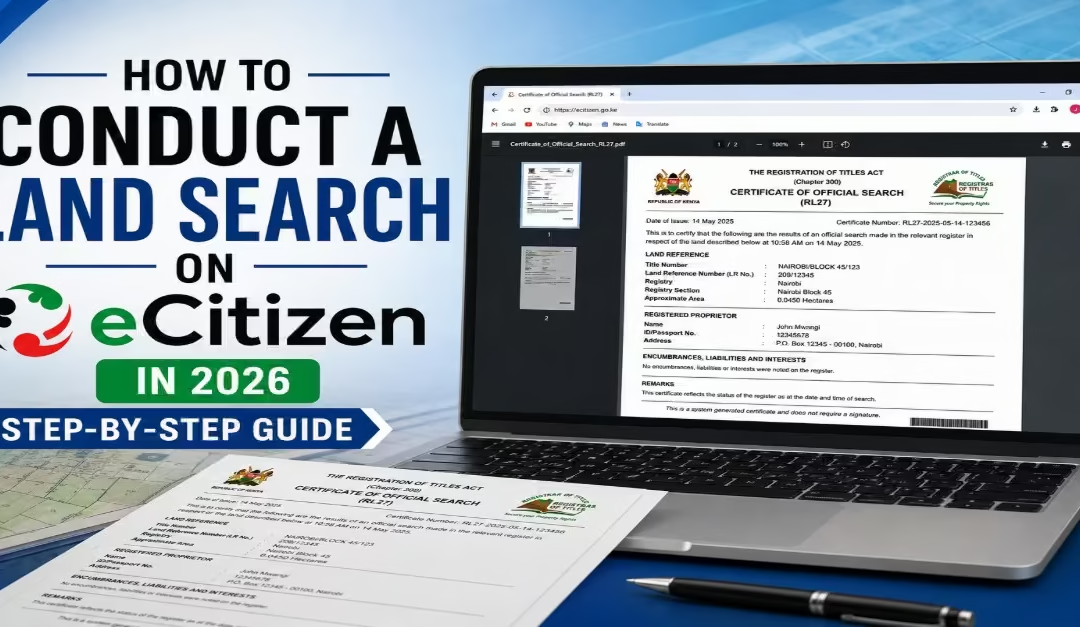
A study by Kennedy (2026) indicates that “A land search is a formal process carried out at the Land Registry to confirm the legal ownership and current status of a specific piece of land.” It is done using the title number (also referred to as the parcel or plot number) indicated on the title deed. Once the search is completed, the registry issues an official Land Search Certificate containing key details such as the registered owner’s name, the size and location of the land, and any existing encumbrances.
Encumbrances are legal claims, restrictions, or liabilities registered against a property that may affect the owner’s rights or the property’s transfer, use, or value. These encumbrances may include charges like mortgages, cautions, court orders, or other legal interests attached to the property. This certificate serves as a critical verification tool, helping you confirm that the seller has the legal authority to transfer the property and that the land is not tied up in disputes or financial obligations that could affect your ownership.
Read Also: How to Apply for or Replace a Birth Certificate in Kenya
What Does a Land Search Reveal? Key Information Explained
A land search from the Lands Registry provides a clear legal snapshot of a property. It shows who owns the land, whether there are any restrictions or financial claims attached to it, and other important details that determine whether the property can be safely transferred. A study by Kelvin (2026) highlights the following details are a land research must reveal, while carrying out a land search you must you will be to know the following.
a) Registered Ownership
It confirms the legal owner of the property. If the person selling the land is not the registered owner, you should not proceed with the transaction.
b) Encumbrances and Charges
It shows whether the land has been used as security for a loan with financial institutions such as Kenya Commercial Bank, Absa Bank Kenya, or NCBA Bank. If there is an existing charge, it must be fully cleared before the property can be transferred.
c) Caveats and Cautions
It reveals any legal restrictions or third-party claims placed on the property. These issues must be resolved before any purchase can continue.
d) Land Use and Tenure Type
It confirms whether the land is freehold or leasehold, as well as its approved use. This helps you ensure the property matches your intended purpose.
e) Previous Dealings and History
It shows the history of ownership and past transactions involving the land. Any unusual or irregular patterns may indicate potential risks that require further investigation.
Requirements for Conducting a Land Search on eCitizen
Before you can successfully conduct a land search on the eCitizen portal, you must have the required details and documents ready. The following are the documents required as per AMCCO Property Ltd
- Active eCitizen account linked to your Kenyan National ID
- Correct title number or parcel number, entered exactly as it appears on the title deed
- Name of the land registry and registry section where the property is registered
- A clear scanned copy of the title deed
- KES 1,000 search fee + KES 50 eCitizen facilitation fee, payable via M-Pesa or debit/credit card
Step-by-Step Guide: How to Conduct a Land Search on eCitizen
Conducting a land search is one of the most important steps when verifying property ownership in Kenya. The whole process is done through the eCitizen platform. In this section, I will break down the exact process of how to search for land ownership on eCitizen.
Step 1 – Log In to Your eCitizen Account

- Visit the official eCitizen platform and log in using your National ID number and password.
- If you are a new user, click “Create Account” and register using your National ID number, phone number, and email address. This step ensures your profile is properly set up before accessing government services.
Step 2 -Navigate to the Ministry of Lands
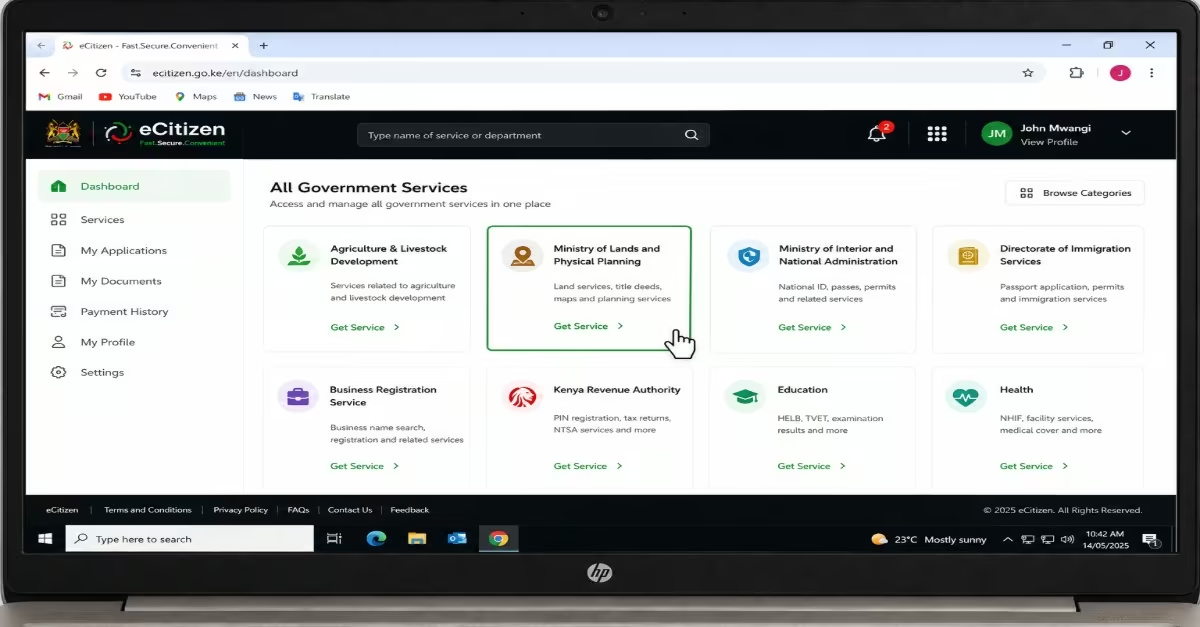
- Once logged in, go to your dashboard and scroll through the available services to find the Ministry of Lands option. It may appear as “Ministry of Lands and Physical Planning” or “Ministry of Lands, Public Works, Housing and Urban Development,” depending on the version of the portal.
- Click “Get Service” to continue. If requested, enter your KRA PIN, as it is required for identity verification on the platform.
Step 3 -Select the Land Search Option
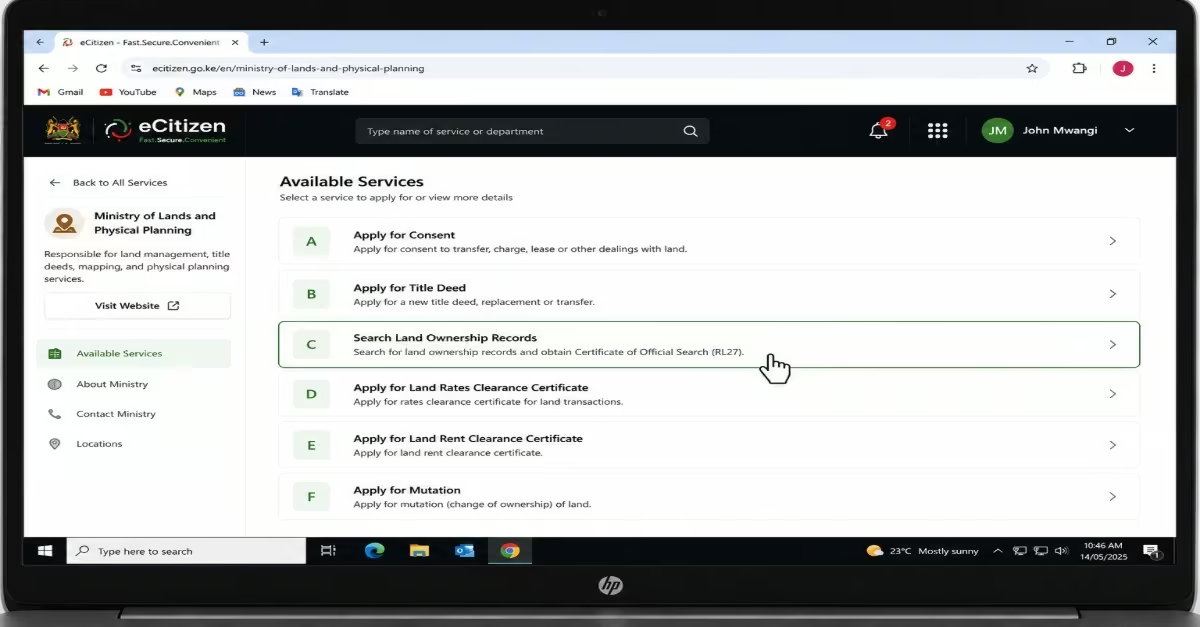
- A menu of services labeled from A to I will appear on your screen.
- Select option “C” — Search Land Ownership Records.
- Read the instructions carefully in the pop-up message, then click “Apply” and choose “Apply for Land Search (RL27)” to proceed.
Step 4 – Fill in the Property Details
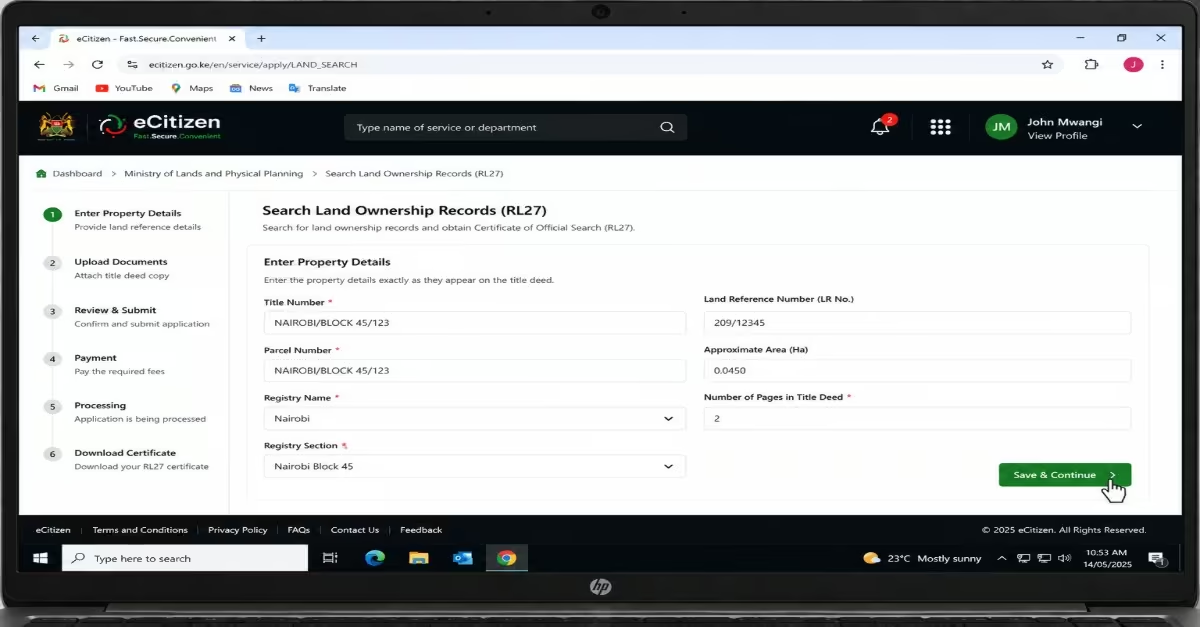
- You will be required to enter the property details exactly as they appear on the title deed. This includes the title number, parcel number, registry name, and registry section.
Step 5 – Upload the Title Deed and Submit
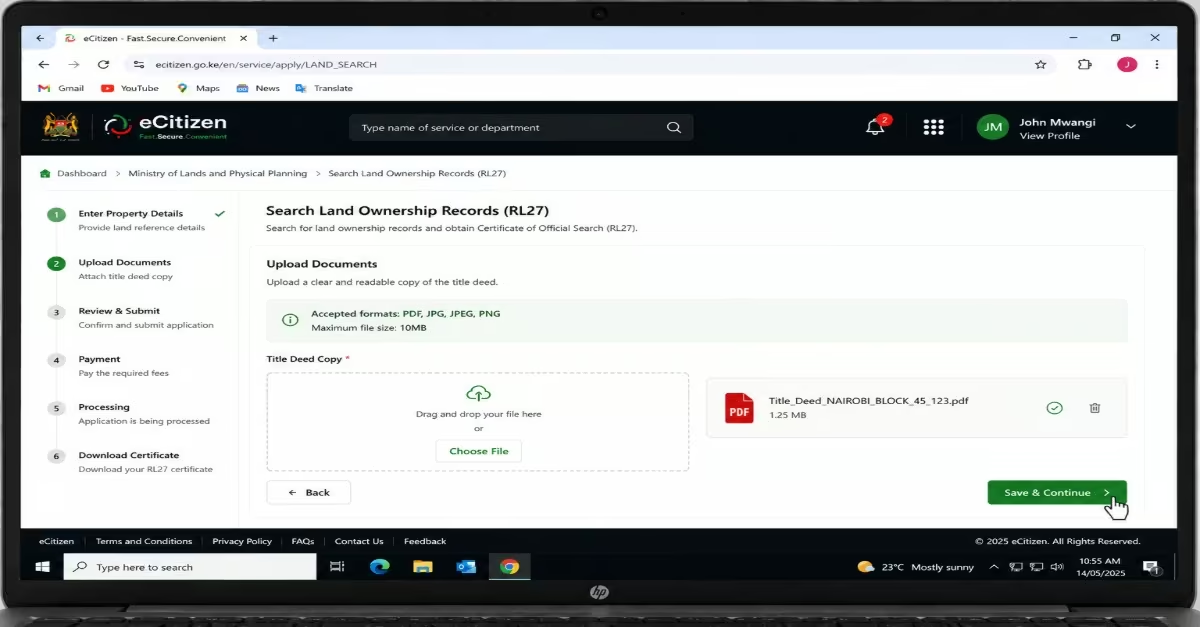
- Upload a clear and readable scanned copy of the title deed when prompted.
- Review all the details on the confirmation page to ensure everything is correct.
- Once satisfied, click “Submit.” You will receive a reference number immediately. The application is usually processed within at least 24 hours, after which you will receive a notification with a transaction ID.
Step 6 – Complete Payment
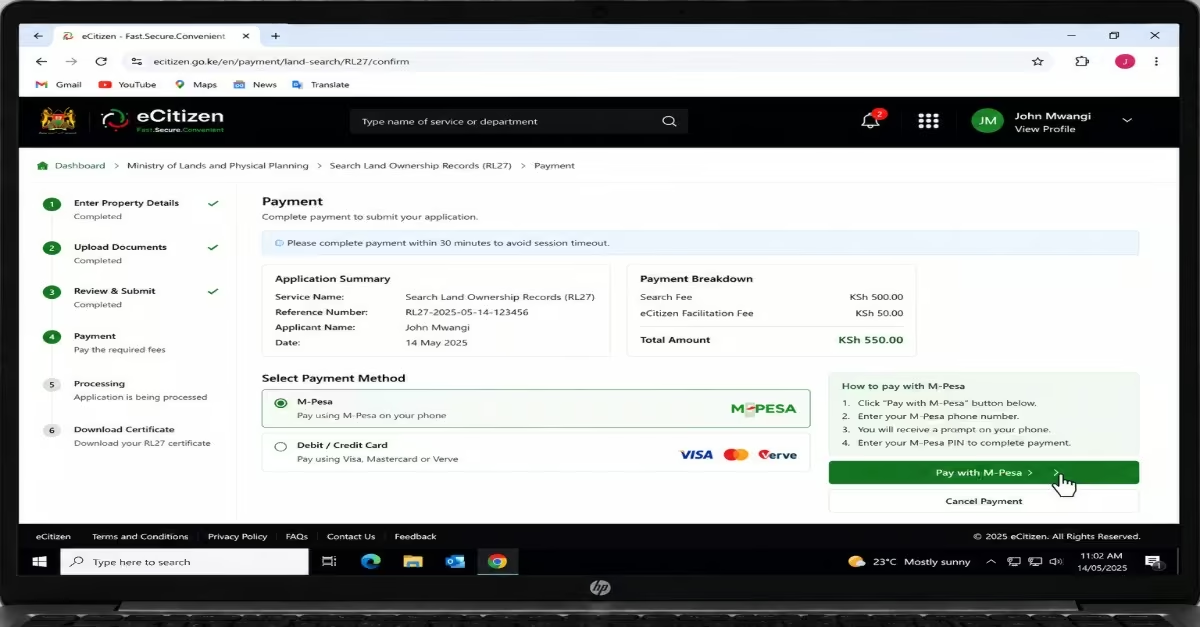
- Log back into your eCitizen platform and open the “Application History” section.
- Find your application, enter the transaction ID sent to you, and click “Apply.”
- Proceed to pay the required fee of KES 550 (KES 500 search fee + KES 50 eCitizen facilitation fee) using M-Pesa or a debit/credit card.
Step 7 – Download Your Certificate
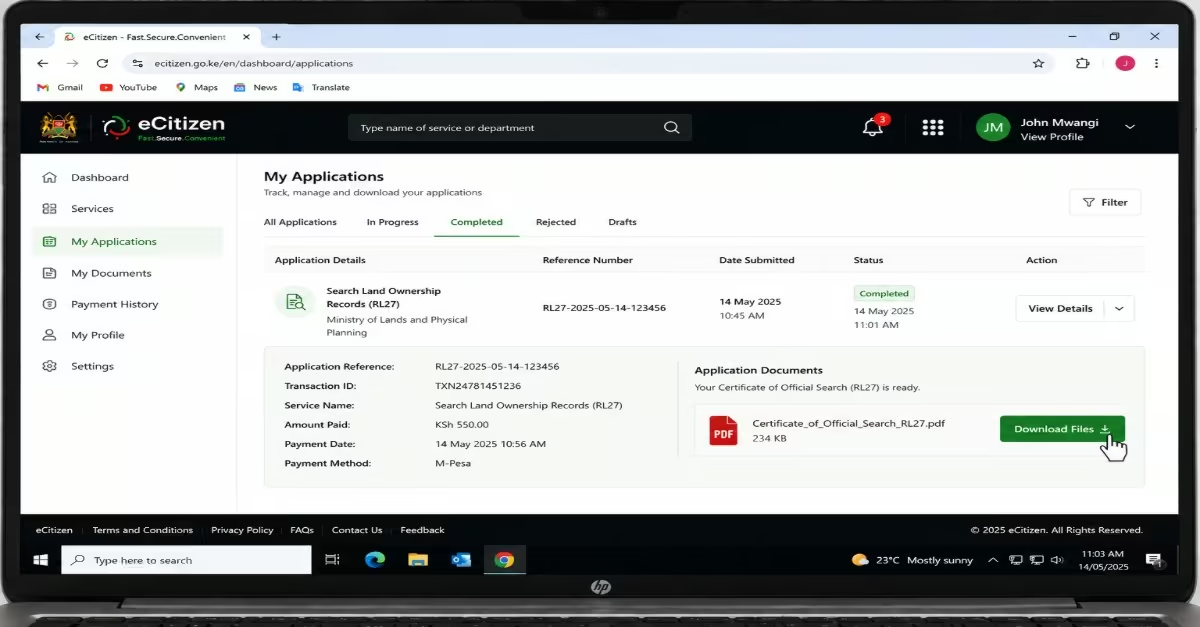
- Go back to “Application History” after confirming payment.
- Click “Download Files” to access your results.
- Your Certificate of Official Search (RL27) will be available in PDF format, which you can download, save, or print for official use or personal records.
Cost of Land Search in eCitizen
The cost of conducting a land search through eCitizen is standardized, with a government land search fee (RL27) of KES 1,000 per parcel. This amount covers official verification of ownership, encumbrances, and title details from the Ministry of Lands.
Payment is not made at the time of application but is only required after the search request has been processed and approved, and it can be completed conveniently via M-Pesa or debit/credit card on the platform.
How Long Does Land Verification Take?
Land verification through the eCitizen platform usually takes between 24 and 48 hours, depending on the workload at the land registry and the accuracy of the details submitted. In some cases, the process may be completed within a single day, but delays can occur during peak periods or when additional manual checks are required before approval and issuance of the final RL27 land search result.
How to Interpret Your eCitizen Land Search Results in Kenya (2026 Guide)
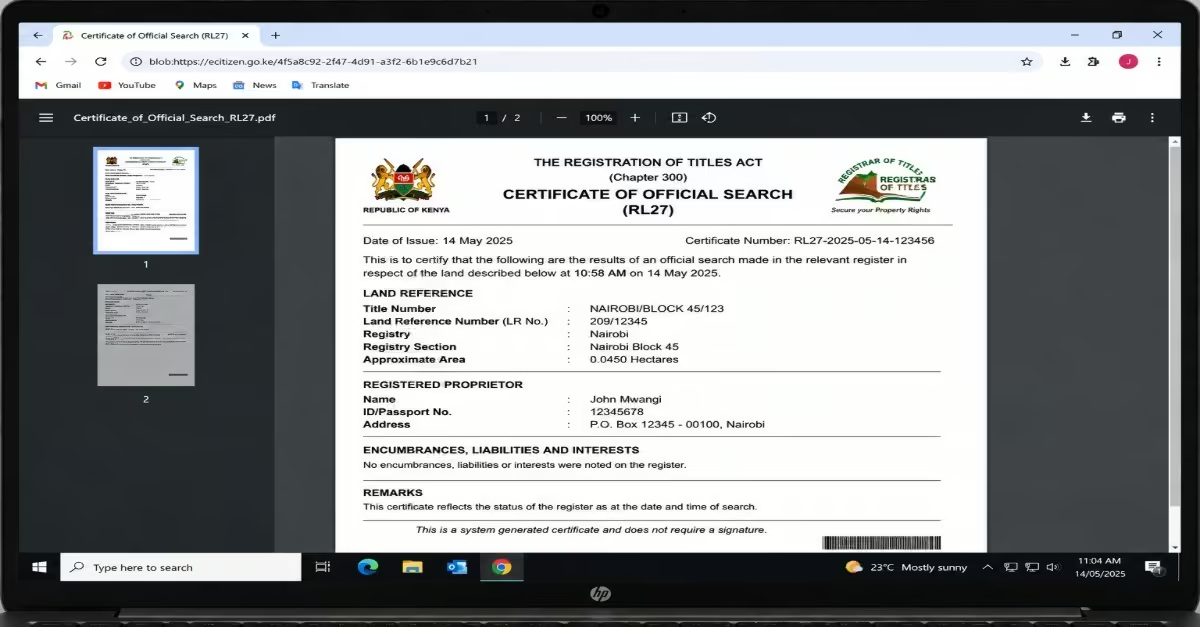
Getting your Certificate of Official Search (RL27) from the eCitizen platform is only part of the process. The next important step is understanding how to read the information correctly.
Without understanding the legal terms included in the certificate, it may not be helpful. In some cases, misunderstanding the results can lead someone to buy problematic land or reject a property that actually has a clean record. Each term is explained below.
a) The Registered Proprietor (Owner’s Name)
This section shows the official owner of the property as recorded by the Ministry of Lands. The name on the certificate must match the person or company selling the land. If someone is selling on behalf of the owner, ask for legal proof such as a Power of Attorney. Even small name differences should be investigated before making any payment. If a company owns the property, conduct separate company searches through the eCitizen platform to confirm the company is legitimate and that the seller has authority to act for it.
b) Title Number / Land Reference Number
This is the official identification number of the land parcel. It may appear as a Title Number, Parcel Number, or LR Number depending on the registration system used. Compare the number on the certificate with the one on the title deed carefully. If there is any mismatch, stop the transaction immediately until the issue is fully explained, as it may indicate a forged title or incorrect records.
c) Land Size and Location
This section shows the registered size and location of the property. Compare these details with what the seller told you and what you saw during the site visit. If the size does not match, involve a licensed surveyor before proceeding, especially in areas where plot sizes are commonly misrepresented.
d) Nature of Title – Freehold or Leasehold
This section explains the type of ownership attached to the land. Freehold means permanent ownership, while leasehold means ownership for a fixed period of years. For leasehold property, always check the remaining lease years because properties with short leases can be difficult to finance.
e) Ownership History
This section shows the sequence of previous owners of the land. Review the transfers carefully to ensure they follow a clear and logical pattern. Be cautious if the property has changed hands many times within a short period, was recently transferred before being listed for sale, or has missing ownership records, as these may indicate possible fraud or disputes.
f) Encumbrances – Legal Claims on the Property
The encumbrances section shows whether the property has any legal or financial claims attached to it.
- A charge means the property was used as security for a bank loan, and the bank must approve or release the charge before the sale can proceed.
- A caution or caveat means another person has claimed an interest in the property. Do not proceed until it is officially removed.
- A restriction is usually placed by the government, Registrar, or court to block transactions on the property and should always be reviewed by a lawyer.
If there are no entries in this section, the title is generally considered “clean” according to registry records.
Common Challenges and Solutions
Even though the eCitizen platform has made land searches in Kenya much easier, users may still experience a few common challenges. Below are these issues and simple ways to solve them:
· Wrong Details? Results Fail
If you enter incorrect title numbers or parcel details, your search may fail or return no results. To avoid this, always confirm the details directly from the seller, real estate agent, or the title deed before submitting your application.
· No Notification? Check Spam/Junk Email
Sometimes approval messages or payment notifications may not appear in your main inbox. If this happens, check your spam or junk folder. You can also log in to your eCitizen account and view the application status directly.
· Ardhisasa Overlap
Some land records, especially in Nairobi and a few other areas, are not processed through eCitizen. Instead, they are handled through the Ardhisasa platform, which provides fully digital land search services for those specific jurisdictions
· Complex Cases Require Legal Help
If a property has unclear ownership history or multiple transfers, it is advisable to consult a lawyer or licensed advocate. They can help interpret official documents such as the green card and other registry records correctly.
· Peak Time Delays
During busy periods, especially at the end of the month, the system may process applications more slowly. To avoid delays, it is better to submit your application early in the month or during off-peak hours when traffic is lower.
Read Also: How to Apply for a Kenyan Passport in 2026: Full Guide for First-Timers
Conclusion
Conducting a land search through the eCitizen platform is one of the most important steps when buying, selling, financing, or verifying property ownership in Kenya. The process helps confirm the true owner of the land, identify any legal or financial claims attached to the property, and reduce the risk of fraud or costly disputes. You can easily do this by following the step-by-step procedure explained above. Ensure also that you have all required documents so as to avoid errors and mistakes during the land search.