You have just bought a vehicle, completed the ownership transfer, and everything appears to be in order. But then one question comes to mind: Where is my logbook? Do I still receive the familiar paper document? For years, the motor vehicle logbook has been one of the most important documents for proving vehicle ownership in Kenya. However, that familiar paper document is no longer the only way to issue and access vehicle registration information. In 2026, the National Transport and Safety Authority (NTSA) introduced a major change, moving the motor vehicle registration certificate into a digital format.
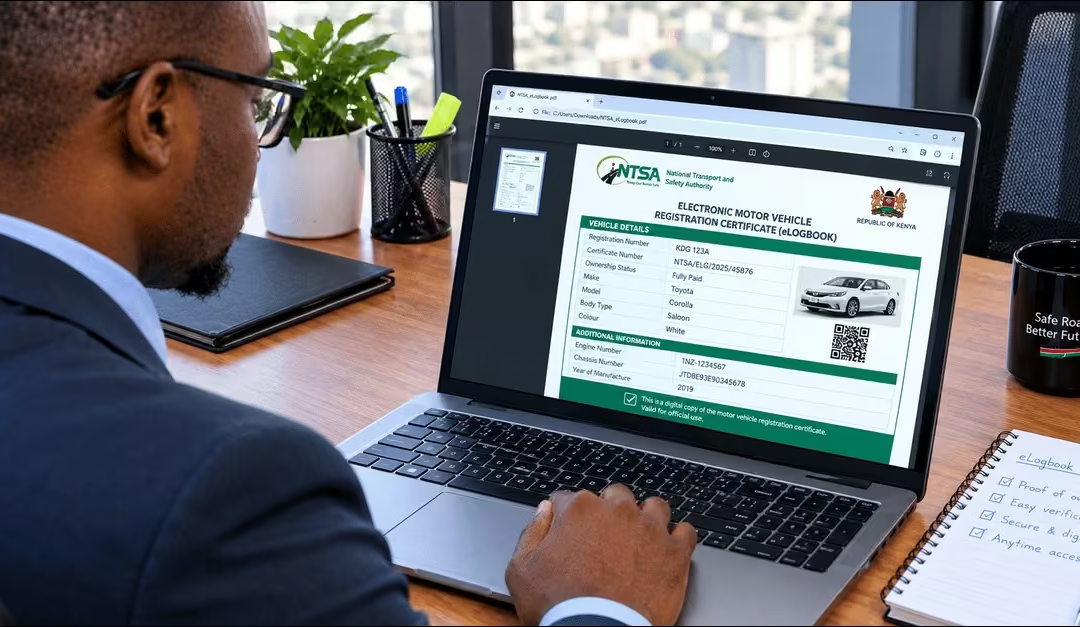
The new document is known as the Electronic Motor Vehicle Registration Certificate, commonly called the NTSA eLogbook. NTSA officially rolled out the system on 10 June 2026, as part of its wider digital transformation of motor vehicle registration services. Under the new system, e-Logbooks are integrated into processes such as new vehicle registration, ownership transfers, and changes to vehicle particulars. Vehicle owners can access, view, download, and verify their digital registration certificates through their eCitizen accounts.
But what exactly is an NTSA eLogbook, and what does the change mean for vehicle owners who are used to the traditional paper logbook? This article explains:
- What Is an NTSA eLogbook?
- Key Benefits of the Electronic Motor Vehicle Logbook
- NTSA Services & Transactions That Require an eLogbook
- How to Access and Download Your NTSA eLogbook via eCitizen (2026 Guide)
- How to Verify NTSA eLogbook Authenticity (Online & App)
- What Information Does an NTSA eLogbook Contain?
- Common NTSA eLogbook Download & eCitizen Errors
- FAQs About the NTSA eLogbook
- Conclusion
What Is an NTSA eLogbook?
The NTSA eLogbook is the electronic version of Kenya’s Motor Vehicle Registration Certificate, which serves as official proof that a vehicle is registered and records its ownership details. Japhet’s guide on eLogbook highlights that “Unlike the traditional paper logbook, the eLogbook is stored digitally and can be accessed and downloaded online after the relevant NTSA transaction has been completed.” NTSA introduced the system as part of its shift from paper-based vehicle registration to digital services, allowing vehicle owners to access their registration information without relying on a physical document. The digital certificate also makes vehicle records easier to access and verify while helping reduce problems linked to lost, altered, or forged paper logbooks.
Key Benefits of the Electronic Motor Vehicle Logbook
The NTSA eLogbook offers several benefits by making vehicle registration records easier to access, manage, and verify digitally. According to NTSA, the key benefits of the eLogbook are:
- Easy Access – Vehicle owners can access their registration certificate digitally without depending on a physical paper logbook.
- Improved Security – Digital records reduce the risk of losing, damaging, or physically altering a vehicle registration certificate.
- Easy Verification – The eLogbook makes it easier to confirm vehicle registration and ownership details through the digital system. You can verify the eLogbook through the NTSA portal or the NTSA app. This guide explains these methods later.
- Convenient Downloads – Vehicle owners can view and download their electronic registration certificate whenever they need it.
- Faster Services – Digital processing reduces reliance on manual, paper-based procedures, helping make vehicle registration services more efficient.
- Reduced Fraud – Electronic records and digital verification features help strengthen the security of vehicle registration information and reduce opportunities for fraudulent changes.
NTSA Services & Transactions That Require an eLogbook
The introduction of the eLogbook not only changes how vehicle owners access their registration certificates. It also changes how NTSA processes and records several motor vehicle registration, ownership, financing, and record-management transactions. A study by Lilian (2026) highlights the following NTSA transactions affected.
- Motor Vehicle Registration – New vehicle registrations result in the issuance of an electronic registration certificate.
- Transfer of Motor Vehicle Ownership – When ownership changes, the new owner’s details are updated in the digital vehicle records.
- Re-registration of a Motor Vehicle – Vehicles that undergo re-registration receive updated electronic registration records.
- De-registration of a Motor Vehicle – The vehicle’s de-registration status is recorded and reflected in the NTSA digital records.
- Change of Vehicle Particulars Following Inspection – Approved changes to vehicle details after inspection are updated electronically in the vehicle records.
Read Also: NTSA Motor Vehicle Inspection Booking Kenya 2026: A Step-by-Step Guide
How to Access and Download Your NTSA eLogbook via eCitizen (2026 Guide)
Once your vehicle is registered or the ownership transfer is complete, you can access its electronic registration certificate through the NTSA services on eCitizen. Log in to your eCitizen account, open the NTSA portal, and locate your vehicle in the TIMS system. Follow the steps below to find and download your NTSA eLogbook.
Step 1: Go to the NTSA eCitizen Portal
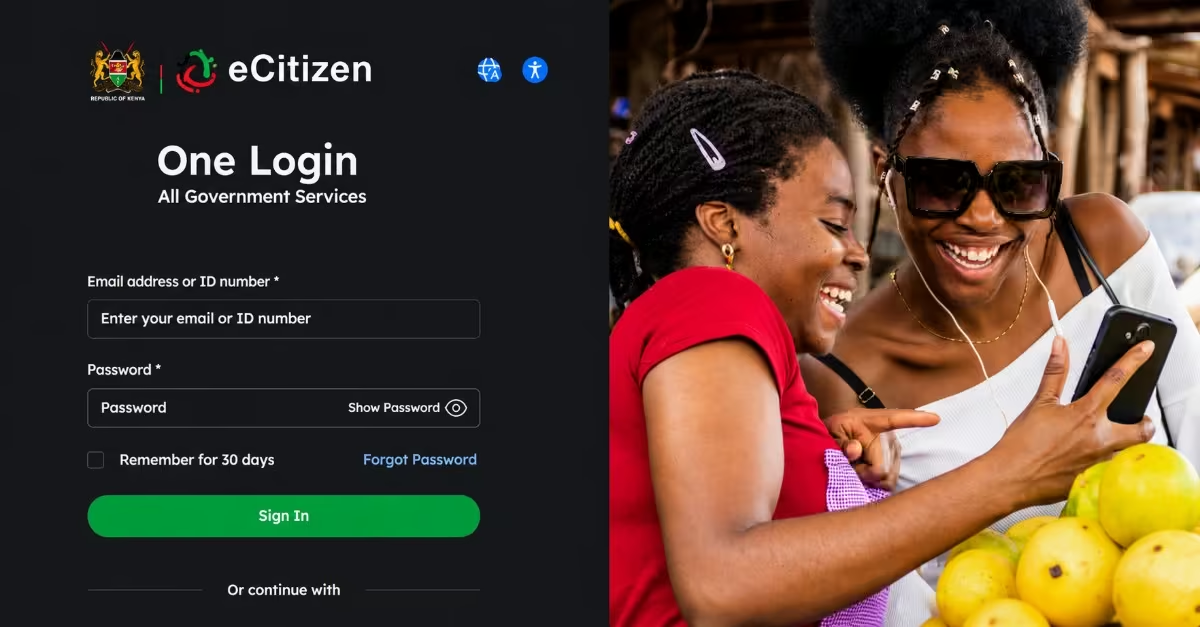
- Visit the NTSA eCitizen Portal and enter your National ID number together with your password to log in.
- If you cannot remember your password, click on “Forgot Password,” and a one-time PIN will be sent to your registered phone number to help you reset it.
Quick Tip: For a smoother experience, use Google Chrome on a desktop or laptop, as some mobile browsers may encounter loading or navigation issues on the portal.
Step 2: Open the NTSA Service Portal
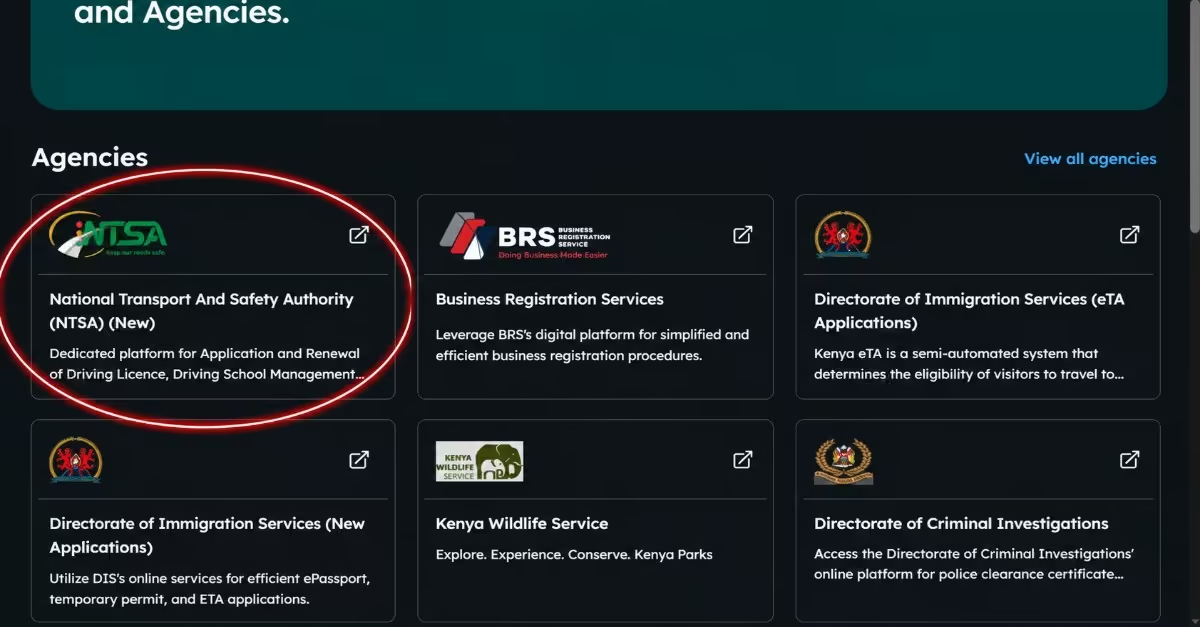
- After logging in, click on “New NTSA Portal” or choose “NTSA Services” from your eCitizen dashboard. This will redirect you to the section containing all NTSA online services.
Step 3: Go to Motor Vehicle → View
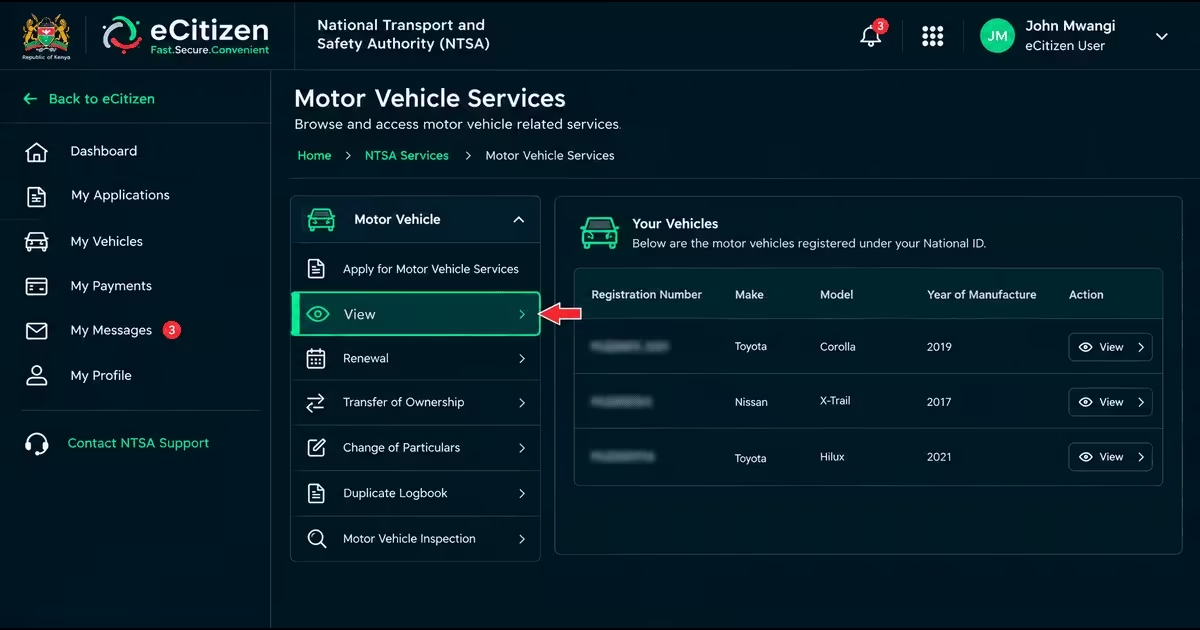
- On the TIMS dashboard, click Motor Vehicle from the side menu and then select View.
- This will display the vehicles registered under your National ID.
Step 4: Open Your Vehicle’s Logbook Section
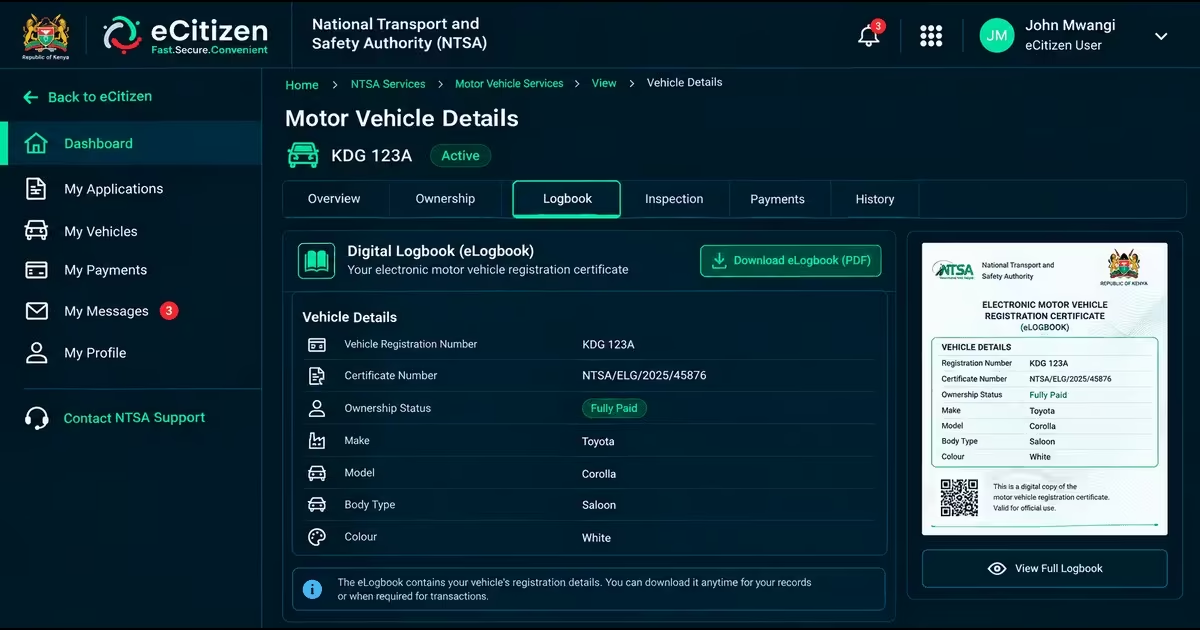
- Click on your vehicle’s registration number to open its details page.
- Look for and select the Logbook tab or section. This is where your digital registration certificate is stored.
Step 5: Download Your eLogbook
- Click Download to save a PDF copy of your electronic registration certificate to your device.
- The download is free, and you can download the certificate whenever you need another copy.
Quick Tip: If the PDF does not open, check whether your browser is blocking pop-ups, as the document may open in a new window. Also, make sure you have a stable internet connection.
How to Verify NTSA eLogbook Authenticity (Online & App)
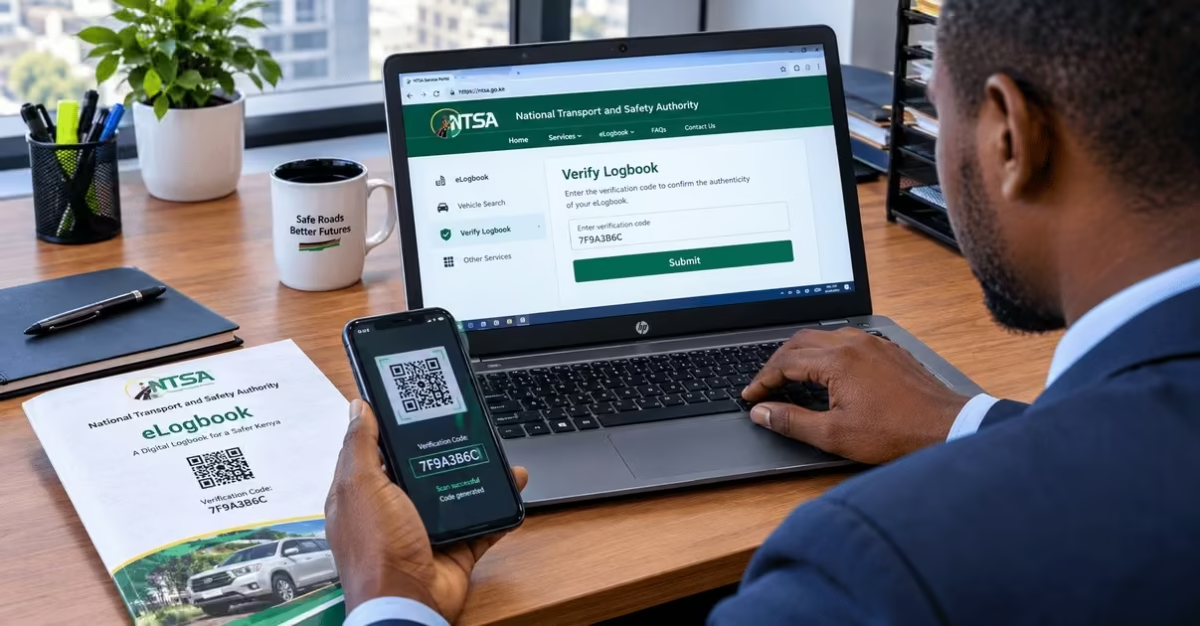
Before buying a vehicle or accepting an eLogbook as proof of registration, confirm that the document and vehicle details are genuine. You can verify the eLogbook in two ways: via the NTSA portal or through the NTSA application. These two methods are explained below:
Option 1: Verifying via the NTSA Portal
This option allows you to verify an eLogbook using the QR code provided on the document. By scanning the QR code and entering the generated verification code on the NTSA service portal, you can view the vehicle details and confirm the eLogbook information is genuine and accurate.
- Open the eLogbook and scan the QR code using your smartphone camera or a QR code reader. The scan will generate a unique verification code.
- After scanning the QR code, copy the verification code displayed on your device.
- Visit the NTSA service portal and select the Verify Logbook option.
- Enter or paste the generated code into the verification field and submit it. The system will display the vehicle details, allowing you to confirm whether the information matches the eLogbook and verify its authenticity.
Option 2: Verifying via NTSA Mobile App
The NTSA Mobile App provides another convenient way to verify an eLogbook using a smartphone. The process involves accessing the document verification service through the app and scanning the QR code on the eLogbook to retrieve the vehicle details and confirm the authenticity of the registration certificate.
- Download and install the NTSA Mobile App.
- Log in using your eCitizen credentials.
- On the home page, select Services and proceed to the document verification section.
- Select Verify Registration Certificate.
- Scan the QR code on the eLogbook. The system will display the relevant vehicle details for verification.
- Select Verify to confirm whether the eLogbook is authentic.
What Information Does an NTSA eLogbook Contain?
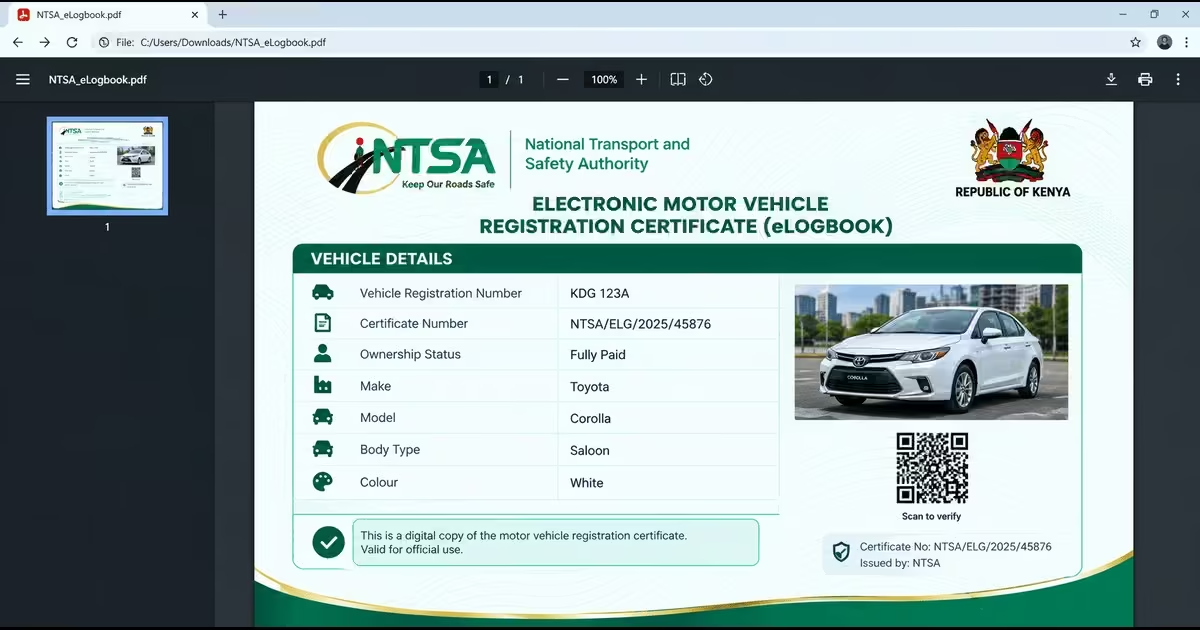
The NTSA eLogbook contains important information used to identify a vehicle and show its registration details. This information helps vehicle owners and other authorised parties confirm key vehicle details using its electronic registration certificate. The main details include:
- Vehicle Registration Number – The unique number assigned to the vehicle and used to identify it in NTSA records.
- Certificate Number – A unique number assigned to the electronic motor vehicle registration certificate.
- Ownership Status – Shows the current status of the vehicle’s ownership, including whether it has been fully paid for or has an outstanding financing obligation.
- Make of the Vehicle – Identifies the manufacturer or brand of the vehicle.
- Model – Shows the specific model or version of the vehicle.
- Body Type – Indicates the vehicle’s body classification, such as a saloon, station wagon, pickup or bus.
- Colour – Shows the colour of the vehicle as recorded in the NTSA registration records.
Common NTSA eLogbook Download & eCitizen Errors
Although the NTSA eLogbook is designed to make vehicle registration services more convenient, vehicle owners may still have difficulty accessing or using the new digital system. The Common issues include the following.
- Unable to Log In to eCitizen – You may have difficulty accessing your account because you have forgotten your password or are experiencing problems with the phone number registered to your account.
- Vehicle Not Appearing on the NTSA Portal – A vehicle may not appear if its registration details have not been properly linked to the owner’s eCitizen or NTSA account.
- eLogbook Not Downloading – The electronic certificate may fail to download because of browser problems, blocked pop-ups, or an unstable internet connection.
- Difficulty Navigating the New System – First-time users may find the new eCitizen NTSA portal difficult to navigate, especially when trying to locate their vehicle and access the eLogbook.
- eCitizen Portal Downtime or Slow Response – The portal may sometimes be slow or temporarily unavailable
FAQs About the NTSA eLogbook
When Did the NTSA eLogbook Take Effect in Kenya?
The eLogbook system went live on 10 June 2026 and applies to various motor vehicle registration transactions.
How Can I Access my NTSA eLogbook?
Vehicle owners can access, view, and download their electronic Motor Vehicle Registration Certificate through their eCitizen account after completing the relevant NTSA transaction. Log in and follow the process described above.
Can an NTSA eLogbook be Verified?
Yes. NTSA provides a digital verification service that allows users to check an electronic registration certificate using the required verification information.
What Should I Do if my Vehicle Does Not Appear on My NTSA Account?
If your vehicle does not appear in your NTSA records, first confirm that the vehicle and ownership details are correctly linked to your account. If the problem continues, contact NTSA through its official support channels for assistance.
Is the NTSA eLogbook Available for Vehicle Transfers?
Yes. The eLogbook is integrated into motor vehicle ownership transfers and other related registration transactions.
Can I Download my eLogbook?
Yes. NTSA allows vehicle owners to access, view, and download their electronic Motor Vehicle Registration Certificates through eCitizen.
Read Also: How to Conduct an NTSA Motor Vehicle Search in Kenya via eCitizen (2026)
Conclusion
The introduction of the NTSA eLogbook marks an important change in how Kenya manages vehicle registration and ownership records. Instead of relying entirely on the traditional paper logbook, vehicle owners can now access, view, download and verify their electronic Motor Vehicle Registration Certificate through e citizen you need to log in to e citizen account, navigate to NTSA services, click Motor Vehicle from the side menu and then select View, select motor vehicle log book’s view, at this you can view your log book and even download it. After downloading, you can also verify the e-logbooks using the NTSA portal or using the NTSA application, which you download from the Play Store. The change is intended to make vehicle records more secure, easier to access, and simpler to verify, while also supporting faster processing of registration, ownership transfers, and other NTSA transactions. As the system takes effect, vehicle owners should familiarize themselves with how to access their eLogbook and understand the changes so they can manage their vehicle records smoothly and avoid unnecessary delays or confusion.