
Many Kenyans are currently experiencing difficulties when trying to add dependants to their Social Health Authority (SHA) accounts, especially after the transition from the National Hospital Insurance Fund (NHIF) to the new SHA system. As the government continues implementing the new healthcare system, many members have noticed that their spouses or children are missing from their SHA profiles. This has caused confusion and challenges when seeking treatment at hospitals and other healthcare facilities. In some cases, dependants are unable to access medical services because their information has not been updated or properly verified on the SHA portal.
Adding dependants to your SHA account is an important step in ensuring your family members can continue accessing healthcare services under your coverage without interruptions. The SHA platform allows members to add, update, and manage family information online in a secure way. However, many users still face problems such as rejected applications, delayed verification, missing dependant records, or incomplete registrations during the process.
In this article, I will guide you step by step on how to:
- Add dependants to your SHA account
- Remove dependants from your SHA account
- Documents required for successful additions of dependants
- Common mistakes to avoid while adding dependants to your account.
Who Qualifies as a Dependant Under SHA?
Under the Social Health Authority (SHA) system, members can register eligible family members as dependants so they can access healthcare services under the principal member’s cover. However, not all relatives automatically qualify for registration. SHA has specific rules on who can be added as a dependant, including age limits and special considerations for persons living with disabilities. A study by Yvonne (2025) highlights the following people who qualify to be added as a dependant under the SHA.
a) Spouse
If you are legally married, you can add your spouse as a dependant under your SHA account. During the registration process, you may be asked to provide supporting documents such as a marriage certificate or other details that confirm the relationship between the spouse and the principal member.
b) Biological Children
Biological children of the principal member are eligible for dependant registration under SHA. Their information is entered correctly during the application process, and documents such as birth certificates may be required for verification purposes.
c) Legally Adopted Children
Children who have been legally adopted can also be registered as dependants under SHA coverage. In some cases, legal adoption documents may be requested to confirm the relationship with the principal member.
d) Children’s Age Limits
SHA generally allows children to remain as dependants up to a certain age limit. In most cases, children below 18 years qualify automatically. Older children may be required to provide proof showing they still depend on the principal member, such as documents confirming continued education or other supporting evidence where necessary.
e) Disability Considerations
Children or dependants living with disabilities may continue receiving SHA coverage beyond the normal age limit, depending on SHA guidelines and verification requirements. Additional medical reports or disability documents may be needed during registration or review of the dependant’s status.
Read Also: How to Register for SHA via USSD and Online
Requirements for Adding Dependants on SHA Kenya
I. Documents Needed to Add a Spouse on SHA
- Spouse’s National ID or passport
- Proof of marriage — this can be a marriage certificate, an affidavit, or a letter from your area chief.
- Spouse’s phone number, since SHA sends a one-time PIN for consent verification
Quick Tip: Your spouse must first register independently with SHA before you can add them as a dependant. SHA registration is based on household information.
II. Documents Required to Add a Biological Child to the SHA
- Birth certificate or birth notification number for children under 18
- Birth notification reference number for newborns below 6 months
- National ID once the child reaches 18 years
- Proof of school enrolment, such as university, college, or vocational training documents, for dependents aged 21–25
- Disability documentation for children who need continued coverage beyond age 25, provided they are fully dependant on and living with the contributor.
III. Documents Required to Add an Adopted Child to the SHA
- Court adoption order confirming the legal adoption
- National ID for adopted children aged 18 years and above
- Proof of school enrolment for dependants aged 21–25, similar to the requirements for biological children
IV. Documents Required to Add a Disabled Dependant
- Dependant’s National ID
- The dependant must be an immediate family member, such as a parent, sibling, or child.
- The dependant must be fully dependant on and living with the contributor
- There is no upper age limit for dependants living with disabilities if these conditions are met
How to Add Dependants on SHA Kenya Online (Step-by-Step)
Step 1 — Log In to the SHA Portal
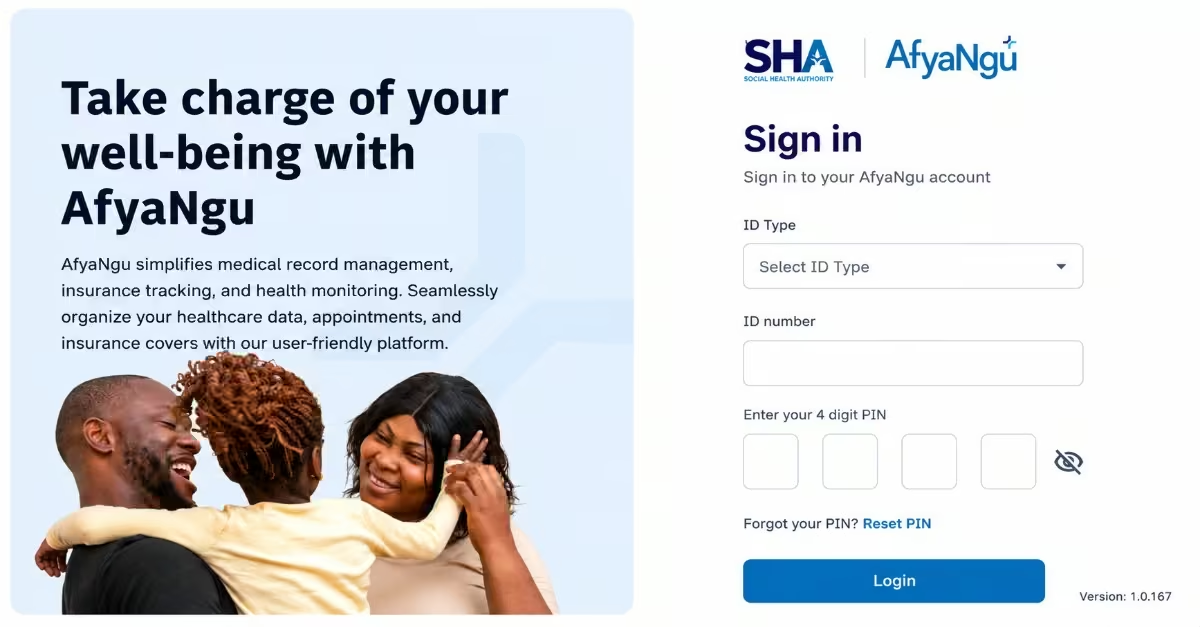
- Visit the official SHA website
- Log in using your National ID number and password.
- If you haven’t created an account yet, click “Register” and complete the sign-up process using your National ID number and phone number.
Step 2 — Go to My Profile
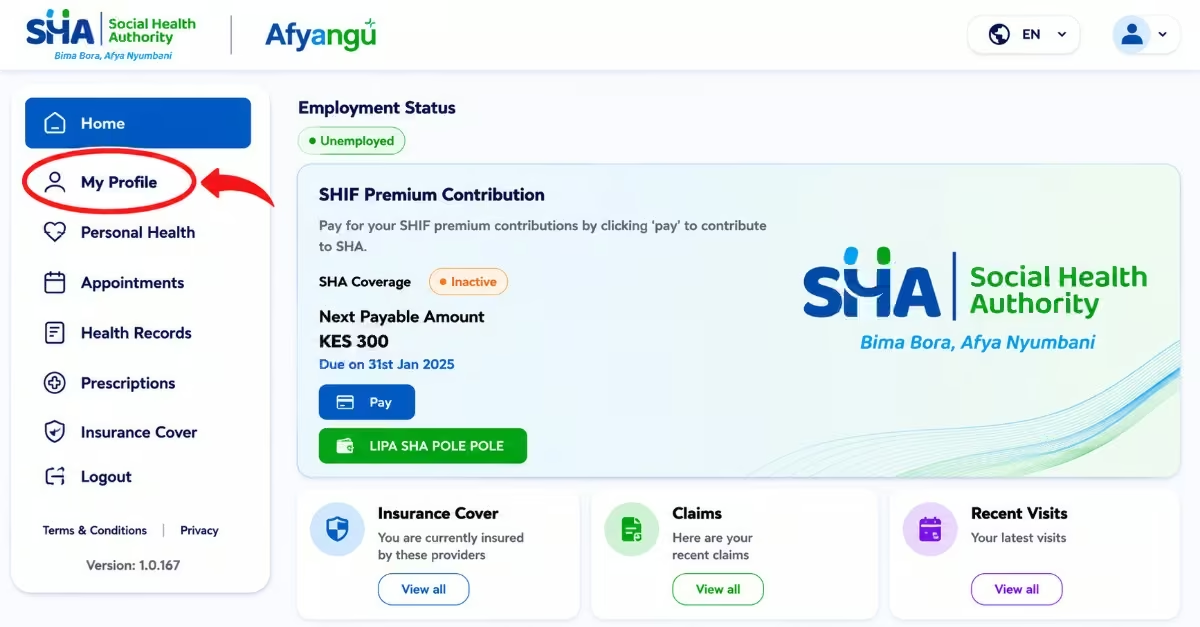
- Once logged in, locate the menu on your dashboard.
- Click on “My Profile“, then select “Dependants“ from the options provided.
Step 3 — Add a Dependant
- Click the “Add Dependant“ button.
- Select the type of dependant you want to add: Spouse, Biological Child, Adopted Child, or Child Under Guardianship.
Step 4 — Enter Details and Upload Documents
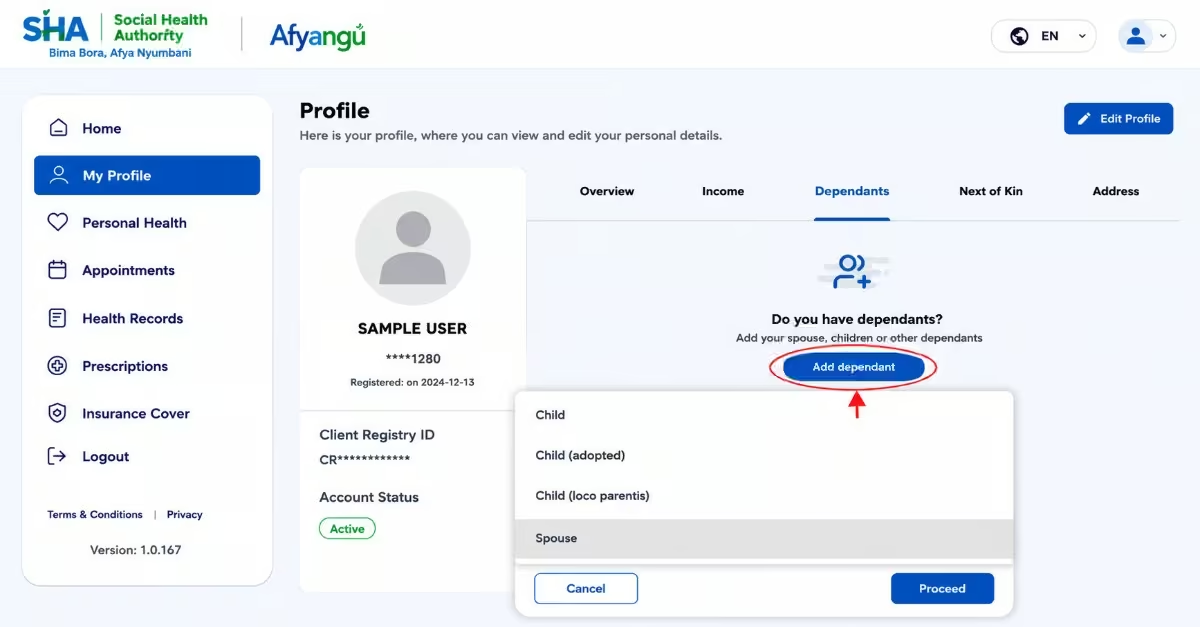
Provide the required information and documents based on the dependant type:
- Spouse — Upload proof of marriage (marriage certificate, affidavit, or letter from the chief) and spouse’s National ID. Your spouse must already have their own SHA account registered before you can add them.
- Child (Under 18) — Enter the birth certificate number or birth notification reference number.
- Child (18 and above) — Enter their National ID number.
- Child (Aged 21–25) — Provide proof of active school/college enrolment.
- Child (Over 25 with Disability) — Provide their National ID and a Certificate of Registration from the National Council for Persons with Disabilities (NCPD).
- Adopted Child — Upload the court adoption order. Age-related document rules above apply.
- Child Under Guardianship — Upload the court guardianship order, will, or deed as recognized under the Children’s Act.
Step 5 — Consent Verification (Spouse Only)
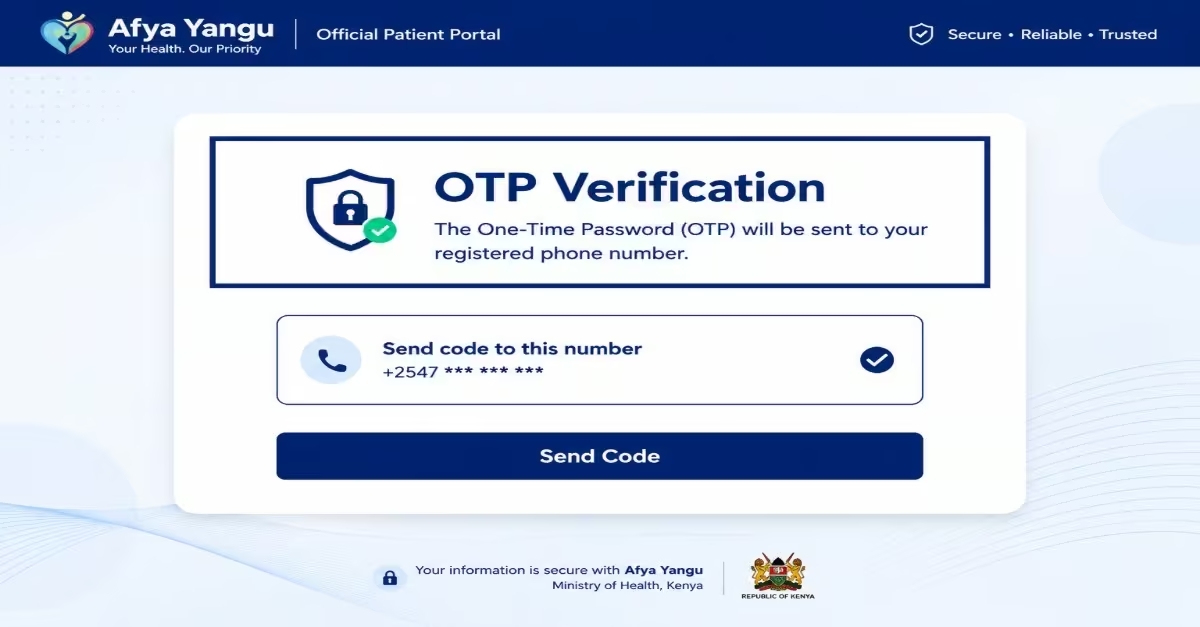
- Enter your spouse’s phone number when prompted.
- An OTP (One-Time Password) will be sent to your spouse’s phone for their consent and verification.
- Your spouse must enter this OTP to confirm they consent to being added as your dependant.
Step 6 — Review and Submit
- Double-check all the information and uploaded documents for accuracy.
- Click “Save“ to submit your dependant’s details for review.
Step 7 — Await Verification
- SHA will review and verify the submitted information.
- You will receive a notification via SMS or email once your dependant has been successfully added and verified.
- Once approved, your dependant will be covered under your SHA membership.
How to Remove a Dependant on SHA Kenya (Step-by-Step)
Keeping your dependants’ information updated under the Kenya Social Health Authority system is important to avoid complications when accessing healthcare services. For instance, when a child has exceeded the eligible age limit, a spouse is no longer under your cover, or you need to correct your family details. The following is the procedure to follow when removing dependants from your SHA account, as per Jason (2025)
Step 1: Log In to the SHA Portal
- Visit the official SHA website
- Log in using your National ID number and password.
Step 2: Go to My Profile
- Once logged in, locate the menu on your dashboard.
- Click on “My Profile”, then select “Dependants” to view your current dependant list.
Step 3: Select the Dependant to Remove
- Locate the dependent you wish to remove from the list.
- Click on their name, then select “Remove Dependant.”
Step 4: Upload the Required Supporting Documents
SHA requires proof before any removal is processed. Upload the relevant document based on your situation:
- Divorce — Upload a valid decree of divorce.
- Death of a dependant — Upload a death certificate.
- Change in guardianship or adoption status — Upload the relevant court order or legal document.
Step 5: Submit Your Request
- Review all the information and the uploaded documents carefully.
- Click “Submit“ to send your removal request for processing by SHA.
Step 6: Await Confirmation
- SHA will review your request and supporting documents.
- You will receive a notification via SMS or email once the removal has been processed and confirmed.
Common Reasons SHA Rejects Dependants
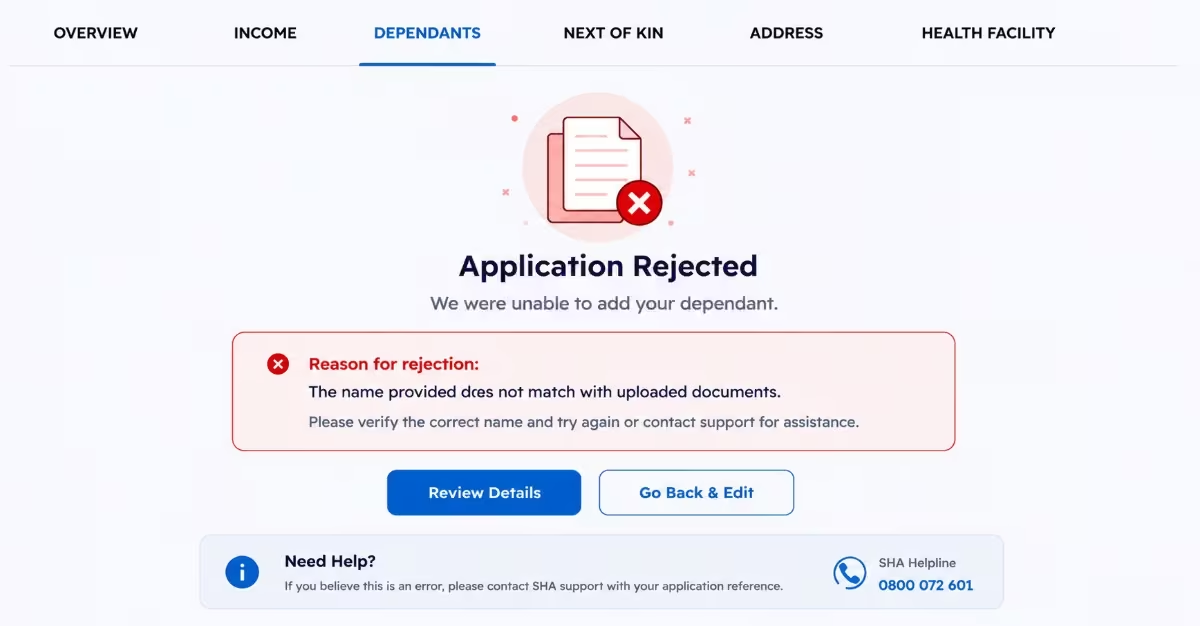
Many SHA members successfully submit dependant applications only to find out later that the request has been rejected or placed under review. In most cases, these rejections happen because of incorrect information, missing documents, or verification problems during the registration process. A study done by the HowKe Team points out the following reasons why your dependants were rejected.
a) Incorrect Documents
Submitting unclear, expired, or incorrect documents is one of the main reasons applications are rejected. For example, uploading the wrong birth certificate, incorrect identification documents, or unsupported file formats may prevent SHA from verifying the dependant’s identity and relationship with the principal member.
b) Name Mismatch
The names entered on the SHA portal must match exactly with the names appearing on official documents such as National IDs, birth certificates, or passports. Even small spelling mistakes, missing middle names, or differences in surname arrangement can cause verification errors and lead to rejection.
c) Incomplete Details
Many applications are rejected because some important information is left out during registration. This may include incomplete dates of birth, missing ID numbers, blank required sections, or incorrect contact details. SHA requires all mandatory information to be filled in correctly before an application can be approved.
d) No Proof of Dependency (For Parents)
When adding parents or other extended family members, SHA may request proof showing that the person genuinely depends on the principal member. If proper supporting documents or verification details are not provided, the application may be rejected during the review process.
How to Fix Rejected SHA Dependants
If SHA rejects your dependant application, the problem can usually be corrected, and the application can be resubmitted successfully. Most rejection cases happen because of verification issues, incorrect documents, or incomplete information. Use the methods below to solve the problem.
- Re-upload Correct Documents – Carefully check the rejection reason provided by SHA and upload the correct supporting documents. Make sure all files are clear, readable, and valid before submitting again. Blurry images, cropped documents, expired identification cards, or missing pages can cause the application to be rejected again during verification.
- Ensure Names Match Official Records – Confirm that the names entered on the SHA portal match exactly with the names appearing on official documents such as National IDs, birth certificates, passports, or marriage certificates. Even small spelling mistakes, missing middle names, or differences in name arrangement can result in verification failures.
- Visit the Huduma Center for Assistance – If the issue continues, or the SHA portal does not allow you to make corrections, visit a Huduma Center or an authorized SHA support office for assistance. The officials can help verify your documents, guide you through the correction process, and assist you in updating or resubmitting your dependent information successfully.
FAQs About Adding Dependants on SHA
Can I Register My Parents As Dependants Under the SHA in Kenya?
Yes. Parents may be added as dependants if they rely on you financially and satisfy SHA’s verification and eligibility conditions.
How do I Add Dependants on SHA Using USSD?
You can use the SHA USSD service by dialing *147#, choosing the option for updating member details, and following the instructions provided on the screen.
Which Documents Are Needed When Adding Dependants to the SHA?
Commonly required documents include marriage certificates for spouses, birth certificates for children, national ID cards, and supporting dependency documents when registering parents.
What Causes SHA-Dependant Applications to be Rejected?
Applications are usually rejected because of inaccurate documents, inconsistencies in personal details, incomplete information, or a lack of proper dependency evidence.
How Long Does SHA Take to Approve Dependants?
Dependant approval may take anywhere from 1 to 7 working days, although some applications can take longer if additional verification is required.
Read Also: How to Check HELB Loan Balance, Pay Your Loan & Get HELB Compliance Certificate (Step-by-Step)
Conclusion
Adding dependants to your SHA account is an important step in ensuring your spouse, children, or other eligible family members can continue accessing healthcare services without interruptions. This process can be easily done by following the processes above to add or remove a dependant from your SHA account. By understanding the eligibility requirements and preparing the correct documents, you can easily avoid common errors that often lead to delays or rejection. If challenges arise, you can try to correct the mistakes early, and seeking assistance from Huduma Centers or SHA support offices can help resolve the issue quickly.