
Let’s talk about trading using Safaricom’s Ziidi Trader. Mobile technology is rapidly changing the way people invest, and mobile-based stock trading is becoming an important part of modern finance.
In the past, investing in the stock market required opening brokerage accounts, filling out many forms, and learning how to use complicated trading platforms. These steps often discouraged many people from participating. Today, smartphones and digital financial tools allow individuals to buy and sell shares directly from their mobile phones, making investing much easier and more convenient. Many investors can now purchase shares listed on the Nairobi Securities Exchange using M-Pesa through the Ziidi Trader feature. Ziidi Trader by Safaricom is a mobile-based platform created to make stock trading easier. Through Ziidi Trader, users can connect directly to the Nairobi Securities Exchange and buy or sell shares via M-Pesa, reducing many of the traditional challenges associated with brokerage services. This allows more people to participate in the stock market without depending entirely on traditional banks and brokerage firms. This promotes financial inclusion by giving more individuals the opportunity to invest and grow their wealth through the stock market.
Understanding Nairobi Securities Exchange
The Nairobi Securities Exchange (NSE) is Kenya’s main stock market where investors buy and sell financial securities. It plays an important role in the country’s financial system by connecting businesses that need capital with investors seeking opportunities to grow their wealth. Companies list their shares on the exchange to raise funds for expansion, innovation, or to support their daily operations. In return, investors who purchase these shares become shareholders, meaning they own a small part of the company.
Types of Securities Traded on the NSE
- Ordinary shares – They are units of ownership in a company that give investors a portion of ownership in the business.
- Preference shares – A type of share that carries both equity and debt elements of a security. They usually pay fixed dividends to investors, which are paid before ordinary shareholders and may have priority if the company distributes profits.
- Government bonds – they are debt instruments issued by the Government of Kenya to raise funds for public projects and national development. Investors who buy these bonds receive interest payments at regular intervals over a specified period.
- Corporate bonds – They are debt securities issued by companies to raise capital for business activities such as expansion or investment. Investors who purchase these bonds lend money to the company and receive interest payments at an agreed rate.
Read Also: How to Open a CDS Account and Start Buying Shares in Kenya Step by Step
What Is Ziidi Trader by Safaricom?
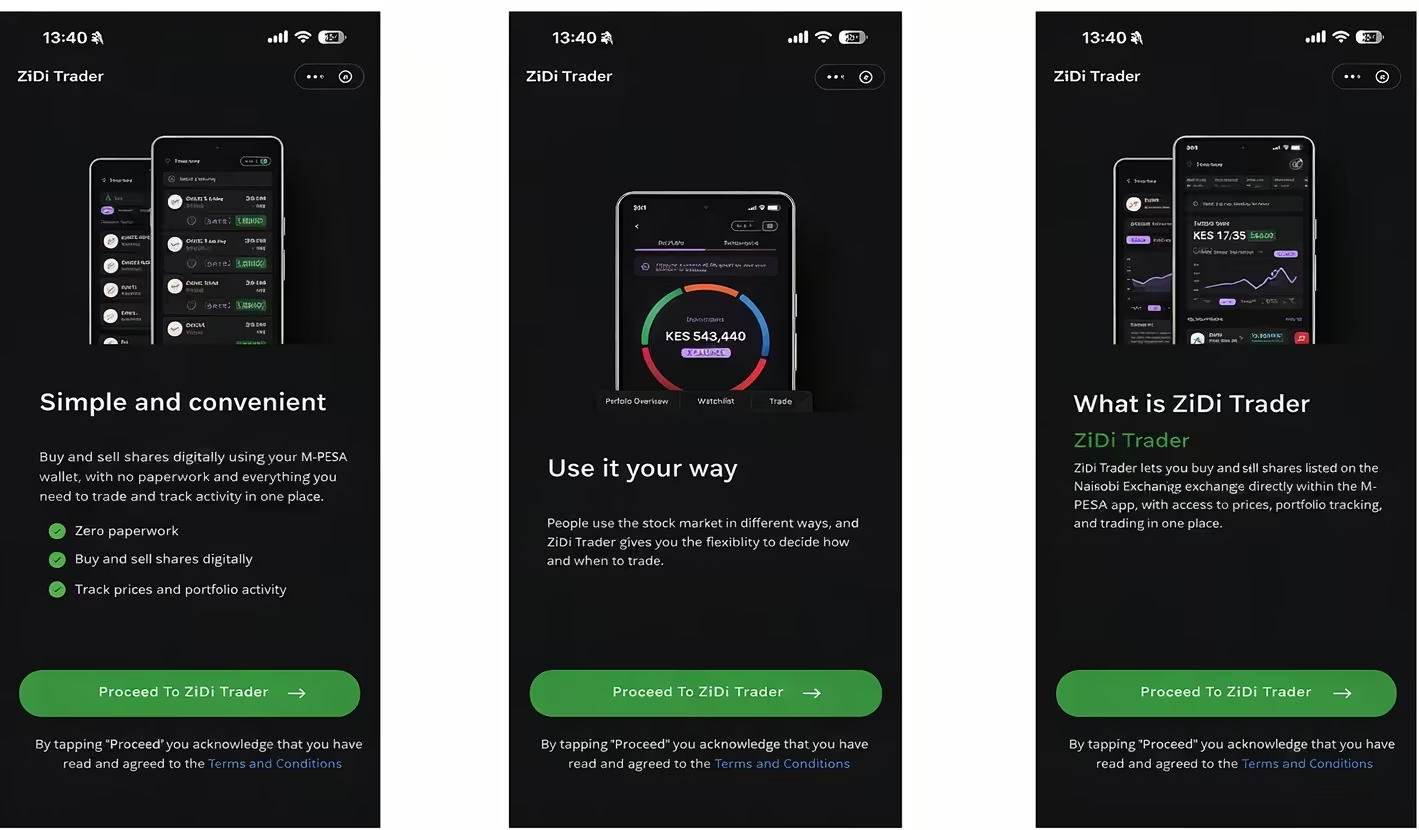
A study by Mzalendo (2025) highlights that Ziidi Trader is a fully digital, mobile-first stock trading platform integrated directly within the M-Pesa app under the Financial Services section. The platform is part of the wealth management services introduced by Safaricom PLC to make investing easier for everyday users. The platform is designed to make stock market investing simpler by linking traditional share trading with M-Pesa. This means investors can fund their trading accounts and complete transactions using mobile money. By combining mobile payments with stock market access, Ziidi Trader helps remove many of the challenges that previously made stock investing difficult for ordinary retail investors and supports the growth of mobile stock trading in Kenya.
Through Ziidi Trader, users of M-Pesa can:
- Browse companies listed on the Nairobi Securities Exchange and explore different investment opportunities.
- Place orders to purchase stocks directly through the platform without needing a traditional trading setup.
- Sell the shares you own whenever you want to take profits or adjust your investment portfolio.
- Monitor stock price movements to make better, more informed trading decisions.
- Monitor your investment portfolio by viewing the current value and performance of the shares you hold in one place.
- Deposit money quickly from your M-Pesa wallet to start investing.
- Access market updates and information
Requirements Before You Start Trading on the Ziidi Trader Platform
Before you can begin buying or selling shares through Ziidi Trader, there are several important requirements you must meet. These requirements help ensure that investors are properly registered, financially ready, and compliant with the regulations that govern trading on the Nairobi Securities Exchange. The following are the requirements.
a. A Registered M-Pesa Account
Since deposits and withdrawals are processed through M-Pesa, you must have an active and registered mobile money account that is linked to your phone number.
b. Identity Verification (KYC Compliance)
Users must complete identity verification as part of financial regulations. This process usually involves providing personal identification details to confirm your identity and help prevent fraud or illegal financial activities.
c. Meeting Minimum Funding Requirements
Before purchasing shares, you need to deposit enough funds from your M-Pesa wallet into your trading account. The amount required will depend on the price of the shares you plan to buy.
d. A Linked Trading Account
To access the stock market, your Ziidi Trader account must be connected to a valid trading account that allows you to place orders on the Nairobi Securities Exchange.
e. Access to the Ziidi Trader Platform
You must have access to the Ziidi Trader via your smartphone or another supported digital channel to browse stocks, monitor prices, and place trades.
How Ziidi Trader Works
Once you have complied with the above requirements, you are almost ready to start trading using Ziidi Trader. The following steps are followed until you acquire ownership of securities.
Activating Ziidi Trader Account
The process involves registering for the service and completing identity verification so that you can access shares listed on the Nairobi Securities Exchange and begin trading directly through your mobile money account. Here is a clear, step-by-step explanation of how to activate your Ziidi Trader account inside the M-Pesa app as per Elijah (2026)
- Open the M-Pesa app – Launch the app on your smartphone and log in using your Safaricom number and M-Pesa PIN.
- Scroll to Financial Services – Navigate through the app menu until you find the Financial Services section, where investment and wealth-management tools are located.
- Tap Ziidi Trader – Select Ziidi Trader from the list of available financial services inside the app.
- Read and Accept the Terms and Conditions – Review the platform’s terms, risk disclosures, and service agreement before proceeding.
- Complete the one-time verification process – Follow the prompts to verify your identity and confirm the basic information required for regulatory compliance and account setup.
- Confirm with your M-Pesa PIN – Enter your M-Pesa PIN to finalize the activation and gain access to stock trading features connected to the Nairobi Securities Exchange.
Read Also: Shares Investment in Kenya: Everything You Need to Know
How to Buy Shares in the Ziidi Trader Account
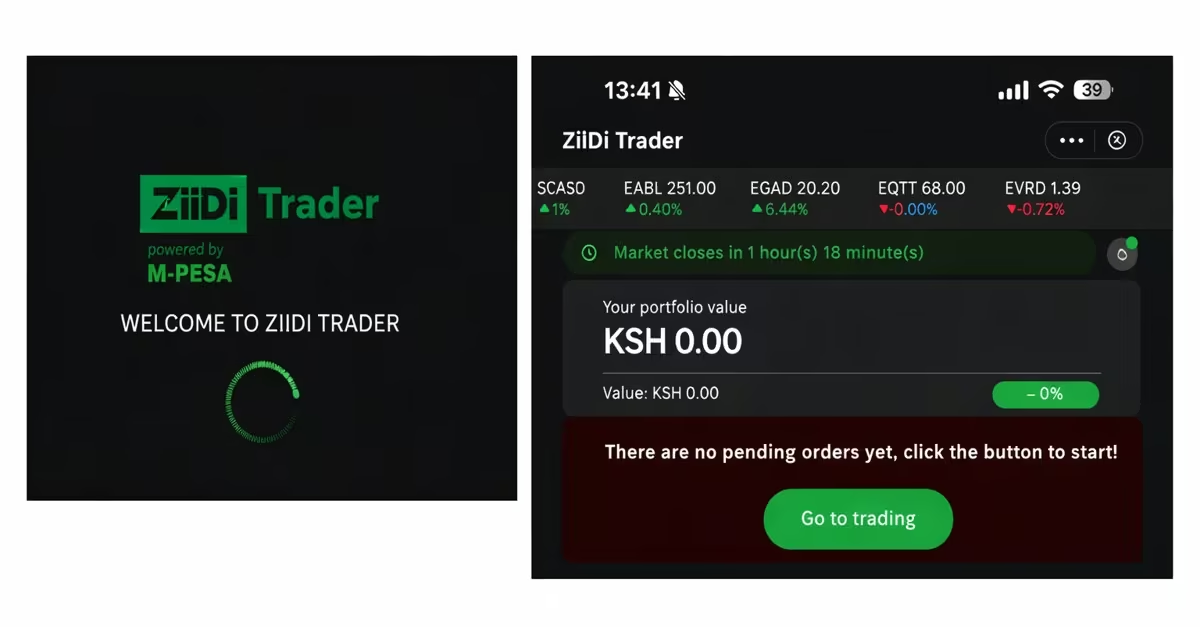
In the Ziidi trade mini app, follow the steps below to place an order as per the Kenya MMF Calculator.
- Tap Trade
Inside the Ziidi min app, go to the financial services section, where investment services are available. From there, tap Ziidi Trader to access the trading dashboard.
- Choose the Stock You Want to Trade
You will see a list of companies listed on the Nairobi Securities Exchange. The platform also shows the current market prices and daily performance indicators for each company. Tap the company whose shares you want to buy or sell.
- Select Buy
After opening the stock page, choose the type of transaction you want to make. In this case, we are buying shares, so Tap Buy.
- Choose Your Pricing Option
Ziidi Trader supports two pricing options, “Best price and Own price.” When placing an order on Ziidi Trader, you will be asked to choose how your price will be set. If you select “Best Price,” the system will execute your order at the lowest available asking price on the Nairobi Securities Exchange. This option is usually faster because it matches your order with the best available seller immediately, but you do not have control over the exact price at which the shares are purchased.
If you choose “Own Price,” you can set the maximum amount you are willing to pay for the shares. In this case, your order will only be completed if a seller agrees to trade at that price. This option gives you more control over the purchase price, but the trade may take longer to execute if there is no matching seller at that price.
- Enter the Number of Shares
Next, enter the number of shares you want to trade. You may also need to specify the price if the platform allows limit orders, or you can accept the current market price. The app will automatically calculate the total transaction cost, including the value of the shares, brokerage fees, and any required statutory charges.
- Confirm the Order Details
Before submitting the order, carefully review all the details provided on the screen. This includes the company name, number of shares, price per share, and the total amount you will pay or receive. This step helps ensure that all the information is correct before the transaction is processed.
- Confirming with M-Pesa PIN
The system will prompt you to authorize payment from your M-Pesa wallet. Once you confirm the payment, the order is submitted to the Nairobi Securities Exchange for processing.
After you place a buy order through Ziidi Trader, the purchase amount is immediately reserved from your M-Pesa balance. The NSE market operates Monday to Friday between 9.30 AM and 3.00 PM. Your order submitted to the Nairobi Securities Exchange with a “Good Till Day” instruction remains valid only until 3:00 PM on the same trading day. If a seller agrees to your price during that time, the trade is executed, you receive a confirmation notification, and the purchased shares appear in your investment portfolio.
If no seller matches your order before the market closes, the order automatically expires, and the reserved funds are returned to your M-Pesa account. In some situations, the order may also be partially fulfilled. For example, if you requested to buy 200 shares but only 150 shares were available at your selected price, the system will complete the purchase for the 50 shares, while the remaining portion of the order may expire or wait for another matching offer before the trading session ends.
How to Sell Shares in the Ziidi Trader
- Go to the Trade Section
Open Ziidi Trader inside the M-Pesa app and navigate to the Trade section, where your available stocks and trading options are displayed.
- Go to “My Portfolio”
In the dashboard, open the My Portfolio section. Here you will see all the shares you currently own on the Nairobi Securities Exchange, including the company name, the number of shares you hold, and the current market price.
- Select the Shares You Want to Sell and Tap the Sell Button
From your portfolio, choose the shares you currently own that you want to sell. These are shares listed on the Nairobi Securities Exchange.Upon choosing theshares you want to trade, tap the Sell option to start the selling process.
- Enter Price and Quantity
After choosing the shares you will sell on your portfolio, specify the number of shares you want to sell and the price at which you want to sell them.
- Review the Order Summary and Submit the Sell Order
Check the order summary carefully to confirm the share price, quantity, and the transaction total before proceeding.After that, tap Sell Shares to finally Sell Shares again to submit your order to the market.
- Confirm with Your M-Pesa PIN
Complete the transaction by entering your M-Pesa PIN. Once confirmed, your sell order is sent to the Nairobi Securities Exchange for matching with buyers.
Can You Lose Money Trading NSE Shares on Ziidi Trader?
Investing through Ziidi Trader exposes investors to the normal risks of the stock market, as share prices on the Nairobi Securities Exchange fluctuate regularly. Although the platform makes it easier for people to buy and sell shares using M-Pesa, it does not eliminate investment risk. The value of your shares can go up or down depending on the following circumstances.
a. Company Earnings
A company’s financial performance has a strong influence on its share price. When a company reports strong profits, investors usually become more confident, which increases demand for its shares. However, if the company reports weak earnings or declining profits, investor confidence may fall, and the share price may drop. Investors who sell their shares during such periods may experience losses.
b. Market Demand
Share prices are also affected by the balance between buyers and sellers in the market. When many investors want to buy a particular stock, the price usually increases. On the other hand, when more investors sell than buy, the price tends to fall. If you decide to sell your shares when demand is low, you may receive less money than the amount you originally invested.
c. Economic Conditions
Wider economic factors such as inflation, interest rates, and the overall performance of the economy can affect stock prices. During periods of economic slowdown or uncertainty, investors may become cautious and reduce their investments in shares. This can lead to falling prices on the Nairobi Securities Exchange and lower the value of shares held through Ziidi Trader.
d. Investor Sentiment
Public opinion and market psychology can also influence stock prices. Positive news about a company or the economy can increase investor confidence and push share prices higher. However, negative news, rumors, or uncertainty can quickly reduce confidence and cause prices to drop. These emotional reactions in the market can sometimes lead to unexpected gains or losses.
e. Corporate Actions
Corporate events such as dividend announcements, rights issues, stock splits, or mergers can affect a company’s share price. Some of these actions may increase the attractiveness or value of the shares, while others may reduce their value or dilute ownership. Investors who do not fully understand these corporate actions may make decisions that could lead to financial losses.
Risks Investors Should Understand While Trading in Ziidi Trader

As you use the Ziidi Trader to buy and sell securities at the NSE, you should be aware that financial markets carry several risks that can affect the value of your investments. Understanding these risks helps investors make informed choices and avoid mistakes that could lead to losses. The following are the major risks you are exposed to.
a. Market Volatility
Market volatility refers to rapid, often unpredictable changes in share prices. These fluctuations can cause the value of your investment to rise or fall quickly, sometimes within hours or even minutes.
b. Execution Risk
Execution risk occurs when a buy or sell order is not executed at the price you expected because market conditions change before it is matched. This can lead to paying more when buying a security or receiving less when selling than you planned.
c. Behavioral Overtrading
Behavioral overtrading occurs when investors buy and sell shares too frequently, driven by emotions such as fear, excitement, and impatience. This often leads to unnecessary losses and higher transaction costs.
d. Concentration Risk
Concentration risk arises when an investor invests too much in a single company or sector. If that investment performs poorly, it can result in significant losses.
e. Lack of Diversification
Lack of diversification means investing in too few assets or industries. This reduces protection against market swings and increases the overall risk of losing money on your portfolio.
Common Reasons Ziidi Trader May Fail to Work
Occasionally, users may experience issues with Ziidi Trader, including failed trades and error messages. Normal technical or market-related factors usually cause these problems. The following are the common reasons why the application may fail to work.
a. Outside Market Hours
Ziidi Trader cannot execute trades when the Nairobi Securities Exchange is closed. Trading is only possible Monday to Friday, from 9:30 AM to 3:00 PM, as per Techweez (2026). So if you try to execute a trade outside these hours, the Ziidi Trader will fail to work.
b. Verification Still Pending
If your identity verification is incomplete or your submitted details do not match official ID records, the system may block trading until the issue is resolved. You need to complete the verification process before you can place any trades.
c. App Needs an Update
Using an outdated version of the M-Pesa app can cause Ziidi Trader to malfunction or fail to load correctly. You are advised to update the app to the latest version to resolve these issues.
d. Network Issues
Slow or unstable internet connections can cause delays, failed requests, or timeouts when placing trades. For smooth trading, a reliable connection is needed.
e. No Matching Orders
Even when your trade is valid, it may not execute immediately if there are no buyers or sellers at your chosen price. This is especially common during periods of low market liquidity, where fewer participants are actively trading a particular stock.
Conclusion
You can easily buy and sell shares using a smartphone using the Ziidi Trader min application. By connecting M-Pesa with stock trading, Safaricom PLC has made it easier for everyday investors to access the Nairobi Securities Exchange. To start trading with Ziidi Trader, activate your account by navigating to Ziidi Trader in your M-Pesa application, read the terms and conditions, verify your identity, and confirm your PIN. After activation, you can comfortably buy or sell securities using the procedures described above. While buying and selling securities, you must understand the risks you are exposed to, which include unexpected rapid changes in market prices, execution risks, lack of diversification, and behavioral trading. In some circumstances, your Ziidi Trader min app may not be working. This can be due to using an outdated version of the Mpesa app, trying to execute a trade outside the trading hours, verification pending, or network issues. Register for Ziidi Trader and trade securities from the comfort of your phone.