
Public Wi-Fi has become an indispensable part of our daily lives, providing convenient internet access in cafes, airports, hotels, and other public spaces. As the demand for connectivity grows, so does the need for secure and reliable public Wi-Fi networks. However, with the increasing prevalence of cyber threats, the question of how secure public Wi-Fi really is has become more critical than ever. This article, the future of public wi-fi, explores the current state of public Wi-Fi security, the risks involved, emerging technologies aimed at improving security, and what the future holds for public Wi-Fi.
Understanding the Risks of Public Wi-Fi
The Popularity and Pervasiveness of Public Wi-Fi
Public Wi-Fi networks are everywhere, providing an easy way for people to stay connected on the go. Whether you’re working remotely from a coffee shop, streaming a movie at the airport, or checking emails in a hotel lobby, public Wi-Fi makes it all possible. According to a Cisco report, the number of public Wi-Fi hotspots worldwide is expected to reach 628 million by 2023, highlighting the growing reliance on these networks.
Despite its convenience, public Wi-Fi comes with significant security risks. Many users assume that because a network is available, it is safe to use. However, this is not always the case. Public Wi-Fi networks are often unsecured, making them prime targets for cybercriminals looking to steal personal information, intercept communications, or launch malware attacks.
Common Threats on Public Wi-Fi Networks
- Man-in-the-Middle (MITM) Attacks: One of the most common threats on public Wi-Fi is the Man-in-the-Middle attack. In this type of attack, a cybercriminal intercepts the communication between your device and the Wi-Fi network. They can then eavesdrop on your activities, steal your login credentials, or inject malicious content into the data stream.
- Rogue Hotspots: Rogue hotspots are fake Wi-Fi networks set up by cybercriminals to mimic legitimate public Wi-Fi networks. Unsuspecting users connect to these networks, unknowingly giving hackers access to their personal information.
- Evil Twin Attacks: Similar to rogue hotspots, evil twin attacks involve creating a duplicate of a legitimate Wi-Fi network. Once connected, users are vulnerable to various types of cyberattacks, including data theft and malware installation.
- Packet Sniffing: Cybercriminals can use packet sniffing tools to capture and analyze the data being transmitted over a public Wi-Fi network. This can include sensitive information such as passwords, credit card numbers, and personal communications.
- Malware Distribution: Public Wi-Fi networks are often used to distribute malware. A compromised network can deliver malicious software to connected devices, leading to data theft, device damage, or unauthorized access.

Emerging Technologies for Securing Public Wi-Fi
WPA3: The Next Generation of Wi-Fi Security
Wi-Fi Protected Access 3 (WPA3) is the latest version of the Wi-Fi security protocol, designed to address the vulnerabilities of its predecessor, WPA2. WPA3 offers several enhancements aimed at improving the security of public Wi-Fi networks:
- Stronger Encryption: WPA3 uses 192-bit encryption in enterprise mode and 128-bit encryption in personal mode, making it significantly harder for attackers to crack passwords or decrypt data.
- Individualized Data Encryption: Unlike WPA2, which uses the same encryption key for all devices on a network, WPA3 provides individualized encryption for each device. This means that even if one device is compromised, the security of other devices on the network remains intact.
- Improved Authentication: WPA3 introduces a new authentication protocol called Simultaneous Authentication of Equals (SAE), which replaces the Pre-Shared Key (PSK) used in WPA2. SAE is more resistant to offline dictionary attacks, where hackers try to guess passwords by systematically checking all possible options.
- Forward Secrecy: WPA3 includes forward secrecy, which ensures that even if an attacker gains access to a network’s encryption keys in the future, they cannot decrypt past communications.
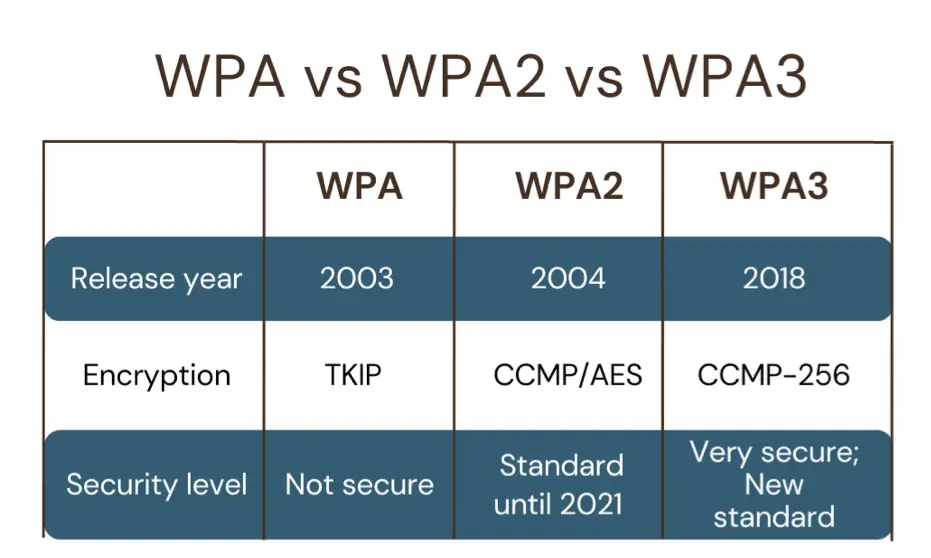
WPA3 is a significant improvement over WPA2, and its adoption is crucial for enhancing the security of public Wi-Fi networks. However, the rollout of WPA3 has been slow, and many public Wi-Fi networks still rely on the older WPA2 protocol. To fully benefit from WPA3, both Wi-Fi access points and client devices need to support the protocol. For more information on WPA3, you can visit the Wi-Fi Alliance website.
Hotspot 2.0: Seamless and Secure Connectivity
Hotspot 2.0, also known as Passpoint, is a technology standard developed by the Wi-Fi Alliance that aims to make public Wi-Fi more secure and user-friendly. Hotspot 2.0 allows devices to automatically connect to secure Wi-Fi networks without the need for manual login or authentication. This is particularly useful in environments like airports, hotels, and conference centers, where users frequently move between different Wi-Fi networks.
Key features of Hotspot 2.0 include:
- Automatic Network Discovery and Connection: Devices that support Hotspot 2.0 can automatically discover and connect to trusted Wi-Fi networks without user intervention. This eliminates the need for users to manually search for and connect to Wi-Fi networks, reducing the risk of connecting to rogue hotspots.
- Enhanced Security: Hotspot 2.0 uses WPA2-Enterprise or WPA3-Enterprise encryption, providing a higher level of security than typical public Wi-Fi networks. It also supports mutual authentication between the client device and the network, ensuring that both parties are who they claim to be.
- Seamless Roaming: Hotspot 2.0 enables seamless roaming between different Wi-Fi networks, similar to how mobile devices roam between cellular networks. This is particularly beneficial for users who need consistent connectivity as they move between different locations.
Hotspot 2.0 is gradually being adopted by public Wi-Fi providers, offering a more secure and convenient way for users to stay connected. For a deeper understanding of Hotspot 2.0, you can read more on the Wi-Fi Alliance Hotspot 2.0 page.
Virtual Private Networks (VPNs): A Layer of Protection
While WPA3 and Hotspot 2.0 provide enhanced security at the network level, users can further protect themselves by using Virtual Private Networks (VPNs) when connecting to public Wi-Fi. A VPN encrypts the internet traffic between your device and the VPN server, making it much more difficult for hackers to intercept or decipher your data.
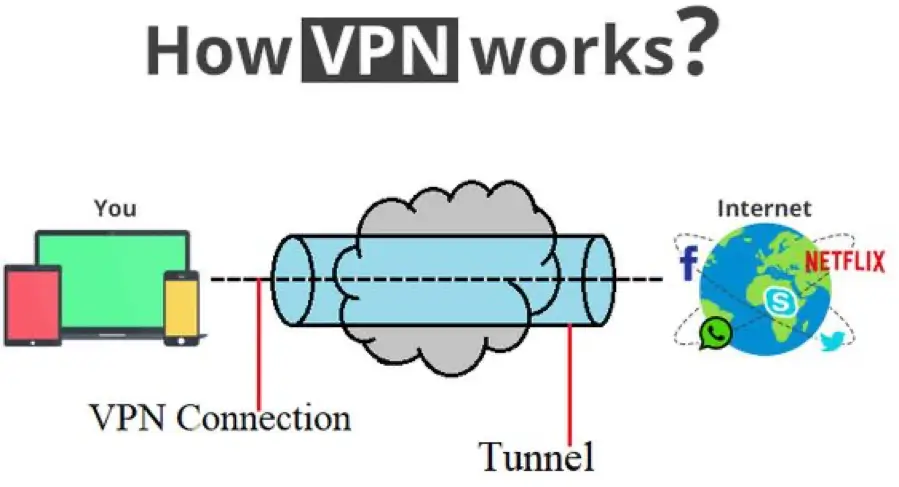
Benefits of using a VPN on public Wi-Fi include:
- Encryption: VPNs encrypt all data transmitted between your device and the internet, protecting your sensitive information from prying eyes.
- Anonymity: By masking your IP address, a VPN can help you browse the web anonymously, making it harder for third parties to track your online activities.
- Bypassing Geo-Restrictions: VPNs can also allow you to bypass geo-restrictions and access content that may be blocked in certain regions.
However, it’s important to choose a reputable VPN provider, as not all VPNs offer the same level of security and privacy. Free VPNs, in particular, may log your data or display intrusive ads. For more information on how to choose a VPN, you can refer to this guide by the Electronic Frontier Foundation (EFF).
The Future of Public Wi-Fi: What to Expect
The Role of 5G and Private Networks
As 5G networks continue to roll out globally, they are expected to have a significant impact on the future of public Wi-Fi. 5G offers faster speeds, lower latency, and more reliable connections compared to current Wi-Fi standards. This raises the question: will 5G replace public Wi-Fi, or will the two technologies coexist?
While 5G has the potential to reduce reliance on public Wi-Fi, particularly in densely populated areas, Wi-Fi will still play a crucial role in providing connectivity in indoor environments, rural areas, and places where cellular coverage is limited. Additionally, the cost of data plans for 5G may make Wi-Fi a more economical option for users with high data usage.
Moreover, the concept of private networks is gaining traction, particularly in business and industrial settings. Private networks are dedicated networks that use either Wi-Fi or cellular technology to provide secure and reliable connectivity for specific organizations or locations. These networks offer greater control over security, performance, and data management compared to public Wi-Fi.

The coexistence of 5G, private networks, and public Wi-Fi will likely create a more diverse and flexible connectivity landscape. Users will have the option to choose the best network based on their specific needs, whether it’s speed, security, or cost. For more insights on the relationship between 5G and Wi-Fi, check out this article from Qualcomm.
Mesh Networks and Wi-Fi 6/6E
Mesh networks are another technological advancement that promises to improve the future of public Wi-Fi. A mesh network consists of multiple Wi-Fi nodes that work together to provide seamless and consistent coverage across a large area. Unlike traditional Wi-Fi networks, which rely on a single router, mesh networks allow devices to connect to the nearest node, reducing dead zones and improving overall performance.
Wi-Fi 6 and Wi-Fi 6E, the latest Wi-Fi standards, are also set to play a significant role in the future of public Wi-Fi. Wi-Fi 6 offers faster speeds, better performance in congested areas, and improved energy efficiency for connected devices. Wi-Fi 6E extends these benefits to the 6 GHz band, providing even more channels for high-speed, low-latency connections.
The combination of mesh networks and Wi-Fi 6/6E will enable public Wi-Fi to handle more users, support more devices, and deliver better performance in crowded environments. This is particularly important as the number of connected devices continues to grow, driven by the proliferation of IoT devices and smart technologies. For a comprehensive overview of Wi-Fi 6 and its benefits, you can visit Cisco’s Wi-Fi 6 page.
Public Wi-Fi and the Internet of Things (IoT)
As the Internet of Things (IoT) expands, the role of public Wi-Fi in connecting smart devices will become increasingly important. IoT devices, such as smart sensors, cameras, and wearables, often rely on Wi-Fi for connectivity. However, these devices also introduce new security challenges, as they can be targeted by hackers to gain access to the broader network.
To address these challenges, public Wi-Fi networks will need to implement stronger security measures, such as network segmentation, which isolates IoT devices from other devices on the network. Additionally, the adoption of WPA3 and other advanced security protocols will be essential in protecting IoT devices from cyber threats.
In the future, public Wi-Fi networks may also incorporate AI and machine learning technologies to detect and respond to security threats in real-time. These technologies can analyze network traffic patterns, identify anomalies, and automatically take action to mitigate potential risks. For more information on IoT security challenges and solutions, you can read this white paper by McKinsey & Company.

Conclusion: Navigating the Future of Public Wi-Fi Security
The future of public Wi-Fi is one of both promise and challenge. As new technologies like WPA3, Hotspot 2.0, and Wi-Fi 6/6E emerge, public Wi-Fi networks will become more secure, reliable, and capable of supporting the growing demand for connectivity. However, the evolving threat landscape means that users must remain vigilant and adopt best practices, such as using VPNs and avoiding risky behavior on public networks.
As we move forward, the coexistence of public Wi-Fi, 5G, and private networks will offer more options for staying connected, while advancements in security protocols will help protect users from cyber threats. By understanding the risks and leveraging the latest technologies, we can enjoy the benefits of public Wi-Fi without compromising our security.

For additional resources on public Wi-Fi security and the latest developments in Wi-Fi technology, you can explore the following links:
- Wi-Fi Alliance – Discover Wi-Fi: https://www.wi-fi.org/discover-wi-fi
- Cisco – Wi-Fi 6 Solutions: https://www.cisco.com/c/en/us/solutions/enterprise-networks/802-11ax-solution.html
- EFF – How to Pick a VPN: https://www.eff.org/deeplinks/2020/09/how-pick-vpn-thats-right-you