
If you are a continuing student who has previously received a HELB loan, the portal is open for subsequent applications. You are required to submit a subsequent loan application for the 2026/2027 academic year to continue benefiting from this support.
Unlike first-time applications, the HELB subsequent loan application process is generally quicker and more convenient because your personal and academic details are already stored in the HELB system.
In this article, I will guide you on:
- How to apply for a HELB subsequent loan for the 2026/2027 academic year
- Who is eligible to apply for the subsequent loan application
- The requirements for the application of HELB subsequent loan.
- Mistakes to avoid during the application
What is a HELB Subsequent Loan?
A study by Jola (2026) indicates that “HELB subsequent loan is a form of financial assistance offered to continuing students who have previously received funding from the Higher Education Loans Board (HELB).” It allows eligible students to apply for additional funding in each academic year as they continue with their studies. Since these students are already registered in the HELB system, the application process is generally simpler and faster than that of first-time applicants.
Who Is Eligible to Apply for a HELB Subsequent Loan in 2026/2027?
HELB subsequent loans are intended for continuing students who have previously received HELB funding and need financial assistance for the next academic year. The following are eligible to apply for the subsequent loan.
- Be a registered continuing university student.
- Be a continuing TVET student, where applicable.
- Have previously benefited from a HELB loan.
- Be actively registered at your institution for the current academic period.
- Have valid student registration details recorded in the HELB system.
Students Who May Not Qualify
- Students who have already completed and graduated from their programme.
- Students with inactive or invalid academic records.
- Applicants who submit false, inaccurate, or misleading information.
- Students whose academic status cannot be verified by their institution.
- Individuals who are no longer enrolled in an eligible university or TVET institution.
Requirements for HELB Subsequent Loan Application
Before starting your HELB subsequent loan application, ensure you have all the required information ready. Although the process is generally easier than a first-time application, you will still need to confirm your identity, academic details, and institution information. A study by Ajah (2026) highlights the following documents you will be required to have with you during the application.
- National ID Number – You will need a valid Kenyan National ID number linked to your HELB account. HELB uses your ID details to verify your identity and access your previous loan records during the application process.
- HELB Account Credentials – Make sure you can access your HELB portal account before starting the application. Have your registered email address, username, and password ready, as you will need them to log in and successfully submit your subsequent loan application.
- Student Registration Details – You should have your current student registration or admission information available. HELB will use these details to verify that you are still enrolled and progressing with your studies at your institution.
- Institution Information – Be prepared to provide details of the university or TVET institution where you are currently studying. The information you provide should match the records maintained by your institution to avoid verification issues.
- Course Details – You will also need accurate information about your course of study. This includes details such as the programme name, year of study, and any other academic information required during the application process. Providing correct course details helps ensure that your application is processed without unnecessary delays.
Step-by-Step Guide on How to Apply for HELB Subsequent Loan 2026/2027
Applying for a subsequent HELB loan is a simple process that can be completed online using different methods. In this article, I have explained the following methods that are used to apply for Helb:
- Using the USSD code
- Using the HELB application
- Using the HELB student portal
Read Also: How To Apply for KUCCPS Online 2026/27: Step-by-Step Guide (Courses, Requirements & Portal Login)
How to Apply for HELB Subsequent Loan Via USSD Code

This method is the most convenient option for students who may not have access to the HELB mobile app or a reliable internet connection. You need to dial the HELB USSD code on any mobile phone to easily access loan services, submit subsequent loan applications and track your application status from anywhere in Kenya.
Step 1: Dial the USSD Code
- Using your mobile phone, dial *642# and press the call button.
- Make sure you use the mobile number registered with your HELB account, as this helps HELB verify your details.
One of the advantages of this method is that it works on any mobile phone, meaning you do not need internet access or a smartphone to apply.
Step 2: Register or Log In
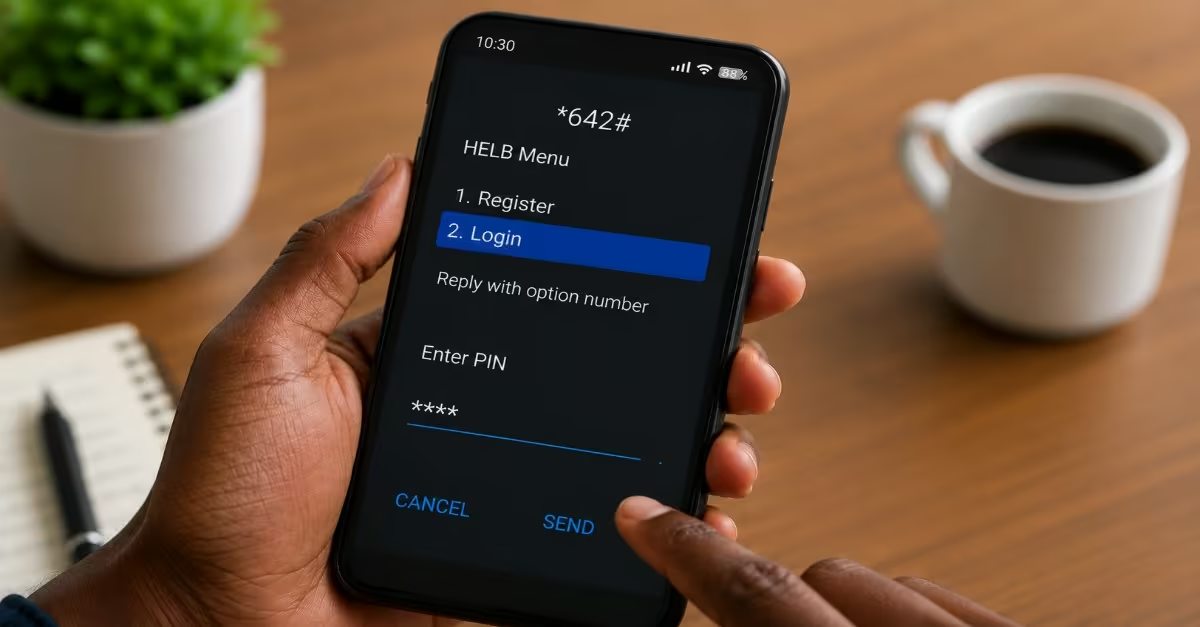
- If this is your first time using the HELB USSD service, you will be required to register by entering your National ID number and creating a PIN. This PIN will be used whenever you access HELB services through the USSD platform in the future.
- If you have already registered, select the login option and enter your PIN to continue.
Step 3: Select the Loan Application Option
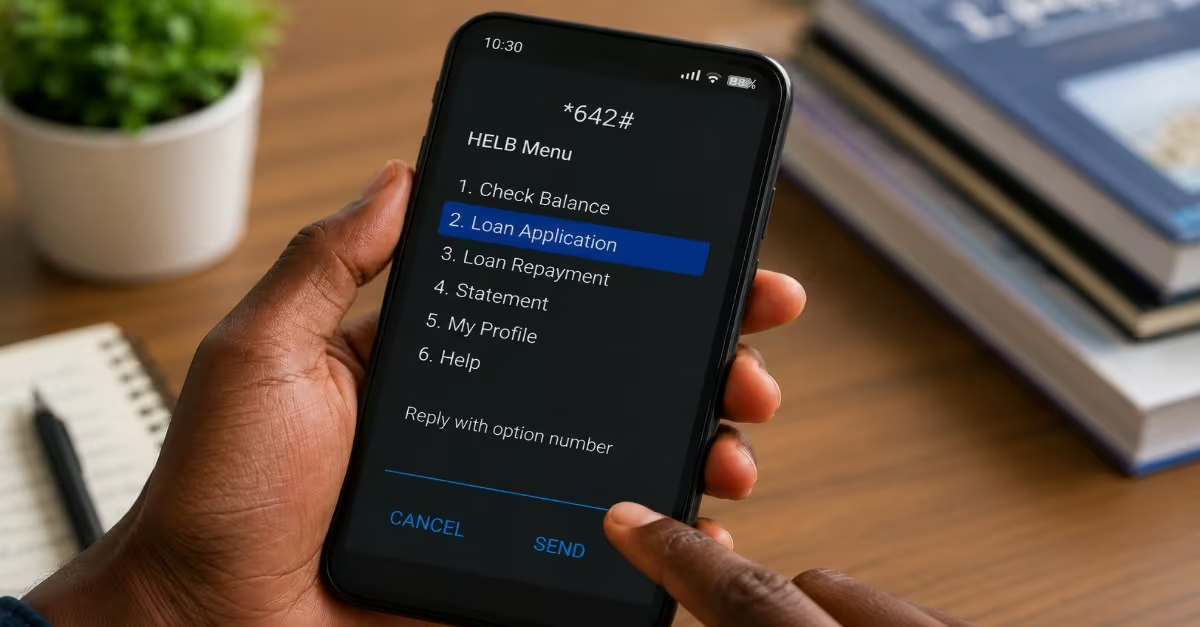
- After logging in successfully, a menu containing several HELB services will appear on your screen.
- From the available options, select Loan Application to begin your loan application.
Step 4: Choose Your Application Level
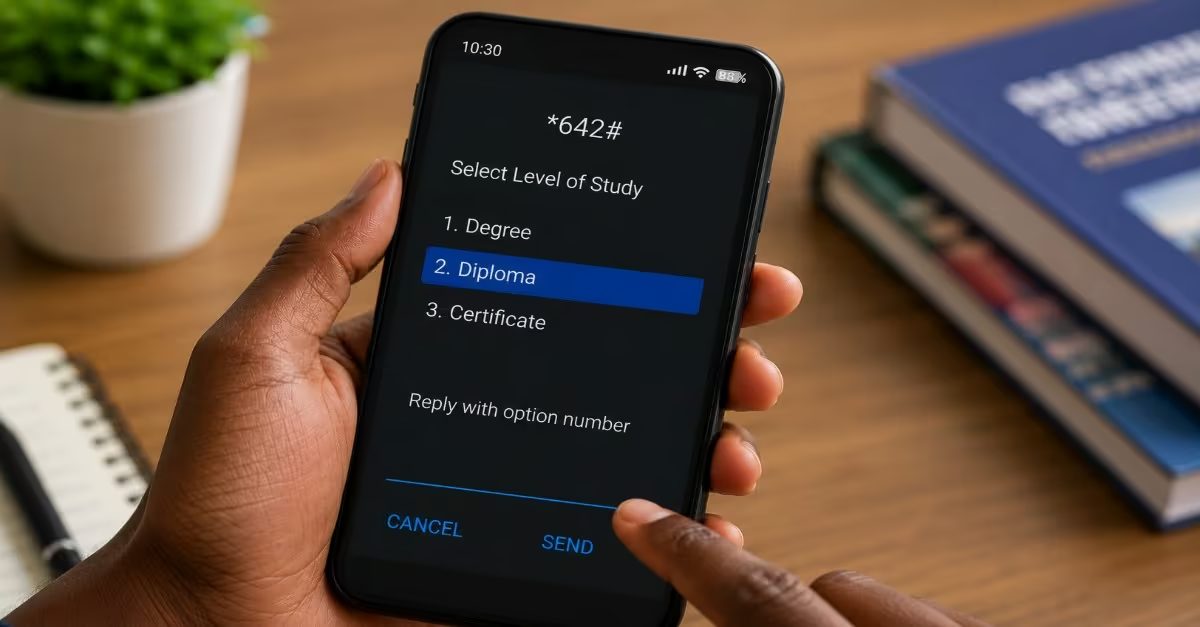
- Next, you will be asked to select your level of study. Choose the option that matches your current programme, whether it is a Degree, Diploma, or Certificate course.
- Ensure you select the correct category to avoid any issues during processing.
Step 5: Select the Academic Year
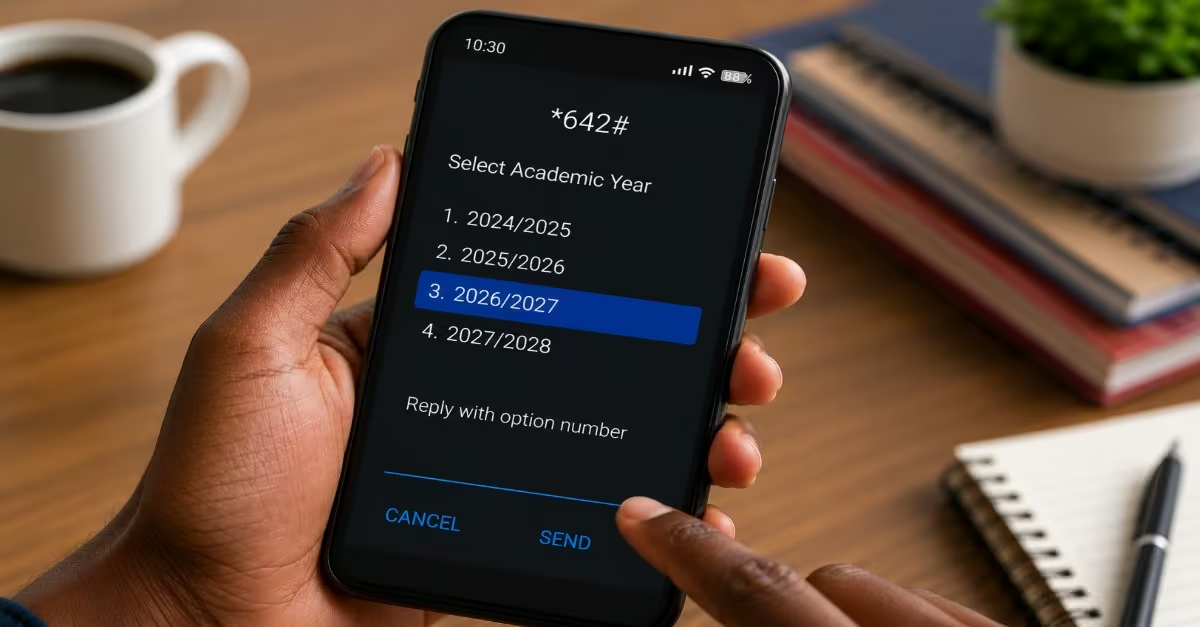
- A list of available academic years will be displayed on the screen.
- Select the 2026/2027 academic year as the period for which you are applying for funding.
- Review your selection carefully, then press Send to submit your application.
Step 6: Receive Confirmation
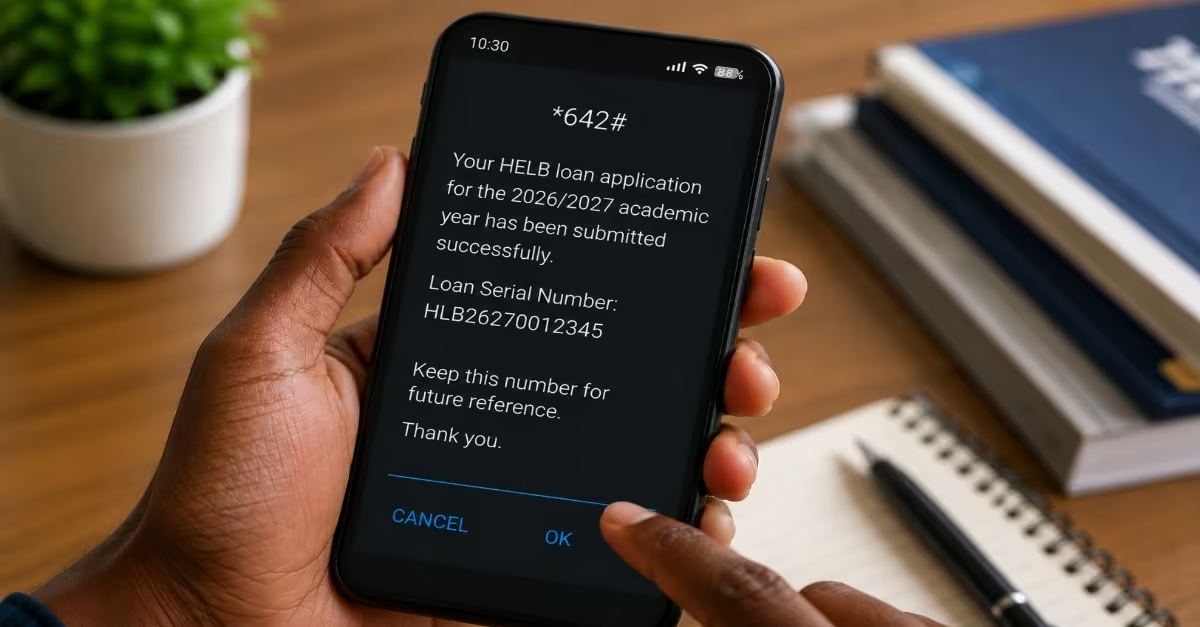
- Once your application has been submitted successfully, HELB will send a confirmation SMS to your registered phone number. The message will contain a loan serial number, which you should keep safe. This number may be required later when checking or tracking the status of your loan application.
How to Apply for HELB Subsequent Loan using HELB App
The HELB mobile app provides a fast and convenient way for students to apply for a subsequent loan directly from their smartphones. With the app, you can complete the entire application process online, upload any required information, and track your application’s progress without visiting a HELB office.
Step 1: Download the HELB App
- Visit the Google Play Store on your Android smartphone and search for “HELB” to download the official HELB Mobile Application.
- Alternatively, you can access the service through the M-Pesa Mini App on your phone under the “Services” section, without needing to download a separate app.
- Ensure you download or use the latest version of the app to avoid functionality issues.
Step 2: Register or Log In
- If you already have an account, log in using your existing PIN to proceed. But if you are new, you will need to register first. Open the app and select the Register option if you are a new user.
- Enter your phone number (registered under your name) to generate an activation PIN.
- Complete your registration by entering your first name as it appears on your National ID, your National ID number, and a valid email address.
Step 3: Read and Accept the Terms and Conditions
- Before accessing the application form, you will be required to read and accept the terms and conditions of the HELB loan.
- Take time to go through these carefully, as they outline your obligations as a loan beneficiary.
Step 4: Navigate to the Loan Application Section
- Once logged in, click on the Scholarship, Loans, or Loans & Scholarship tab depending on what you are applying for.
- Select your level of study — Degree for undergraduate students, or Certificate/Diploma for TVET students.
- Click “Apply” on the Undergraduate Second and Subsequent Scholarship and Loan (or TVET equivalent).
Step 5: Complete the Financial Literacy Guide
- Read through the process tutorial and financial literacy guide provided within the app.
- Answer the financial literacy questions that follow, view your results, and click “Proceed” to move to the next stage.
Step 6: Verify Your Identity and Request Your Loan
- Click “Get Started” to begin the actual application process.
- Enter your phone number and National ID number to verify your identity and confirm account ownership.
- Click “Request Loan” to view and verify the loan details pre-assigned to your account.
- Select your preferred loan payment option (e.g., bank account or M-Pesa).
Step 7: Submit Your Application
- Review all the details carefully before submitting.
- Click “Submit” to complete your application.
- A pop-up confirmation message will appear along with a loan serial number. Save this number, as it is proof of your application and will be used to track your loan status.
How to Apply for HELB Subsequent Loan Using HELB Student Portal
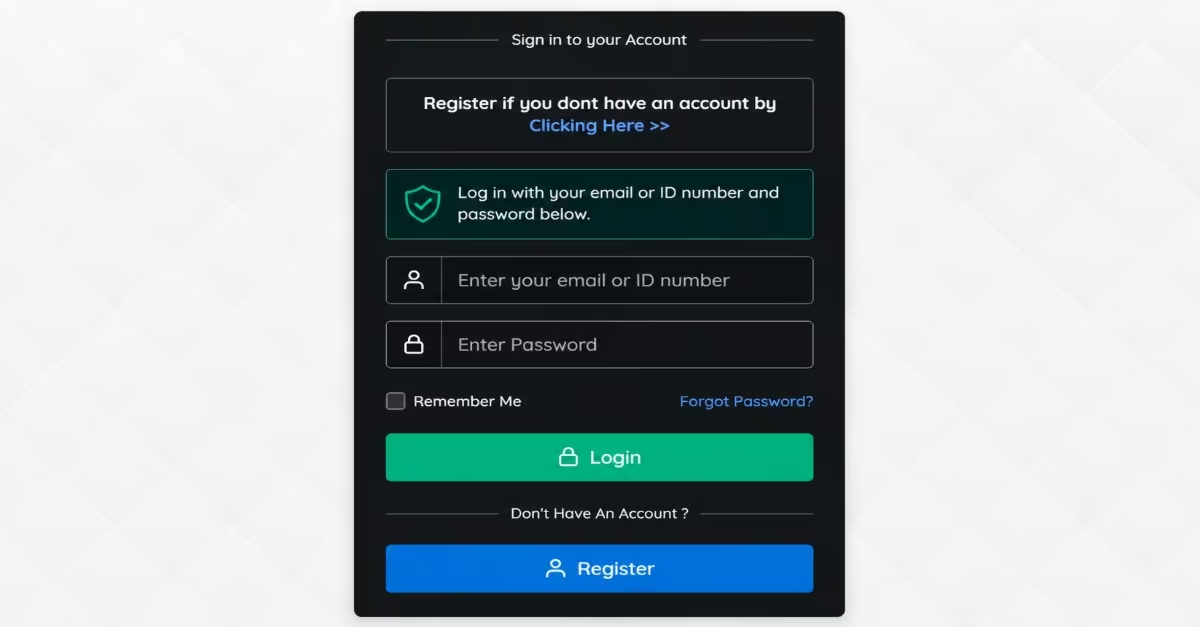
The HELB Student Portal offers an easy and secure way for students to apply for a subsequent loan online. You need to log in to your HELB account, and then you can complete and submit your application, update your details if necessary, and monitor the status of your loan application by following the steps below, as per Emmanuel (2025)
Step 1: Access the Portal
- Open a browser on your computer or smartphone and visit the official Higher Education Financing (HEF) Student Portal.
Step 2: Log In to Your Account
- On the portal homepage, enter your registered email address and password, then click “Log In” to access your account.
- If you have forgotten your password, click the “Forgot Password” link to reset it via your registered email address.
Step 3: Navigate to the Loan Application
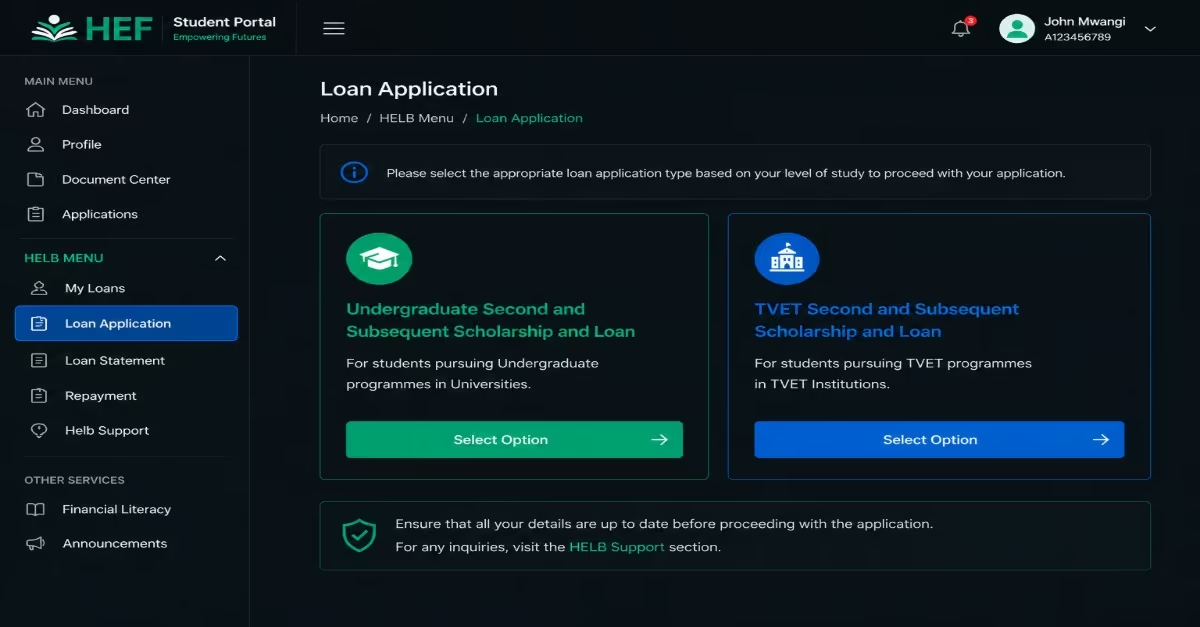
- Once logged in, go to the “HELB menu” and click on the ” Loan Application” tab.
- Select the appropriate option — Undergraduate Second and Subsequent Scholarship and Loan for university students, or TVET Second and Subsequent Scholarship and Loan for TVET students.
Step 4: Complete the Financial Literacy Guide
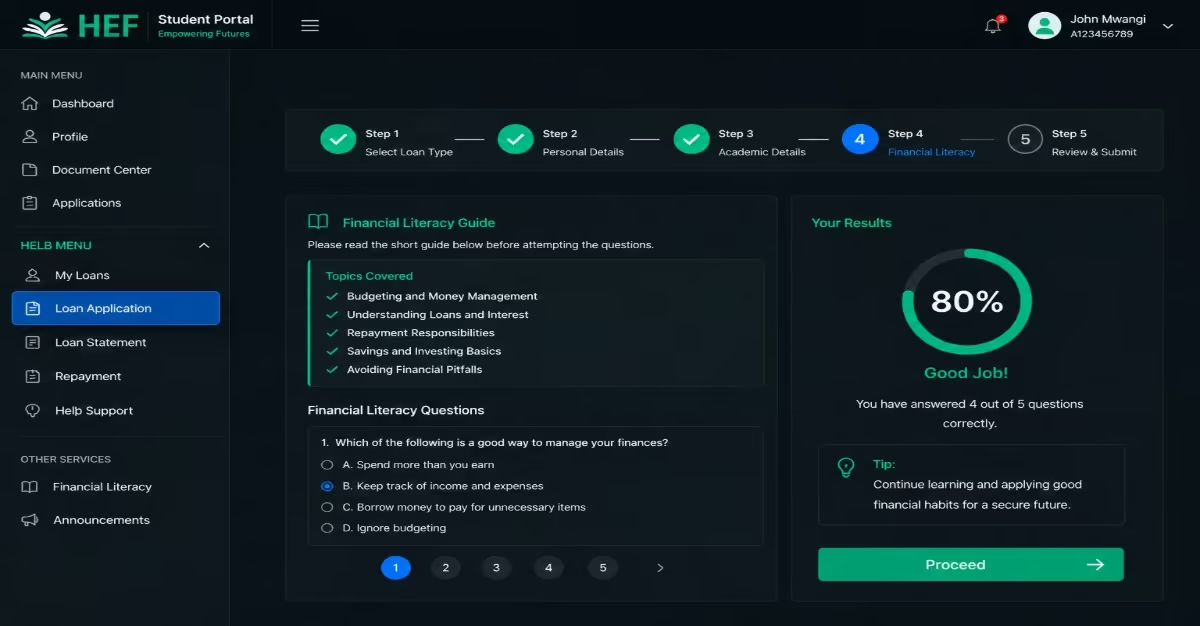
- Read through the process tutorial and financial literacy guide provided on the portal.
- Answer the financial literacy questions, view your results, and click “Proceed“ to continue to the application form.
Step 5: Fill In Your Details and Submit
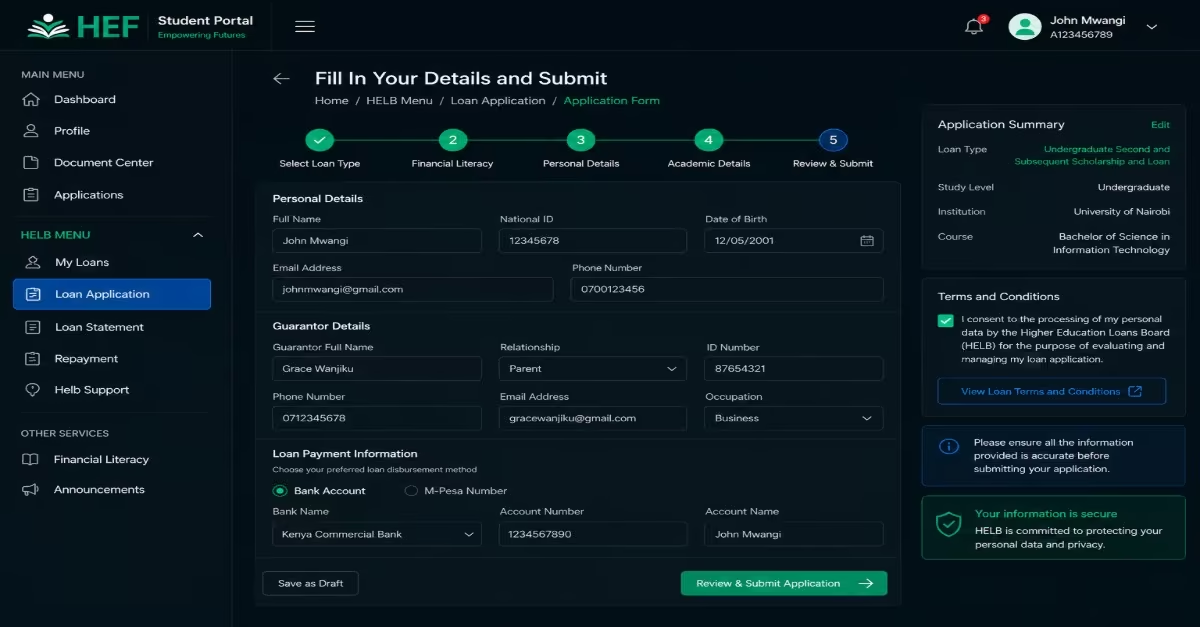
- When all details are complete, submit your scholarship or loan request. Consent to the processing of your data by accepting the loan terms and conditions. Update your guarantor details and provide your loan payment information, either bank account details or a registered M-Pesa number, then submit your loan application. HELB
Step 6: Save Your Confirmation
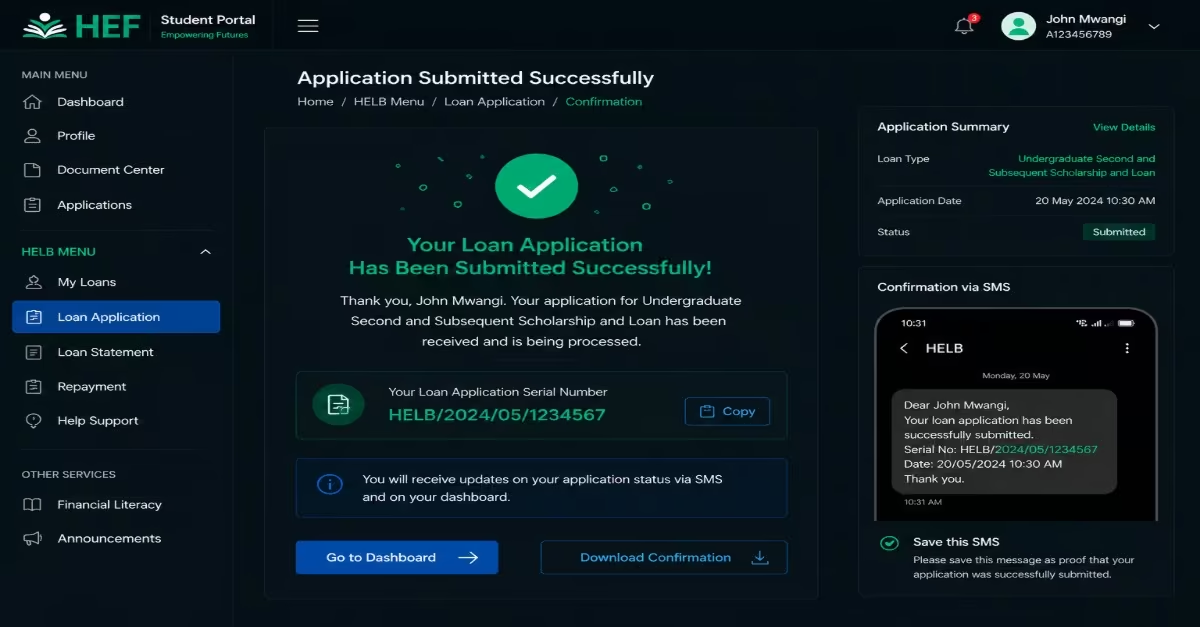
- Upon successful submission, you will receive a confirmation SMS containing your loan application serial number. Save this SMS as proof that your application was successfully submitted.
How Long Does HELB Take to Process a Subsequent Loan?
After submitting your HELB subsequent loan application, the processing and disbursement of funds typically take between 4 and 6 weeks, provided your application is complete, and all the required information is accurate as per Juma (2026)
Read Also: How to Check HELB Loan Balance, Pay Your Loan & Get HELB Compliance Certificate (Step-by-Step)
Common Reasons Why a HELB Subsequent Loan Application May Be Rejected or Delayed
Although the HELB subsequent loan application process is generally simple, some applications may be delayed, returned for correction, or even rejected. This usually happens due to errors in the information provided, missing requirements, or challenges in verifying eligibility. A study by Charles (2026) highlights the following reasons why your loan may be rejected.
a) Incomplete Application
One of the most common reasons for delays or rejection is submitting an incomplete application. Missing details, incorrect information, or unclear document uploads can make it difficult for HELB to review and verify your application properly.
b) Mismatched Personal Details
Any inconsistency between your HELB records and your official documents can cause verification problems. Differences in names, ID numbers, academic details, or other personal information may lead to delays while HELB conducts further checks.
c) Inactive Academic Registration
HELB requires applicants to be actively registered in their institution for the current academic year. If your enrollment cannot be confirmed or your institution’s records do not match your application details, your loan application may be delayed or rejected.
d) Outstanding HELB Loan Obligations
Students who have unresolved issues from previous HELB loans, such as unpaid balances or account discrepancies, may face difficulties when applying for subsequent funding. These issues usually need to be resolved before a new loan can be processed.
e) Incorrect Banking or Contact Information
Providing incorrect bank account details, an inactive account, or the wrong phone number can disrupt communication and delay disbursement. Even after approval, such errors may prevent you from receiving your funds on time.
f) False or Unverified Information
Submitting incorrect or misleading information about your personal, academic, or financial status can lead to immediate rejection of your application. HELB carries out verification checks, and any false declarations may also affect your eligibility for future funding.
Frequently Asked Questions
What is a HELB Subsequent Loan Application?
A HELB subsequent loan application is a funding request made by continuing students who have previously received a HELB loan. It enables them to seek financial support for the next academic year while they continue with their studies.
How Long Does HELB Take To Disburse A Subsequent Loan?
In most cases, HELB processes and disburses subsequent loans within four to six weeks after a successful application. Once approved, tuition funds are sent directly to the institution, while upkeep funds are deposited into the student’s designated bank account.
Can I Request A Higher HELB Subsequent Loan Amount?
HELB determines the amount awarded based on factors such as financial need, available funding, and the student’s profile. However, students whose financial circumstances have changed significantly may submit a formal appeal to HELB for review and consideration.
Conclusion
Applying for a HELB subsequent loan for the 2026/2027 academic year is a simple process when you follow the step-by-step methods I have explained above. Ensure you are eligible to apply and meet the requirements; you can apply for free. It is also important to apply early, monitor your application status regularly, and ensure all personal and academic details are accurate to facilitate smooth processing.