
Kenya is one of Africa’s top destinations for foreign professionals, investors, and entrepreneurs seeking employment and business opportunities. With a growing economy, improving infrastructure, and a strategic location in East Africa, the country continues to attract skilled workers in sectors such as technology, education, healthcare, construction, and finance. However, before any foreign national can legally work or operate a business in Kenya, they must obtain a valid work permit issued by the Directorate of Immigration Services.
Many applicants find the process of applying for a work permit complex due to the various permit categories, required documents, application procedures, and government regulations involved.
This guide explains everything you need to know about obtaining a class D work permit, including
- Eligibility requirements for class D work permit
- Application procedures
- Processing timelines, renewal procedures
- Costs involved.
What is a Class D Work Permit in Kenya?
A study by Spondoo states that a “Kenyan work permit is an official document issued by the Directorate of Immigration Services that allows foreign nationals to live and work in Kenya for a specific period legally.” According to Kenya’s immigration laws, any foreigner planning to engage in employment, business, professional services, investment, missionary work, or other specialized activities in the country must first obtain a valid work permit before beginning work. Working in Kenya without the required authorization is illegal and may lead to fines, deportation, or other legal consequences.
Class D Work Permit Requirements in Kenya
Applications for a Class D work permit in Kenya are submitted online through eCitizen Kenya and the immigration eFNS system managed by the Directorate of Immigration Services. To apply, you will need your documents and the employer’s details. A study by Kazilegal highlights the following documents you need.
Document Checklist for the Applicant
- Completed and signed Form 25 generated through the eFNS portal.
- Copy of the applicant’s valid passport bio-data page.
- Two recent colored passport-size photographs.
- Proof of current immigration status for applicants already living in Kenya.
- Copies of previous permits or passes issued earlier, where applicable.
- Updated curriculum vitae (CV).
- Certified copies of academic and professional qualification certificates.
- Official English translations for documents written in foreign languages, certified by an embassy, public notary, or authorized institution.
Required Documents from the Employer
- Two copies of a signed cover letter from the employer or organization addressed to the Directorate of Immigration Services.
- Certificate of incorporation or business registration documents.
- Valid Tax Compliance Certificate for new applications.
- For renewals, valid Kenya Revenue Authority Tax Compliance Certificates for both the employer and employee where applicable.
- Proof of recruitment efforts or an explanation showing why a qualified Kenyan citizen could not fill the position.
- Clearance or approval letters from relevant regulatory or professional bodies where required.
- Employment contract, appointment letter, job description, or assignment letter confirming the applicant’s role and employment duration.
- Employment Form
- Completed and signed Form 27 — Report on Employment.
Read Also: How to Apply for a Certificate of Good Conduct in Kenya (2026): Step-by-Step Online Guide
How to Apply for a Class D Work Permit in Kenya on eFNS

Step 1: Confirm the Correct Immigration Route
- First, confirm that the position qualifies for a Class D Employment Permit. This permit is intended for foreign nationals whom a Kenyan employer has offered a specific job requiring skills or qualifications that may not be readily available in the local Kenyan labor market.
Quick tips:
- Applicants who are citizens of East African Community member states such as Tanzania, Uganda, Rwanda, Burundi, South Sudan, or the Democratic Republic of Congo may qualify for a Class R Permit instead, which usually has no issuance fee.
- Do not begin collecting documents until the correct permit category has been confirmed. Each permit class has different requirements, and the KES 20,000 processing fee is non-refundable even if the wrong permit category is selected.
Step 2: Prepare Employer and Applicant Documents
- Gather all required employer documents, including the company’s certificate of incorporation or registration, company PIN certificate, Kenya Revenue Authority tax compliance certificate, and memorandum and articles of association where applicable.
- The employer should also prepare a detailed signed cover letter addressed to the Directorate of Immigration Services explaining the position, why a Kenyan citizen could not fill the role, and how skills transfer to local staff will be handled.
- Prepare the employment contract or offer letter clearly showing the job title, duties, salary, and duration of employment.
Step 3: Prepare Understudy Documents
- The employer must identify a Kenyan employee who will act as the official understudy for the foreign applicant. Immigration authorities usually expect a real, traceable individual rather than a generic placeholder name.
- Prepare copies of the understudy’s national ID, contact details, updated CV, and certified academic or professional certificates.
- A written skills-transfer plan should also be prepared. This plan should explain how the foreign employee will transfer knowledge and skills to the understudy, including timelines, training arrangements, and expected competencies.
- The understudy’s qualifications should reasonably relate to the role the foreign employee is filling. Weak or unrelated credentials may result in additional questions or processing delays.
Step 4: Create or sign in to the Government of Kenya Single Sign-On Account
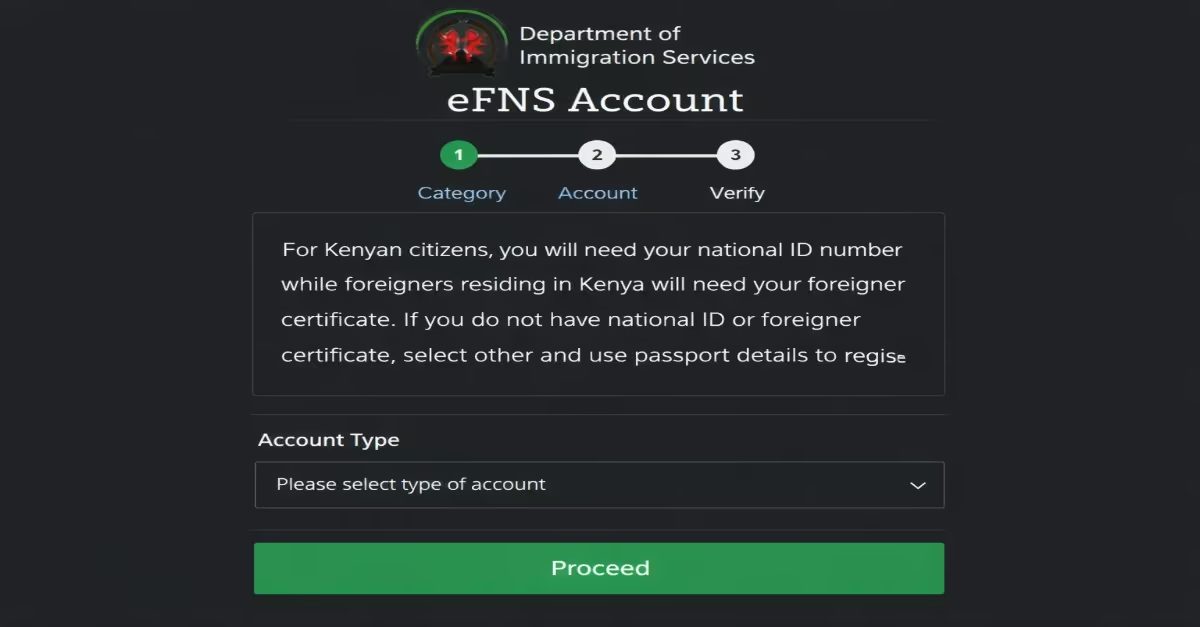
- Visit the official eFNS portal, the official government platform for work permit and immigration applications.
- Log in using your eCitizen Kenya Single Sign-On account.
- If you do not already have an eCitizen account, create one using a valid email address before proceeding with the application.
- Both the employer and the applicant may need portal access during different stages of the process, so login credentials should be stored securely and shared carefully where necessary.
Step 5: Select the Permit Application on eFNS
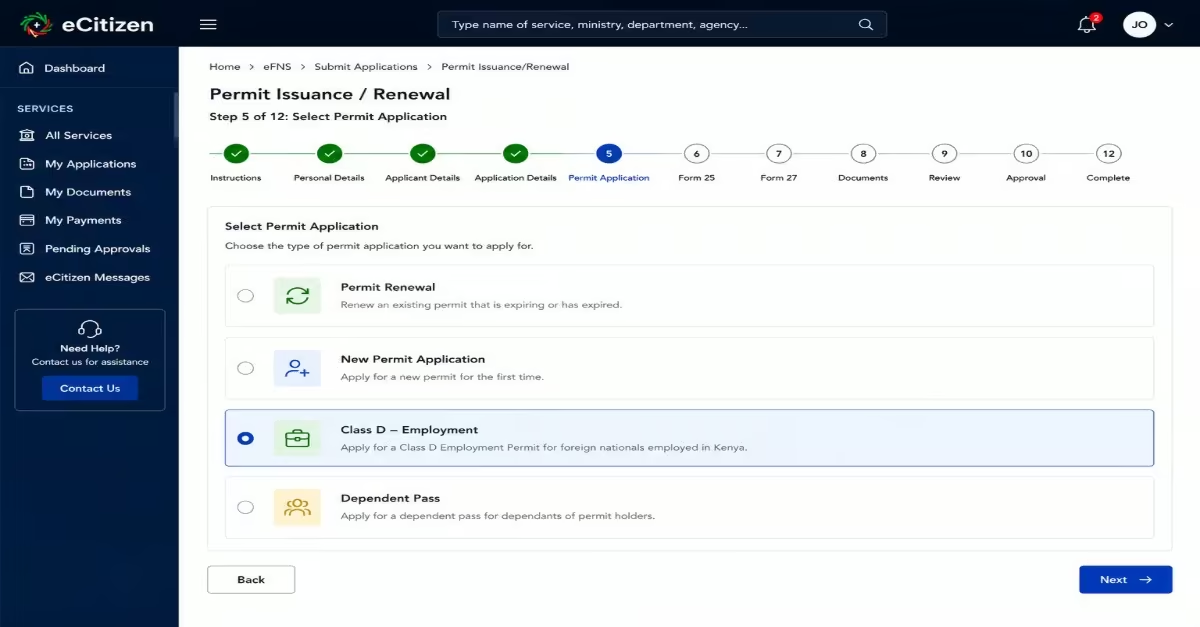
- After logging in, click the “Apply Now” option on the eFNS dashboard.
- Open the “Submit Applications” section and choose the “Permit Issuance/Renewal” tab.
- Select “Class D — Employment” as the permit category before continuing. Choosing the wrong permit class may require starting the process again and paying another processing fee.
- Applicants should also read the official Class D information pack available on the portal, as it contains the latest checklist and document requirements for the application.
Step 6: Complete Form 25 — Application for Issuance/Renewal of a Permit
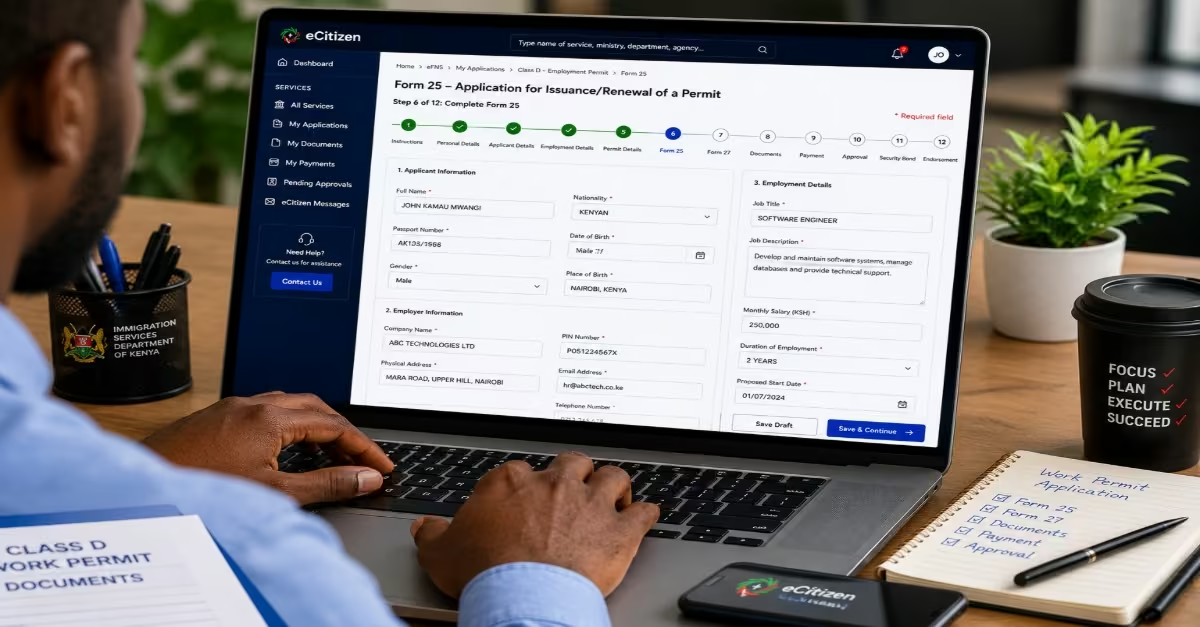
- Carefully complete Form 25 within the eFNS portal. This is the main online application form used for work permit applications in Kenya.
- Ensure that details such as the applicant’s name, passport number, employer information, job title, and employment details match exactly with the supporting documents provided. Differences between the form and the uploaded documents are among the main reasons applications are delayed or queried.
- Once completed, the form is automatically generated through the portal and can be printed if required.
Step 7: Complete Form 27 — Report on Employment
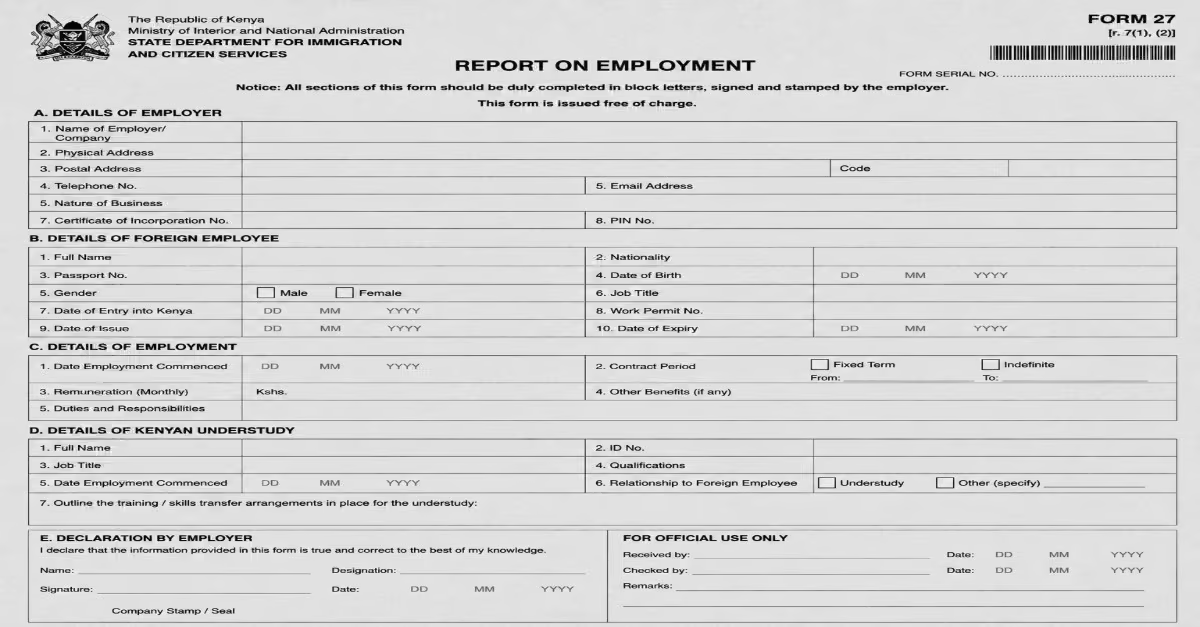
Download and complete Form 27, also known as the Report on Employment. This form is specifically required for Class D employment permit applications and is separate from Form 25.
Step 8: Upload Supporting Documents
- Upload clear and high-quality scanned copies of all required documents in the order requested on the eFNS portal.
- Each file should be clearly named before uploading, for example, Passport_Biodata.pdf or Form27_Signed.pdf. Proper file naming helps reduce confusion and unnecessary follow-up requests from immigration officers.
- Avoid leaving any required upload section empty because incomplete document submissions are one of the main causes of delays, deferrals, or rejection.
- All foreign-language documents must also include certified English translations at this stage.
Step 9: Generate and Pay the Processing Fee Invoice
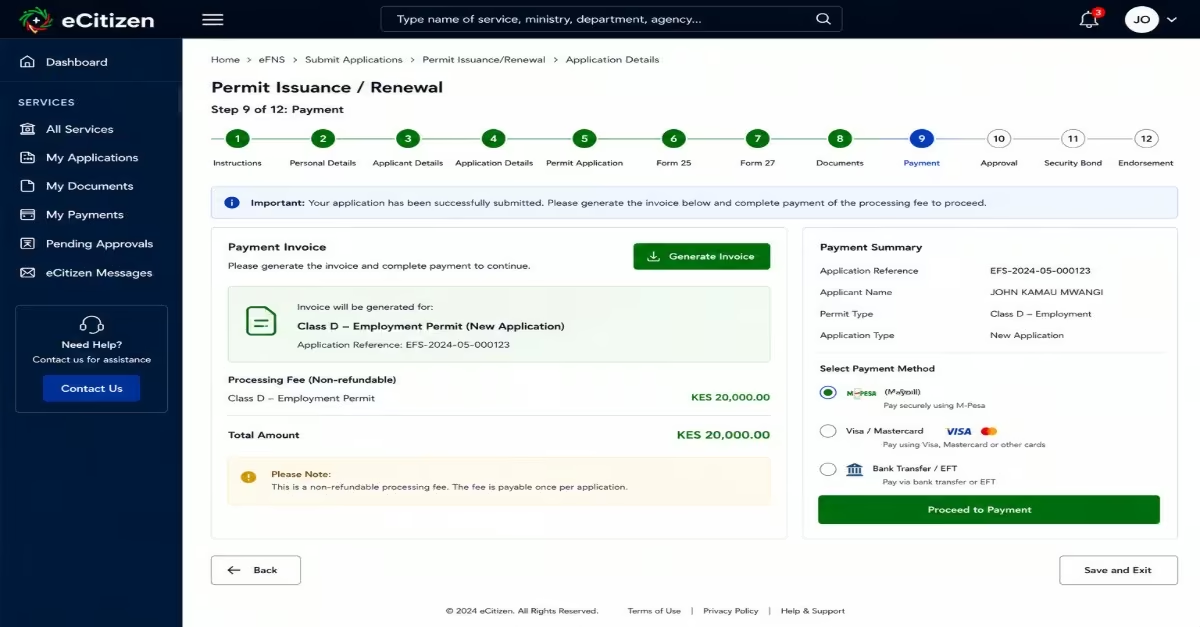
- After submitting the application, go to the “Dashboard” and open the “Payments” section to access the automatically generated invoice.
- Pay the non-refundable KES 20,000 processing fee using the provided payment methods. Payments can usually be made online through your suitable payment method.
- This fee is non-refundable even if the application is withdrawn, rejected, or deferred.
- Keep a copy of the payment receipt, as it may be needed in later stages of the application.
Quick Tip: Regularly monitor the eFNS dashboard and your registered email address for updates. Immigration authorities normally send notifications, approval letters, or requests for additional documents through email and the portal. If additional information or documents are requested, respond as quickly as possible. Delayed responses may result in the application being closed or pushed back in the processing queue.
Step 10: Approval and Payment of the Issuance Fee
- Once the application is approved, an official notification will be sent through the eFNS portal and by email.
- Return to the dashboard and pay the permit issuance fee shown on the invoice.
- The issuance fee must usually be paid within 30 days after approval. Failure to pay within this period may require submitting a new application. Payments can be made through the online payment options available on eFNS.
Step 11: Obtain the Security Bond
After paying the issuance fee, obtain a security bond from a licensed insurance company or bank. This is a mandatory legal requirement for Class D permit holders and is separate from the permit fees.
Applicants normally need the approval letter, passport, and a request letter when applying for the bond. Once processed, the insurance company or bank will issue the bond document and receipt.
Quick tip: Do not proceed with permit endorsement without the security bond documents, as they are required at the immigration office.
Step 12: Print the Permit and Present for Endorsement
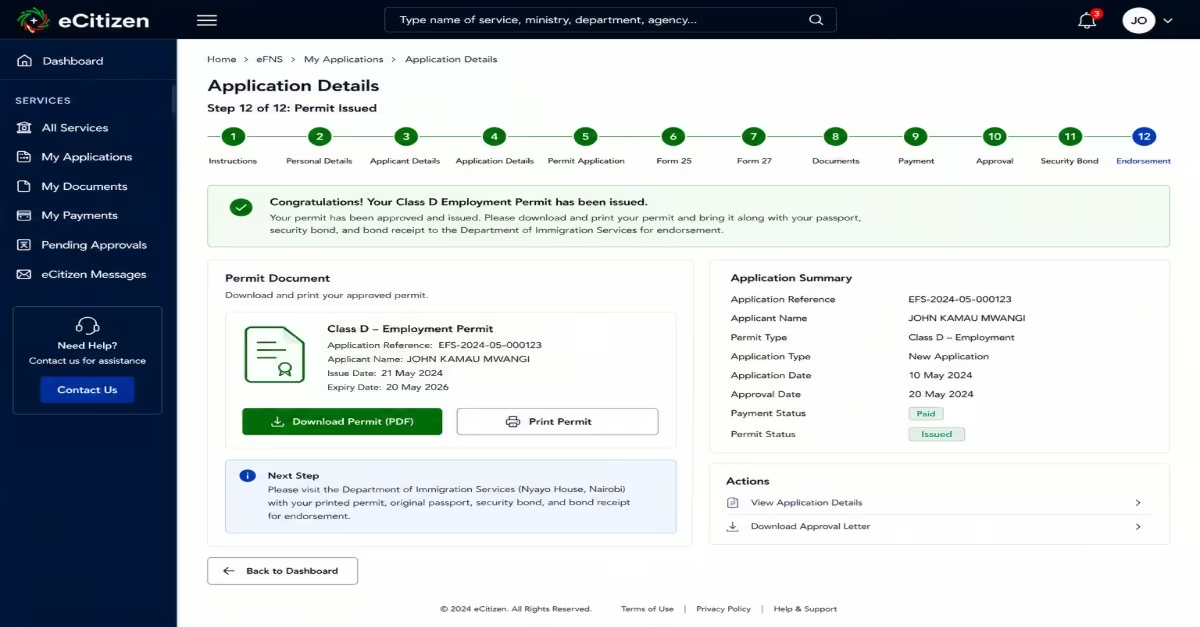
- After payment confirmation, return to the eFNS dashboard and download the approved Class D Work Permit.
- Present the printed permit, original passport, security bond, and bond receipt at the Department of Immigration Services Foreign Nationals Management Section located at Nyayo House for official endorsement. Applicants outside Nairobi should first confirm whether their nearest regional immigration office can handle endorsements before travelling.
Understanding the Kenyan Understudy Requirement for Work Permits
The Kenyan understudy requirement is a condition attached to certain work permit applications, especially Class D Work Permit applications, in which a foreign employee is expected to train or mentor a Kenyan citizen who may eventually take over the position. This policy is intended to encourage skills transfer, strengthen local workforce capacity, and reduce long-term reliance on foreign labor in Kenya.
During the work permit application process, employers may be required by the Directorate of Immigration Services to identify a qualified Kenyan understudy who will work closely with the foreign employee. The employer may also need to explain how the foreign worker’s knowledge and expertise will help train local staff through mentorship, practical training, or skills transfer programs. Failure to provide adequate understudy details may result in delays, requests for additional documents, or rejection of the work permit application.
How Long Does a Class D Work Permit Take to Process in Kenya?
The processing time for a Kenya Class D Work Permit usually ranges from 4 to 12 weeks after the application is submitted through the Directorate of Immigration Services eFNS portal. When all documents are complete and submitted correctly, applications are typically processed within 4 to 8 weeks.
Processing delays are also common when employer tax records, recruitment explanations, or uploaded documents are incomplete, unclear, or inconsistent. After approval, applicants are typically required to complete additional steps, such as payment of issuance fees, processing of the security bond, passport endorsement, and Alien Card registration, before the permit becomes fully valid and officially issued.
Kenya Class D Work Permit Fees and Costs Breakdown
Application Costs
- Processing Fee: KES 20,000 (non-refundable)
- Issuance Fee: KES 500,000 per year (waived for most East African Community (EAC) nationals)
- Security Bond: KES 100,000
Renewal Costs
- Processing Fee: KES 20,000
- Issuance Fee: KES 500,000 per year (waived for most East African Community (EAC) nationals)
- Security Bond: KES 100,000 (maintained or renewed if required)
Common Reasons for Class D Work Permit Delays
Applications for a Kenya Class D Work Permit may sometimes take longer than expected due to documentation errors, missing information, or compliance issues identified during the review process. A study by Business & Immigration highlights the following reasons why your Class D work permits are usually delayed.
- Incomplete Form 25 or Form 27 submissions.
- Employer cover letters that do not clearly justify the need to hire a foreign national.
- Insufficient proof that a qualified Kenyan citizen could not fill the position.
- Missing or incomplete Kenyan understudy documentation.
- Expired or missing Tax Compliance Certificates.
- Missing approvals or clearance letters for regulated professions or industries.
- Foreign-language documents submitted without certified English translations.
Class D Class D Work Permit Renewal Requirements
- Form 25 – Completed online via the eFNS Portal.
- Copy of the expiring Class D Work Permit and current Alien Card as proof of valid immigration status.
- Updated employer cover letter – Two signed copies addressed to the Director of Immigration Services confirming continued employment.
- Form 27-Fully completed and signed by the employer.
- Valid Tax Compliance Certificates (TCC) from Kenya Revenue Authority for both the organisation and the individual applicant.
- Updated Kenyan understudy documents -including progress report, updated CV, academic certificates, and full contact details of the understudy.
- Valid passport copies and two recent coloured passport-size photographs.
How to Renew a Kenya Work Permit on eFNS
Step 1: Prepare the Required Renewal Documents
- Before starting the renewal process for a Kenya Class D Work Permit, ensure all required documents are up to date and ready for upload.
Step 2: Log in to the eFNS Portal
- Visit eCitizen Kenya and access the eFNS immigration portal managed by the Directorate of Immigration Services. Sign in using your Government Single Sign-On (SSO) credentials. Once logged in, navigate to the immigration services section and select the work permit renewal or extension option.
Step 3: Complete the Renewal Application Form
- Fill in all required renewal details carefully within the portal. Ensure that names, passport information, permit numbers, and dates match exactly with the current permit and passport details. Any inconsistencies may lead to delays or additional verification requests.
Step 4: Upload Supporting Documents
- Upload all required supporting documents in PDF format through the portal. Before proceeding, confirm that each document has been uploaded in the correct section to prevent processing errors.
Step 5: Pay the Processing Fee and Submit
- After the application is completed, the system will generate a processing fee invoice. Pay the required fee using the available payment options on the portal.
Step 6: Monitor the Application Status
- Regularly check your eFNS dashboard for updates, notifications, or requests for additional documents.
Step 7: Pay Issuance Fees After Approval
- Once the renewal application is approved, the system will generate the final issuance invoice. Complete the payment and follow the instructions provided on the portal for permit issuance and endorsement. After processing is completed, the renewed work permit will be issued through the immigration system.
Read Also: How to Apply for a Kenyan Passport in 2026: Full Guide for First-Timers
Conclusion
The Kenya Class D Work Permit is an essential legal requirement for any foreign national seeking formal employment in Kenya, ensuring that work is carried out under proper authorization from the Directorate of Immigration Services. For you to apply you need to have all the required documents explained above and the follow the step-by-step procedures to be able to apply one. Some applications may delay ussualy due to reasons like, incomplete documents, missing understand programs, expired tax compliance certificate, your certificates not confirmed and documents submitted in foreign language. Afte your submission the process needs around 4-12 weeks for your application to be processed.