You finally secure a job interview, then the HR department asks for your NSSF number. Suddenly, you find yourself rushing through government websites, trying to understand the registration process before the deadline passes. The National Social Security Fund (NSSF) is Kenya’s government-backed social protection program that helps workers save money for retirement and future financial security. Today, the registration process is mostly done online, making it easier for employees, self-employed individuals, and casual workers to apply without visiting an NSSF office physically.
In this 2026 guide, you will learn:
- The exact step-by-step process of applying for an NSSF number online
- The requirements you need
- Important tips to help you avoid delays during registration.
What Is an NSSF Number in Kenya?
An NSSF number is a unique membership number issued by the National Social Security Fund (NSSF) to registered workers in Kenya, as per George (2026). The NSSF is a government-managed social security scheme that helps employees, casual workers, and self-employed individuals save for their future through monthly contributions. Its main role is to collect contributions from members and later provide financial benefits during retirement. Once you are registered, your NSSF number becomes your official identification within the scheme. It is commonly required when applying for jobs or managing employment records.
Read Also: How to Apply for or Replace a Birth Certificate in Kenya
Who Needs to Register for NSSF Number?
- Employees in both the formal and informal sectors in Kenya
- Self-employed persons registering as voluntary contributors
- Employers who are required to register and remit employee contributions
- First-time job seekers who need an NSSF number before employment
NSSF Number Registration Requirements
The National Social Security Fund (NSSF) is a mandatory retirement savings scheme in Kenya that provides social security protection to workers in both the formal and informal sectors. A study by Jozam (2026) highlights the following requirements that you need to have while applying for an NSSF number.
- National ID Number (or Passport/Alien ID)
- KRA PIN
- Personal Details (Full Name, Date of Birth, and Parents’ Names)
- Employment Details (if applicable)
- Phone Number and Email Address
- Passport-sized Photograph
- Original and Copy of National ID Card (or Passport/Alien ID)
- Active eCitizen Account (if registering online)
- Introduction Letter from Employer (only if employed)
How to Apply for an NSSF Number Online in Kenya (Step-by-Step)
Registering for an NSSF (National Social Security Fund) number in Kenya is a simple process that can be completed either online or by visiting an NSSF office physically. The registration steps may vary slightly depending on whether you are applying as an employee, self-employed person, or voluntary contributor. There are mainly two methods that you can use to apply, namely the use of eCitizen and the use of a USSD code. Below is the step-by-step process for applying for an NSSF number in Kenya in 2026.
How to Register for NSSF Online via eCitizen
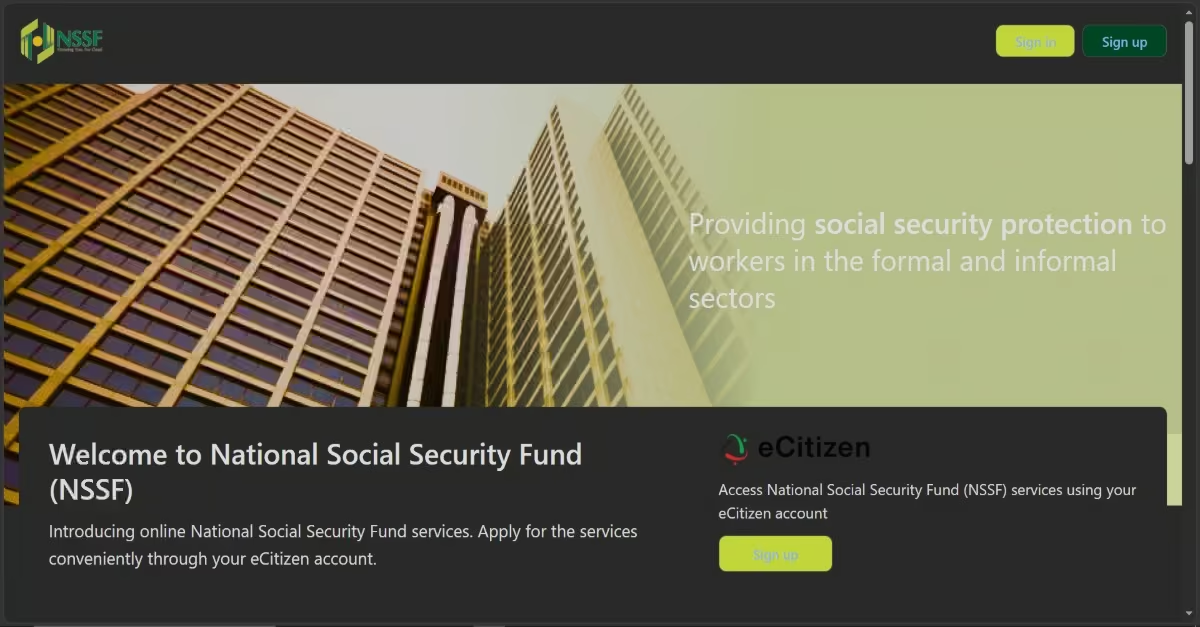
The Kenyan government has integrated many public services into the eCitizen platform, including selected NSSF services. The process is simple and convenient for employees, self-employed individuals, and first-time job seekers who already have an active eCitizen account.
Step 1: Log In to Your eCitizen Account
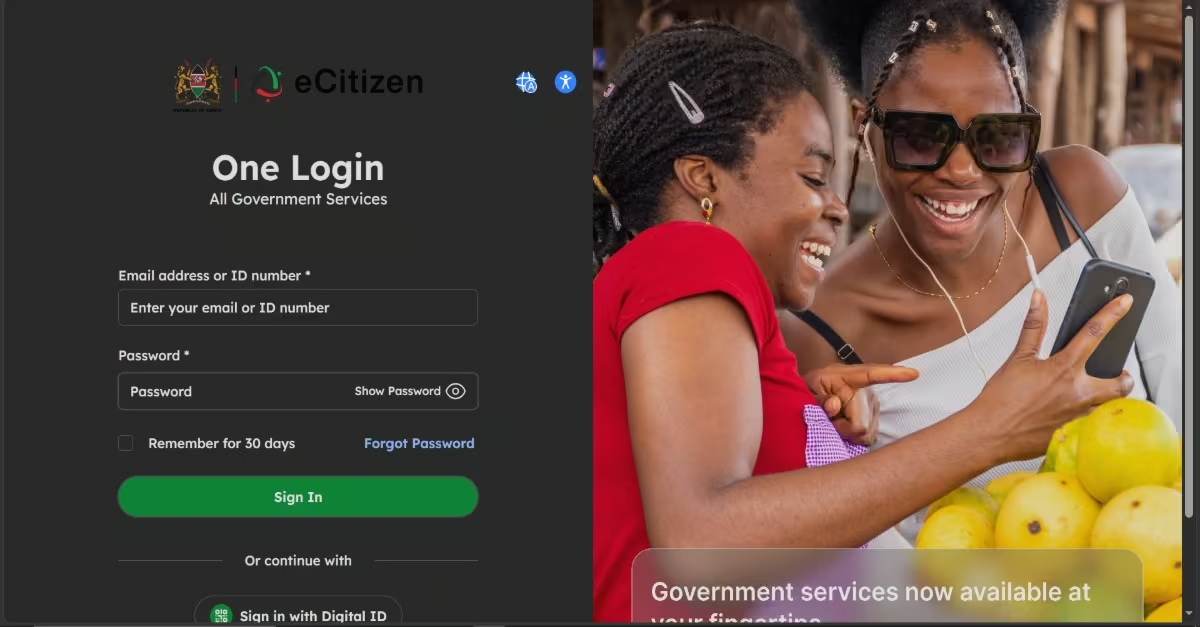
- Visit the official NSSF eCitizen portal at nssf.ecitizen.go.ke on your laptop or computer.
- Sign in using your registered ID number and password.
- If you do not have an eCitizen account, you must create one first before proceeding with NSSF registration.
Step 2: Locate the NSSF Service
- Once logged in, you will be directed to the dashboard where all government services are listed.
- In the search bar, type National Social Security Fund to locate the NSSF services section.
Step 3: Select Member Registration
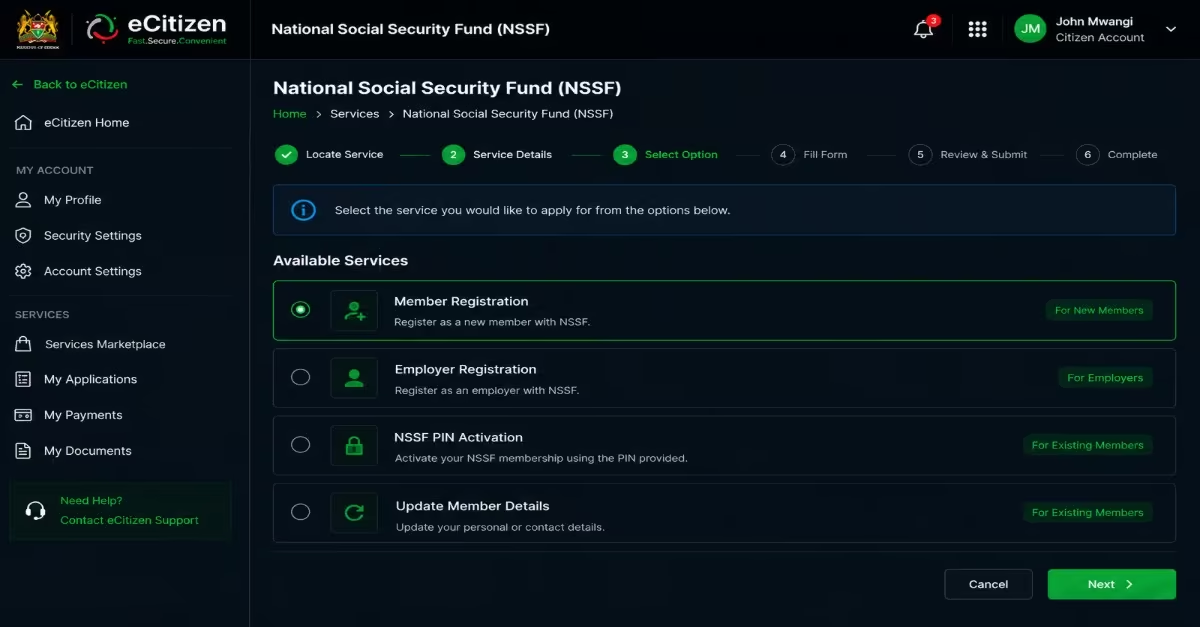
- From the NSSF services menu, select the Member Registration option for first-time applicants.
- This will open the NSSF registration form for you to fill in.
Step 4: Fill In Your Personal Details
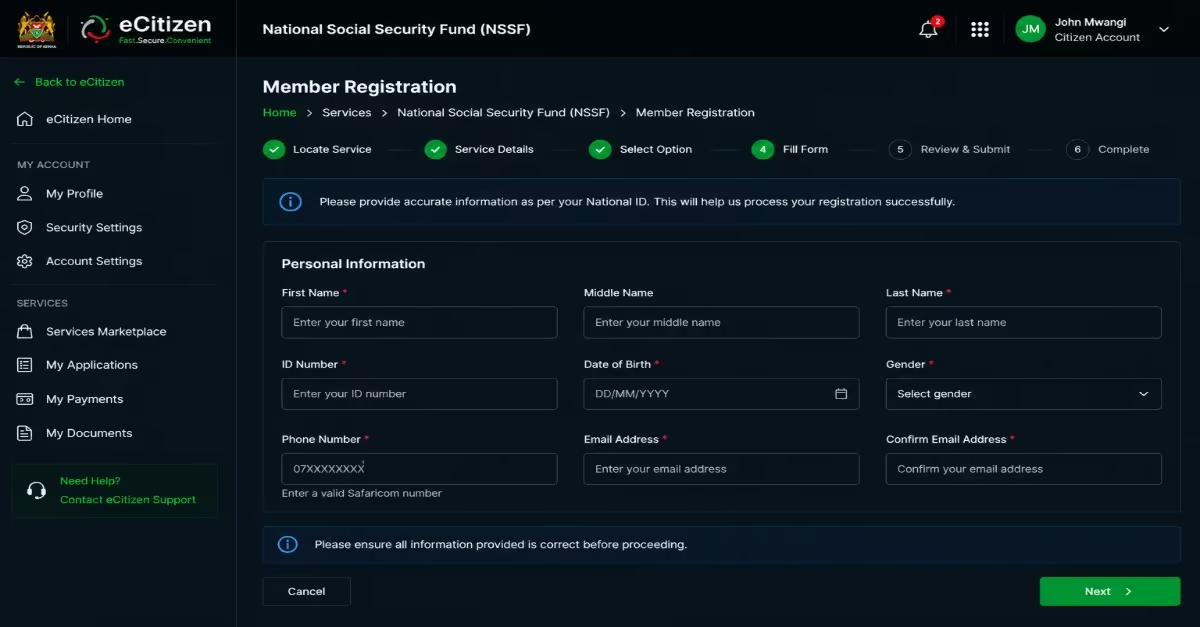
- Enter all your personal details accurately — including your full name, Date of Birth, ID number, phone number, and email address — exactly as they appear on your National ID.
- Double-check all information carefully before submitting, as any errors may delay your approval or cause issues with your membership.
Step 5: Submit and Print the Confirmation Page
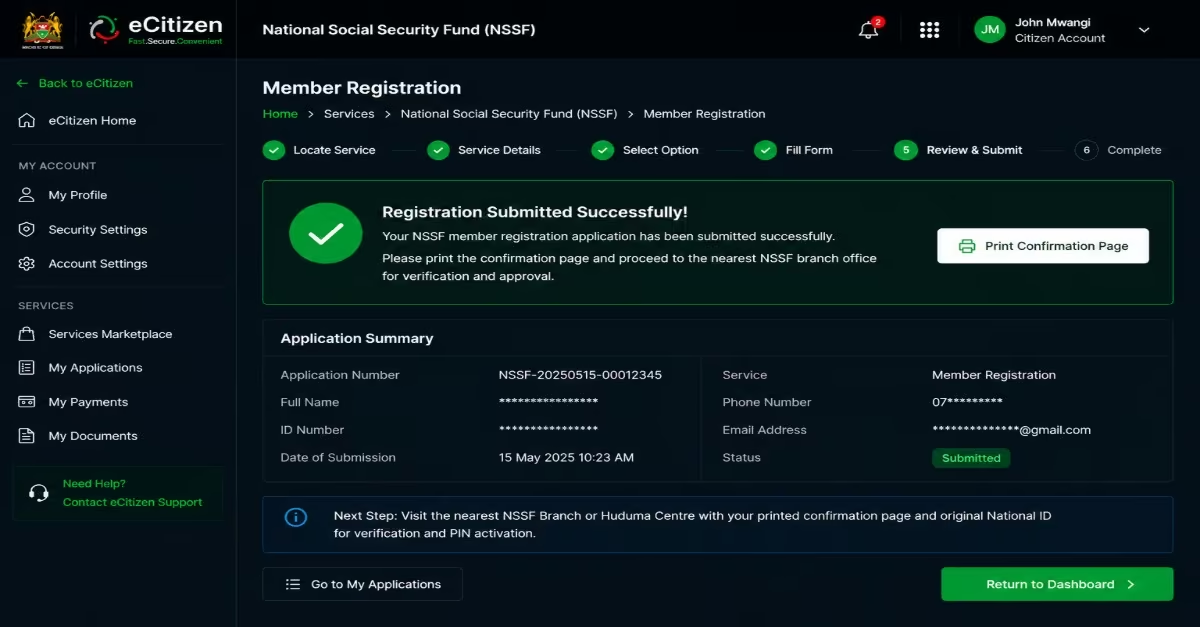
- After reviewing your details, submit the form.
- The system will generate a confirmation page upon successful submission — print this page immediately, as it is mandatory for the next step. Without the printed confirmation, your registration cannot be completed at the branch.
Step 6: Visit the Nearest NSSF Branch Office
- Carry your printed confirmation page along with your original National ID to the nearest NSSF branch office or Huduma Centre.
- At the office, an officer will verify your details and approve your registration request.
- You will then be issued an encoded activation PIN Key — keep this safe as it is required for the final step.
Register for NSSF via USSD Code
For Kenyans who do not have easy access to a computer or stable internet connection, NSSF also offers a quick registration option through a USSD code. The process is simple, fast, and can be completed within a few minutes by following the instructions displayed on the screen. Follow the step-by-step procedure below to register.
Step One: Dial the USSD Code
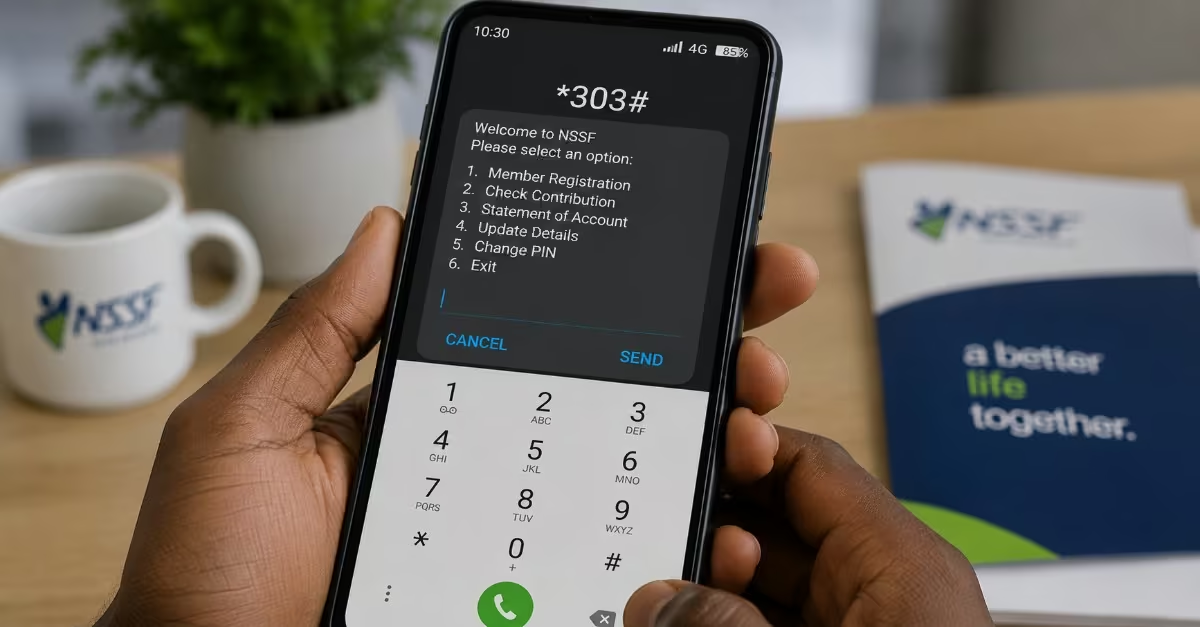
- Dial *303# on your mobile phone and follow the prompts for “Member Registration.”
Quick Tip: Note that some mobile networks also support registration via *300# — if one code fails, try the other.
Step Two: Enter Your Personal Details
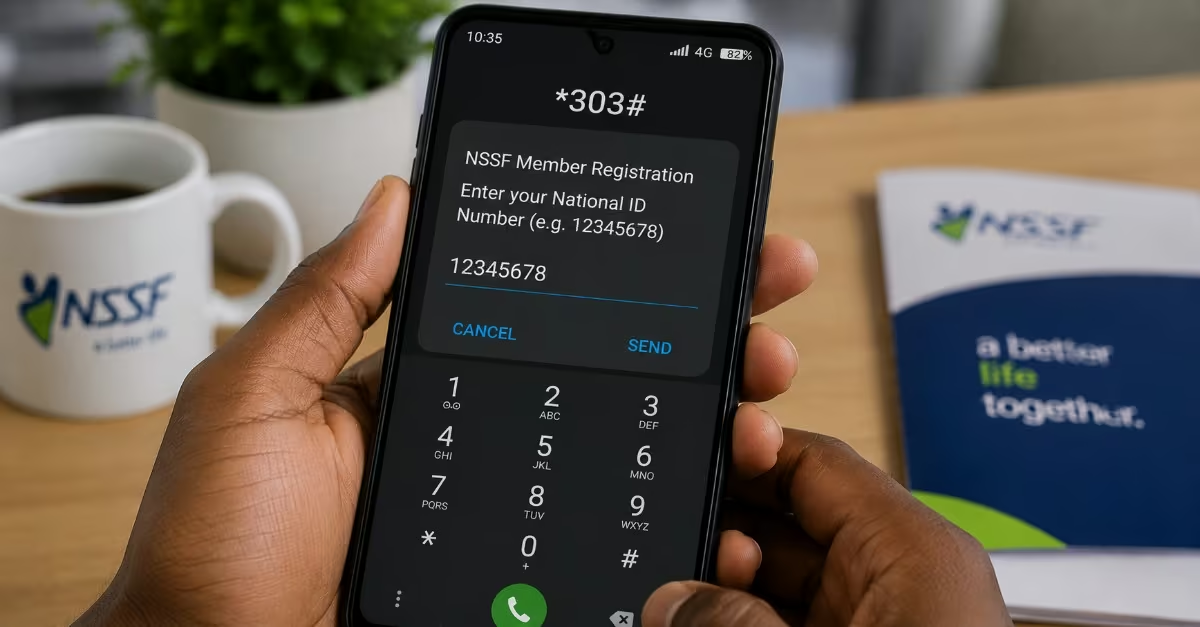
- Enter your ID number and full name as requested when prompted by the system.
- Follow each on-screen prompt carefully and confirm your details before proceeding to the next prompt.
Step Three: Receive Your NSSF Membership Number
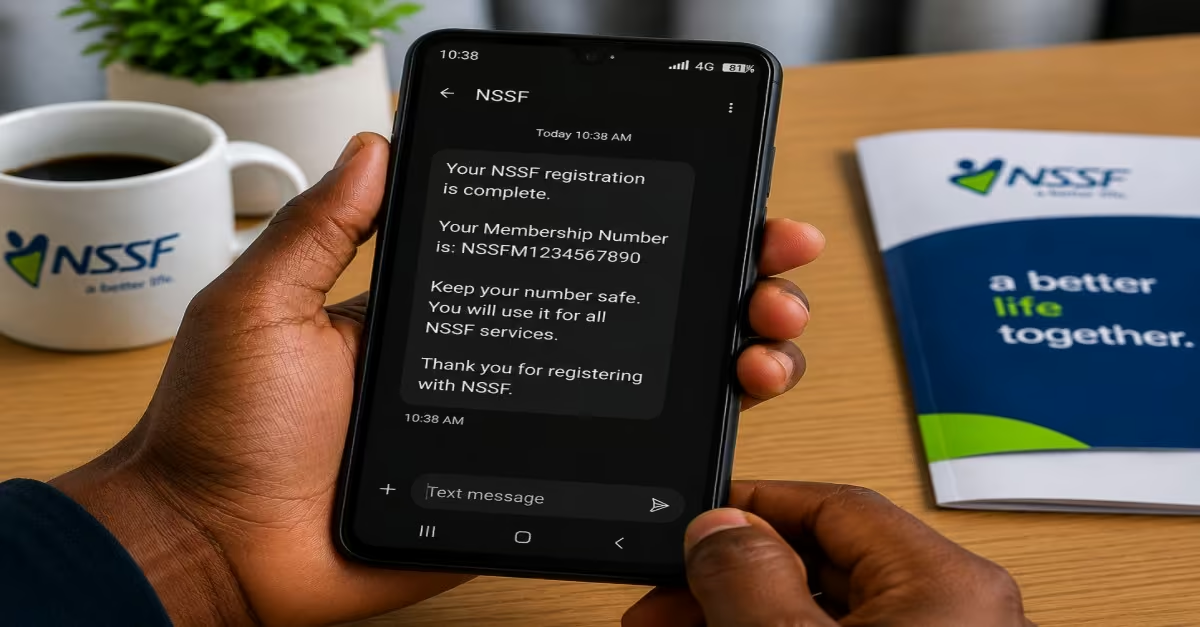
- Upon successful completion of the prompts, you will receive your official NSSF membership number via SMS on the same phone number used to dial.
- Save this number securely — you will need it for all future NSSF transactions, contribution tracking, and benefit claims.
Step Four: Activate Your Account
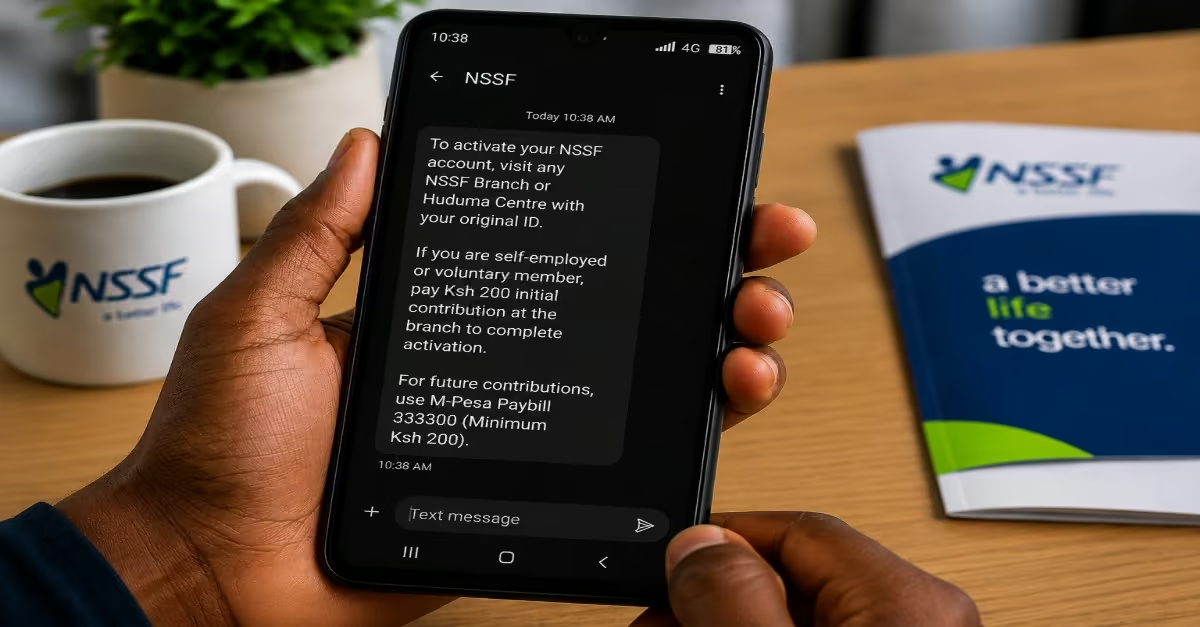
Quick tip: activation of the account is only needed for Voluntary/Self-Employed Members
- If you are self-employed or a voluntary member, visit any NSSF branch with your original National ID to activate your membership card.
- Pay an initial contribution of KES 200 at the branch to complete the activation.
- In the future, you can contribute any amount (minimum KES 200) at any time via M-Pesa Paybill number 333300.
How To Activate Your NSSF Member Account
After successfully registering for an NSSF number, the next step is activating your member account to access online services. Account activation allows members to log in, check contributions, update details, and manage their NSSF records through the online portal. Follow the procedure below so you can activate your account.
Step 1: Visit the NSSF Self-Service Portal
- Go to the NSSF Self-Service Portal to begin the account activation process.
Step 2: Select “Member Activation”
- On the homepage, click on Member Self-Service. You will see “Member Activation” in the drop-down menu; click Member Activation.
Step 3: Enter the Required Details
Provide the following information:
- Your username (created during pre-registration)
- Your password (created during pre-registration)
- Your encoded NSSF PIN Key (issued by the NSSF branch)
Step 4: Click “Activate”
- After entering all the required details, click the Activate button. The system will verify your information and activate your account if everything is correct.
Step 5: Log In to Your Account
Once your account has been activated successfully, you can log in to:
- View your NSSF contributions.
- Check and download your NSSF statement.
- Update your personal information.
- Access other available member services on the portal
How To Register An NSSF Number As An Employer
Employers in Kenya are required to register with the National Social Security Fund (NSSF) so they can remit monthly contributions for their employees. The registration process is also completed online. Once registered, the employer receives an NSSF employer number that is used to manage employee records, submit contributions, and access NSSF services online.
Step 1: Gather Your Requirements
Before starting the registration process, make sure you have the following documents ready:
- Certificate of Incorporation, for companies.
- Registration of Business Names, for sole proprietors/partnerships
- Trading License
- KRA PIN Certificate of the business
- Postal and physical address of the business
- Contact person details (name, phone number, and email address)
- National ID, Passport, or Alien ID of the individual employer (for individual or sole proprietor registrations)
Step 2: Visit the NSSF Self-Service Portal
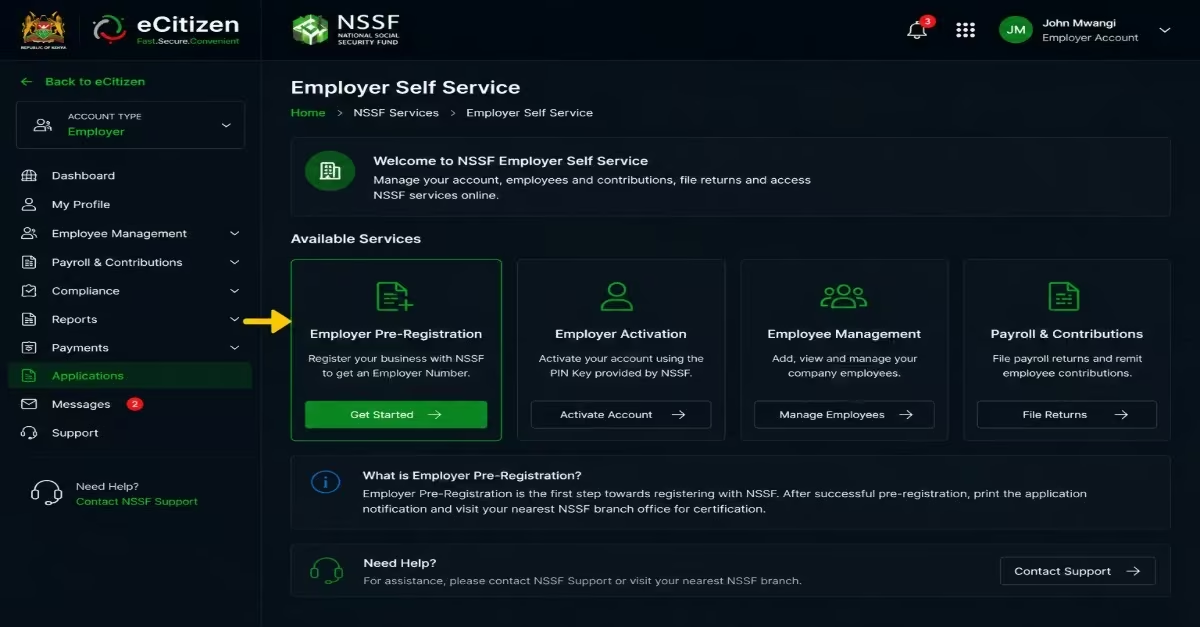
- Go to selfservice.nssf.or.ke to begin the online registration process.
- Under the Employer Self Service section, click on “Employer Pre-Registration.”
Step 3: Choose Your Employer Type and Complete the Form
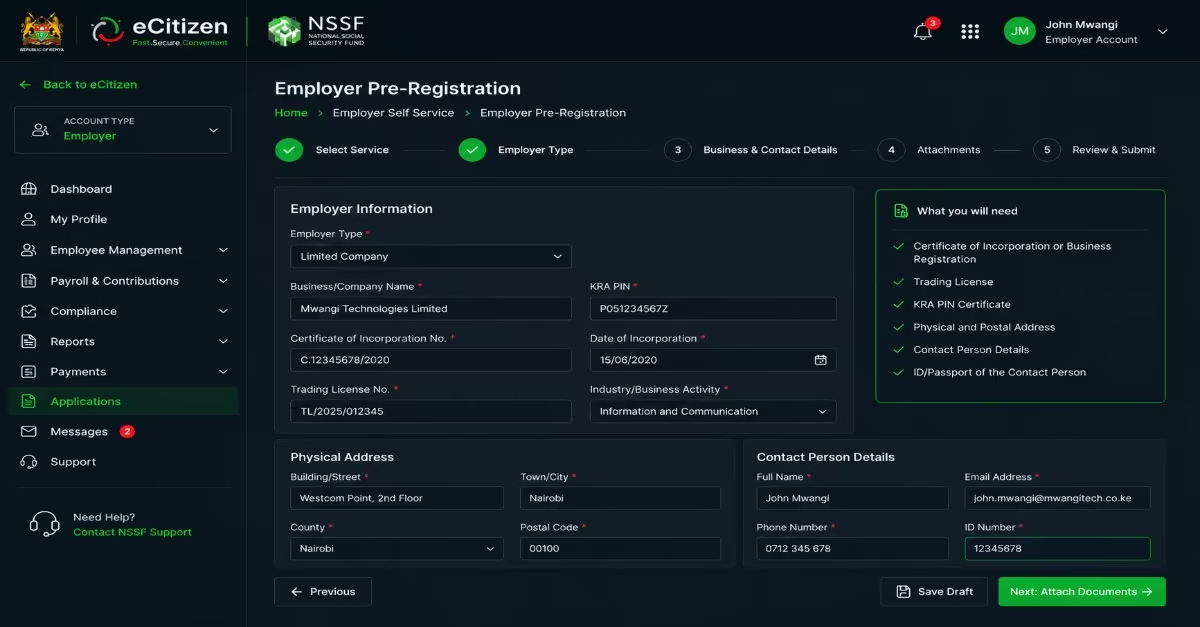
- Select your employer type from the available options, including Sole Proprietor, Partnership, Limited Company, or NGO/Parastatal.
- Fill in the online form carefully by entering your business name, KRA PIN, physical and postal address, and contact person details.
- Attach the required supporting documents — Certificate of Incorporation or Business Name Registration, and Trading License.
Step 4: Print Your Application Notification
- After completing and submitting the form, print the application notification displayed on the screen.
Quick Tip: Do not skip this step because the printed notification will be required during the next stage of the registration process.
Step 5: Visit Your Nearest NSSF Branch for Certification

- Take the printed application notification to the nearest NSSF branch office, where your registration request will be reviewed and approved.
- The branch office will then issue you with a PIN Key to activate your account.
- Carry the original supporting documents (Certificate of Incorporation, Trading License, and ID) for verification purposes.
Step 6: Activate Your Employer Account Online
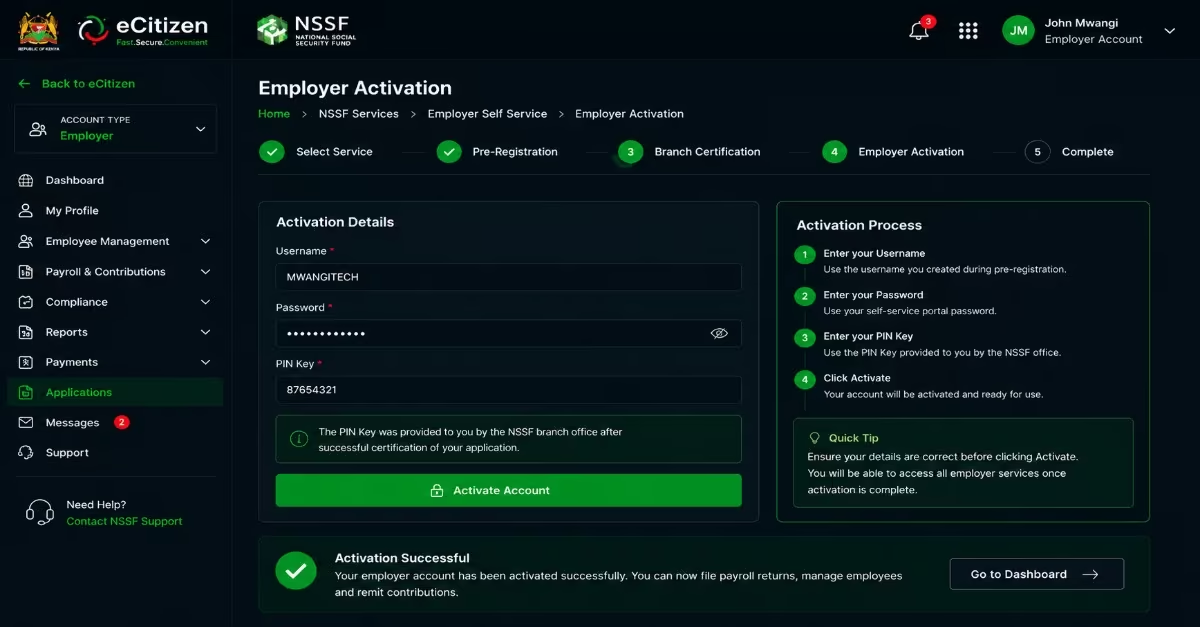
- Once you receive the PIN Key from the NSSF office, return to the Self-Service Portal and click on “Employer Activation.”
- Enter your Username, Password, and PIN Key, then click Activate to complete the process.
- After successful activation, you can start filing payroll returns and submitting employee contributions through the portal.
Frequently Asked Questions
What Happens If I Submit An NSSF Application Incorrectly?
If your application has errors or is missing required documents, it may be rejected or delayed during certification at the NSSF branch. In such cases, you will be required to correct the information and resubmit. Always make sure to carefully review all details and confirm that all supporting documents are attached before submitting.
How Long Does The Registration Process of NSSF Take?
The process involves completing the online pre-registration form, printing the application notification, and visiting the nearest NSSF branch for certification, after which your PIN Key is issued immediately or shortly after. The entire process can take as little as one to a few business days if all your documents are in order. However, processing time may vary depending on the branch.
Are There Any Fees Associated With The Registration of NSSF?
Employer registration with NSSF is free of charge. However, once registered, late payment of monthly contributions attracts a penalty of 5% of the total contributions due for each month or part of a month that the payment is delayed. It is important to make payments on time to avoid penalties.
What Is The Deadline For Remitting Monthly Contributions of NSSF?
Contributions must be paid on or before the 9th day of the following month. Any payments made after the 9th day will attract penalties.
What Happens If I Don’t Register NSSF As An Employer?
Failure to register as an employer may result in a fine of KES 50,000 under the NSSF Act. New businesses are also required to complete NSSF registration within 30 days of hiring their first employee.
Read Also: How to Apply for a Class D Work Permit in Kenya (2026 Guide & Costs)
Conclusion
Applying for an NSSF number in Kenya has become a much simpler and more accessible process with the help of digital platforms such as eCitizen and NSSF self-service portals. Whether you are an employee, self-employed individual, or employer, the process is designed to ensure that you can register efficiently with the right documents and minimal delays. I have extensively explained the processes followed while registering either as an employer or employee. Also, ensure that you provide accurate information and complete the necessary verification at the NSSF office; you can successfully obtain and activate your NSSF number within a short time. This registration is an important step toward securing your financial future, ensuring compliance with employment laws, and building long-term retirement benefits.