
When you buy a product and pay with M-PESA, the business owner or cashier often asks you to show your M-PESA confirmation message before giving you the goods. This is one way businesses verify payments. This method can be inconvenient, especially when you have to unlock your phone, search for the confirmation message, and wait for the cashier to verify the transaction. For businesses that serve many customers, this process can also cause unnecessary delays. Instead of relying on customers to show their payment messages, businesses can make payment confirmation easier by allowing cashiers to receive transaction alerts directly on their phones. This is the work of new technology launched by Safaricom known as the M-PESA Jumbe. The service lets business owners share M-PESA payment notifications with employees, making it easier to confirm incoming payments as soon as customers complete transactions. But you can’t do that without activating M-PESA Jumbe and assigning staff so they can start receiving M-PESA alerts. This is what this article will cover.
- What Is M-PESA Jumbe
- How M-PESA Jumbe Works for Till and Paybill Payments
- What Information Appears in an M-PESA Jumbe Notification?
- Benefits of M-PESA Jumbe for Till and Paybill Businesses
- Requirements for Activating M-PESA Jumbe
- How to Activate M-PESA Jumbe
- Method 1: How to Activate M-PESA Jumbe via USSD (*234#)
- Method 2: How to Activate M-PESA Jumbe on the Merchant Business Hub
- How to Remove an Employee From M-PESA Jumbe
- FAQs on M-PESA Jumbe
- 1. How do I activate M-PESA Jumbe for my Till or Paybill?
- 2. How Many Employees Can I Add To M-PESA Jumbe?
- 3. Can Staff Pause or Stop Receiving M-PESA Jumbe Notifications Themselves?
- 4. What Is A Jumbe ID, And Does the Customer Need To Register For Jumbe?
- 5. What Is the Difference Between Suspending and Removing A Staff Member On M-PESA Jumbe?
- Conclusion
What Is M-PESA Jumbe
M-PESA Jumbe is a payment notification service introduced by Safaricom to help businesses confirm customer payments without requiring the business owner to verify every transaction. Also known as M-PESA Split Notifications, the service allows businesses using Lipa na M-PESA Till and Paybill numbers to share payment alerts with selected employees, such as cashiers, shop attendants, and sales representatives.
When a customer pays a business that has activated the service, three separate notifications are generated. The business owner continues to receive the usual M-PESA transaction message, while nominated employees receive a limited payment alert showing details such as the transaction reference, amount paid, business name, Till or Paybill number, and transaction date and time, as per Staff writers (2026). The customer also receives a separate Jumbe confirmation message. This allows employees to confirm payments directly from their phones without having to contact the business owner or ask customers to display their personal M-PESA messages.
How M-PESA Jumbe Works for Till and Paybill Payments
Unlike the traditional payment notification system, where the business owner receives the transaction alert, Jumbe shares payment notifications among three recipients: the business owner, nominated employees, and the customer. Each recipient receives a separate message with Jumbe Mpesa information relevant to their role. The process is explained below, as highlighted in Ashers’ guide on Jumbe Mpesa.
1. Business Owner Receives the Full M-PESA Notification
Whenever a customer makes a payment through the registered Till or Paybill number, the business owner or primary account holder continues to receive the usual M-PESA transaction notification. This message contains the full transaction details, including the amount received and the business’s M-PESA balance.
2. Nominated Employees Receive Limited Payment Alerts
Employees authorized by the business owner receive separate payment alerts directly on their mobile phones. These notifications contain important details such as the transaction reference, amount paid, and business name. This lets cashiers and other employees confirm customer payments without contacting the business owner. However, these alerts do not give employees access to the owner’s M-PESA balance, PIN, or transaction history.
3. Customers Receive a Separate Jumbe Confirmation Message
Customers also receive a separate Jumbe confirmation SMS in addition to their usual M-PESA transaction message. This message includes the payment details needed to confirm a successful transaction without showing sensitive information such as their full name, phone number, or M-PESA balance. Customers can therefore show the Jumbe message to the cashier as proof of payment instead of displaying their full M-PESA transaction message.
What Information Appears in an M-PESA Jumbe Notification?

M-PESA Jumbe notifications contain important transaction details that help business owners and their employees identify and confirm customer payments. Amos’ guide on how Jumbe Mpesa works highlights the following information that appears on Jumbe notifications:
- Transaction Reference – Each payment has a unique transaction reference that helps employees identify and distinguish individual payments, especially when several customers make payments of similar amounts.
- Amount Paid – The notification displays the exact amount the customer paid to the business. This helps employees confirm whether the payment matches the amount charged for the goods or services purchased.
- Business Name – The alert displays the registered business name linked to the Till or Paybill number. This helps employees confirm that the payment was sent to the correct business.
- Payment Number – The notification identifies the Till or Paybill number that received the payment.
- Transaction Date and Time – The notification shows the date and time the customer completed the payment. Employees can use these details to match the alert with the customer’s purchase and confirm when the transaction took place.
- Jumbe ID – Where included, the notification displays a customer identifier known as a Jumbe ID instead of showing the customer’s full name and phone number. This helps employees identify the payment while protecting the customer’s personal information.
Benefits of M-PESA Jumbe for Till and Paybill Businesses
Activating M-PESA Jumbe gives businesses a convenient way to manage incoming payments and improve the customer checkout experience. Business owners can enjoy several benefits, including:
- Receive M-PESA payment alerts directly on employees’ phones
- Reduce delays when confirming customer payments
- Protect customers’ M-PESA personal information
- Improve payment verification in busy businesses
- Allow business owners to delegate payment monitoring
Requirements for Activating M-PESA Jumbe
Before activating M-PESA Jumbe, there are several requirements that your business and nominated employees must meet. Make sure you have the following in place before starting the activation process:
- An Eligible M-PESA Business Payment Account – Your business must have a supported M-PESA Till or Paybill number.
- Access to the Authorized Business Administrator’s Number – You must have access to the Safaricom number registered as the business account’s Admin or Primary Operator. Ordinary employees cannot activate the service independently.
- Active Safaricom Numbers for Nominated Employees – The employees you want to add must have active Safaricom mobile numbers registered with M-PESA. You cannot add Airtel numbers or business Till or Paybill numbers as staff recipients.
- Employee Consent to Receive Jumbe Notifications – Each nominated employee must accept the invitation sent to their phone before they can start receiving payment alerts. Adding an employee’s number does not automatically activate notifications.
- Acceptance of M-PESA Jumbe Terms and Conditions – The administrator must read and accept Safaricom’s applicable terms and conditions before activating the service for a particular short code.
How to Activate M-PESA Jumbe
To activate M-PESA Jumbe, you can use one of two methods: USSD or the merchant business hub. Follow the process below to activate yours.
Method 1: How to Activate M-PESA Jumbe via USSD (*234#)
M-PESA Jumbe allows businesses to nominate employees to receive limited payment alerts without exposing the business owner’s M-PESA balance or the customer’s full name and phone number. Only the authorized business administrator can activate the service for a Till or Paybill number.
1. Open the M-PESA Jumbe Menu
- Dial *234# using the Safaricom number registered as the business administrator.
- Select the Till or Paybill number you want to activate the service for.
- Read and accept the Terms and Conditions if you want to use the service.
2. Nominate the Staff Member
- Enter the staff member’s full name and Safaricom mobile number.
- The number must be an active personal Safaricom line registered with M-PESA. Airtel numbers and Till or Paybill numbers are not accepted.
- Enter your M-PESA PIN to authorize the nomination.
- The nominated employee will then receive an SMS containing an acceptance code and instructions on how to complete the process.
3. Staff Accept the Nomination
- The nominated employee must dial the USSD code provided in the SMS and enter the acceptance code. Both the business administrator and the employee must consent before the alerts can become active.
- If the invitation expires before the employee accepts it, you can resend the invitation or nominate the employee again.
- Once the employee accepts the invitation, they will start receiving limited payment alerts in near real time whenever customers make payments.
- You can nominate up to 50 recipients per shortcode, while the business owner continues receiving the usual full M-PESA transaction notifications on the main registered number.
Method 2: How to Activate M-PESA Jumbe on the Merchant Business Hub
M-PESA Jumbe, officially known as Split Notifications, lets businesses nominate employees to receive limited payment alerts when customers make payments. You can access the service through the Merchant Business Hub and activate it by following the process below.
1. Log in as the Admin
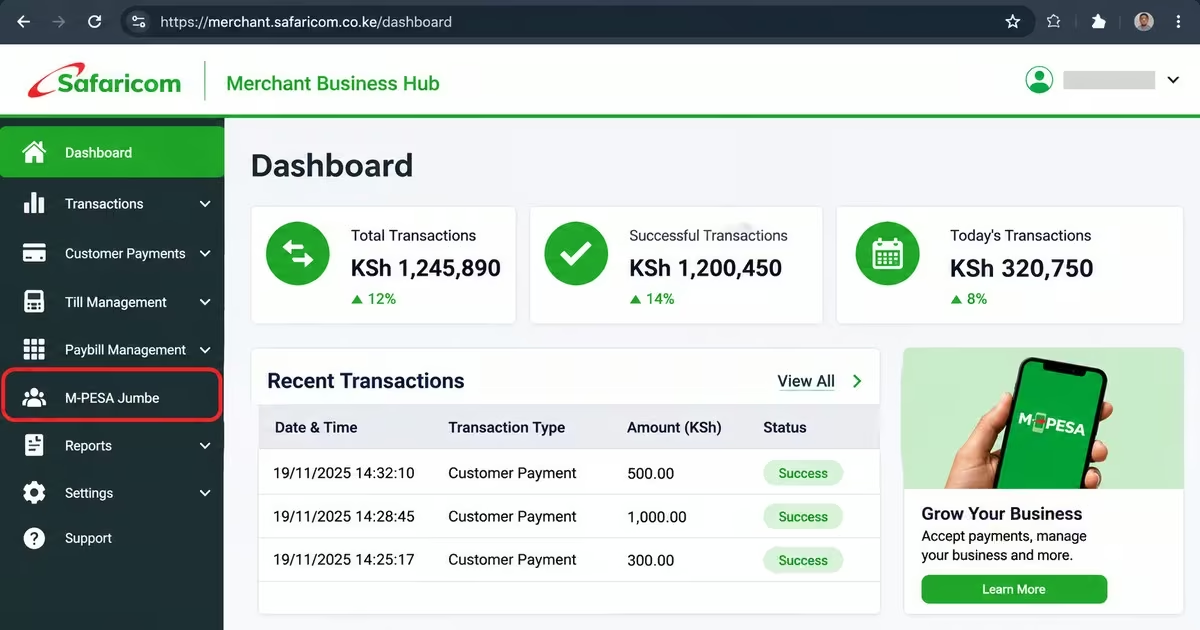
- Log in to the M-PESA Merchant Business Hub using the business administrator’s account.
- Select the Till or Paybill shortcode you want to activate the service for.
2. Accept the Terms and Conditions
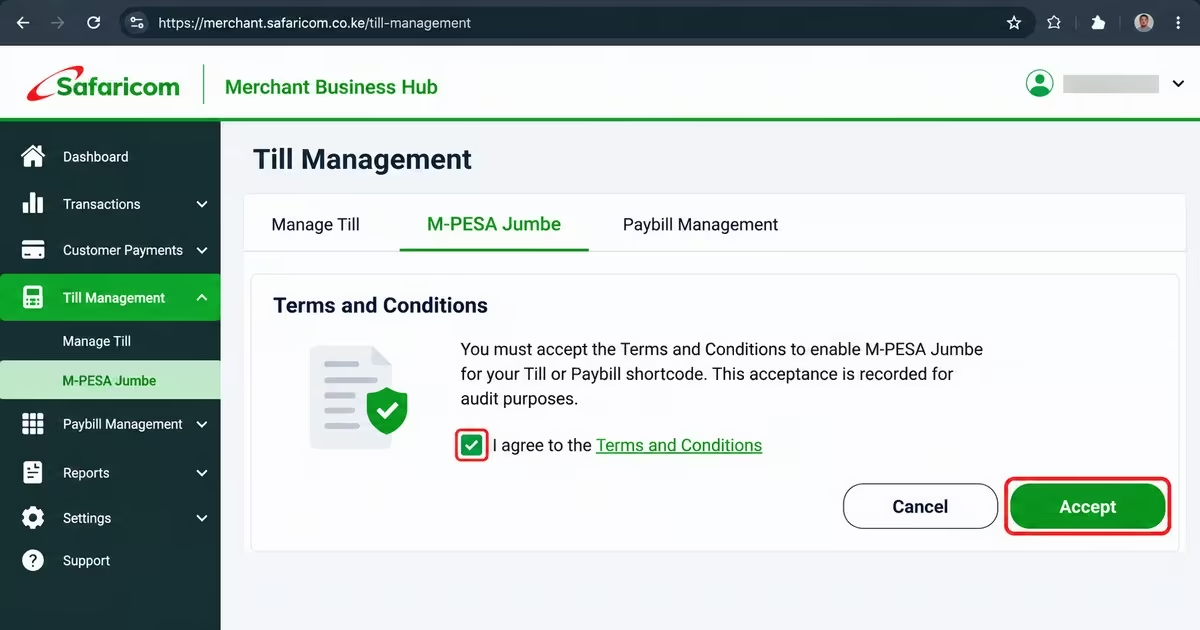
- You must accept the Terms and Conditions once for each shortcode. You may also need to accept them again whenever Safaricom updates the terms.
- Each acceptance is recorded for audit purposes.
3. Nominate Your Staff
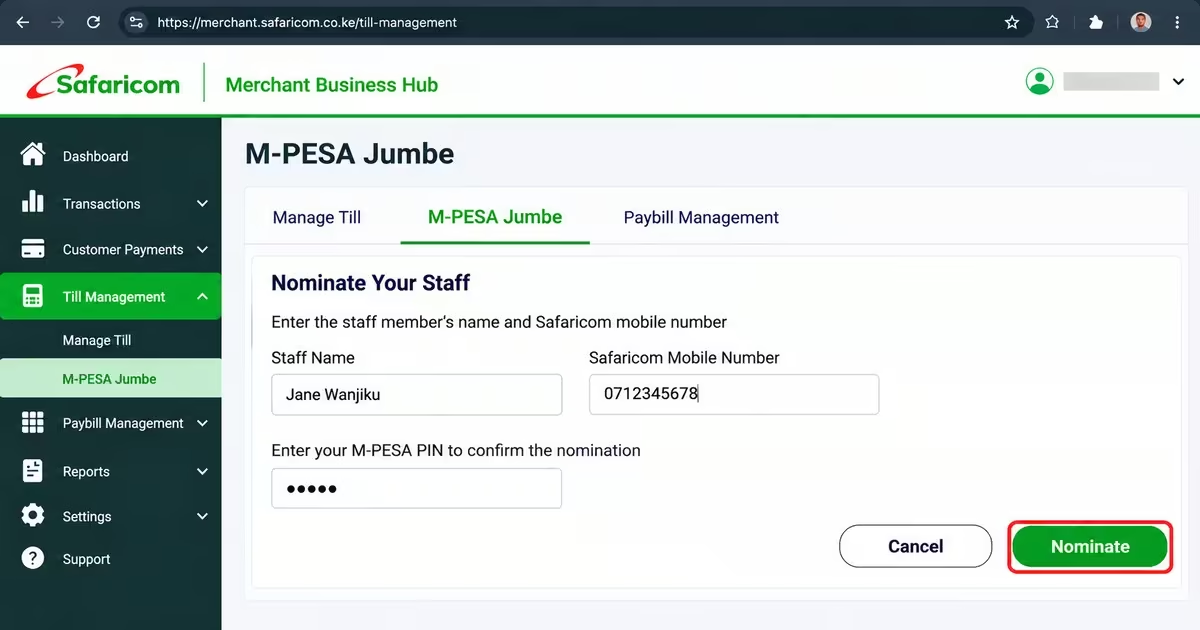
- Enter the staff member’s name and Safaricom mobile number.
- The number must be an active personal Safaricom line registered with M-PESA. Airtel numbers and Till or Paybill numbers are not accepted.
- Enter your M-PESA PIN to confirm the nomination.
- On the Merchant Business Hub, nominations follow your business’s approval procedures. This means another authorized user must approve any changes you make.
4. Staff Accept the Nomination
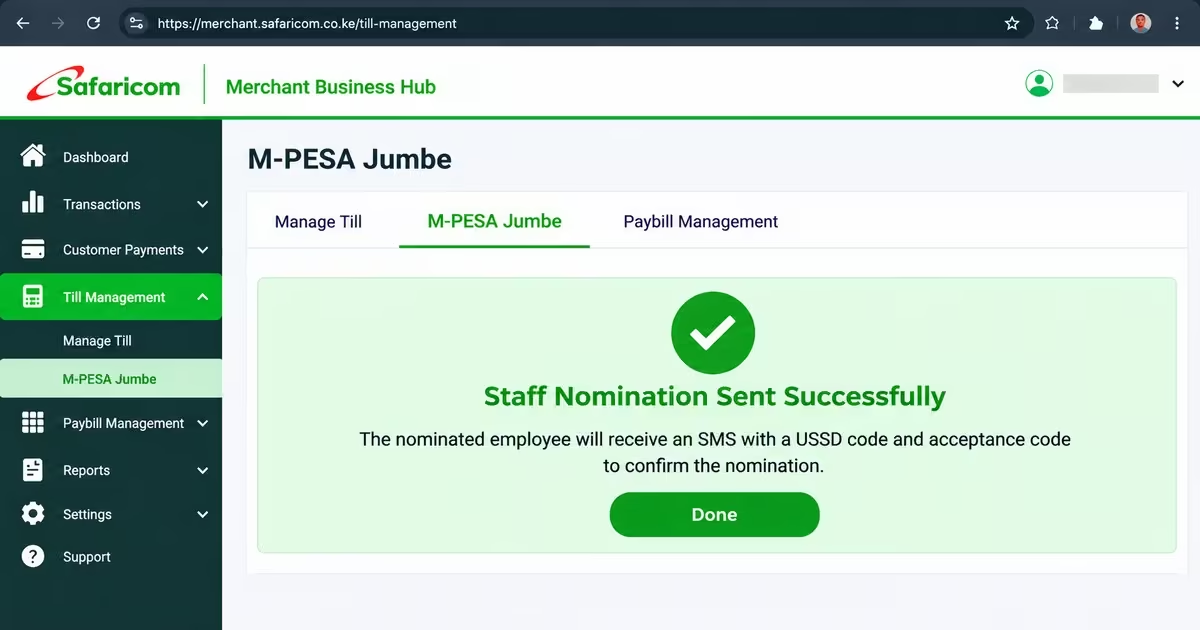
- The nominated employee receives an SMS containing a USSD code and an acceptance code.
- They must dial the USSD code and enter the acceptance code to accept the invitation.
- Payment alerts will not start until the employee accepts the nomination. If the invitation expires before acceptance, you can send another invitation.
5. Confirm and Add More People
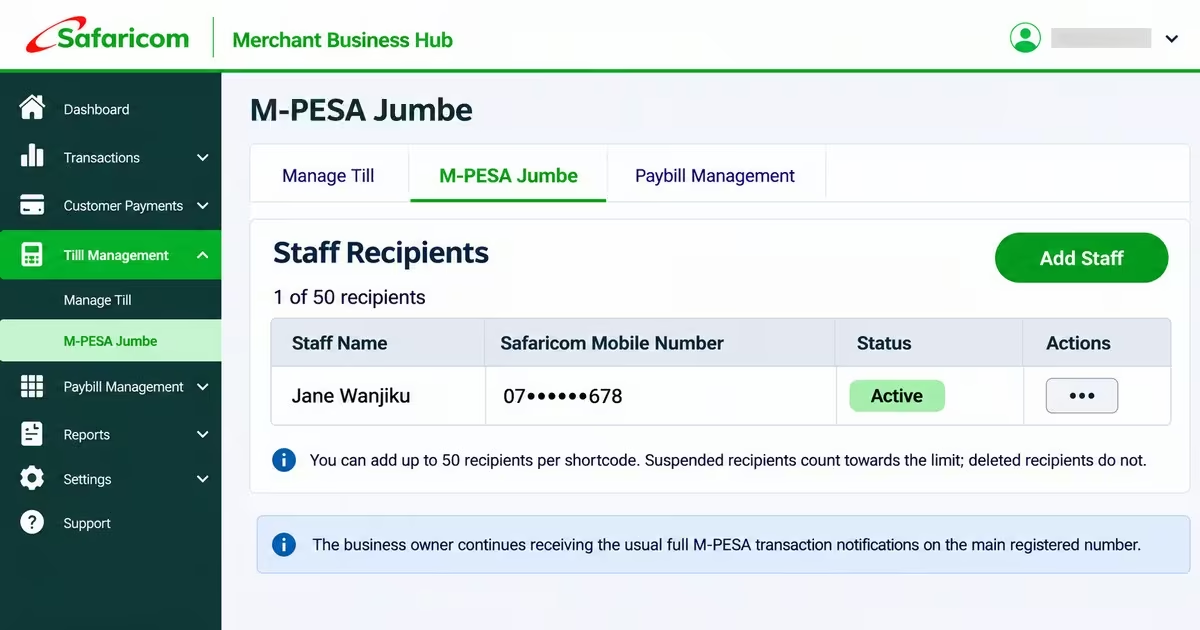
- Once the employee accepts the invitation, their details will appear as an active recipient for that shortcode.
- You can add up to 50 recipients per shortcode. Suspended employees still count towards this limit, while deleted employees do not.
- The business owner continues receiving the usual full M-PESA transaction notifications on the main registered number.
How to Remove an Employee From M-PESA Jumbe
Removing an employee from M-PESA Jumbe is permanent. Once removed, the employee immediately stops receiving payment notifications and is deleted from the recipient list. If you want the employee to receive payment alerts again in the future, you must add them again through the nomination process, and they must accept the invitation once more.
- Dial *234# using the Safaricom number registered to the Admin or Primary Operator.
- Select the relevant Till or Paybill number.
- Choose the Manage Recipients or Split Notifications / M-PESA Jumbe option.
- Select the employee you want to remove from the list.
- Choose Delete.
- Confirm the action. You will be required to enter your M-PESA PIN.
- The system will confirm that the employee has been removed. Payment notifications to that number will stop immediately.
Read Also: Kenya Power Prepaid Electricity Tokens in Kenya
FAQs on M-PESA Jumbe
1. How do I activate M-PESA Jumbe for my Till or Paybill?
Only the Admin (Primary Operator) can activate the service. Dial *234# and follow the process outlined above.
2. How Many Employees Can I Add To M-PESA Jumbe?
You can nominate up to 50 recipients for each Till or Paybill number. Both active and suspended employees count towards this limit, while removing an employee frees up a space.
3. Can Staff Pause or Stop Receiving M-PESA Jumbe Notifications Themselves?
Yes. Employees can dial *234# and select Manage Split Notifications, or use the direct code provided in their invitation SMS. They can temporarily pause notifications or permanently opt out. Pausing notifications is private, while permanently opting out notifies the merchant.
4. What Is A Jumbe ID, And Does the Customer Need To Register For Jumbe?
A Jumbe ID is a privacy identifier, such as NK_74, generated using the customer’s initials and the last two digits of their phone number. Customers do not need to register for the service. They automatically receive a separate Jumbe receipt without their full personal details or M-PESA balance when they pay a merchant who has activated the feature.
5. What Is the Difference Between Suspending and Removing A Staff Member On M-PESA Jumbe?
Suspending an employee temporarily stops payment alerts but keeps their details on the recipient list. The employee still counts towards the 50-recipient limit but can be reactivated without going through the nomination and consent process again. Removing an employee permanently deletes them from the list, frees up a space, and requires the business owner to nominate them again. The employee must also provide fresh consent before receiving payment alerts.
Conclusion
M-PESA Jumbe provides businesses using Lipa na M-PESA Till and Paybill numbers with a convenient way to manage payment confirmations by allowing authorized employees to receive transaction alerts directly on their phones. To activate it, dial *234#, accept the terms and conditions, and nominate the staff member who will receive the messages. Staff must confirm consent by dialing the USSD and entering the acceptance code; after confirmation, they will start receiving payment alerts. By using this technology, your business can reduce checkout delays, minimize interruptions, and protect customers’ personal payment information.