
Taxpayers with outstanding debts to the Kenya Revenue Authority (KRA) have a limited opportunity to clear their tax obligations without paying accumulated penalties, interest and fines. Under the 2026 tax amnesty programme, eligible taxpayers will receive a 100 per cent waiver of penalties, interest, and fines on qualifying tax debts. The programme is still open and closes on 31 December 2026. The tax amnesty applies to qualifying tax liabilities that arose on or before 31 December 2025.
The Finance Act 2026 introduced the tax amnesty to encourage taxpayers to settle outstanding tax obligations and bring their tax affairs up to date. Taxpayers who paid their principal tax in full by 31 December 2025 qualify for the waiver automatically, while those with outstanding principal tax can settle it during the amnesty period to have penalties and interest waived. Taxpayers who do not owe principal tax but have outstanding late-filing penalties qualify automatically for the relief after filing all their pending tax returns. However, the programme excludes tax obligations arising from 1st January 2026 onwards, meaning all principal taxes, penalties and interest for that period will remain fully payable.
With the deadline approaching, this guide explains:
- What is the KRA Tax Amnesty 2026?
- How to Check KRA Penalties on iTax (Step-by-Step)
- Conditions to Qualify For a Tax Amnesty 2026
- How to Apply for KRA Tax Amnesty Payment Plan on iTax
- How Can I Apply for a Tax Amnesty Payment Plan?
- How to Pay KRA Principal Tax via M-Pesa & iTax
- FAQs on Tax Amnesty
- a) What is the Kenya Tax Amnesty 2026?
- b) Who Qualifies for the 2026 Tax Amnesty?
- c) When Does Kenya’s 2026 Tax Amnesty End?
- d) Do I Need to Apply for the Tax Amnesty, Or Is The Waiver Automatic?
- e) Are Tax Debts Arising From 2026 Covered By The Amnesty?
- f) Does the Tax Amnesty Waive The Principal Tax Owed?
- Conclusion
What is the KRA Tax Amnesty 2026?
A tax amnesty is a temporary opportunity offered by a tax authority to help taxpayers clear their outstanding tax debts with reduced financial penalties. The insights from a local forecaster’s guide on who qualifies for tax amnesty state that “During the amnesty period, the tax authority waives, or cancels, penalties and interest that have accumulated on eligible tax debts, provided the taxpayer pays the original amount of tax owed; this original amount is known as the principal tax.” For instance, if you owe KES 100,000 in principal tax plus KES 20,000 in interest and penalties, a tax amnesty may allow you to pay the KES 100,000 principal tax while the KES 20,000 for interest and penalties will be waived.
Read Also: How to Use the KRA Shuru WhatsApp Chatbot (2026): A Step-by-Step Guide for Kenyan Taxpayers
How to Check KRA Penalties on iTax (Step-by-Step)
This method uses the iTax General Ledger Report to view transactions posted to your account, including penalties, for a specific tax obligation and period. It is useful when you want to see exactly when a penalty was charged and the amount involved.
Step 1: Log in to iTax
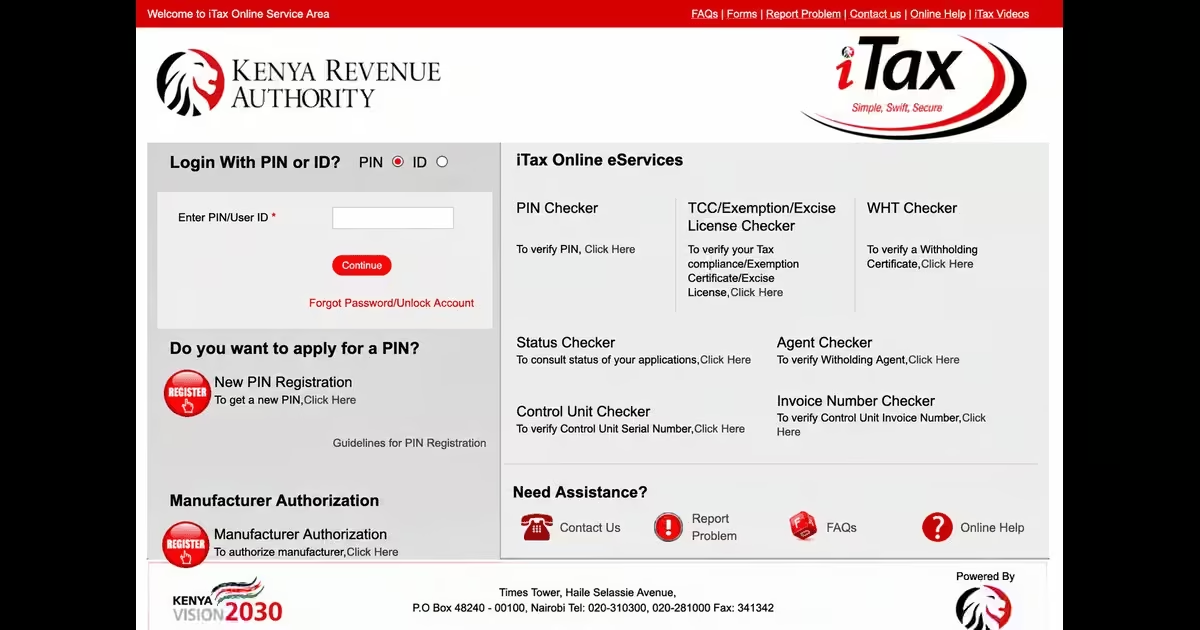
- Go to the KRA iTax portal, enter your KRA PIN, and click Continue.
- Enter your password, complete the arithmetic security check shown on the screen, and click Login to access your dashboard.
Step 2: Open the Ledger Menu
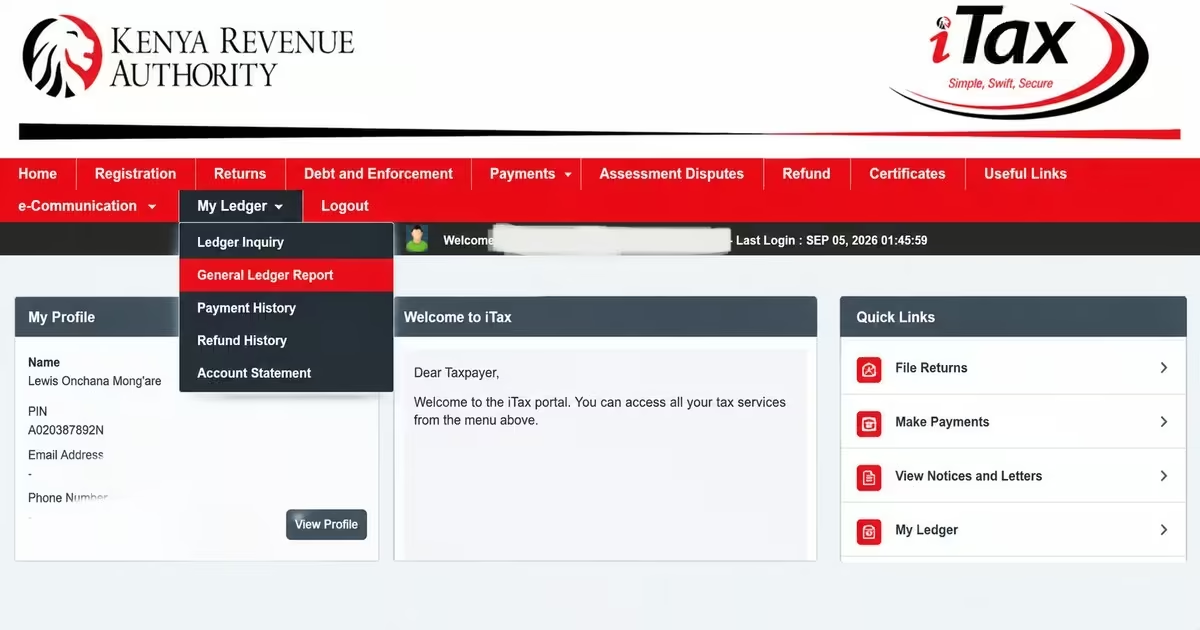
- From your dashboard, click My Ledger on the top menu.
- From the drop-down menu, select General Ledger Report.
Step 3: Choose the Tax Obligation You Want to Check
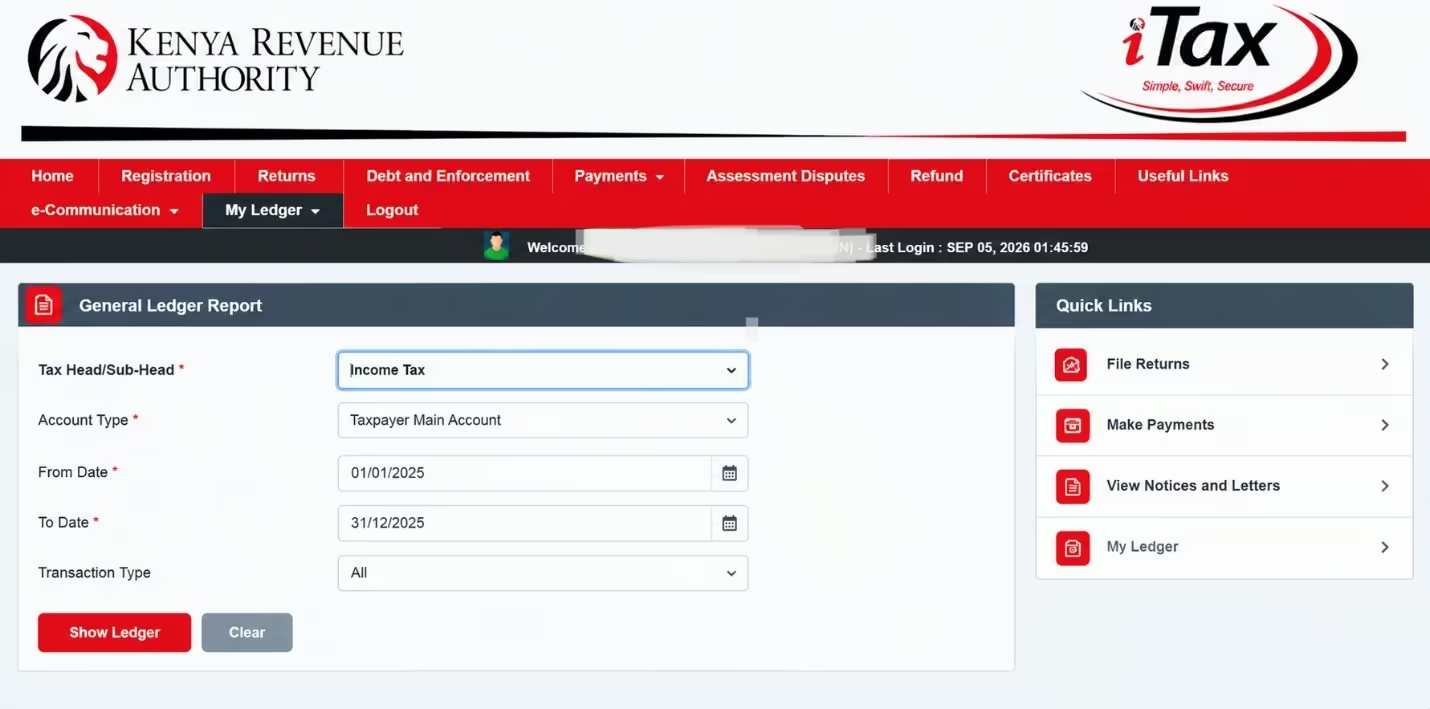
- Under Tax Head/Sub-Head, select the specific tax obligation you want to check, such as Income Tax, VAT, or PAYE.
- If you are unsure which tax obligation has penalties, you may need to repeat the search for each tax head you are registered for.
Step 4: Set the Account Type and Period
- Under Account Type, select Taxpayer Main Account.
- Enter the date range you want to check. Choose a period that covers the tax periods where you believe penalties may have been charged.
Step 5: Filter by Transaction Type
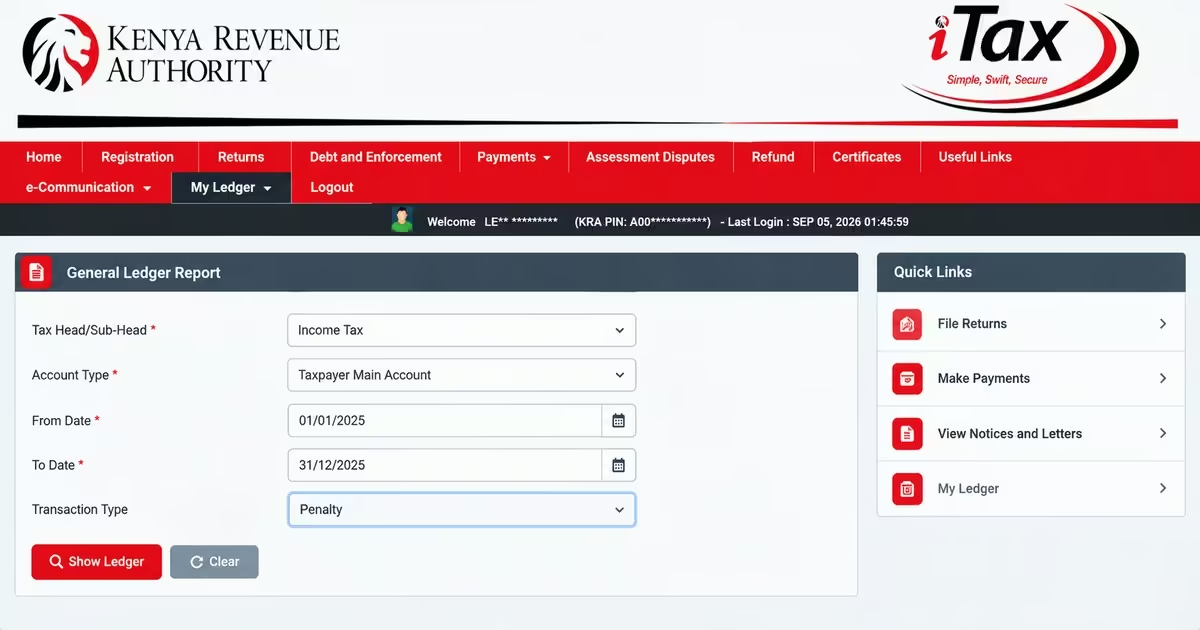
- Where the option is available, set Transaction Type to Penalty. This narrows the results so you don’t have to review every transaction in your ledger.
Step 6: Generate the Report
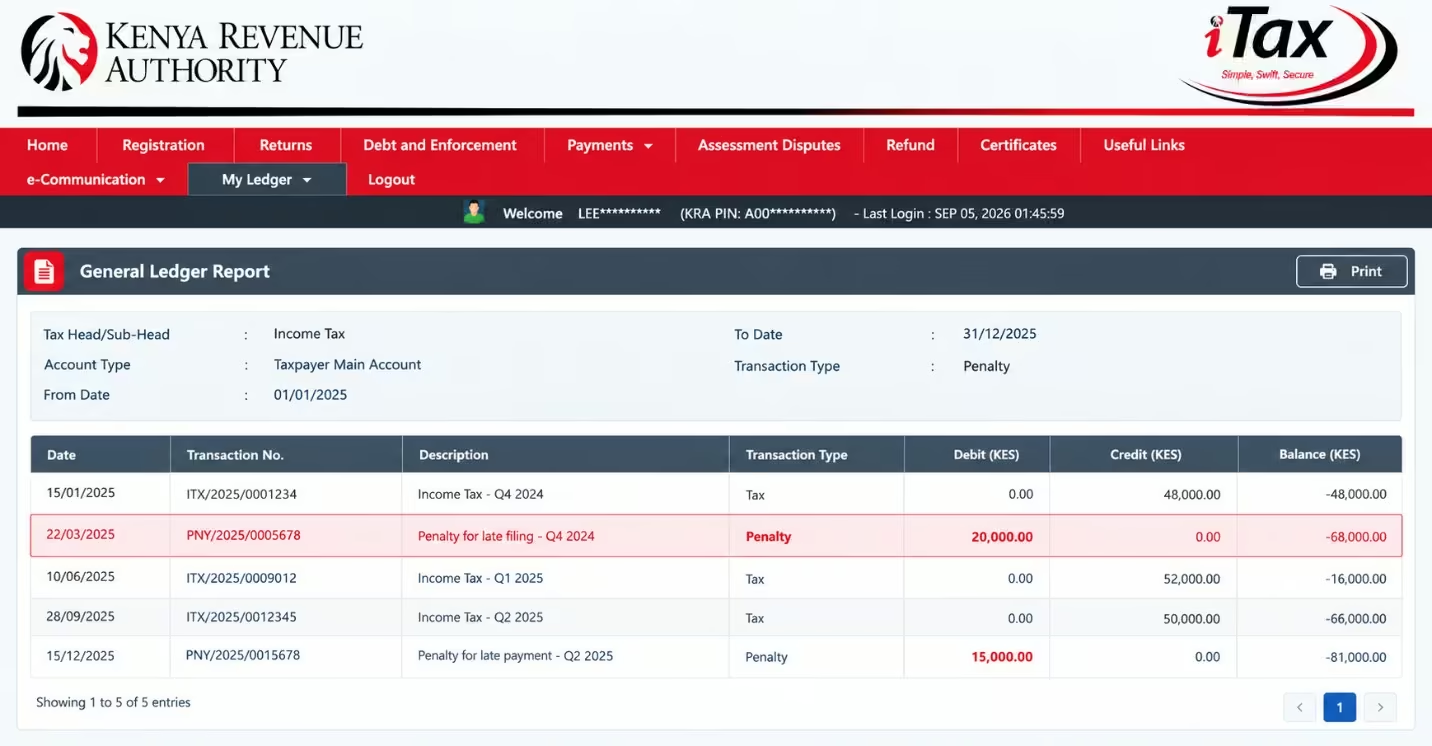
- Click Show Ledger to generate the report.
- A table will appear showing the transactions posted to your account. Check the “Transaction Type” column for entries marked “Penalty” and the “Debit” column to see the amount charged.
Must Read: If no entries appear when you filter the report for “Penalty,” there may be no penalties recorded for that tax obligation and period.
Conditions to Qualify For a Tax Amnesty 2026
The 2026 tax amnesty is designed to make the waiver process largely automatic. Eligible taxpayers do not need to submit a separate application for the amnesty itself. Instead, the waiver is triggered when the conditions set by KRA are met through the iTax system. According to Kennedy’s guide on tax amnesty 2026, the following are the conditions you are supposed to meet for tax amnesty to work.
a) Payment of Outstanding Principal
Taxpayers with outstanding principal tax for periods up to 31 December 2025 are required to pay the principal tax, and the related penalties, interest and fines are automatically waived. To qualify, you must pay the principal tax in full on or before 31 December 2026.
For example, if a taxpayer owes KES 100,000 in principal tax for the period up to 31 December 2025, you are supposed to pay the principal tax due before 31 December 2025, so that the fines, penalties, and interest related to the above principal tax due in your account are waived automatically.
b) Filing of Tax Returns
Taxpayers who have no outstanding principal tax but still have penalties, interest or fines arising from failure to file their returns, or who filed their returns late but are within the qualifying period, which is up to 31st December 2025, qualify for the tax amnesty automatically, given that they file the tax returns which they failed to file with KRA.
The same principle applies to taxpayers who had already cleared their principal tax before the amnesty period began but still had related penalties and interest showing on their iTax ledger. Once the system confirms that the qualifying principal has been cleared, it processes the applicable relief automatically. For instance, you had a tax principal outstanding before 1st July 2025, which you have already paid, but you have not paid the related penalty, interest, or fines. You are automatically eligible for the amnesty, and the fines, interest, and penalties will be waived.
How to Apply for KRA Tax Amnesty Payment Plan on iTax
Taxpayers who cannot afford to pay their qualifying principal tax in one lump sum, in cases where the principal tax is too big, do not necessarily have to miss out on the 2026 tax amnesty. KRA provides a payment plan facility through iTax, which allows eligible taxpayers to spread their principal tax payments over an agreed period. The payment-plan process is available through iTax, allowing taxpayers to arrange their payments while working toward clearing the qualifying principal tax before the 31 December 2026 deadline.
How Can I Apply for a Tax Amnesty Payment Plan?
Taxpayers who cannot pay their qualifying principal tax in full can apply for a Tax Amnesty payment plan through the iTax platform. The process allows eligible taxpayers to spread their payments while ensuring the outstanding principal tax is cleared before the 31 December 2026 deadline.
Step 1: Log in to iTax
- Logging into iTax is the first step when setting up a payment plan for qualifying tax debts under the amnesty.
- Access the KRA iTax portal using your KRA PIN and password.
Step 2: Open the Payments Menu and Apply for a Payment Plan
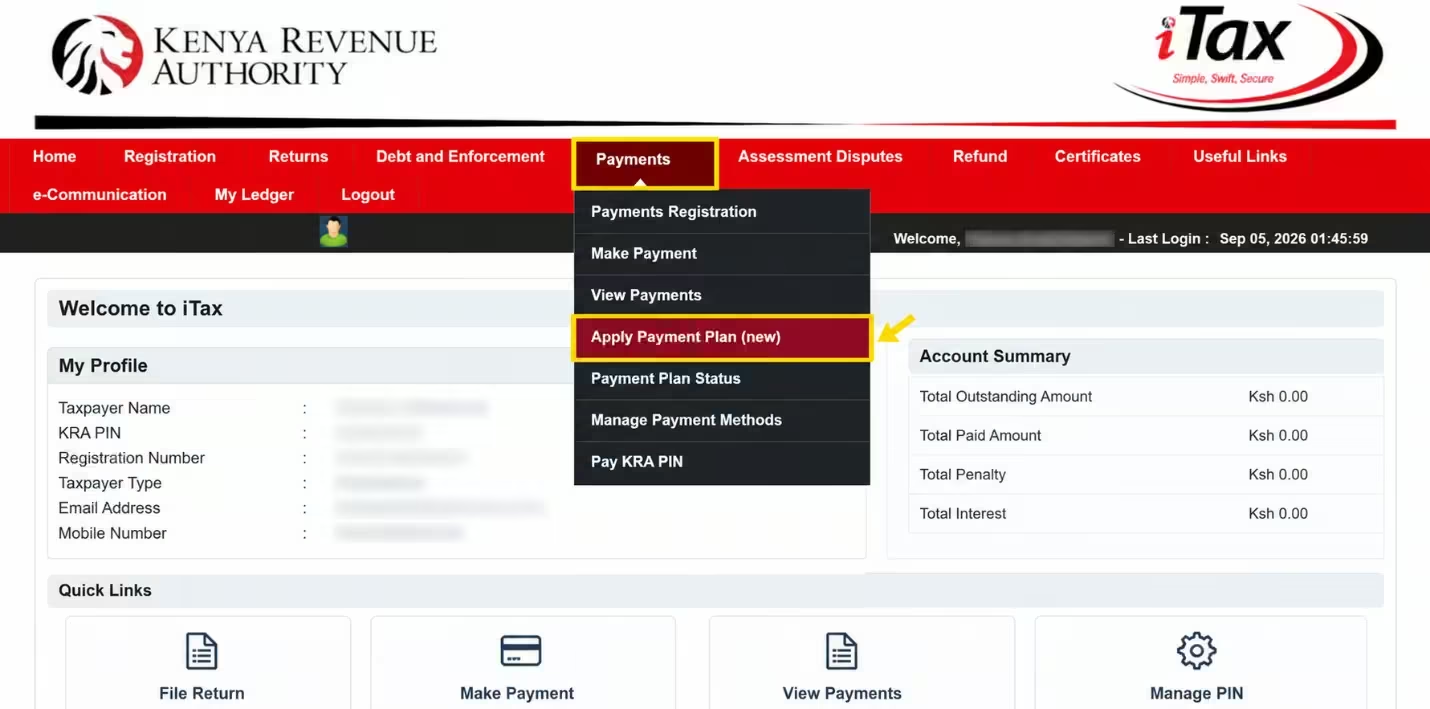
- From the iTax dashboard, open the “Payments menu.
- Select “Apply Payment Plan (new).”
- Choose the relevant amnesty period(s) that you want to include in your payment plan.
Step 3: Generate Your Payment
- Go back to the Payments menu and select “Payments Registration.”
- This allows you to generate the payment reference, which you will use when making the payment.
Step 4: Select the Tax Details and Adjust the Amount
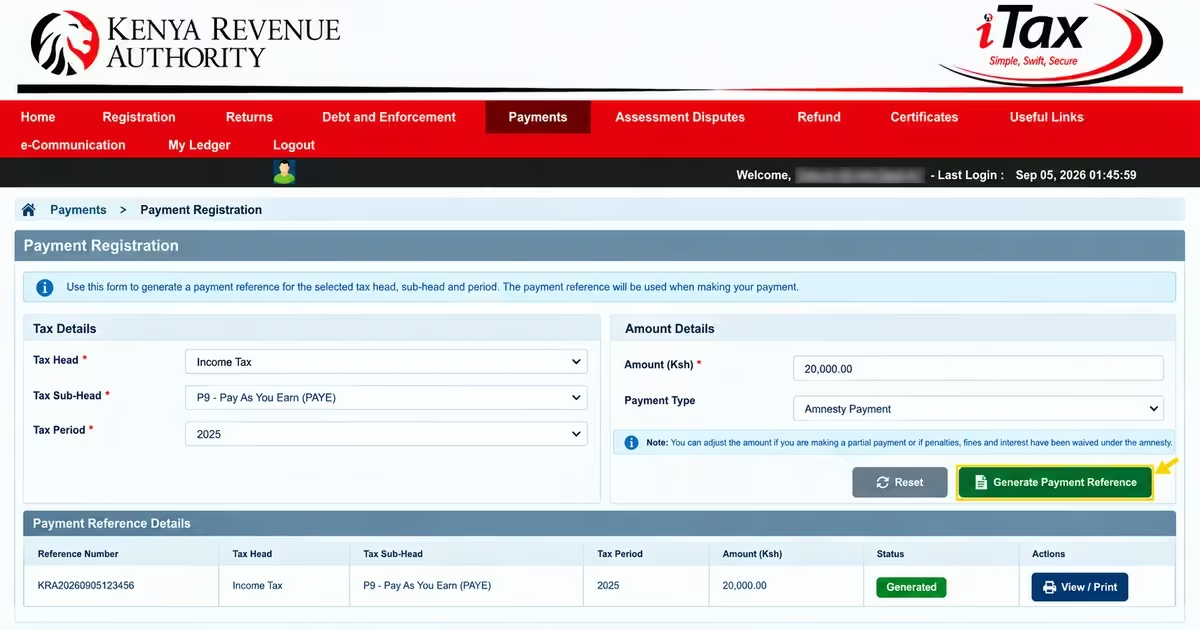
- Select the appropriate tax head, tax sub-head and tax period.
- Where necessary, adjust the payment amount if you are making a partial payment or if penalties, fines and interest have been waived. Under the amnesty, the amount payable is the qualifying principal tax, while the eligible penalties, fines and interest are waived.
Step 5: Follow the Instalment and Deadline Limits
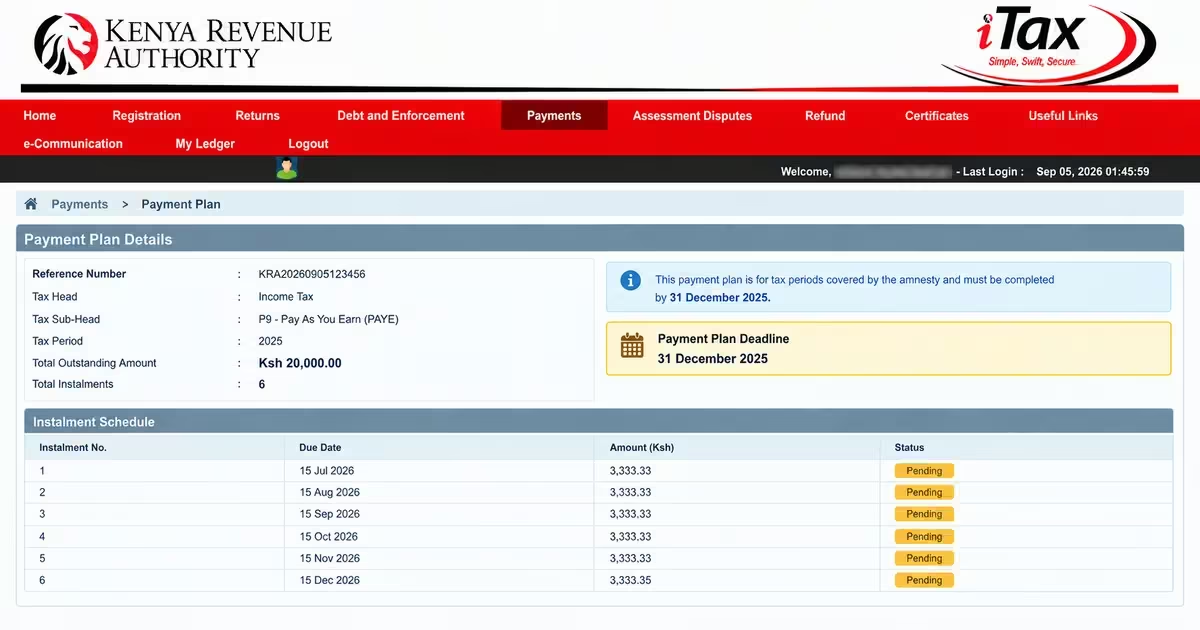
- A payment plan for tax periods covered by the amnesty should run only up to 31 December 2026.
- For example, if a payment plan was applied for in July 2026, it may allow a maximum of six instalments within the amnesty period.
Must Read: The payment arrangement must not extend the tax amnesty beyond 31 December 2026. All qualifying principal tax covered by the arrangement must be fully cleared by that date for the related penalties, interest and fines to be waived.
How to Pay KRA Principal Tax via M-Pesa & iTax
This is the process used, for instance, when you are settling outstanding principal tax. Once you confirm the amount you owe, generate a payment slip on iTax before making the payment. KRA uses the Payment Registration Number (PRN) on the slip to identify and allocate your payment to the correct tax obligation.
Step 1: Log in to iTax
- Go to the KRA iTax portal and log in using your KRA PIN and password.
- Complete the arithmetic security check and click Login to access your dashboard.
Step 2: Start Payment Registration
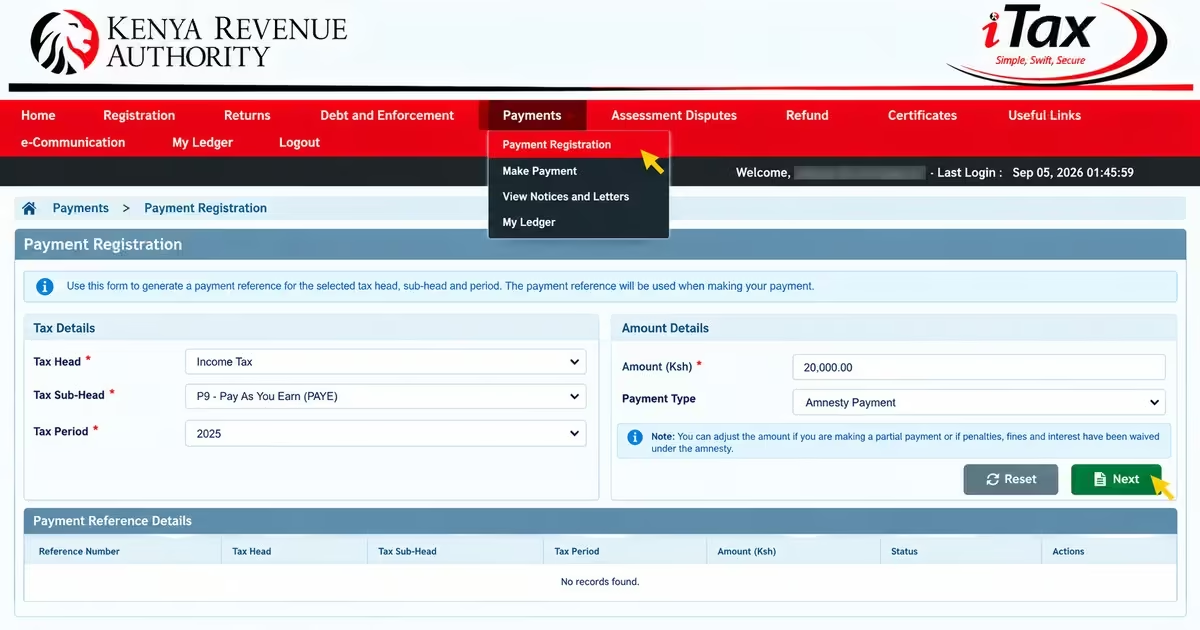
- Click the Payments menu and select Payment Registration.
- On the e-payment page, click Next to proceed to the payment configuration section.
Step 3: Fill In the Payment Details
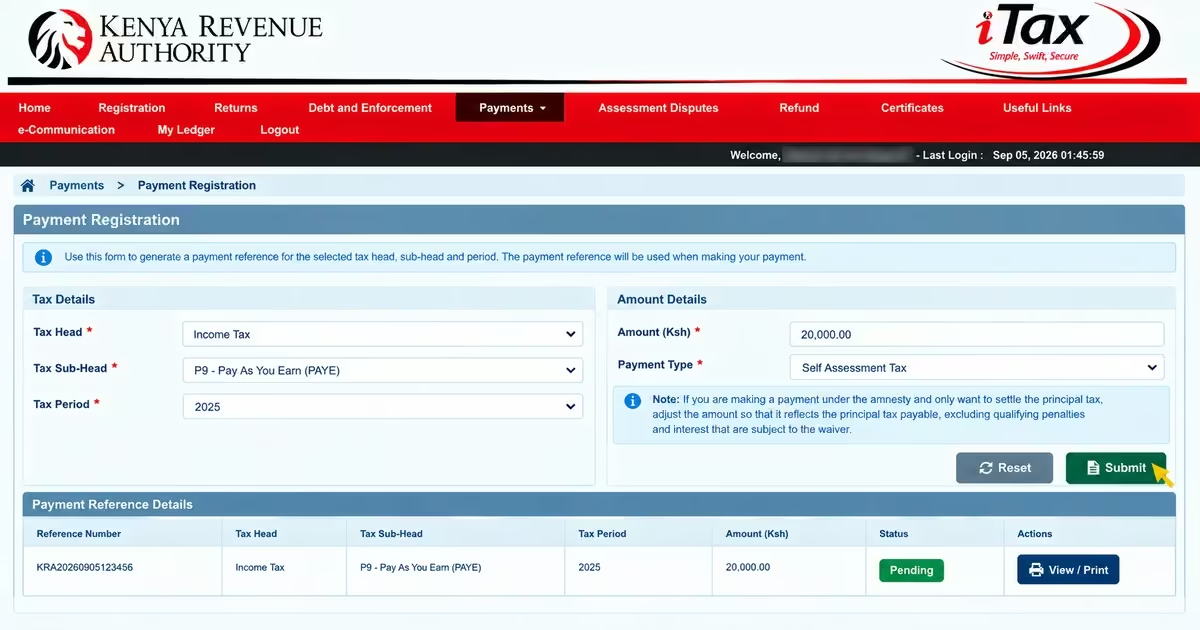
- Select the correct Tax Head, such as Income Tax, VAT or PAYE, and the matching Tax Sub-Head.
- Choose the appropriate Payment Type, such as Self-Assessment Tax, Instalment Tax, Advance Tax or Penalty, depending on what you are paying, and select the relevant tax period.
- If you are making a payment under the amnesty and only want to settle the principal tax, adjust the amount so that it reflects the principal tax payable, excluding qualifying penalties and interest that are subject to the waiver.
Step 4: Generate and Download Your Payment Slip
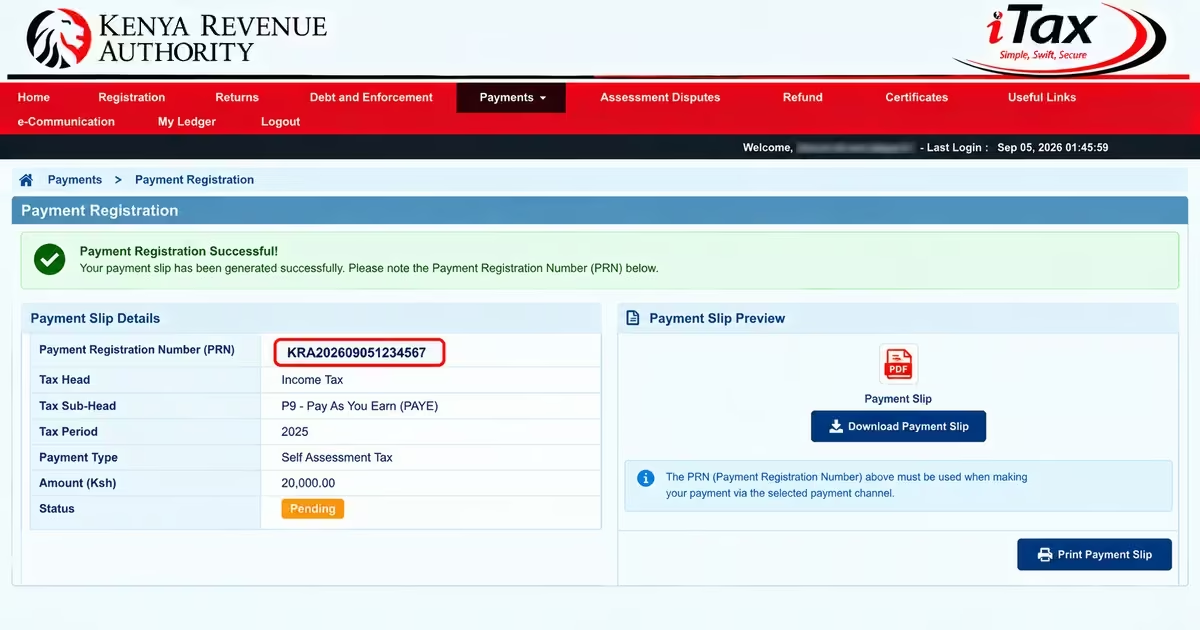
- Click Submit to generate your e-slip. This will create a unique Payment Registration Number (PRN), which appears on the payment slip.
- Download or print the payment slip and keep the PRN, as you will need it when making the payment.
Step 5: Pay via Mobile Money (M-Pesa)
- Open your mobile money service and select the option for “Pay Bill”
- Enter the KRA government Paybill number 222222 as the business number.
- Enter your Payment Registration Number (PRN), as the account number. Do not use your KRA PIN unless the payment instructions specifically require it.
- Enter the amount shown on your payment slip and confirm the payment.
- You should receive a confirmation message from your mobile money provider. KRA will also process the payment against the relevant tax obligation.
FAQs on Tax Amnesty
a) What is the Kenya Tax Amnesty 2026?
The 2026 Tax Amnesty is a KRA relief programme that provides a 100% waiver of qualifying penalties, interest, and fines on tax liabilities accrued up to 31 December 2025, provided the taxpayer meets the programme’s conditions.
b) Who Qualifies for the 2026 Tax Amnesty?
Taxpayers with outstanding penalties, interest or fines relating to qualifying tax liabilities up to 31 December 2025 qualify for this amnesty. Taxpayers who had already cleared their principal tax by 31 December 2025 may qualify for a waiver of the related penalties, interest and fines.
c) When Does Kenya’s 2026 Tax Amnesty End?
The 2026 Tax Amnesty runs from 1 July 2026 to 31 December 2026. To benefit from the waiver, taxpayers must meet the applicable conditions during this period.
d) Do I Need to Apply for the Tax Amnesty, Or Is The Waiver Automatic?
The waiver is generally automatic once the taxpayer meets the statutory conditions. The conditions are: if you have outstanding principal tax, pay the tax and the related penalties and interest will be waived; and if you have penalties and interest arising from failure to file KRA returns, file all the returns and the penalties and interest will be waived. It’s automatic.
e) Are Tax Debts Arising From 2026 Covered By The Amnesty?
No. The 2026 Tax Amnesty covers qualifying tax liabilities, penalties, interest and fines relating to periods on or before 31 December 2025. Tax obligations arising from 1 January 2026 onwards remain payable and are not covered by the amnesty.
f) Does the Tax Amnesty Waive The Principal Tax Owed?
No. The amnesty does not cancel the principal tax, which is the original amount of tax owed. Taxpayers must still pay the principal tax, while qualifying penalties, interest, and fines may be waived once they meet the amnesty conditions.
Read Also: How to Apply for a Tax Compliance Certificate Online in Kenya (2026)
Conclusion
The Kenya Tax Amnesty 2026 gives taxpayers a valuable opportunity to clear qualifying tax debts without the additional burden of penalties, interest and fines. However, the relief is subject to specific conditions: taxpayers with outstanding principal tax should review their iTax accounts, settle the qualifying principal or arrange an eligible payment plan as early as possible, and ensure all required returns are filed to qualify for the amnesty. All of this should be done before 31st December 2026, when the amnesty will close. Acting before the deadline can help you organize your tax affairs and avoid losing the amnesty’s benefits.