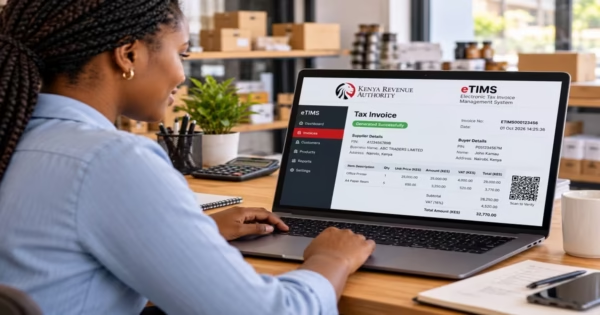
If you are running a limited company in Kenya, you may be required to provide a CR12 when applying for a government tender, opening or maintaining a corporate bank account, seeking financing, or completing a business transaction. The document is commonly used to confirm the current details of a company recorded by the Business Registration Service (BRS), including information about its directors and shareholders.
Getting a CR12 in Kenya currently is easier as it does not require you to visit the Companies Registry to request a physical document. You can apply online through the government’s eCitizen platform by accessing the Business Registration Service and requesting an Official Search. The search is computer-generated, and companies that have been verified can receive an automated official search. This article will cover the whole process of applying for a CR 12 certificate and downloading it.
- What Is a CR12 Certificate in Kenya?
- What Information Does a CR12 Certificate Entail?
- Why Do You Need a CR12? Key Uses for Businesses in Kenya
- Requirements for Getting a CR12 Certificate in Kenya
- How to Apply for a CR12 Certificate Online via eCitizen (Step-by-Step Guide)
- How to Download Your CR12 Certificate from the BRS Portal
- How to Update Company Details on eCitizen Before Getting a CR12
- How Long Is a CR12 Valid in Kenya?
- FAQs on CR12 Certificate
- Conclusion
What Is a CR12 Certificate in Kenya?
A CR12 certificate, now officially called an Official Search by the Business Registration Service (BRS), is a document that shows the current registered details of a company as recorded in the Companies Registry. It is commonly used to verify a company’s ownership and management before entering into business transactions such as applying for tenders and seeking financing. The document is generated through the BRS system on eCitizen.
What Information Does a CR12 Certificate Entail?
A CR12/Official Search generally contains important information about a registered company. A study by Onyinyechi (2025) highlights the following contents that are included in the CR12 certificate.
- Company Name – This is the official name used to register the company.
- Company Registration Number – This is the unique number given to the company when it is registered.
- Date of Incorporation – The date when the company was officially registered.
- Company Status – Shows whether the company is registered and its current status in the registry.
- Registered Office Details – The registered address or office details recorded for the company.
- Directors’ Details – The names and other relevant details of the company’s current directors.
- Shareholders’ Details – The names of the shareholders recorded in the company’s registry.
- Shareholding Information – The number or proportion of shares held by each shareholder.
Read Also: How to Apply for Smart Driving Licence in Kenya 2026: Cost, Renewal & NTSA e-Citizen Guide
Why Do You Need a CR12? Key Uses for Businesses in Kenya
A CR12 certificate can be requested at different stages of running, managing, or dealing with a registered company in Kenya. The requirement may arise during routine business transactions, formal applications, or when an organization needs up-to-date company information. Some of the common situations where you may need a current CR12 certificate include the following, as per Timothy (2025)
a) Government Tenders
Companies applying for government tenders may be required to submit a recent CR12 as part of their tender documents. The document helps the procuring organization confirm the company’s registered directors, shareholders, and other company details.
b) Bank Loans
Banks and other financial institutions may request a CR12 when a company applies for a business loan, overdraft or other credit facility. It helps the lender confirm the people listed as the company’s directors and shareholders as part of the customer verification and credit assessment process.
c) Opening a New Corporate Bank Account
A CR12 may also be required when opening a corporate bank account. Banks use it to confirm the company’s registered ownership and directorship details. It may also be requested when updating an existing account, especially if there have been changes to the company’s directors or ownership structure.
d) Corporate Transactions and Due Diligence
A current CR12 can be one of the documents required during due diligence, which is the process of checking a company before completing a major business transaction. For example, it may be requested when a company is being acquired, when investors are considering an investment, or when businesses are forming a joint venture. It allows the parties involved to compare the company’s registered ownership and management details with the information provided during negotiations.
e) Dispute Resolution and Court Proceedings
A CR12 may be useful in company-related disputes and legal proceedings where it is necessary to confirm a company’s registered identity, directors, or shareholders. Courts, arbitrators, or other parties involved in resolving a commercial dispute may request an official company search as supporting documentation.
Requirements for Getting a CR12 Certificate in Kenya
Getting a CR12, officially called an Official Search, is handled by the Business Registration Service (BRS) under the Registrar of Companies. The application is made online through the eCitizen Business Registration Service portal. According to Anthony (2026), when one is carrying out a standard Official Search for a verified company, one will be required to have the following.
- Company Name or Registration Number – You need the company’s official registered name and/or registration number to identify the company you want to search.
- eCitizen Account – You need an active eCitizen account to access BRS services and submit the Official Search request.
- Applicant Details – The online application requires basic contact information, such as your postal address, postal code, email address, and telephone number. Since your identity is already linked to your eCitizen account, you will generally not need to upload a separate physical ID for a standard online search.
- Payment – The current fee for an Official Search is KSh 650. Payment is made electronically using the available eCitizen payment options, such as M-Pesa or a bank card.
How to Apply for a CR12 Certificate Online via eCitizen (Step-by-Step Guide)
Getting a CR12 certificate (Official Search) in Kenya is a straightforward online process that can be completed through the eCitizen Business Registration Service (BRS) portal. Once you have an active eCitizen account, the company details, and the required fee, you can submit the search request online and download the Official Search once it is generated.
Step 1: Log in to eCitizen
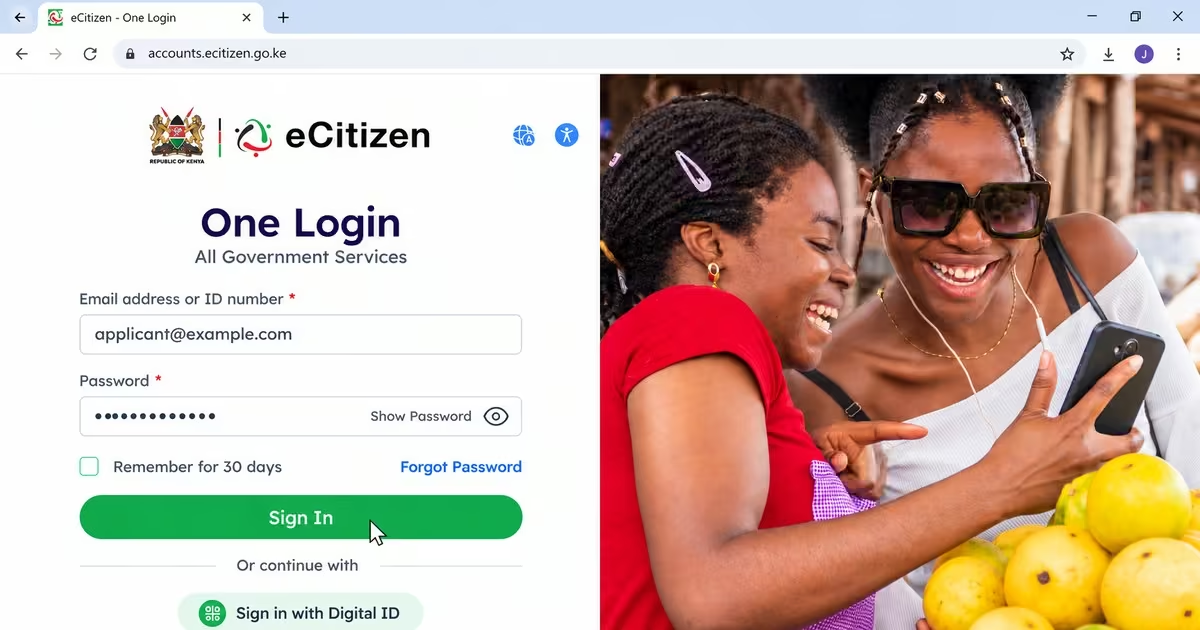
- Log in using your eCitizen credentials, such as your National ID number or email address and password. If prompted, complete the OTP verification.
- If you do not have an eCitizen account, you will need to create one using your National ID or passport details.
Step 2: Access Business Registration Service (BRS)
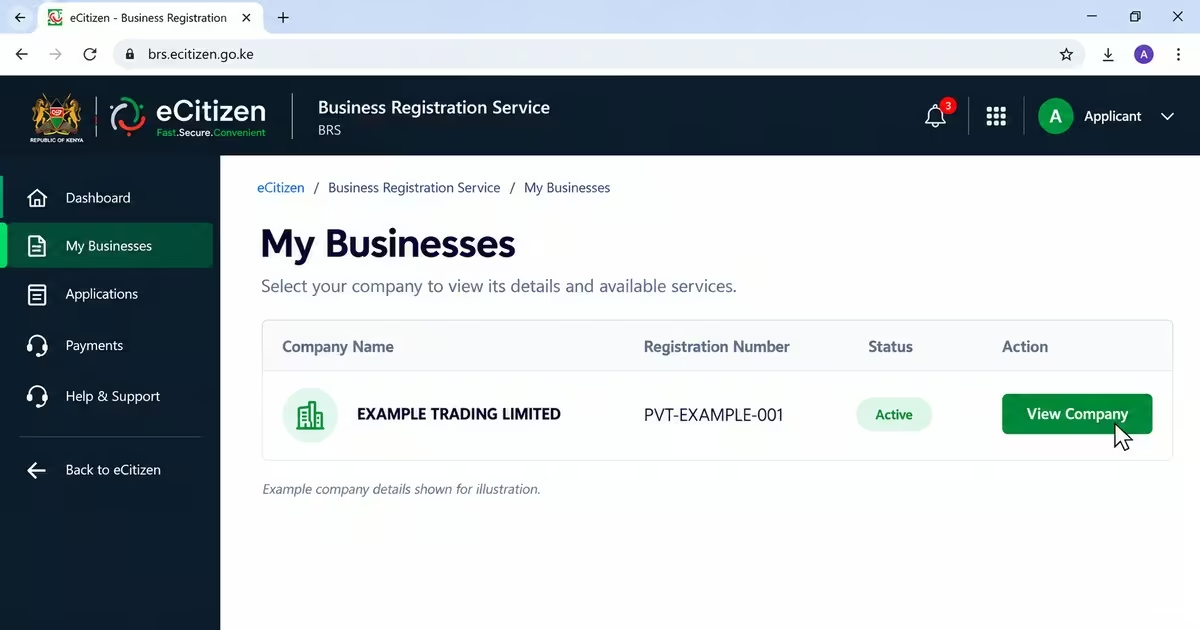
- From the eCitizen dashboard, select Business Registration Service (BRS) or the Company Registry service.
- Click Make Application to begin the process.
Step 3: Select Official Search
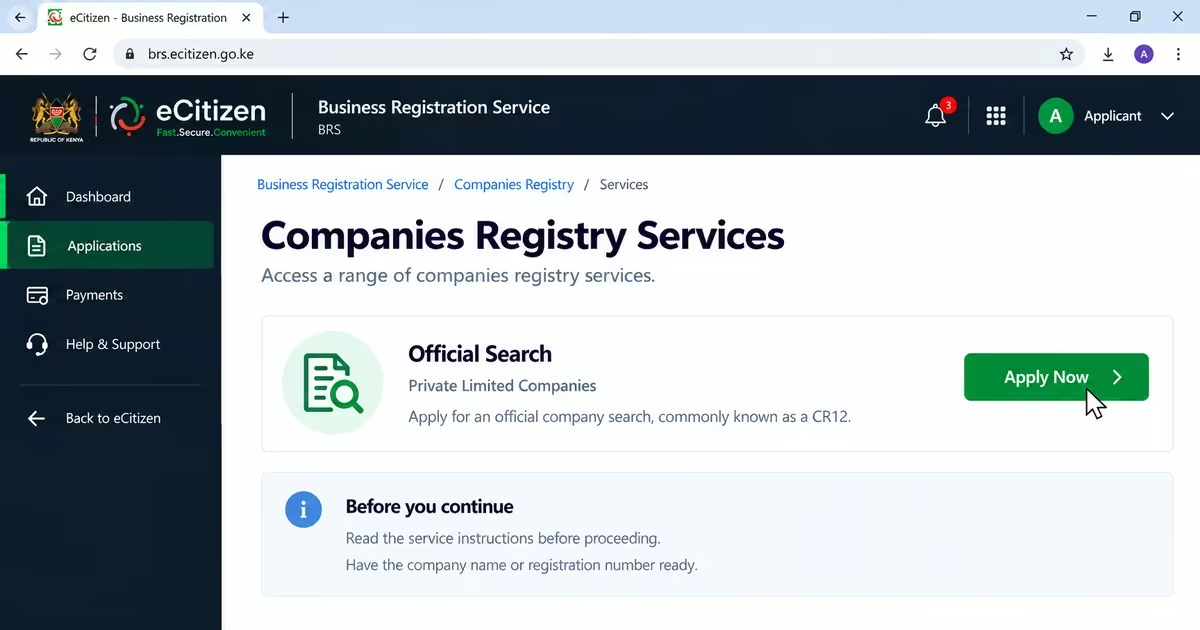
- Select Official Search, which was previously commonly known as a CR12, for private limited companies.
- Click Apply Now and read any notices or instructions provided by BRS before continuing.
Step 4: Search for the Company
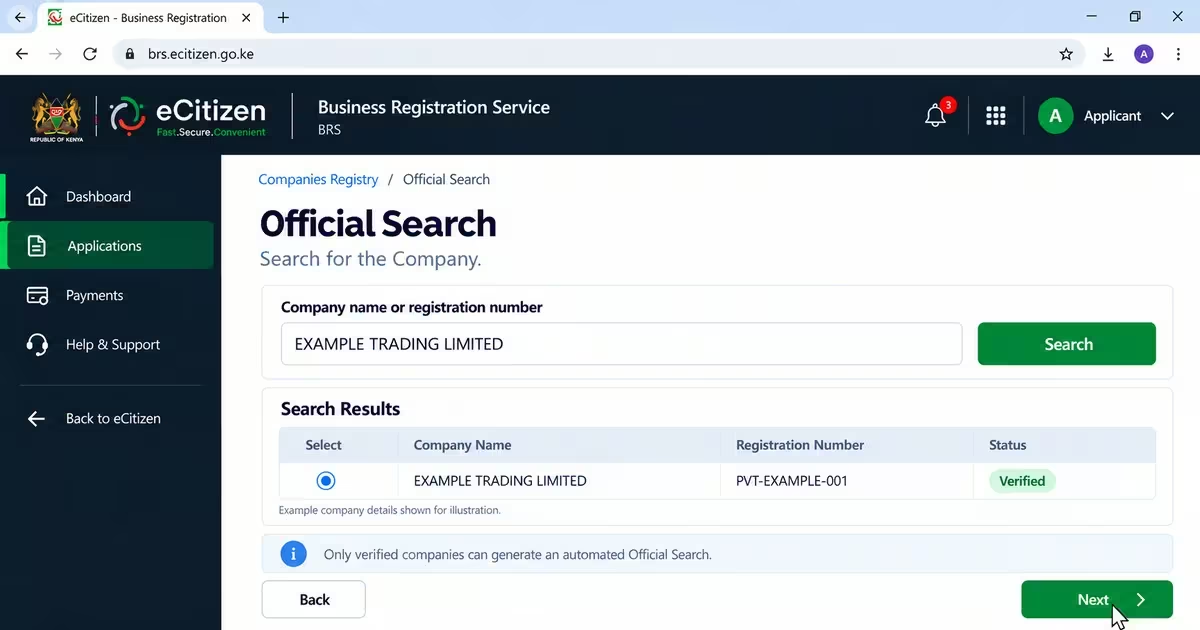
- Enter the exact company name or registration number.
- Select the correct company from the search results and click Next.
- It is important to note that only companies with Verified status can generate an automated Official Search.
Step 5: Enter Applicant Details
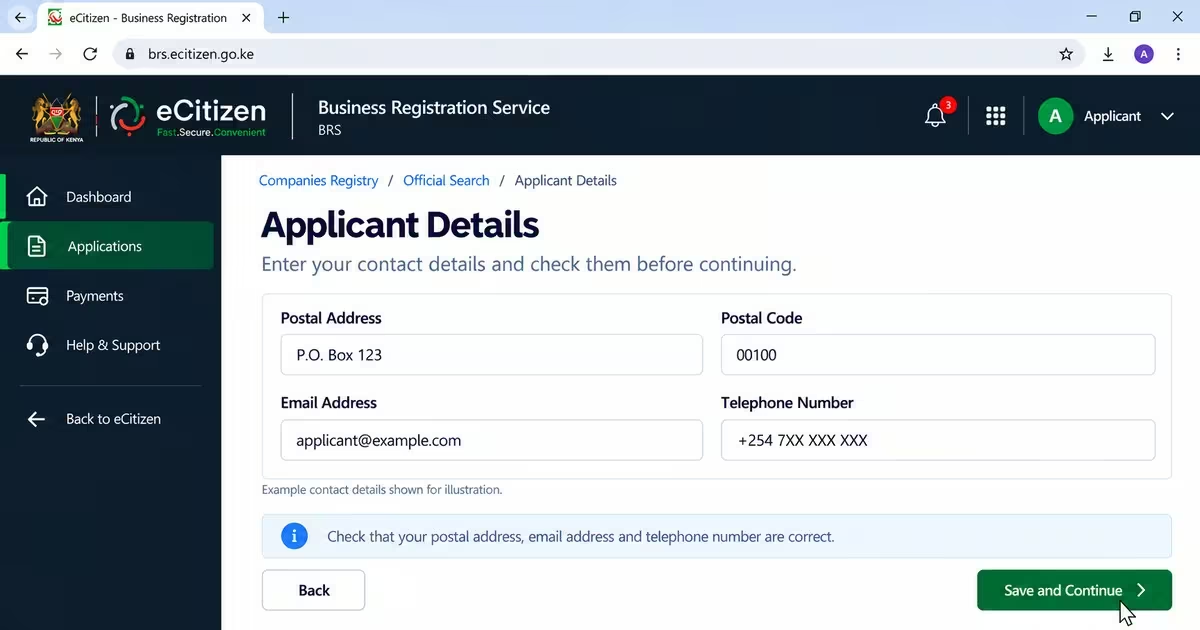
- Enter your postal address, postal code, email address, and telephone number.
- Check the information carefully to make sure all the details are correct before proceeding.
Step 6: Confirm and Pay
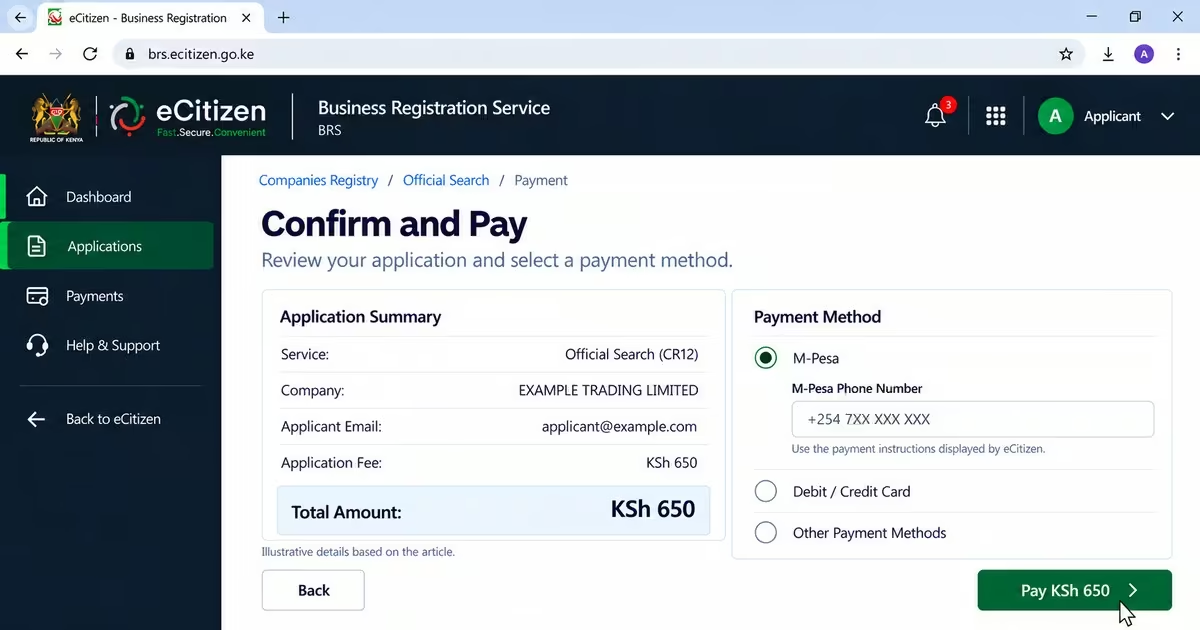
- Click Save and Continue. Confirm that you have entered all the required information.
- Click Finish and pay the official KSh 650 fee using M-Pesa, a card, or another payment method available through the eCitizen payment gateway.
Read Also: How to Conduct a Land Search on eCitizen in 2026: Step-by-Step Guide
How to Download Your CR12 Certificate from the BRS Portal
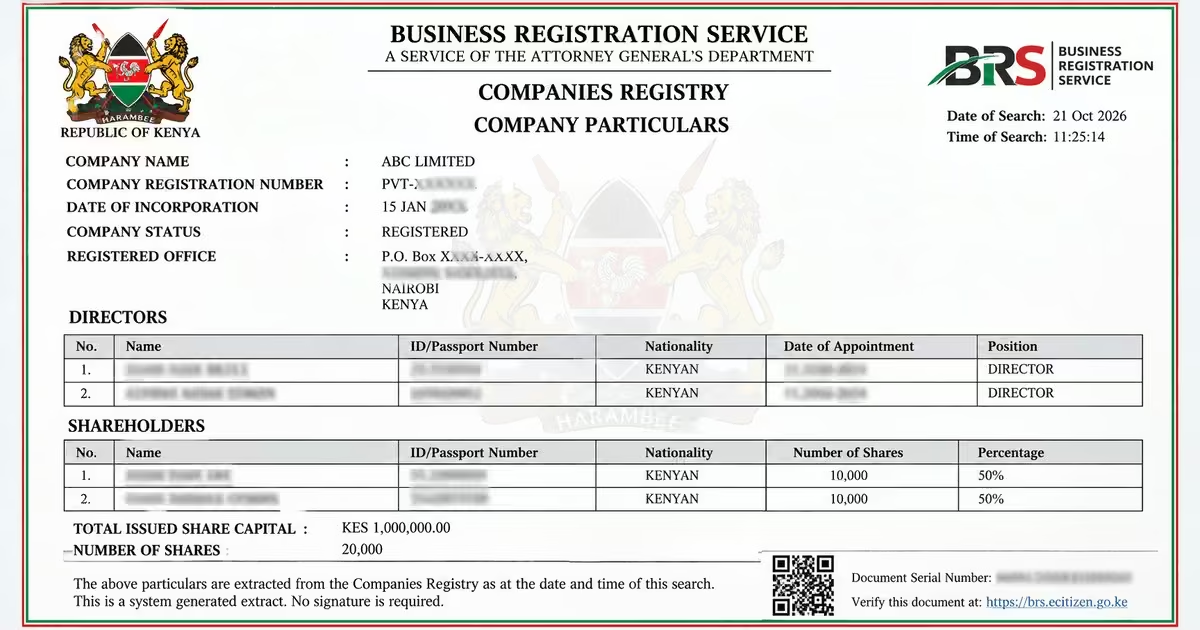
Once your Official Search application has been processed, you can download the CR12 directly from the BRS Version 2 portal. Verified companies generally receive the Official Search instantly, while searches for non-verified companies may take about 3–5 days to process.
Step 1: Log in to the BRS eCitizen Portal
- Go to the BRS Version 2 portal and log in using the eCitizen account you used to submit the Official Search application.
Step 2: Select Companies Registry Services
- After logging in, select Personal Account from the account switcher. Then choose Companies Registry Services and click Proceed.
Step 3: Open Application History
- On the Companies Registry Services page, click Application History. This section displays applications you have submitted through the BRS portal, together with their status and available outputs.
Step 4: Find Your Official Search Application
- Look for the Official Search (CR12) application you submitted. Once the application has been processed, click View to open its details and available documents.
Step 5: Download the CR12
- After opening the application, the available output will be displayed. Click Download to save the CR12 to your device. You can then open or print the document when needed. BRS’s official guide confirms that completed outputs can be downloaded and printed from this section.
How to Update Company Details on eCitizen Before Getting a CR12
If your company’s directors, shareholders, or other registered details have changed, you need to update the information in the Business Registration Service (BRS) records before obtaining an updated CR12, now known as an Official Search. Follow the procedure below to update the company details.
Step 1: Log in to eCitizen
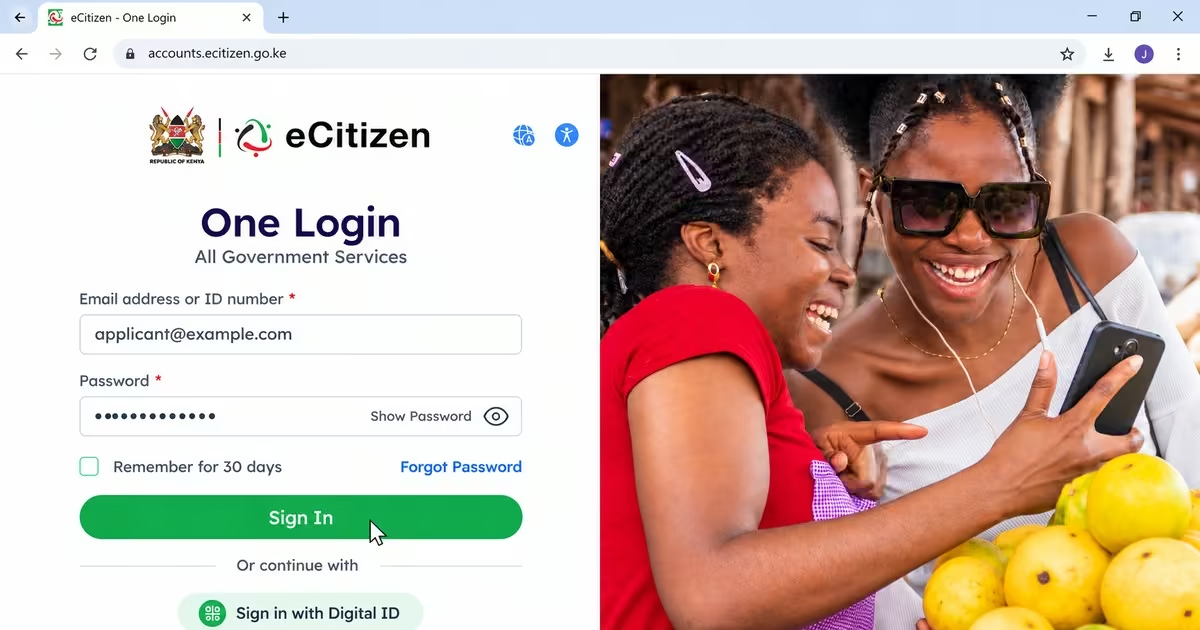
- Go to the eCitizen website or the BRS eCitizen portal.
- Log in using your personal eCitizen account with your National ID or email address and password. Complete the OTP verification if required.
Step 2: Access Business Registration Service (BRS)
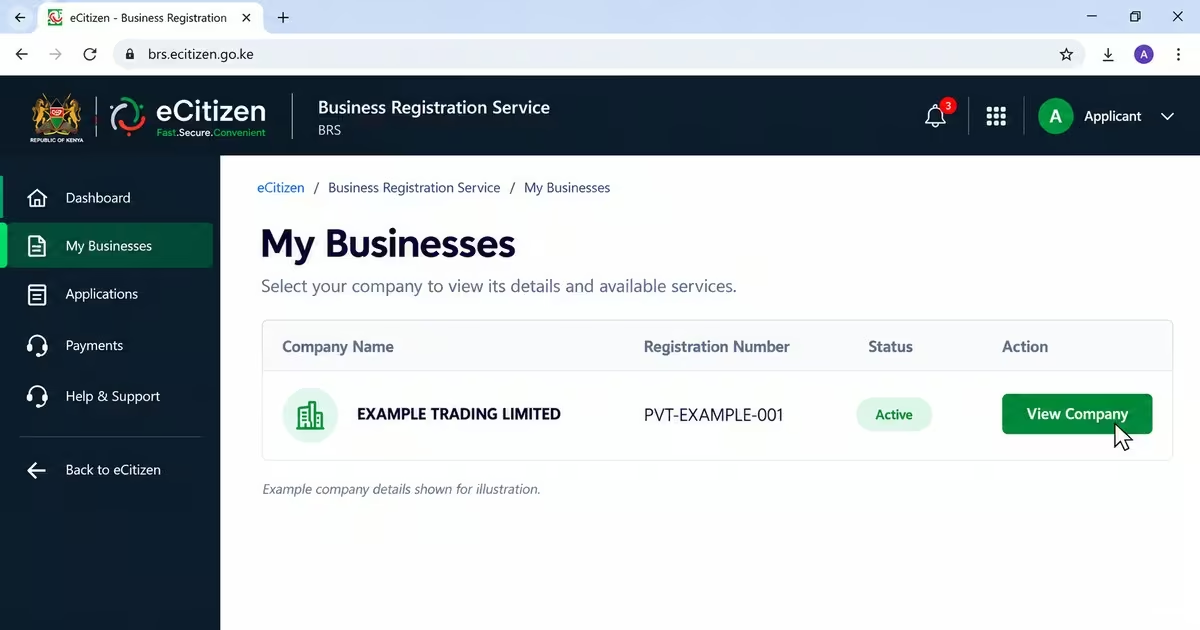
- From the eCitizen dashboard, select Business Registration Service (BRS) or Company Registry.
- Find and select your company under My Businesses.
Step 3: File the Company Changes
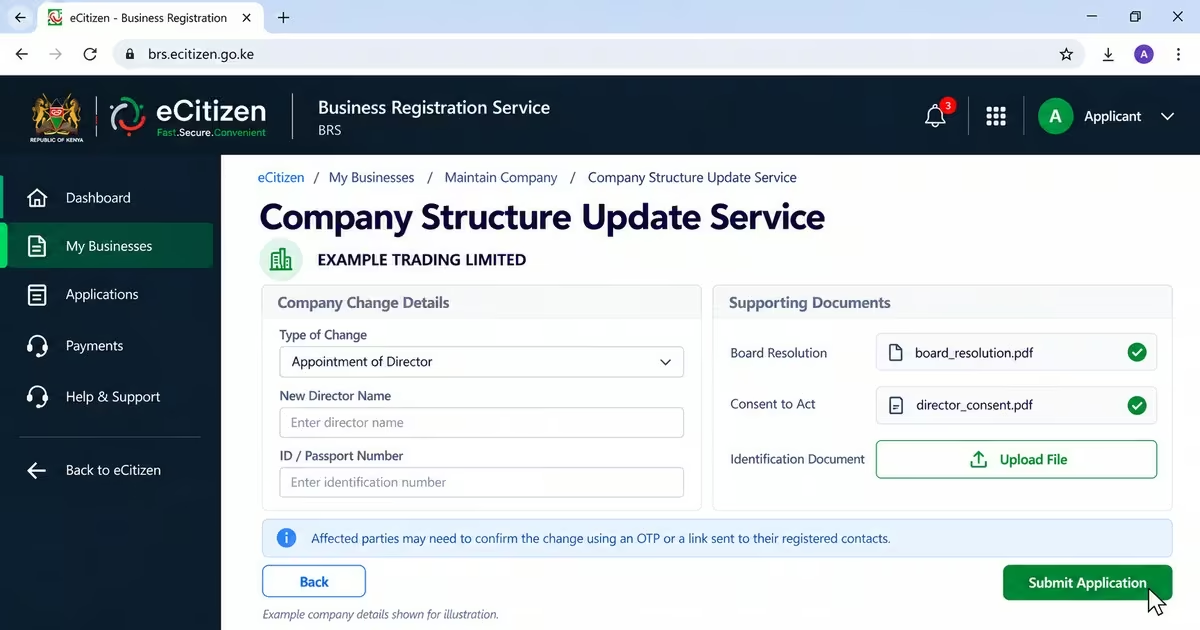
- Click Maintain Company and then select Company Structure Update Service, or the option for Change of Officials or Change Company Particulars.
- Select the type of change you want to make, such as appointing new directors, removing or replacing directors, transferring shares, or changing the company secretary.
- Upload the required supporting documents, such as a board resolution, consent forms, identification documents, or a resignation letter, where applicable.
- Complete the required online forms and submit the application.
- The affected parties, such as new or outgoing directors or shareholders involved in a transfer, may need to confirm the change using an OTP or link sent to their registered contact details.
Step 4: Wait for Approval
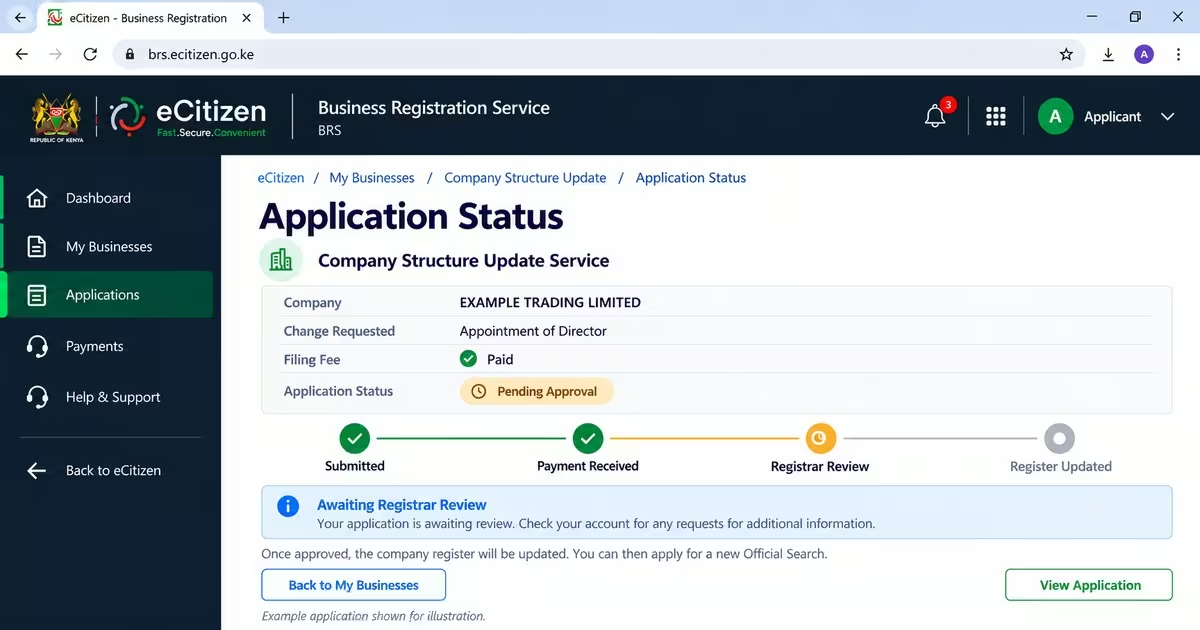
- Pay the applicable filing fee for the company change.
- Wait for the Registrar of Companies to review and approve the application. Processing may take a few working days and can take longer if additional information or clarification is required.
- Once the change is approved, the Companies Register is updated with the new company details.
- After the update, you can now apply for a new official search
How Long Is a CR12 Valid in Kenya?
A CR12 does not have a fixed expiry date. It remains useful as long as the company’s registered details have not changed. However, if there are changes to the directors, shareholders, share capital, or registered address, the existing CR12 may no longer show the company’s current information. In such cases, it is advisable to update the details and then obtain a new CR12 to ensure that the details are up to date.
FAQs on CR12 Certificate
1. What is a CR12 Certificate in Kenya and Why Do I Need It?
A CR12, officially known as an Official Search, is a document generated from company records maintained by the Business Registration Service (BRS). It provides information about a company’s registered directors, shareholders, and other important company details. It is commonly requested for government tenders, bank financing, corporate bank accounts, business transactions, due diligence, and some licensing processes.
2. How Much Does a CR12 Cost in Kenya in 2026?
The official BRS fee for obtaining an Official Search is KSh 650. Payment is made online through eCitizen using the available payment options.
3. How Long Does It Take to Get a CR12 in Kenya?
The processing time depends on the company’s records and verification status. For a verified company, BRS indicates that an automated Official Search can be generated instantly, while searches for companies that require further verification may take longer.
4. Does a CR12 Expire and How Often Should I Get a New One?
A CR12 does not have a fixed statutory expiry period. Instead, it shows the company’s registered information at the time the search is conducted. However, the organization requesting the document may require a recently issued copy, such as one issued within the previous three or six months. If the company’s directors, shareholders, or other registered details change, it is advisable to obtain a new Official Search after updating the change.
5. How Do I Get an Updated CR12 After Changing Directors or Shareholders?
You first need to ensure that the relevant changes have been properly filed and processed by BRS. Once the new directors or shareholders have been recorded in the company’s official register, you can submit another Official Search request through eCitizen and pay the applicable KES 650 fee. The new CR12 should then show the updated company information.
Read Also: How to Apply for a Tax Compliance Certificate Online in Kenya (2026)
Conclusion
Getting a CR12 in Kenya is now an easier process that is being conducted online through the Business Registration Service (BRS) on eCitizen. You need to have the required details explained above, like the company name, registration number, an active eCitizen account, the applicant details, and the required application fees. After that, you can log in to the eCitizen account, access the business registration services, make your application, pay the search fee, and submit the application. After that, you can automatically download the CR12 certificate. The certificate is important as it helps to facilitate different business transactions, like applying for government tenders, facilitates due diligence by investors, and is used during the application for loans and bank overdrafts.