Meetings have always faced one major challenge: the person taking notes often misses parts of the actual conversation. While teams discuss ideas, strategies, and important decisions, someone is usually focused on typing quickly and trying not to miss key details. Traditional note-taking methods have been used for many years, but in today’s fast-moving digital workplace, they are becoming less efficient. As businesses continue adopting automation and smarter workflows, AI meeting assistants are emerging as the new standard, quietly listening, transcribing, summarizing, and organizing meetings at a level of speed and accuracy that is difficult for humans to maintain consistently.
What makes this shift even more impressive is how rapidly companies are adopting the technology. AI-powered assistants are changing the way professionals capture and manage information. Instead of spending hours reviewing recordings or disorganized handwritten notes, teams can now receive instant summaries, action items, and searchable transcripts within minutes.
What Are AI Meeting Assistants?
An AI meeting assistant is a digital tool created to improve the efficiency and productivity of meetings. These AI-powered solutions help manage different meeting tasks, including scheduling, meeting preparation, real-time support during meetings, and post-meeting follow-ups as per Azeus Convene. They can automate activities such as creating meeting invitations, managing scheduling conflicts, generating agendas, recording notes and meeting minutes, and tracking important decisions. By reducing the manual administrative work required during meetings, AI meeting assistants help users save time and enable teams to focus more on productive discussions and collaboration.
Features of AI Meeting Assistants
AI meeting assistants include a wide range of features designed to improve productivity, simplify teamwork, and reduce the manual effort required to manage meetings. Although the available features may vary by platform, most AI-powered meeting tools offer several key functions that help teams stay organized, efficient, and better prepared. The following are the features of AI meeting assistants as per Khadeer (2025)
a) Automated Transcription
AI meeting assistants can transcribe conversations in real time with high accuracy, allowing users to review, edit, download, and refer back to meeting discussions whenever needed. For instance, otter.ai stands out for its collaborative transcription approach. It has a live notes feature that enables multiple participants to view and annotate the transcript as the meeting happens, with speaker identification working well in most conditions.
b) Meeting Summaries
These tools can automatically generate short, organized summaries that highlight key discussions, decisions, action items, and the next steps after the meeting ends. The most used Tool here is Microsoft 365 Copilot. It has advanced meeting summaries beyond what many other AI tools currently offer. A study by Seth (2026) highlights that “When users ask Copilot Chat to summarize a meeting, they can now receive a video recap alongside the written summary.” This video recap turns the meeting summary into a narrated highlight reel by combining key discussion points with short, relevant video clips that help bring important moments and decisions to life in a more engaging and easier-to-understand format
c) Scheduling Support
Many AI meeting assistants help organize meetings by sending invitations, setting reminders, and automatically resolving scheduling or calendar conflicts. For instance, Zoom AI Companion includes built-in tools that help users manage tasks after meetings more easily. Its Post-Meeting Follow-Up feature can automatically create follow-up tasks and draft email messages based on what was discussed during the meeting. The Daily Reflection Report also provides a simple summary of meetings, tasks, and important activities from the day — helping reduce the manual work that usually follows meetings and calls.
Additionally, Google Workspace tools like Google Meet and Gemini can detect when people try to schedule a meeting via Gmail and automatically suggest available meeting times from the user’s Google Calendar. This helps reduce the long back-and-forth conversations that usually happen when trying to find a suitable meeting time.
d) Multi-Language Support
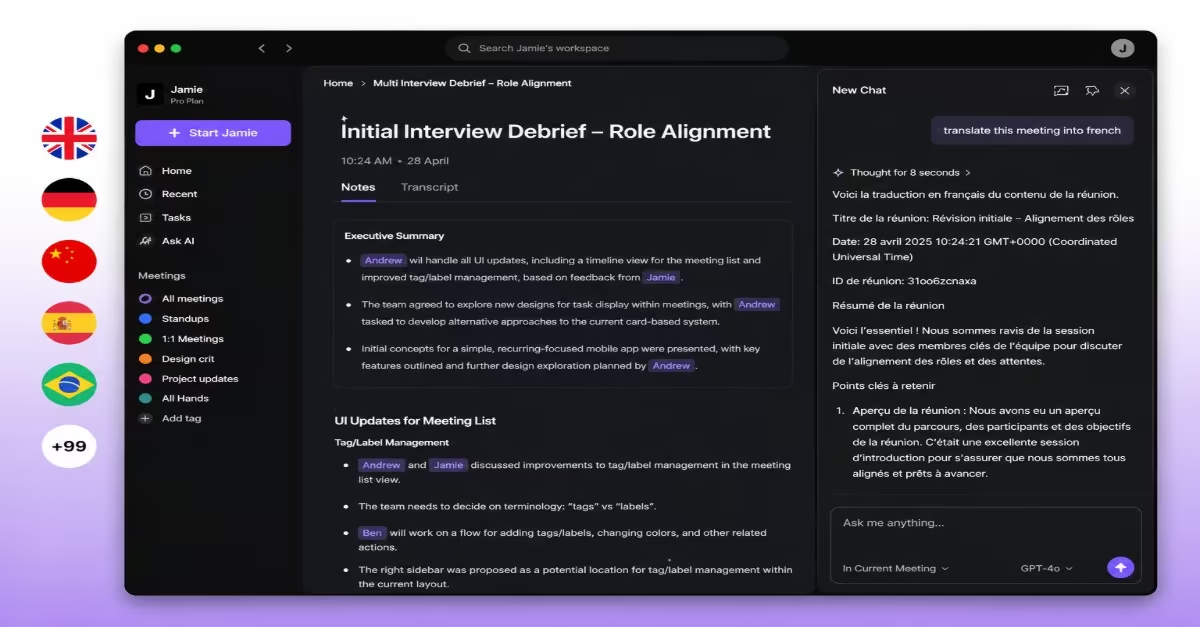
Some advanced AI meeting tools can recognize and transcribe multiple languages, making communication easier for international teams and multilingual workplaces. For instance, Google Workspace now includes Gemini features in its Business and Enterprise plans. One of these features is real-time speech translation, which allows people speaking different languages to understand and follow meetings more easily without needing a human interpreter. Additionally, Fireflies.ai offers one of the widest language support systems among standalone AI meeting tools. It can transcribe meetings in more than 100 languages, making it a useful option for international and multilingual teams, according to Business Wire. The platform also includes a feature called “Talk to Fireflies,” powered by Perplexity AI, that allows users to ask questions and receive real-time web-based answers or information during meetings.
e) Integration With Business Tools
Most AI meeting assistants integrate smoothly with workplace platforms such as Microsoft Teams, Zoom, Slack, and Google Meet to improve workflow efficiency and team collaboration. For instance, Krisp works with more platforms than most other tools because it does not require a bot to join the meeting. Instead, it processes audio directly on the user’s device, which means it can work with almost any meeting app, including Zoom, Google Meet, Microsoft Teams, and even phone calls, without needing special integration. On higher subscription plans, it can also connect with tools like Salesforce to help automatically record and manage customer and meeting information in CRM systems.
Read Also: Understanding AI Agents: The Digital Minds Behind Modern Technology
Best AI Meeting Assistants for Businesses in 2026
I. Microsoft 365 Copilot
Microsoft 365 Copilot is an AI-powered tool designed to improve both workplace productivity and meeting management. Built into the Microsoft ecosystem, it works with apps like Outlook, Microsoft Teams, Microsoft Word, Microsoft Excel, and Microsoft PowerPoint to automate tasks, summarize meetings, track action points, and improve communication. For organizations in the banking, government, education, consulting, and corporate sectors, it offers a smarter way to manage meetings, documents, scheduling, and collaboration without additional software.
Key Features
- Automatically summarizes Teams meetings and generates action items
- Drafts follow-up emails directly from meeting discussions inside Outlook
- Collects important information from documents, emails, and chats before meetings
- Works across Word, Excel, PowerPoint, and Teams without switching between apps
- Provides office-day recommendations for hybrid teams
- Supports natural-language questions such as “What did we agree on in Monday’s meeting?”
Pricing
Microsoft 365 Copilot Chat is free for users with an eligible Microsoft 365 license, while Copilot Business (for up to 300 users) starts at $18 per user per month under annual billing as part of a promotional offer running until June 2026, after which it increases to $21 per user per month. For larger organizations, the Enterprise plan is priced at $30 per user per month on an annual billing plan.
II. Otter.ai
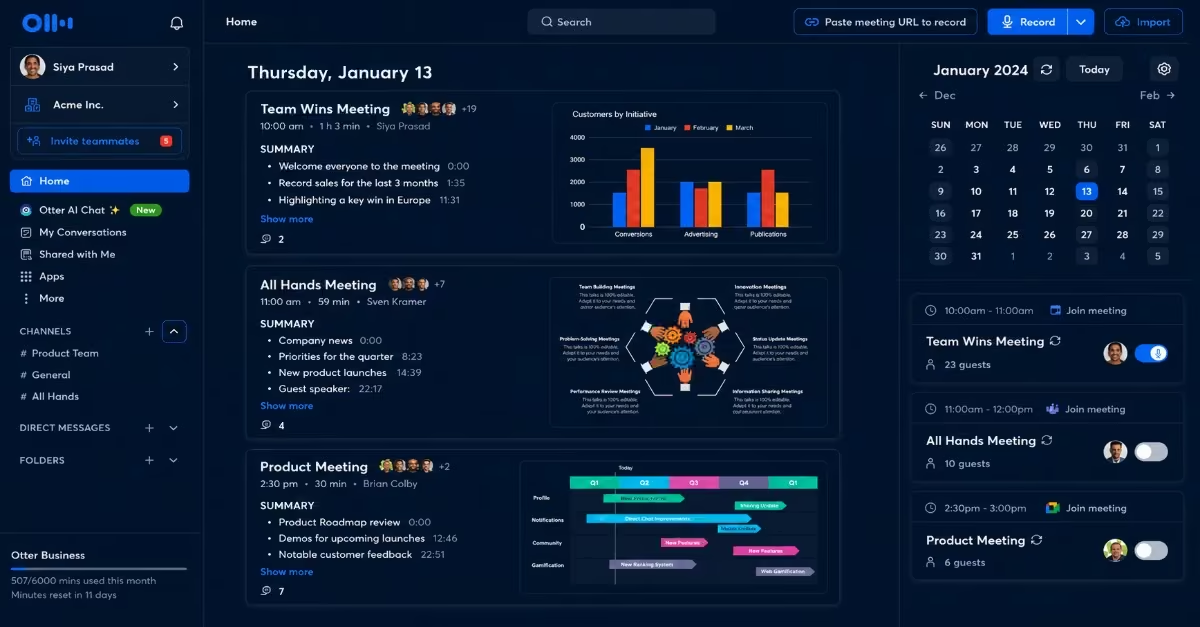
Otter.ai is one of the best-known AI transcription tools globally and is often a starting point for professionals exploring AI note-taking. It has processed more than one billion meetings worldwide and offers features that go beyond basic transcription by allowing users to search and interact with meeting content conversationally.
Key Features
- Real-time live transcription during meetings
- Conversational search for finding information inside meeting notes
- AI-generated summaries with highlights and action items
- Supports Zoom, Google Meet, and Microsoft Teams
- Collaborative notes where teams can comment and highlight discussions
- Imports and transcribes audio or video files from multiple platforms
- Mobile app support available
Pricing
- Free plan: 300 minutes/month
- Pro: $16.99/month per user
- Business: $30/month per user
- Enterprise: Custom pricing
III. Zoom AI Companion
Zoom remains one of the world’s most widely used video conferencing platforms, and Zoom AI Companion is its built-in AI assistant designed to improve productivity, automate meeting-related tasks, and strengthen collaboration through features such as meeting summaries, note-taking, smart recaps, and workflow support. Supporting this ecosystem is Afatrading Zoom, an authorized Zoom solutions provider that helps organizations deploy, integrate, and optimize Zoom-powered meeting environments. This enables businesses to fully benefit from AI-assisted communication, virtual collaboration, and modern hybrid work solutions. It’s best for professionals and organizations already using paid Zoom plans.
Key Features
- Identifies important moments during meetings and creates summaries and next steps
- Drafts follow-up emails directly inside the Zoom app
- Helps late participants catch up by asking the AI questions such as, “What did I miss?”
- Detects action items and important decisions automatically
- Works across Zoom Meetings, Zoom Phone, Zoom Docs, and Zoom Chat
- Includes admin controls for privacy and usage management
Pricing
Basic plan is free but comes with limited AI features and allows up to 40-minute group calls. The Pro plan costs $13.33 per user/month (annual billing) and includes Zoom AI Companion. The Business plan is priced at $18.33 per user/month (annual billing) and also includes AI Companion features, while the AI Companion standalone option (for users without a Zoom license) costs $10 per user/month.
Quick tip: Only the meeting host can activate the feature. Performance may also vary depending on language, accent, and internet quality.
IV. Fireflies.ai
Fireflies.ai is one of the most widely discussed standalone AI meeting assistants. It works by joining meetings as an AI bot, recording conversations, generating transcripts, and delivering summaries afterward. The platform supports more than 100 languages and integrates with tools such as Zoom, Google Meet, Microsoft Teams, Notion, Slack, and major CRM systems. This Tool is best for Remote teams, HR departments, project managers, and multilingual teams.
Key Features
- Automatically joins meetings to record and transcribe conversations
- Produces accurate transcriptions across different accents and speaking styles
- Generates summaries with key points, decisions, and action items
- Creates searchable meeting archives for easy reference
- Provides speaker analytics such as talk time and engagement levels
- Integrates with tools like Slack, Notion, and Trello
- Available on Android and iOS mobile apps
Pricing
- Free plan available with limited storage
- Pro: $10/month per user
- Business: $19/month per user
- Enterprise: $39/month per user
V. tl;dv
tl;dv focuses on helping professionals avoid rewatching long meeting recordings. Instead, it captures meetings, creates summaries, and automatically shares the most important information with relevant team members. It is especially popular among startup communities and fast-moving teams. It’s best for Startup founders, product teams, and cross-functional remote teams.
Key Features
- Records and transcribes meetings on Zoom, Google Meet, and Microsoft Teams
- Generates summaries and key takeaways automatically
- AI-powered search across past meetings
- Timestamped highlights linked directly to recording sections
- Weekly and monthly summaries with action items and next steps
- Allows tagging teammates and assigning tasks directly from transcripts
Pricing
The free plan costs $0 and includes unlimited recording, up to 10 AI summaries per month, and 3 months of data retention. The Pro plan is priced at $18 per user/month when billed annually or $29 per month on a monthly plan. The Business plan costs $59 per user/month on an annual plan or $98 per user/month on a monthly plan.
VI. Fathom
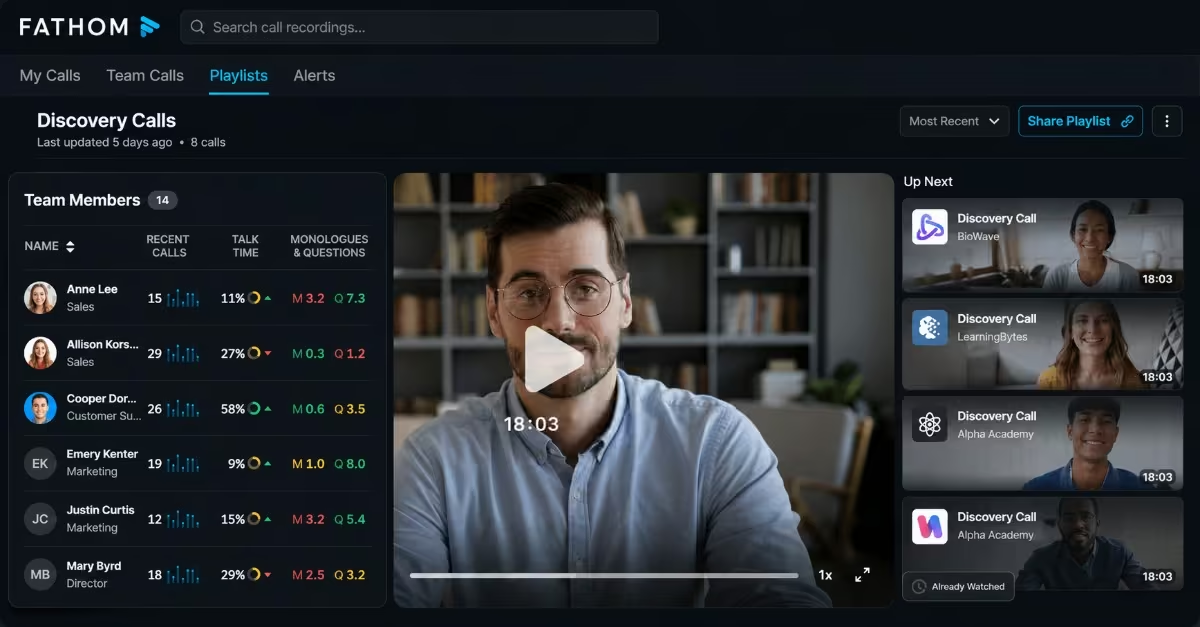
Fathom is an excellent option for Kenyan users looking for a capable AI meeting assistant with a generous free plan. It offers unlimited meetings, recordings, and transcription on its free tier, making it attractive for freelancers, startups, and small businesses.
Key Features
- Automatically records, transcribes, and summarizes meetings
- Provides fast and shareable recaps after calls
- Syncs meeting summaries with CRM tools like Salesforce and HubSpot
- Allows users to create short video clips from meetings
- Keyword alert system for tracking important topics
- Works with Zoom, Google Meet, and Microsoft Teams
Pricing
The Free plan costs $0 and includes unlimited recordings but limits 5 AI summaries per month. The Premium plan is priced at approximately $15 per user/month when billed annually or $19 per month on a monthly subscription. The Team Edition costs about $19 per user/month annually, or $29 per user/month on a monthly plan, while the Team Edition Pro is priced at around $29 per user/month annually, or $39 per user/month on a monthly plan.
VII. Google Workspace
Kenyan startups, NGOs, schools, and SMEs widely use Google Workspace tools such as Gmail and Google Meet. Gemini is now integrated into this ecosystem, providing users with AI-powered meeting assistance without installing additional software. One of its strongest features is within Gmail, where Gemini can identify scheduling requests and automatically suggest suitable meeting times. This Tool is mainly best for NGOs, startups, schools, and small businesses.
Key Features
- Detects scheduling requests inside Gmail and proposes available meeting times
- Let users create and edit calendar events using natural language prompts
- Generates meeting summaries and recaps within Google Meet
- Searches across Docs, Gmail, Calendar, and Slack for useful meeting context
- Integrates smoothly with the entire Google Workspace ecosystem
Pricing
Users with a personal Google account can access basic Gemini features for free. The Business Starter plan costs $7 per user/month (annual billing) and includes basic Gemini features, primarily within Gmail. Business Standard costs $14 per user/month, billed annually, and provides full Gemini features across Google Meet, Docs, and Sheets. At the same time, the Business Plus plan costs $22 per user/month under annual billing.
Quick Tip: Scheduling support currently works mainly for one-to-one meetings and may not handle complex team scheduling automatically.
VIII. Notion AI
Notion has become a popular workspace platform among Kenyan startups, content creators, and product teams. Notion AI adds meeting intelligence directly into the workspace, keeping meeting notes, tasks, and projects connected in one central system.
Key Features
- Generates transcripts, summaries, and action items from meetings
- AI-powered search across meetings, emails, Slack, and documents
- Connects meeting outputs directly to projects and tasks inside Notion
- Allows users to ask questions about past meetings using plain language
- Integrates with Google Calendar
- Includes enterprise-grade permission and admin controls
Pricing
- Free plan available
- Plus: $10/month per user
- Business: $15/month per user
- Enterprise: Custom pricing
Quik tip: The Tool currently does not clearly identify speakers in transcripts, which may cause confusion in larger meetings.
IX. Krisp
Krisp takes a different approach from most AI meeting assistants. Instead of adding a visible bot to meetings, it runs quietly in the background on the user’s device, improving audio quality and capturing notes. This makes it particularly useful in environments with background noise or unstable working conditions. This feature requires proper audio device setup, which may be difficult for less technical users. It’s particularly suitable for remote workers, professionals in noisy environments, and organizations that are uncomfortable with visible meeting bots.
Key Features
- Bot-free meeting recording and summarization
- Real-time noise cancellation for cleaner audio
- Generates transcripts, summaries, and action items
- Works across Zoom, Google Meet, Teams, and phone calls
- Designed for remote and hybrid work environments
- Easy sharing of meeting notes afterward
Pricing
The Free plan costs $0 and includes 60 minutes of noise cancellation per day, unlimited transcription, and up to 2 AI summaries daily. The Core/Pro plan is priced at $8 per user/month when billed annually or $16 per month on a monthly subscription. The Advanced/Business plan costs $15 per user/month annually or $30 per month, while Enterprise pricing is customized based on organizational needs.
Read Also: The Rise of AI-Powered Marketing Tools
Benefits of Using AI Meeting Assistants In Your Business
AI meeting assistants are changing how organizations manage meetings by improving efficiency, communication, and workflow. Instead of relying entirely on manual processes, businesses can use AI-powered tools to automate repetitive tasks and improve overall meeting outcomes. Below are some of the main benefits of using AI meeting assistants.
a) Time Savings
Manual note-taking, preparing meeting minutes, and organizing follow-up tasks can take up many hours. AI meeting assistants help save time by instantly generating transcripts, summaries, and action items after meetings.
b) Improved Productivity
Since the AI assistant handles meeting documentation, participants can focus entirely on discussions, without dividing their attention between listening and taking notes. This helps create more productive and engaging meetings.
c) Consistency and Accuracy
Compared to manual note-taking, AI tools capture conversations more accurately and consistently. They record discussions word-for-word, making it easier to review exact details, decisions, and important statements later.
d) Better Collaboration
AI meeting assistants improve teamwork by sharing transcripts, summaries, and assigned tasks across collaboration platforms. This helps all team members, including those who missed the meeting, stay informed and aligned with ongoing discussions.
e) Reduced Administrative Work
By automating tasks such as scheduling, reminders, meeting documentation, and follow-ups, AI meeting assistants reduce repetitive administrative work for managers, executives, and support teams.
How to Get the Best Out of AI Meeting Assistants
AI meeting assistants can greatly improve productivity and teamwork. Still, their effectiveness depends on how they are used, following a few best practices to get the best from AI meeting assistants.
- Use High-Quality Audio Equipment: Clear microphones, low background noise, and a stable internet connection help AI tools capture conversations more accurately.
- Encourage Clear Communication- Participants should speak clearly and mention decisions, responsibilities, and deadlines directly during meetings.
- Review AI-Generated Summaries-Always review AI-generated transcripts and summaries afterward to confirm their accuracy and completeness.
- Integrate With Workflow Tools-Connecting AI meeting assistants with collaboration and project management tools helps improve task tracking and follow-ups.
- Inform Participants before Recording-Always notify participants before recording or transcription begins to maintain transparency and support privacy compliance.
Conclusion
AI meeting assistants are rapidly changing the way professionals and organizations manage meetings, communication, and collaboration in the modern workplace. By automating tasks such as transcription, note-taking, meeting summaries, scheduling, and follow-ups, these tools help teams save time, improve productivity, and stay more focused during discussions. They are range of tools businesses may use such as Microsoft 365 Copilot and Zoom AI Companion to startups and remote teams relying on tools like Fireflies.ai, Notion AI, and Krisp. As businesses continue to embrace digital transformation and hybrid work environments, AI meeting assistants are expected to play an even greater role in improving efficiency, teamwork, and decision-making across industries.