
A birth certificate is one of the most important legal and identification documents in Kenya. It serves as official proof of a person’s identity, nationality, parents, and place of birth. The document is required for school admission, applications for a national ID card and passport, access to government services, and many other official processes. To make these services more accessible, the government, through the Civil Registration Services (CRS), has integrated birth registration services into the eCitizen platform. This allows Kenyans to apply for and manage birth certificate services online.
In this guide, I will take you through the step-by-step process:
- On how to apply for a birth certificate online in Kenya
- How to replace a lost birth certificate
- Requirements for a successful application
- The fees charged for applying for a birth certificate
When Should You Apply for a Birth Certificate in Kenya?
Every child born in Kenya must be registered with the Civil Registration Services (CRS) as required by law. Ideally, birth registration should be completed within six months of the date of birth. This is known as current registration. Applications submitted within this period are charged the standard registration fee and are usually processed faster, as per Kennedy (2026). If the birth is not registered within six months, it is considered late registration, which requires additional supporting documents and may attract a higher processing fee.
Requirements for Birth Certificate Application on eCitizen
Applying for a birth certificate in Kenya is done online through the eCitizen portal. Before starting the application, make sure you have all the required documents and information ready. A study by Daisy (2026) highlights the following documents that are required for a successful application.
- Birth Notification Card-this document confirms that a hospital, health facility, or the relevant local authority officially recorded the child’s birth.
- Parent’s National ID Card, Passport, or Alien Card– this is required to verify the identity and personal details of the parent or guardian making the application.
- Active eCitizen Account-an active eCitizen account is required to access Civil Registration Services and submit the birth certificate application online.
- Scanned Copies of Supporting Documents-Clear digital copies of all required documents must be available for upload during the application process.
- Child Must Be at Least 30 Days Old-Birth certificate applications can only be submitted online after the child has reached 30 days of age.
How to Apply for a Birth Certificate Online Through eCitizen
The birth certificate application process in Kenya is completed online through the eCitizen platform. It is available for both current registrations, which are within 6 months of birth, and late registrations, which are after 6 months of birth. The main difference between the two is the registration category selected during the application process, which depends on the child’s age at the time of application. After selecting the appropriate category, the remaining steps are generally the same: providing the required information, uploading supporting documents, making payment, and collecting the birth certificate once it has been processed and approved. Follow the step-by-step procedure below to make your application.
Read Also: How to Pay for SHA in Kenya: A Complete Beginner’s Guide
Step 1: Create or Log In to Your eCitizen Account
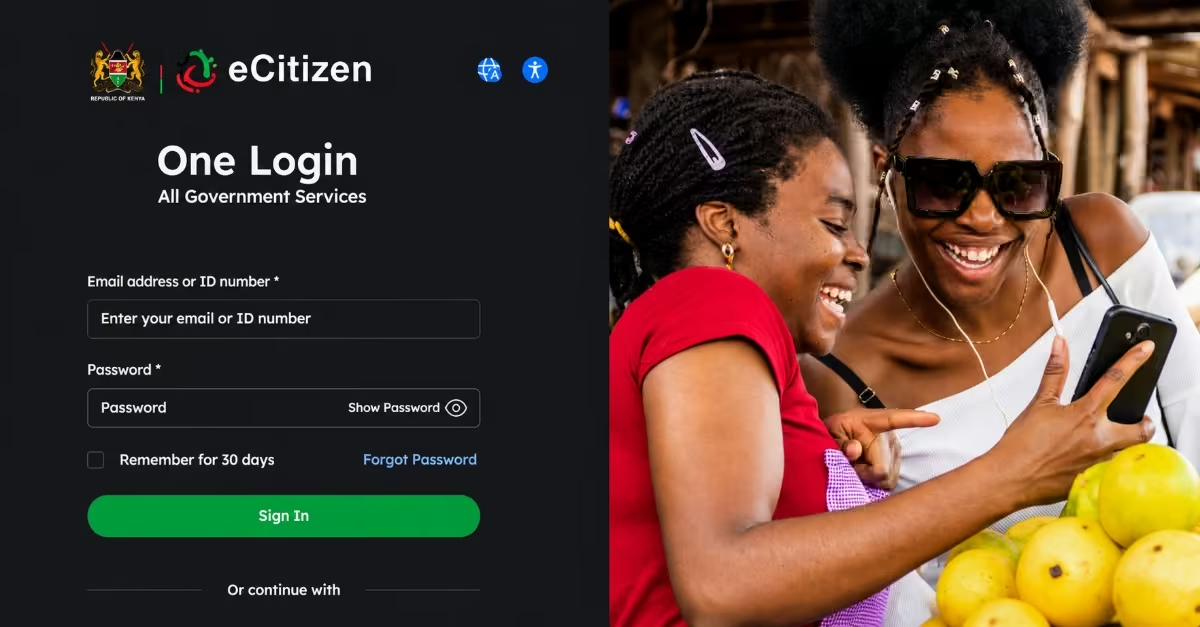
- Visit the eCitizen portal and sign in to your account.
- If you are a first-time user, create an account using your National ID number, phone number, and email address.
- Verify your account using the confirmation code sent to your phone number or email address.
Step 2: Select Civil Registration Services
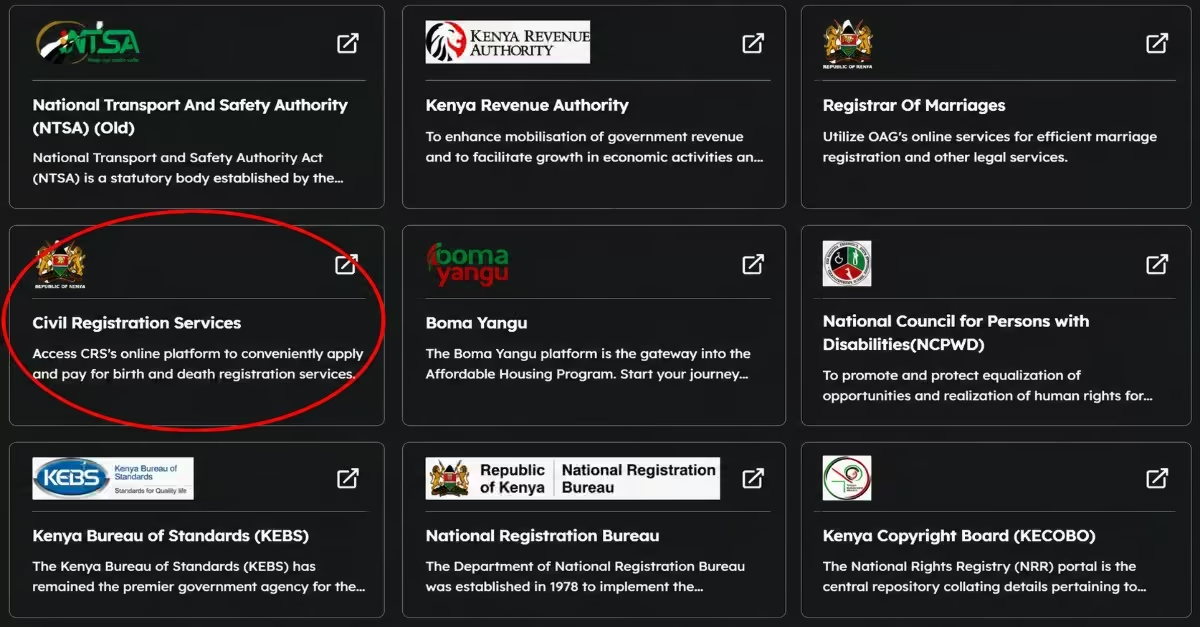
- From the e-Citizen dashboard, select Civil Registration Services (CRS).
- Choose the appropriate application type: Birth Certificate for registrations made within 6 months of birth; choose current registration. Or, a Late Birth Certificate for registrations made after 6 months; choose the late registration section.
Step 3: Enter the Child’s Details
- Provide the child’s full name, gender, date of birth, place of birth, county of birth, and details of the hospital or home where the birth occurred.
- If you are applying for late registration, you will also be required to explain the reason for the delay in registration.
Step 4: Enter Parent Information
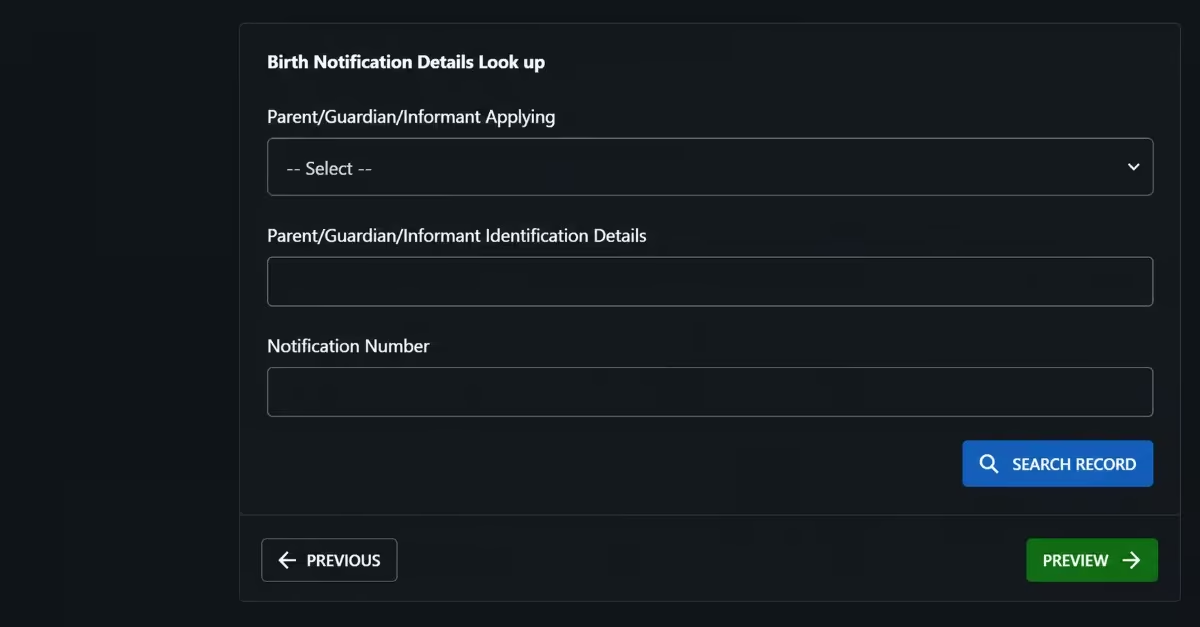
- Enter the National ID numbers of both parents, or the mother’s details only for single-parent registration.
- Please note that the father’s details will appear on the birth certificate only if he is present or officially verified at the time of registration.
Step 5: Upload Supporting Documents
- Upload the Birth Notification (B1 Form) issued by the hospital, health facility, or local chief for home births.
- Upload copies of the parents’ identification documents.
- Ensure that all uploaded documents are clear and readable to avoid delays or rejection of the application.
Step 6: Select a Collection Center
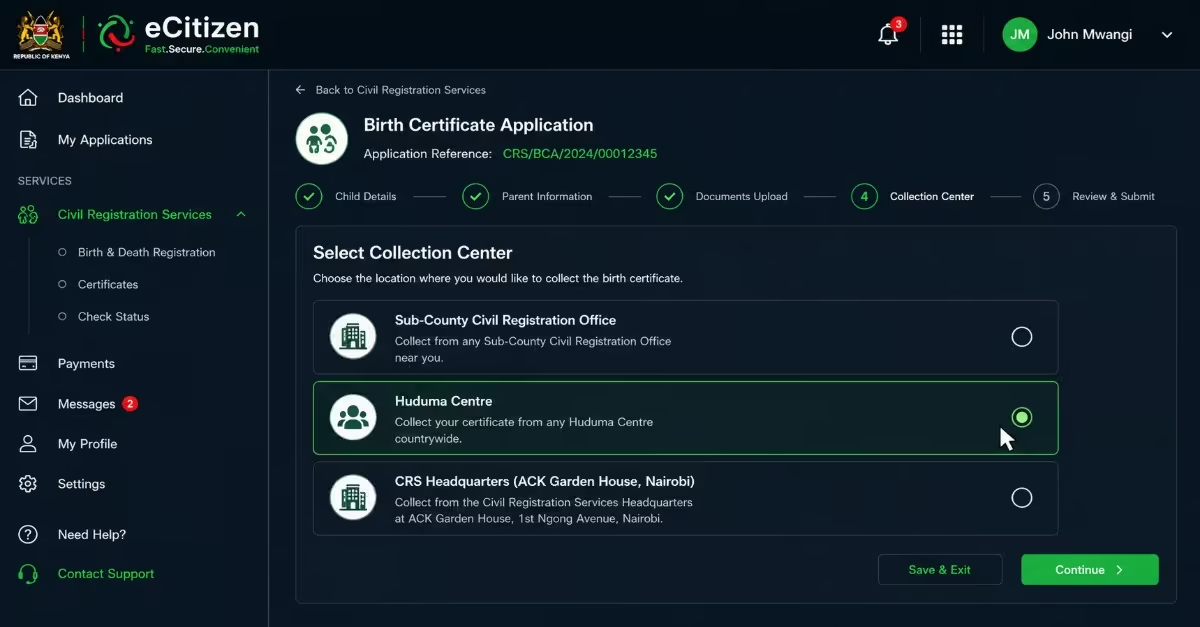
- Choose the location where you would like to collect the birth certificate. Options may include a Sub-County Civil Registration Office, a Huduma Center, or the CRS Headquarters at ACK Garden House in Nairobi.
Step 7: Pay the Applicable Fee
- Make payment using M-Pesa, a bank card, or any other payment option available on the eCitizen platform. After payment, print the application form and payment invoice, as both documents will be required during certificate collection.
How Long Does It Take to Get a Birth Certificate in Kenya?
After you submit your application and the required supporting documents through the eCitizen portal, processing a birth certificate usually takes 7 to 14 working days once the Civil Registration Office has received and verified the application. However, the actual processing time may vary depending on the number of applications being handled, the accuracy and completeness of the information provided, and whether additional verification is required, especially for late-registration applications.
How to Track Your Birth Certificate Application Status Online
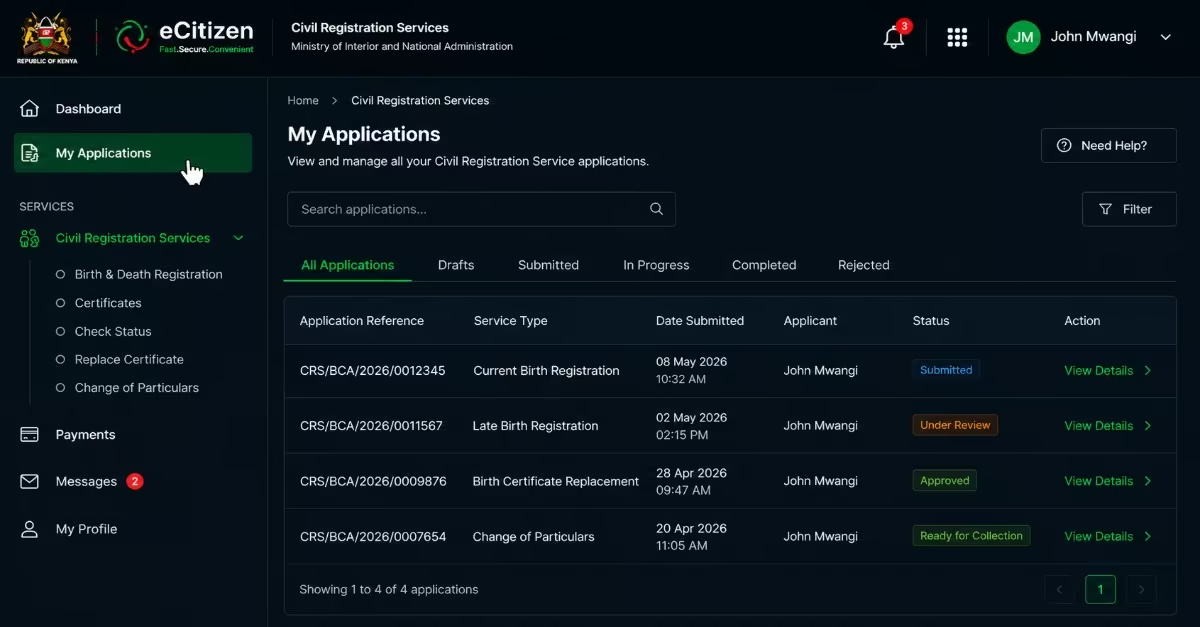
Step 1: Log In to Your eCitizen Account
- Open your browser and go to the official eCitizen portal at https://ecitizen.go.ke/.
- Enter your registered email address or ID number and password, then click Sign In.
Step 2: Open Civil Registration Services
- From the eCitizen dashboard, select the Civil Registration Services (CRS) module.
Step 3: Go to “My Applications”
- Within the CRS section, click My Applications. Depending on portal updates, this option may also appear as “Application History” or “Track Application”.
- This section displays all birth certificate requests linked to your account, including current registrations, late registrations, replacement applications, and change of particulars requests.
Step 4: Locate Your Application
- Find the application you want to track using the application reference number or invoice number generated when you submitted and paid for the application.
Step 5: Check the Current Status
- Click on the application to view its current progress. Typical status updates may include:
- Submitted/Pending – The application has been received and is awaiting review.
- Under Review/Processing – The application is being verified by the Civil Registration Office.
- Approved – The application has been verified and approved for certificate processing.
- Ready for Collection – The birth certificate has been printed and is ready for pickup at the selected collection center.
How Much is a Birth Certificate on eCitizen?
The fee for applying for a birth certificate in Kenya depends on whether the birth is registered within the required period or through late registration. Births registered within six months are classified as current registrations and attract a fee of KES 200. Applications submitted through the eCitizen platform may also include a small convenience fee. If the birth is registered after six months, it is treated as a late registration. It incurs a KES 500 fee, as additional verification is usually required.
Requirements for Replacing a Lost Birth Certificate
If your birth certificate has been lost, damaged, or destroyed, you will be required to submit several supporting documents when applying for a replacement through the eCitizen portal. These documents help the Civil Registration Services confirm your identity and verify the loss or damage of the original certificate.
- Police Abstract-A police abstract obtained from a police station confirming that the birth certificate was lost or stolen.
- Sworn Affidavit – An affidavit sworn before a Commissioner for Oaths or at a court of law explaining the circumstances under which the birth certificate was lost, damaged, or destroyed.
- National ID Card or Passport – A copy of your National ID card or passport to verify your identity during the replacement process.
- Copy of the Lost or Damaged Birth Certificate (If Available) – If available, a copy of the original birth certificate can help make the verification and replacement process faster and easier.
How to Replace a Lost Birth Certificate Online
If your birth certificate has been lost, stolen, damaged, or destroyed, you can apply for a replacement through the eCitizen portal. Follow the steps below to replace your birth certificate.
Step 1: Report the Loss and Gather Required Documents
- Obtain a Police Abstract from a police station or Huduma Center confirming that the birth certificate was lost or stolen.
- Prepare an affidavit before a Commissioner for Oaths or an advocate explaining how the birth certificate was lost, damaged, or destroyed.
Step 2: Log In to the eCitizen Portal
- Sign in to your eCitizen account. If you do not have one, create an account and complete the verification process.
Step 3: Access Civil Registration Services
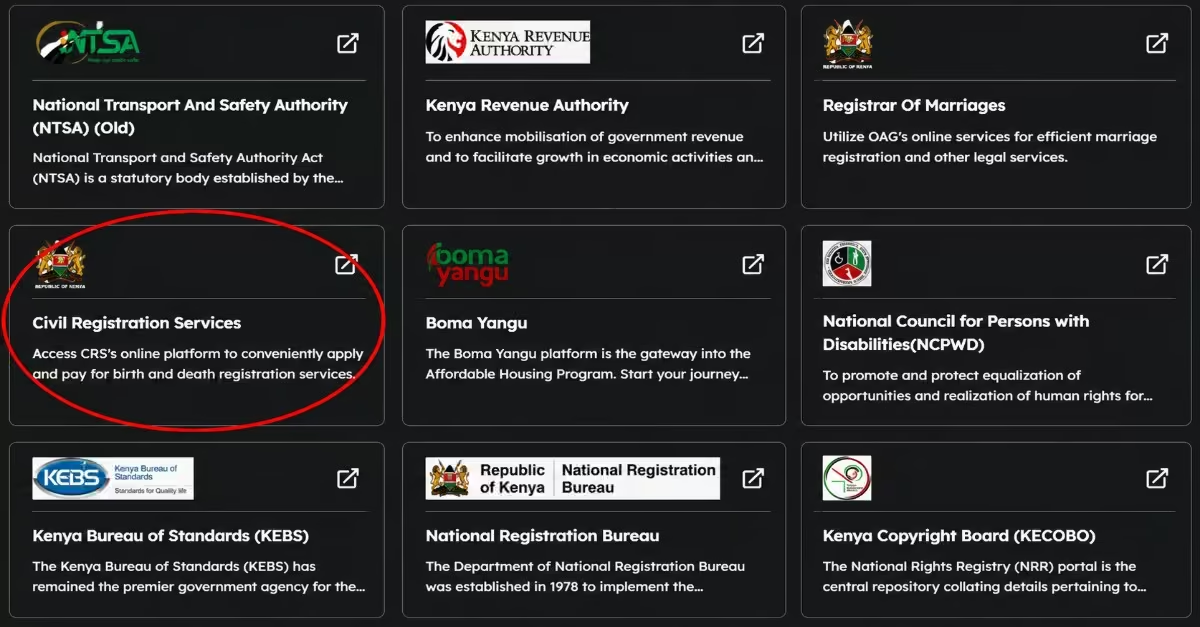
- From the eCitizen dashboard, select Civil Registration Services (CRS) and proceed with the birth certificate replacement or certified copy request process.
Step 4: Enter the Required Information
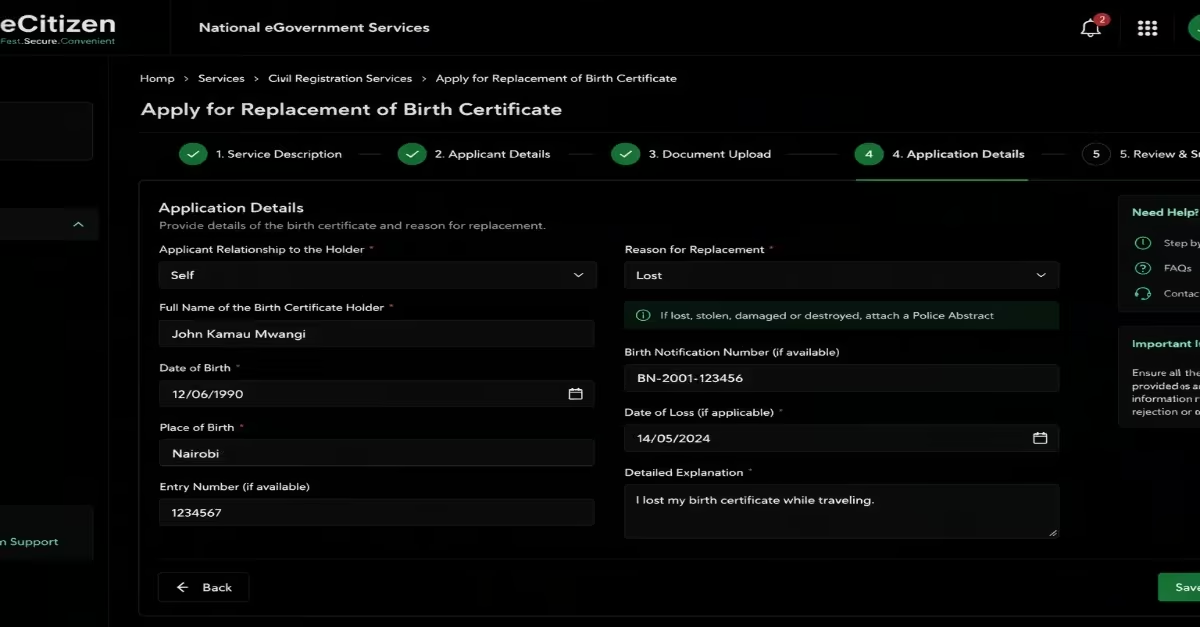
- Provide the applicant’s personal details, the reason for requesting a replacement certificate, and the Entry Number or Birth Notification Number if available.
Step 5: Upload Supporting Documents
- Upload clear scanned copies of the Police Abstract, affidavit, applicant’s identification document, and parents’ identification documents or death certificates where applicable.
- Ensure all documents are clear and readable to avoid delays during verification.
Step 6: Pay the Required Fee
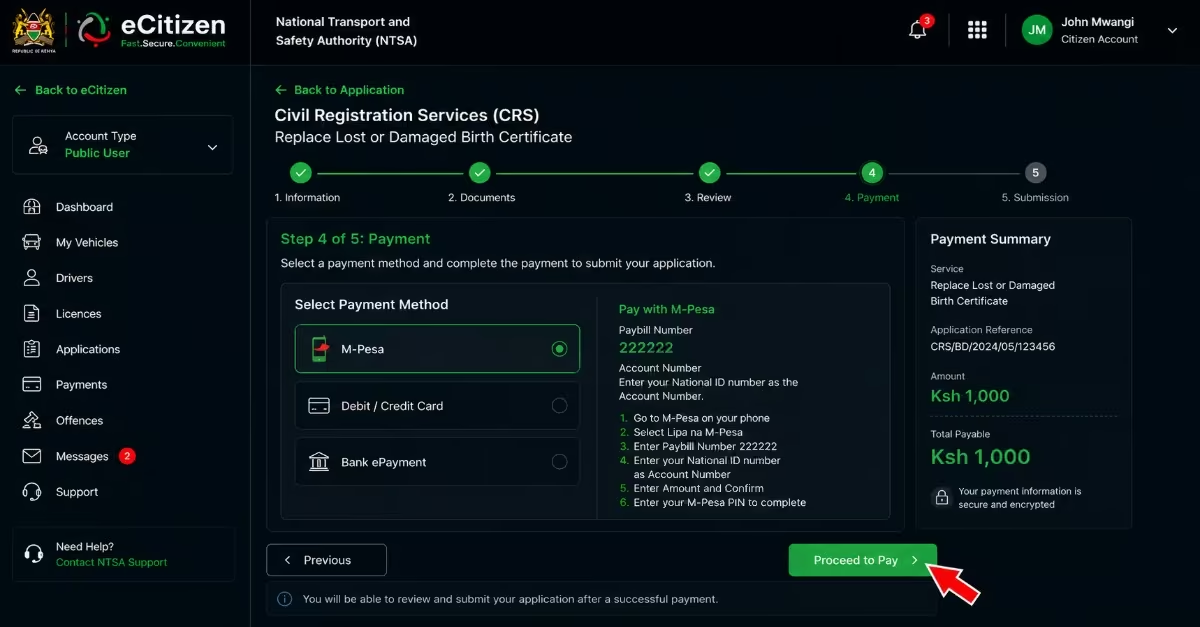
- Make payment through the available eCitizen payment options, including M-Pesa and bank cards. The current government fee for replacing a lost birth certificate is KES 1,000
Step 7: Submit the Application and Collect the Certificate
- Review the application details, submit the request, and print the application form together with the payment invoice for future reference.
Quick Tip: Once processing is complete, you will receive an SMS notification. When collecting the replacement birth certificate, carry your original identification document and proof of payment to the selected Huduma Center or Civil Registration Office.
Read Also: How to Apply for HELB Subsequent Loan 2026/2027
Frequently Asked Questions (FAQs)
What Is a Standard Birth Certificate Application?
A standard birth certificate application, also known as current registration, is the registration of a birth within six months of the child’s birth.
What Is a Late Birth Certificate Application?
A late birth certificate application is made when a birth is registered more than six months after the date of birth and requires additional supporting documents; the application fee is higher than for the current registration.
How Much Does Standard Birth Certificate Registration Cost?
Standard registration for births reported within six months attracts a fee of KES 200
How Much Does Late Birth Certificate Registration Cost?
Late registration incurs a KES 500 fee due to the additional verification required before a certificate can be issued. You will be required also to pay an additional issuance fees of KES 200.
How Long Does Birth Certificate Replacement Take?
Processing times vary, but replacement applications are generally completed within a few weeks after document verification and approval.
What Should I Do If My Application Is Delayed?
Check the status under the “My Applications” section on eCitizen. If the delay persists, contact the nearest Civil Registration Office or Huduma Center for assistance.
Can I Replace a Lost Birth Certificate Online?
Yes. You can apply for a replacement through the eCitizen portal by submitting the required documents, including a police abstract and affidavit. Follow the procedure above for a successful application.
How Will I Know When My Birth Certificate Is Ready?
You will usually receive an SMS notification once your application has been processed and the certificate is ready for collection.
Conclusion
A birth certificate is a crucial document for anyone, as it facilitates access to many government services in Kenya. The process of acquiring one has been made simple, as it can be done online on e-citizen. You only need to have the required documents, such as the birth notification, the parents’ details, an active e-citizen account, and scanned supporting documents. After that, you will follow the process I described above to apply for a birth certificate successfully. Additionally, the replacement process is available, provided you report it to the police station when it’s lost, so as to obtain a police extract. After that, you will follow the process and successfully replace your birth certificate.