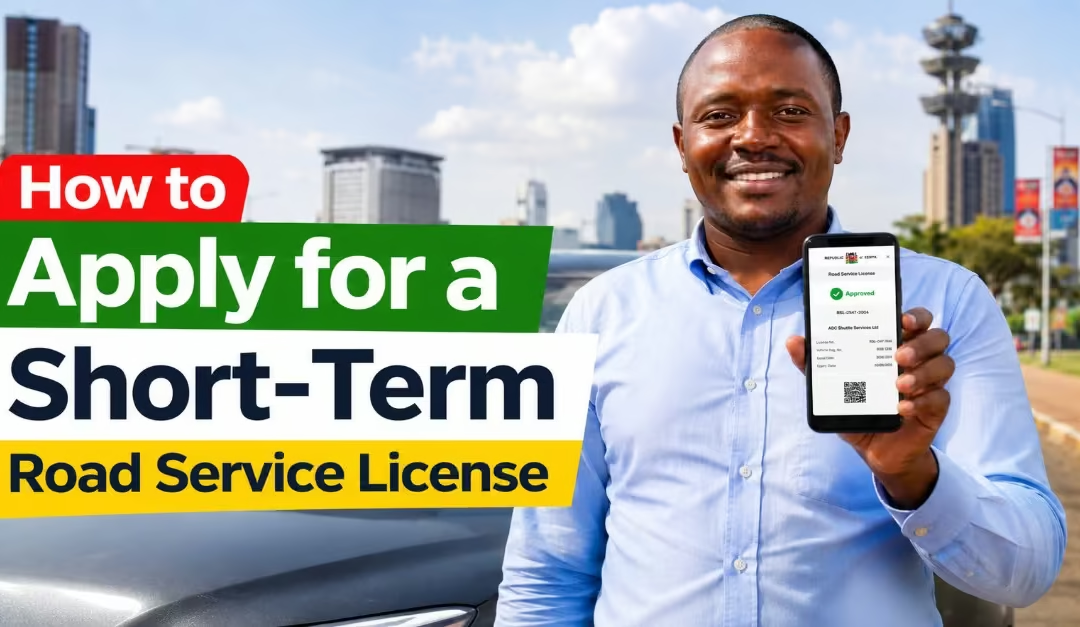
Public Service Vehicles (PSVs) in Kenya are only allowed to operate on routes approved by the National Transport and Safety Authority (NTSA). However, there are times when a matatu, bus, or other PSV may need to temporarily operate on a different route outside its normal licensed area. This can happen during special events, peak travel periods, emergencies, or periods of increased passenger demand. In such situations, operators must obtain a Short-Term Road Service License (RSL). This is a special permit that allows a PSV to operate legally on a specific route for a limited period, usually no more than 3 days. This requirement helps NTSA regulate public transport services, enhance passenger safety, and ensure that vehicles only operate on approved routes.
In this guide, you will learn:
- How to apply for a Short-Term Road Service License on eCitizen
- Requirements for a short-term road service license application.
- Application fees required and processing timelines
- How to check the status of your application.
- Tips to help ensure your application is approved without unnecessary delays.
What is a Short-Term Road Service License in Kenya
A Short-Term Road Service License (RSL) is a temporary permit issued by the National Transport and Safety Authority (NTSA) that allows a Public Service Vehicle (PSV) to operate on a route other than its normally licensed route for a limited period, as highlighted by Nairobi online.
This license is commonly issued to matatus, buses, and other PSV operators who require temporary authorization to serve specific routes due to increased passenger demand, special events, emergencies, or other exceptional situations.
Today, PSV operators can conveniently apply for a Short-Term Road Service License online through the eCitizen platform, making the application process faster, simpler, and more accessible.
Read Also: How to Place a Vehicle Caveat: Step-by-Step Guide
Why Is a Short-Term Road Service License Important?
By requiring PSV operators to obtain approval before operating on temporary routes, NTSA can effectively manage transport services while protecting passengers and other road users. The following are the reasons why you need a short-term road service license.
- Ensures Passenger Safety: The license helps ensure that only roadworthy vehicles that have been properly inspected are permitted to provide public transport services. This helps reduce the risk of accidents caused by unsafe vehicles or unauthorized operators.
- Maintains Regulatory Standards-Before a license is issued, operators must meet specific NTSA requirements related to vehicle condition, insurance coverage, licensing, and compliance with transport regulations. This helps maintain high operational standards across the PSV industry.
- Regulates Public Transport Operations-The Short-Term RSL allows NTSA to monitor which vehicles operate on specific routes and for how long. This helps prevent unauthorized route changes, reduce transport congestion, and ensure passenger demand is served in an organized and controlled manner.
- Supports Efficient Service Delivery: During peak travel seasons, public holidays, special events, or emergencies, the Short-Term RSL allows operators to legally expand their services temporarily. This helps meet increased passenger demand while ensuring that all transport operations remain compliant with the law.
Requirements for a Short-Term Road Service License Application
Before applying for a Short-Term Road Service License (RSL) through the eCitizen platform, you should ensure that both the vehicle and its operator meet NTSA’s licensing requirements. A study by Izzla (2026) indicates the following requirements for the successful application for a short-term road service license.
a) Original Vehicle Logbook
The vehicle logbook serves as proof of ownership. It must match the vehicle being registered for the Short-Term Road Service License.
b) Vehicle Inspection Report
You must provide a valid vehicle inspection report showing that the vehicle has been inspected and meets NTSA’s roadworthiness requirements.
c) Speed Governor Compliance Certificate
This certificate confirms that the vehicle has an approved speed governor installed and that it is functioning properly in accordance with legal requirements.
d) Copy of the Owner’s National ID
A copy of the vehicle owner’s valid National Identity Card is required to verify ownership and identity.
e) Valid PSV Badge for the Driver
The driver assigned to operate the vehicle must have a valid PSV badge issued by NTSA, confirming authorization to transport passengers.
f) Insurance Certificate
The vehicle must have valid insurance coverage to protect both the vehicle and its passengers while operating on public roads.
g) Brake Lining Certificate
A valid brake lining certificate may be required to confirm that the vehicle’s braking system is in good condition and complies with the required safety standards.
Quick tip: Before submitting your application, confirm that all certificates, licenses, and supporting documents are valid and up to date. Expired or invalid documents are among the most common reasons why Short-Term Road Service License applications are delayed or rejected.
How to Apply for a Short-Term Road Service License on eCitizen
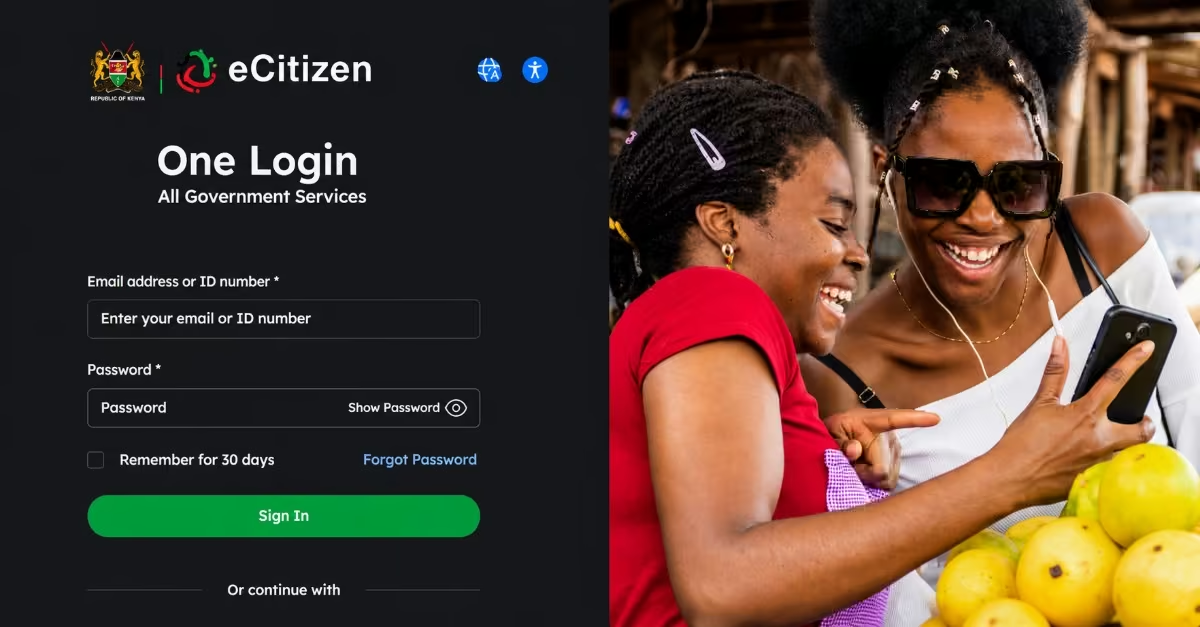
The application process for a Short-Term Road Service License (RSL) has been simplified through the eCitizen platform, allowing PSV owners and operators to submit their applications online without visiting NTSA offices in person. Follow the procedure below to make your application.
Step 1: Log In to Your eCitizen Account
- Open your browser and go to the official eCitizen portal.
- Enter your registered email address or ID number and password, then click Sign In.
- If you do not have an eCitizen account, click “Register” and follow the prompts to create one using your National ID details, phone number, and email address before proceeding.
Quick Tip: Short-Term RSL can only be applied for by a registered Public Transport Operator (PTO). If your organization is not yet registered as a PTO on NTSA, you must complete that registration first before this service becomes available to you.
Step 2: Navigate to the NTSA Service Portal
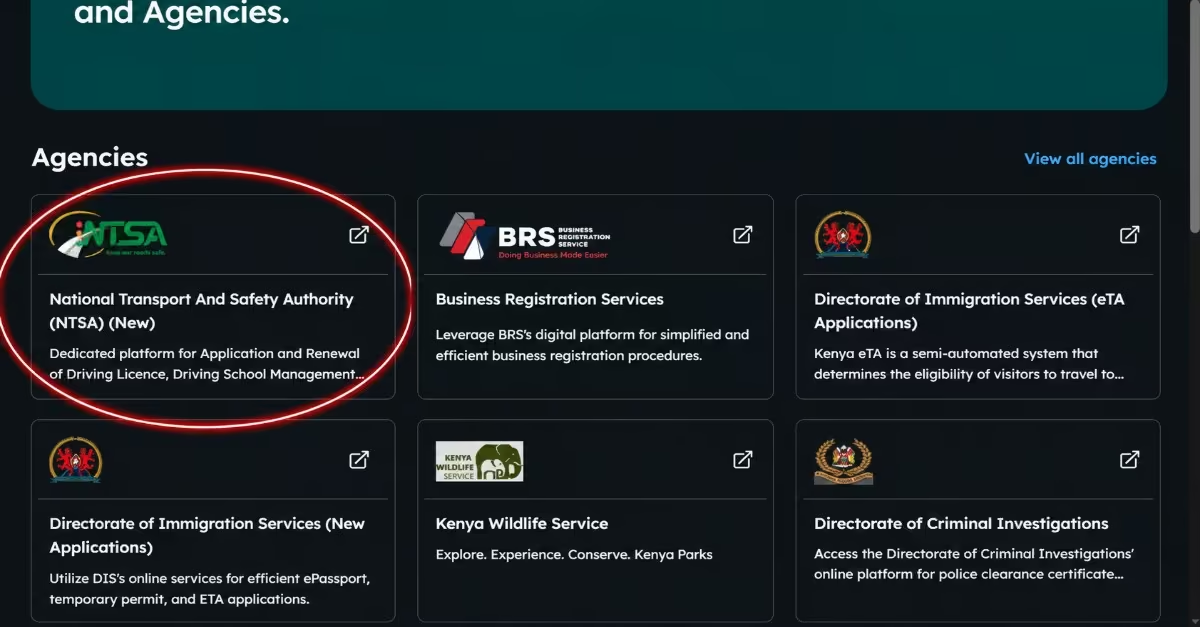
- Once logged in to your eCitizen dashboard, locate and click on the “National Transport and Safety Authority (NTSA) (New)” icon from the list of available government services. This will redirect you to the NTSA Service Portal, where all transport-related services — including RSL applications — are managed.
Step 3: Switch Account to Public Transport Operator
- On the NTSA Service Portal, ensure you are logged in to your Public Transport Operator account. If your dashboard shows a different account type, switch to the PTO account to access PSV-specific services, including the Short-Term RSL option.
Step 4: Select Your Vehicle
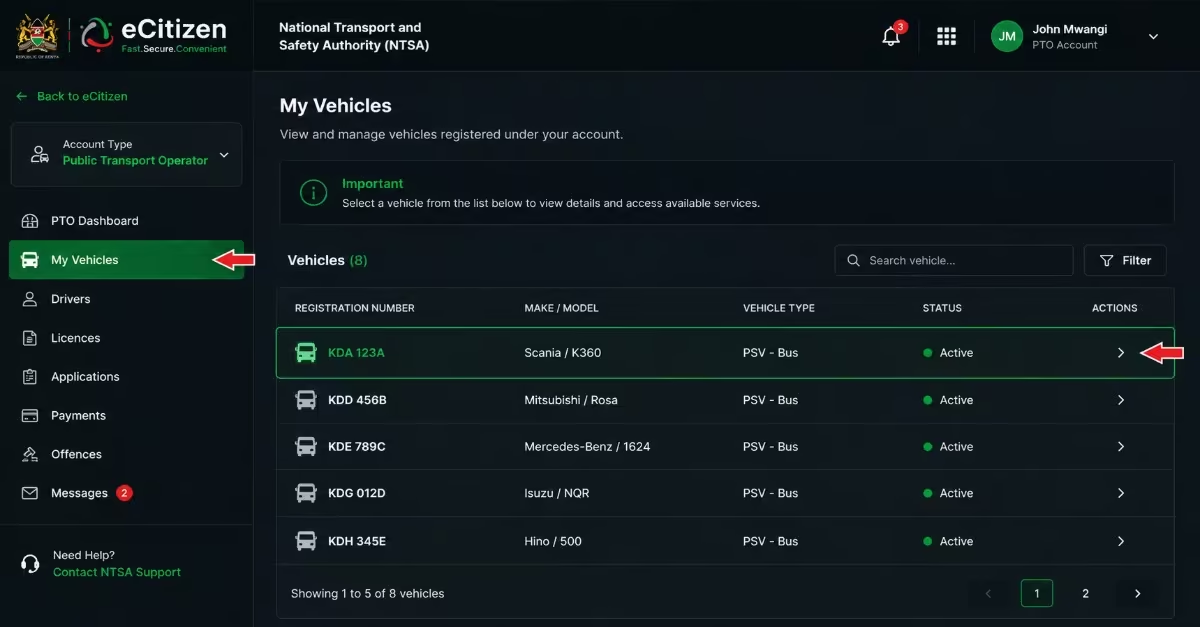
- On the left-hand side of the screen, click on “My Vehicles” to display the list of vehicles registered under your account.
- Locate the specific vehicle for which you are applying the Short-Term RSL and click on it to open its details page.
Step 5: Click on the Short-Term RSL Icon
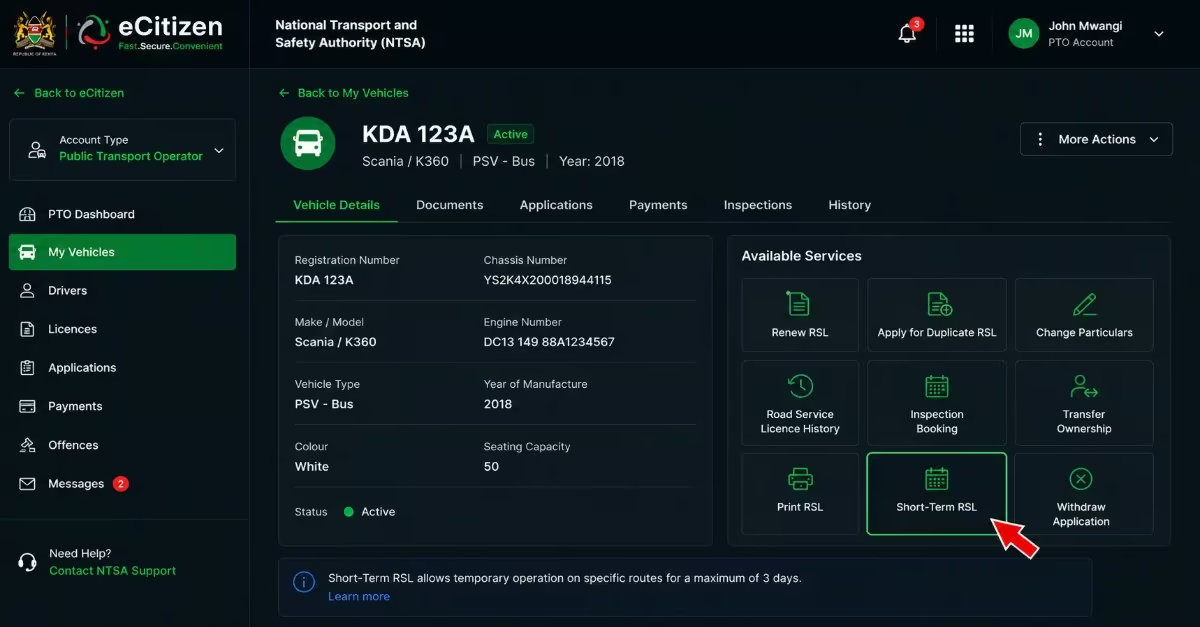
- Within the vehicle’s details page, locate and click on the “Short-Term RSL” icon or option to begin the application.
- This option is separate from the standard RSL application and is specifically designed for temporary route operations.
Step 6: Fill In the Required Application Details
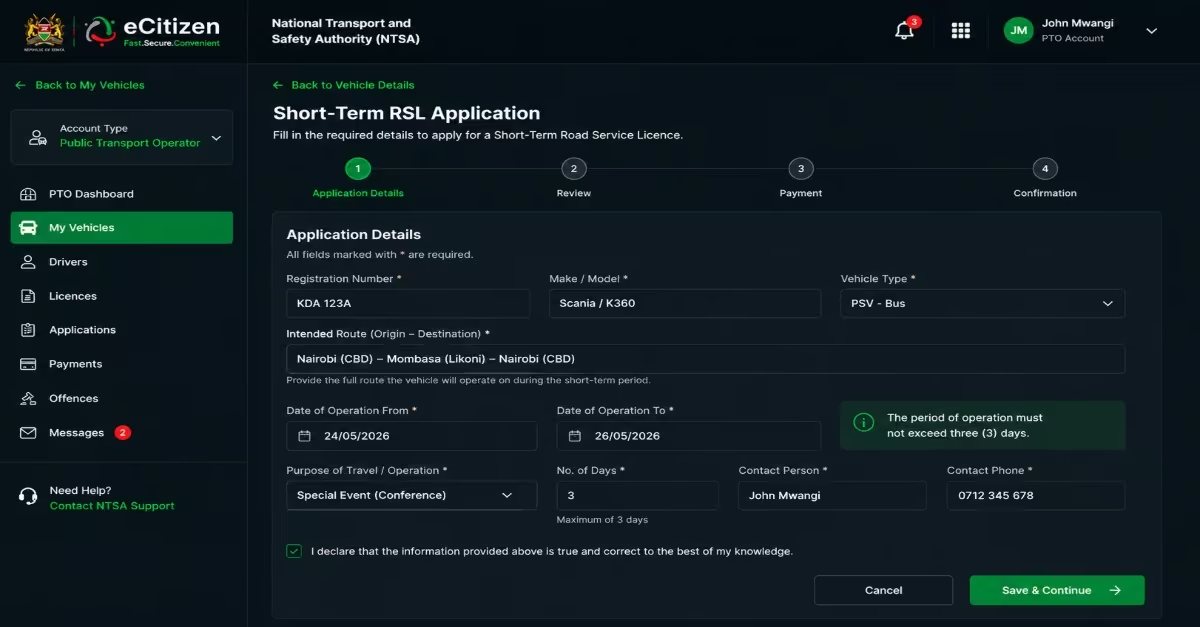
- Complete all the mandatory fields in the application form, which are marked with an asterisk (*). Key details to provide include “The intended route the vehicle will operate on during the short-term period and the period of operation, which must not exceed three (3) days.”
- Double-check all entered details for accuracy before proceeding, as errors can delay or invalidate your application.
Step 7: Make Payment
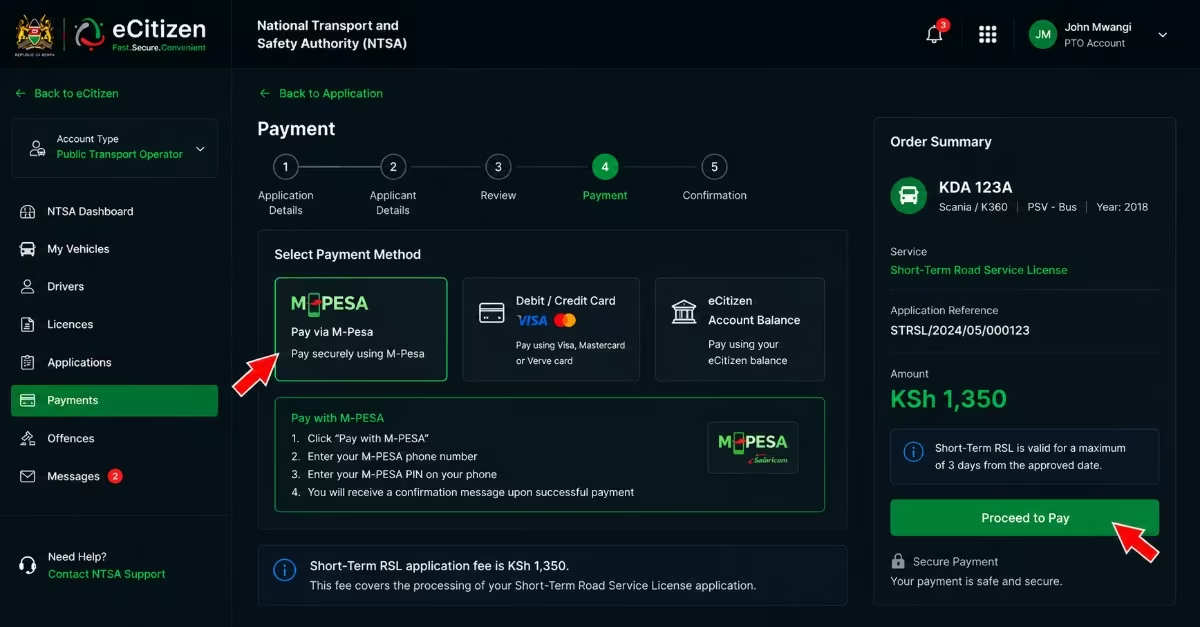
- Proceed to the payment section. The application fee for a Short-Term RSL is KES 1,350.
- Payment is made online through the eCitizen platform via the available options, including M-Pesa or a card. Ensure you receive a payment confirmation before submitting.
Step 8: Submit and Check Application Status
- After successful payment, submit your application. Short-Term RSL applications are processed on the same day, making this service suitable for urgent or last-minute operational needs.
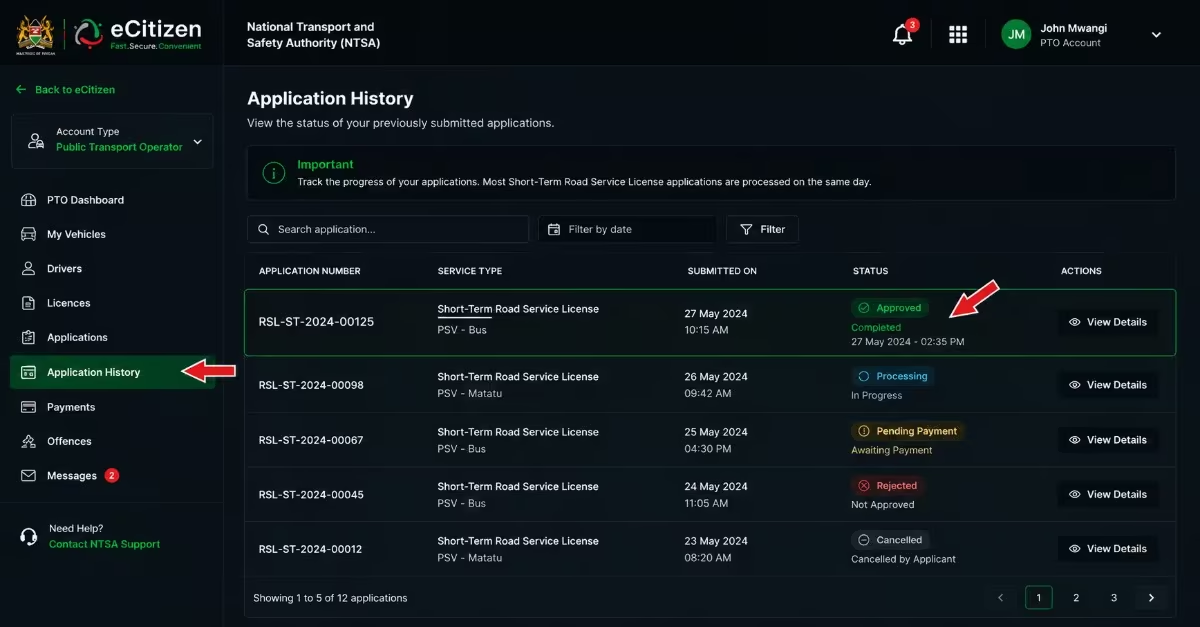
- To monitor your application, navigate to the “Application History” section on the portal to track real-time status updates.
Step 9: Download and Print the Short-Term RSL
- Once your application is approved, return to the portal and download your Short-Term RSL.
- Print the license and keep it inside the vehicle at all times during the approved period of operation, as it serves as proof of compliance during NTSA enforcement checks.
Short-Term Road Service License Charges
The fee for a Short-Term Road Service License (RSL) is KES 1,350, regardless of the vehicle’s passenger capacity. Once the application is approved, the license authorizes a Public Service Vehicle (PSV) to operate legally on the approved temporary route for up to 3 days. Applicants must make the required payment through the eCitizen platform during the application process before the license can be issued.
How to Check Your Short-Term Road Service License Application Status
Step 1: Log in to the Correct Portal
- Visit the NTSA Service Portal at serviceportal.ntsa.go.ke and log in using your eCitizen credentials.
Quick Tip: Do not use the general eCitizen dashboard, as Road Service License (RSL) services are accessed through the dedicated NTSA portal. Ensure you are logged in as a Public Transport Operator so that you can access PSV-related services, including your Short-Term RSL application records.
Step 2: Navigate to the Application History Section
- After logging in and accessing your dashboard, locate and click on the “Application History” section. This is the area where your Short-Term Road Service License application records are stored and updated.
Step 3: Check Your Application Status
- Within the Application History section, find the Short-Term RSL application you submitted. The system will display the current status of your application.
- Since Short-Term Road Service License applications are usually processed on the same day, the status should be updated shortly after submission and payment are made.
Common Problems When Applying for a Short-Term Road Service License
Although the e-Citizen application process is generally simple and convenient, applicants may sometimes face challenges that can delay approval or even prevent a successful submission. Being aware of these common issues in advance can help you avoid unnecessary delays and complete your application more smoothly. A study by Bestcare Facilities Management highlights the following problems you may encounter while making your application.
a) Vehicle Details Not Appearing
In some cases, the vehicle registration number may not appear in the system. This usually happens when the vehicle records have not been properly updated or correctly linked within the NTSA databases.
b) Payment Confirmation Delays
After making a payment through eCitizen, confirmation may sometimes take longer than expected. Applicants are advised to keep their payment receipts and allow some time for the transaction to be fully reflected in the system.
c) Document Upload Problems
Applications may be delayed if documents are uploaded in the wrong format, exceed the required file size, or are unclear and difficult to read. It is important to ensure that all uploaded documents are clear and properly formatted.
d) Application Rejection
Applications may be rejected if the required documents have expired, the information provided is inaccurate, or the vehicle does not meet NTSA licensing requirements. Careful verification of all details before submission is important to avoid rejection.
e) e-Citizen System Downtime
At times, the eCitizen platform may undergo maintenance or experience temporary technical issues. During such periods, users may face difficulties submitting applications or accessing certain services.
Read Also: Applying for New Generation Number Plates in Kenya: Step-by-Step Guide
Frequently Asked Questions (FAQs)
Can I Apply for a Short-Term Road Service License Without an eCitizen Account?
No. An active eCitizen account is required. The entire application process is handled through the NTSA portal on eCitizen.
How Long Is a Short-Term Road Service License Valid?
It is valid for up to 3 days only. The Short-Term RSL is designed for temporary situations such as events, emergencies, or route changes. It cannot be extended, so if you need to continue operating beyond this period, you must submit a new application.
Can Someone Else Apply on My Behalf?
Yes, but with conditions. A third party can assist with creating or accessing an eCitizen or NTSA TIMS account. However, the vehicle must be registered under your name or your organization’s name within the NTSA system. Applications cannot be submitted under unrelated accounts.
Do I Need to Print the License?
Yes. Once approved, you must download and print the Short-Term RSL. A printed copy must be kept in the vehicle at all times during operation. Failure to produce it during inspection may lead to penalties.
How Long Does a Short-Term RSL Application Take?
Short-Term RSL applications are usually processed on the same day. However, delays may occur during system downtime or peak usage periods.
What Are the RSL Fees?
The fee for a Short-Term Road Service License is KES 1,350, regardless of vehicle capacity. This fee is fixed for the short-term license and must be paid through eCitizen during the application. Standard annual RSL fees differ and should be confirmed directly through NTSA for accuracy before application.
Conclusion
Through the eCitizen platform, you can easily apply for a Short-Term Road Service License. You need to have all the required documents, then follow the procedure explained above to apply, make payments, and receive approvals without visiting physical offices. However, success depends on ensuring that all required documents are valid, accurate, and properly submitted. By following the correct procedure and avoiding common mistakes, operators can obtain approval quickly and operate legally, safely, and in full compliance with NTSA regulations.