
If you are registered under the Social Health Authority (SHA) program in Kenya, you are required to make regular SHA contributions to keep your health cover active. These contributions help support medical services under Kenya’s new healthcare system, allowing members and their dependents to receive treatment at approved hospitals and healthcare facilities across the country.
For many people, especially first-time users, understanding how SHA payments work can be challenging after the transition from NHIF to SHA. This guide explains everything you need to know about paying SHA in Kenya, including who is required to pay, the available payment methods, contribution rates, and the step-by-step process of making payments through M-Pesa, online platforms, and other official payment channels.
What Are SHA Payments?
SHA payments are contributions made by registered members to the Social Health Authority (SHA) in Kenya to support access to healthcare services under the national health insurance program. These payments may include monthly health insurance contributions, contributions toward the national health scheme, and penalties charged for late payments.
Making regular SHA payments helps keep your account active. It ensures that you and your dependents can continue receiving medical services at approved hospitals and healthcare facilities across the country.
Read Also: How to Register for SHA via USSD and Online
Who Is Required to Pay SHA Contributions?
SHA contributions are mandatory for all Kenyan residents, including employed individuals, self-employed workers, business owners, and vulnerable households. The system is designed to ensure that every person contributes according to their financial ability so that all Kenyans can access healthcare services under the national health insurance program. The following are the individuals required to make SHA contributions as per Elsie (2026)
a) Employed Individuals (Formal Sector Workers)
If you earn a monthly salary, your SHA contribution is automatically deducted from your salary at a rate of 2.75% of your gross income, with a minimum contribution of KES 300 per month and no maximum limit. The deduction is made entirely from the employee’s salary, and employers are legally required to remit the amount to SHA by the 9th day of the following month.
b) Self-Employed and Informal Sector Workers
Self-employed individuals and informal sector workers, such as traders, boda boda riders, farmers, and freelancers, are required to register and pay their SHA contributions personally. Before the contribution amount is determined, members must complete a Means Testing process that assesses factors such as housing, household assets, family size, and access to basic services.
c) Employers (Business Owners with Employees)
Employers and business owners with staff are legally required to register their organizations with SHA, enroll all employees into the system, deduct 2.75% of each employee’s gross salary every month, and remit the contributions to SHA before the 9th day of the following month. Failure to remit payments on time attracts a 2% monthly penalty on unpaid amounts, while continued non-compliance may lead to additional legal penalties, including heavy fines or imprisonment under the Social Health Insurance Act.
d) Vulnerable and Indigent Households (Government-Sponsored)
Kenyans who are unable to afford SHA contributions may receive government-sponsored support through the social protection program, where the government pays contributions on behalf of eligible households. Identification of vulnerable households is usually done through existing social protection databases such as the Inua Jamii program, and individuals who believe they qualify for assistance but are not yet enrolled are advised to visit the nearest Huduma Center or sub-county social protection office for guidance.
What is SHA Means Testing?
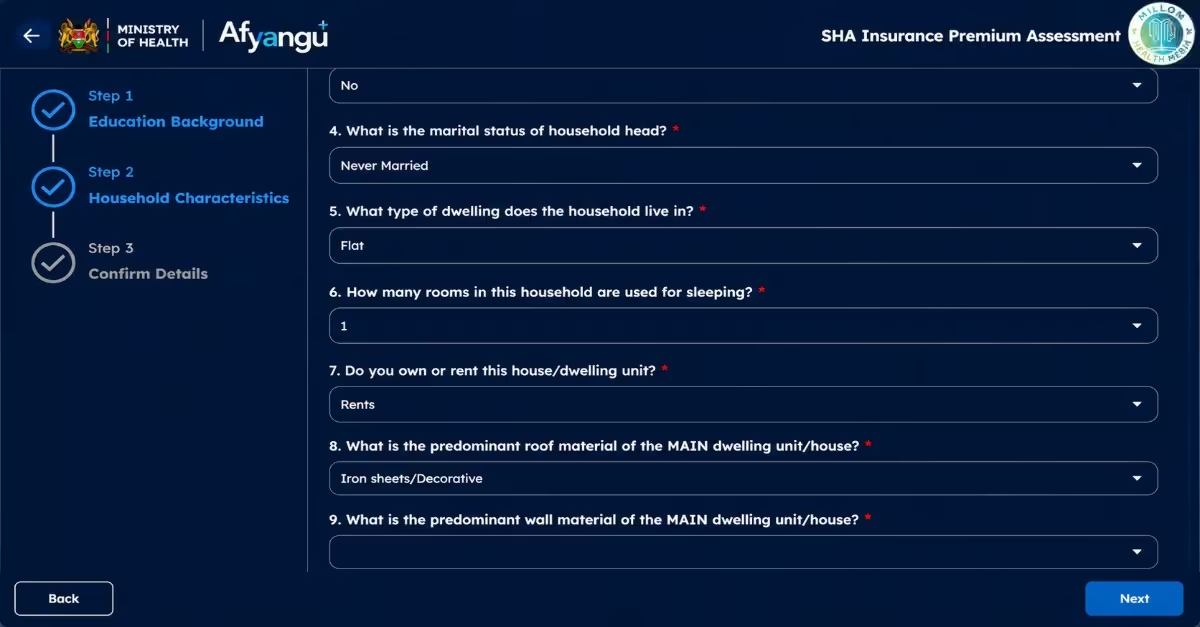
SHA Means Testing is a system used by the Social Health Authority to calculate the amount self-employed and informal sector workers should contribute toward health insurance each month. It mainly applies to people who do not earn a fixed monthly salary, such as small business owners, farmers, freelancers, and boda boda riders. This approach is intended to ensure that members contribute fairly based on their financial situation while still maintaining access to healthcare services under the SHA program.
Step-by-Step Guide: How to Access the SHA Means Testing Tool
- Visit afyayangu.go.ke and sign in to your account.
- Open the “My Profile” section.
- Click on “Income” and indicate that you are self-employed.
- Complete the Means Testing questions provided.
- SHA will then calculate your monthly or annual premium based on your responses.
Key Factors Considered in the SHA Means Testing Model
To determine how much a self-employed member should contribute, the SHA Means Testing model evaluates several social and economic factors about a household. The information provided helps the system calculate a fair SHA contribution amount based on a member’s financial situation. A study by Jason (2025) highlights the following factors considered during SHA means testing.
- Household composition and characteristics
- Housing characteristics
- Access to basic services
- Asset ownership
- Education level
- Employment status
Once the assessment is completed, the system automatically generates the amount you are required to contribute to SHIF.
Read Also: How to Add Dependants on SHA Kenya: A Step-by-Step 2026 Guide
How to Pay SHA via M-Pesa (Step-by-Step Guide)
There is an M-Pesa Paybill number managed directly by the Social Health Authority that is used for SHIF contributions, especially by self-employed individuals and people working in the informal sector. Members can conveniently pay their monthly or annual SHA contributions through M-Pesa by following these steps:
- Open the M-Pesa menu on your phone. If you are using a smartphone, you can open the M-Pesa app or dial *334#. If you are using a basic phone, open the Safaricom SIM Toolkit menu and select M-Pesa.
- Select “Lipa na M-Pesa” from the available menu options.
- Select “Paybill” and not “Buy Goods and Services.” SHA payments are made through a Paybill number, and choosing the wrong option may cause the transaction to fail or send money to the wrong account.
- Enter the Business Number: 200222. This is the official SHA Paybill number managed by the Social Health Authority. It is important to use the correct number to avoid sending money to an incorrect account.
- Enter your National ID number as the Account Number. Use the number exactly as it appears on your national identity card without spaces or special characters. SHA uses this number to connect your payment to your account, so entering the wrong ID number may prevent your contribution from reflecting in your profile.
- Enter the exact contribution amount required based on your SHA Means Testing results. The minimum contribution is KES 300 per month. Using the correct amount helps avoid payment errors or rejected transactions.
- Enter your M-Pesa PIN and press OK to authorize the payment.
QIICK TIP: Carefully review the payment details shown on your screen, including the Paybill number (200222), your National ID number, and the contribution amount, then press OK to complete the payment.
How to Pay SHA Online via the Afya Yangu (Step-by-Step Guide)
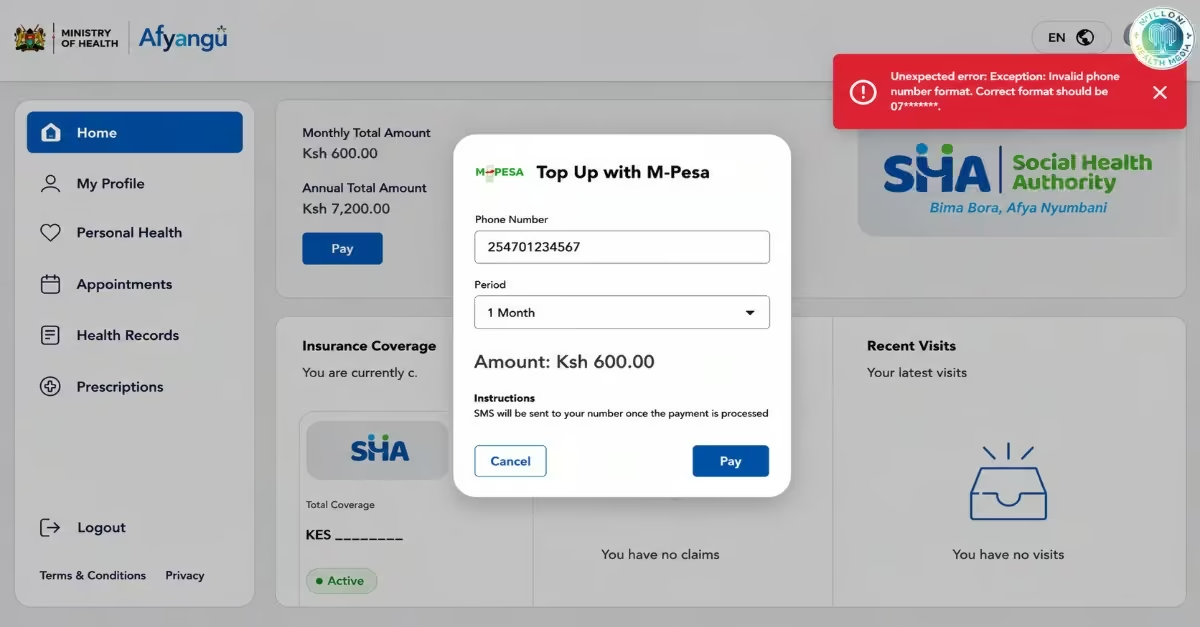
The Afya Yangu Portal provides a convenient alternative to the normal M-Pesa Paybill payment method, especially for members who prefer managing their SHA account and contributions from one online dashboard. The portal also allows users to keep digital records of their payments and contribution history. Before making any payment through the platform, ensure you have already completed your SHA registration, because you cannot access the payment section without an active account.
Step 1: Open the Afya Yangu Portal
- Visit the official Afya Yangu Portal or the SHA Kenya Website.
- Both platforms can be used for SHA contributions, although Afya Yangu is mainly designed for individual and self-employed members.
- If the website loads slowly, try accessing it during off-peak hours, such as early morning or late evening.
Step 2: Sign In to Your Account
- On the homepage, click “Sign In.”
- Select “Kenyan Citizen” as your ID type.
- Enter your National ID number and the 4-digit PIN you created during SHA registration.
- This PIN is different from your M-Pesa PIN and is only used to access your SHA account.
Step 3: Verify Your Account Using OTP
- After entering your login details, a One-Time Password (OTP) will be sent to your registered mobile number through SMS.
- Enter the OTP on the portal to complete the verification process.
- Ensure your phone is nearby and able to receive SMS messages before logging in.
Step 4: Go to the Payments Section
- Once logged in, navigate to the “Payments” or “Contributions” section on your dashboard.
- Depending on the portal version, the section name may vary slightly, but it will contain your SHIF contribution and payment options.
Step 5: Select Your Payment Method
- Click “Make Payment” and choose M-Pesa as your preferred payment method.
- The portal will display your required contribution amount based on your profile and Means Testing results.
- Confirm that the amount shown is correct before proceeding.
Step 6: Authorize the Payment
- After confirming the payment details, the system will send an STK Push notification to your registered Safaricom number.
- Open the prompt on your phone, enter your M-Pesa PIN, and press OK to complete the transaction.
- Make sure you authorize the payment before the request expires.
Step 7: Confirm Successful Payment
- Once the payment is successful, you will receive an M-Pesa confirmation SMS.
- You will also receive a second confirmation message from SHA or Afya Yangu confirming that your contribution has been credited to your account.
- You can also check your contribution history on the portal to verify the payment status.
Quick Tip: Download, save, or take a screenshot of your payment receipt from the portal. This receipt acts as your official proof of payment. It may help if your contribution does not reflect immediately, or if you need to confirm your SHA coverage at a hospital or healthcare facility.
Step-by-Step Guide: How to Pay SHA via USSD Code *147#
The *147# USSD service provides a simple way for SHA members to make contributions directly from their mobile phones without needing internet access. This method is especially useful for individuals using basic phones or those who prefer a faster payment option without logging into the Afya Yangu Portal.
Step 1: Dial *147#
- Dial *147# on your phone.
- Wait for the SHA menu to appear on your screen.
- If the menu does not load immediately, wait a few seconds and try again because network delays may occur during busy hours.
Step 2: Select Your ID Type
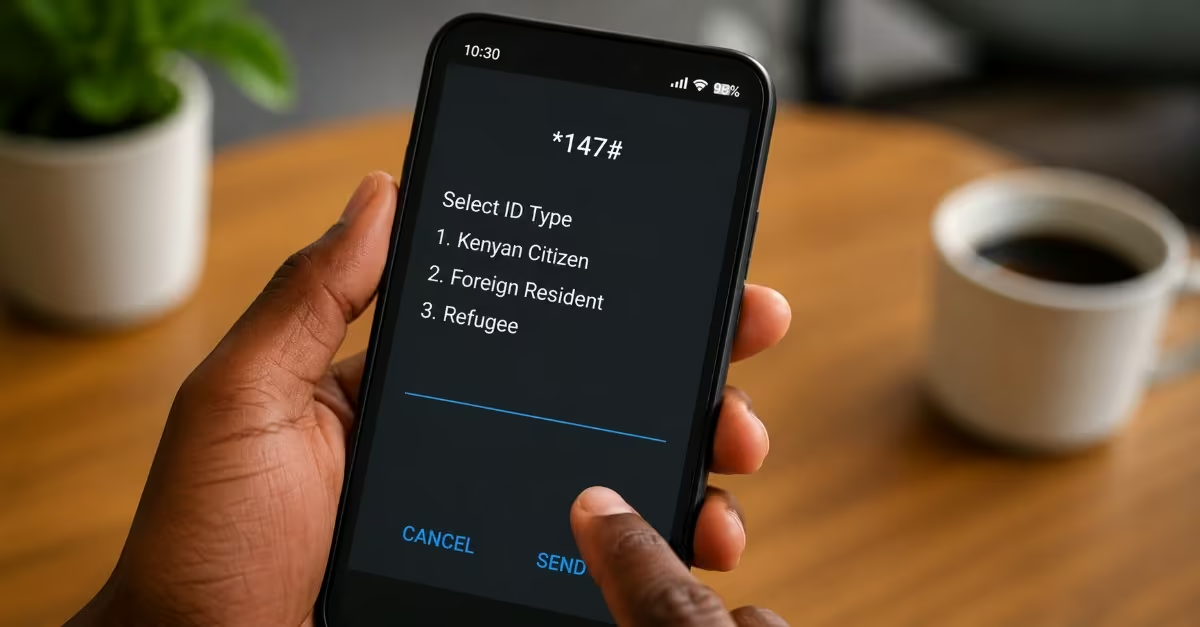
- Choose the ID type that matches your registration status.
- Options may include Kenyan Citizen, Foreign Resident, or Refugee.
- Foreign residents and refugees should use their registered identification numbers instead of a Kenyan National ID number.
Step 3: Enter Your Identification Number
- Enter your National ID number or the identification number requested.
- Press OK to continue to the next step.
Step 4: Select “Make Payment”
- From the menu options displayed, choose “Make Payment.”
- This will take you to the SHA contribution payment section.
Step 5: Choose the Payment Option
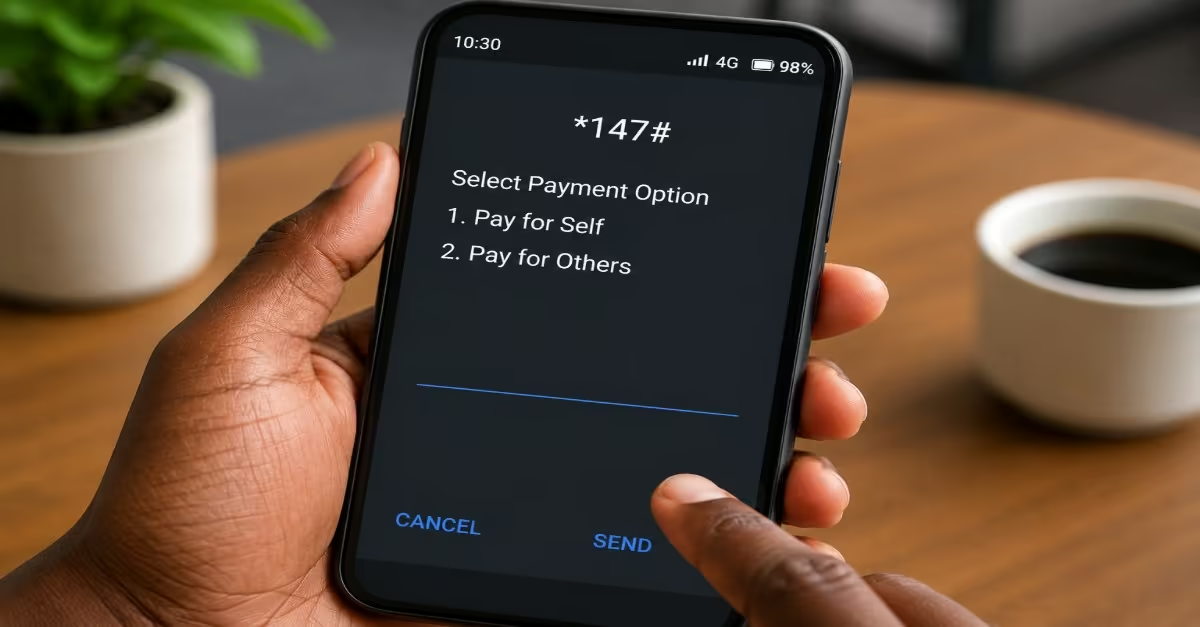
- Select “Pay for Self” if you are paying your own SHA contribution.
- Select “Pay for Others” if you are paying on behalf of another person or dependant.
- If paying for another person, enter their National ID number when prompted.
Step 6: Enter the Contribution Amount
- Enter the exact contribution amount assigned to you through the Means Testing process.
- The minimum SHA contribution amount is KES 300.
- Using the correct amount helps avoid rejected transactions or payment processing errors.
Step 7: Authorize the Payment
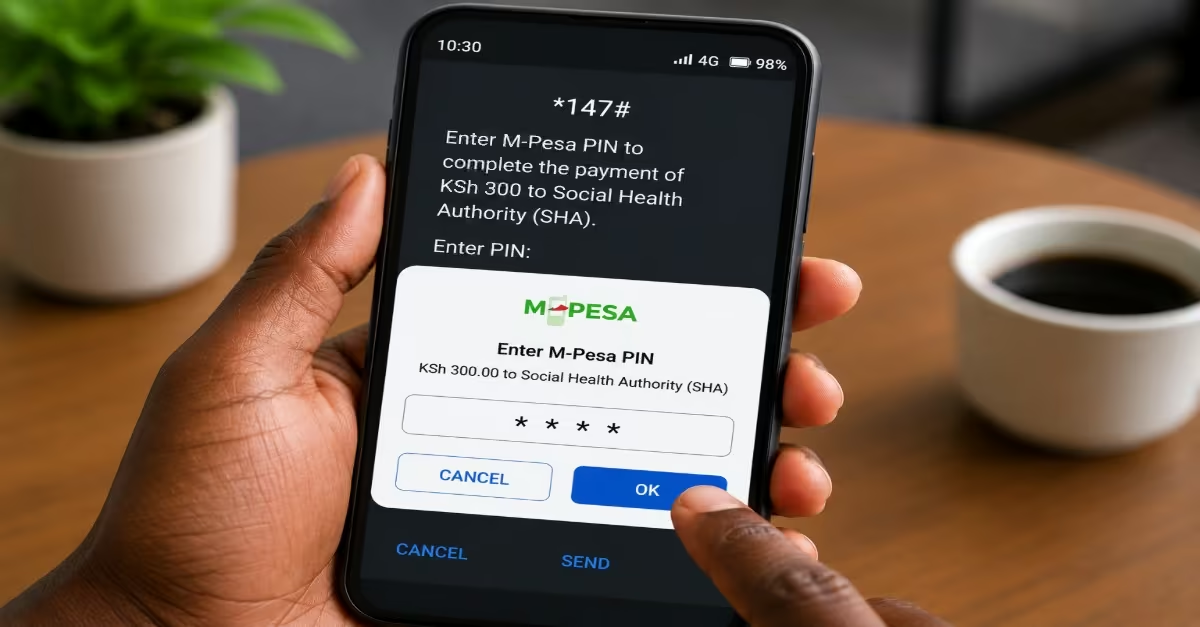
- After confirming the amount, the system will send an M-Pesa STK Push notification to your phone.
- Enter your M-Pesa PIN and press OK to authorize the payment.
- Complete the transaction before the payment request expires.
Step 8: Confirm the Payment
- Once the payment is successful, you will receive confirmation messages from both M-Pesa and SHA/Afya Yangu.
- These messages confirm that your contribution has been received and credited to your account.
- It is advisable to save the messages as proof of payment.
What Are the SHA Contribution Rates?
SHA contributions for salaried employees are calculated at a flat rate of 2.75% of gross salary. They are automatically deducted from the employee’s salary every month by the employer. Since many people in the informal sector do not have a fixed monthly income or pay slips, SHA uses a means-testing system to estimate their contribution amount based on their financial situation, as highlighted by a study by the HowKe team.
In both cases, the minimum contribution is KES 300 per month, and there is no maximum limit, meaning higher earners contribute more. Vulnerable and indigent households identified through the State Department for Social Protection have their contributions fully paid by the government through a subsidized amount of KES 660 per month to ensure that financially disadvantaged individuals are not excluded from accessing healthcare services.
SHA Key Deadlines and Compliance
SHA compliance has strict deadlines and penalties for employers who fail to remit contributions on time. According to Faidi hr the employers are required to submit all employee SHA contributions by the 9th day of the following month, and failure to do so attracts an automatic 2% monthly penalty on the unpaid amount.
Continued non-compliance is considered an offense under the Social Health Insurance Act and may result in fines of up to KES 2 million, imprisonment for up to three years, or both. Employees may also be directly affected because delayed or unpaid remittances can lead to suspension of healthcare access until the outstanding contributions are cleared. To avoid penalties and service interruptions, employers are encouraged to remit contributions early instead of waiting until the deadline.
Conclusion
Understanding how to pay for SHA contributions in Kenya is important for maintaining active health coverage and ensuring continued access to medical services for you and your dependents. Whether you are employed, self-employed, a business owner, or covered under a government-supported program, you can easily make your SHA contributions through official channels such as M-Pesa, the Afya Yangu Portal, or *147# by carefully following the procedures illustrated above. If you are also working in the informal sector, ensure you go through the SHA means testing before you start making your payments, so as to avoid over- or under-payments.