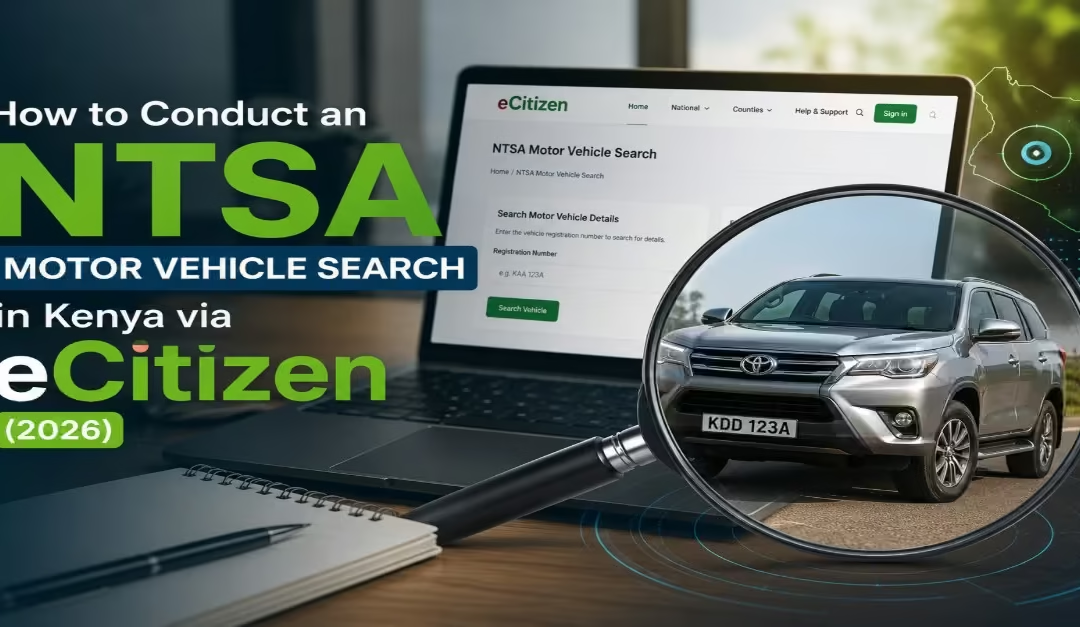
Before you buy a car locally (a secondhand vehicle), it is important to carry out proper checks to make sure you are getting a genuine vehicle and value for your money. To do this, you must conduct an NTSA motor vehicle search to confirm the registered owner of the vehicle and view important details such as the make and model, engine number, chassis number, year of manufacture, and past ownership information.
In this guide, you will learn the step-by-step process on how to:
- Conduct an NTSA motor vehicle search in Kenya
- Requirements for Obtaining an NTSA Copy of Records via eCitizen
- Explanations of details included in the NTSA Copy of Records
- NTSA Vehicle Search Charges
- Common vehicle frauds in Kenya.
What is An NTSA Motor Vehicle Search?
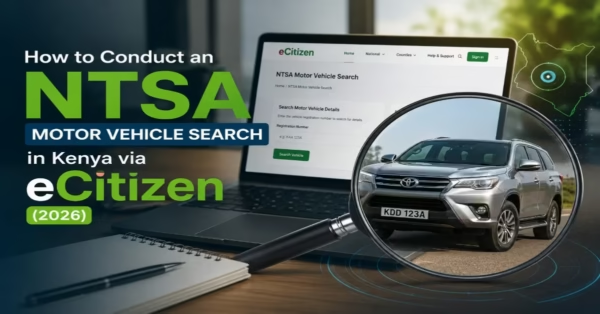
An NTSA motor vehicle search is an official process that allows individuals to check and confirm a vehicle’s registration details through the National Transport and Safety Authority (NTSA) database. This service is commonly known as a Motor Vehicle Copy of Records search.
When the search is complete, you are given a Copy of Records, which provides detailed information about the registered owner.
- Logbook information
- Make and model
- Engine number and chassis number
- Year of manufacture
- Previous ownership records
When Should You Conduct a Motor Vehicle Search?
A motor vehicle search matters when you need to confirm ownership and verify vehicle records. Conducting an NTSA vehicle search helps protect buyers, lenders, and other parties from fraud, ownership disputes, and hidden liabilities attached to a vehicle.
- Before Buying a Used Vehicle – This is the most common reason for conducting a vehicle search. It helps confirm the vehicle’s actual owner and identify any loans, caveats, or suspicious ownership history before making payment.
- Before Accepting a Vehicle as Collateral – Banks, SACCOs, and other lenders usually conduct vehicle searches to verify ownership and check whether the vehicle already has existing financial charges or restrictions.
- Before Ownership Transfer – A vehicle search allows both the buyer and seller to confirm that the ownership records are correct before starting the transfer process through NTSA TIMS.
- Before Buying an Imported Used Vehicle Locally – Buyers can use the NTSA search to confirm that the imported vehicle has been properly registered in Kenya and that the details match the logbook and importation records.
Read Also: How to Re-Register a Vehicle in Kenya via eCitizen (2026 Guide)
Requirements & Documents Needed for NTSA Motor Vehicle Search
Before conducting a motor vehicle search on the eCitizen platform, you need a few documents to complete the process smoothly. A study by thekenyanway highlights the following requirements.
a) Vehicle Registration Number
The vehicle registration number (number plate) is the main detail used to retrieve vehicle records from the NTSA system. If the number plate is not available, you can also use the chassis or frame number as an alternative. Enter either detail in the search section on the NTSA service portal to access the vehicle information.
b) A Valid Government-Issued Identification Document
A valid identification document is required to create or access an eCitizen account. The accepted identification documents include:
- National ID — for Kenyan citizens
- Alien ID — for foreign residents
- Diplomatic ID — for diplomats
- Passport — for foreign visitors
The identification number is also used as your username when logging into the eCitizen portal.
c) An Active eCitizen Account
Currently, all NTSA services, including motor vehicle searches, are available only through the eCitizen platform. Therefore, you must have an active eCitizen account and be logged in before proceeding with the search. If you do not have an account, create one.
d) A Payment Method
A fee of KES 550 is required to obtain the NTSA Copy of Records. The eCitizen platform supports several payment options, including M-Pesa, Debit card, credit card, and bank transfer. You make payment after entering the vehicle registration number or chassis number and before the records are released.
e) Internet Access
Since the entire process is completed online through the eCitizen platform, you must have a stable internet connection. The vehicle search, payment, and downloading of the Copy of Records are all done digitally within the same session.
Step-by-Step Guide: How to Conduct an NTSA Motor Vehicle Search via eCitizen (2026)
The entire process is completed online; you will need your eCitizen account login details and the vehicle registration number or chassis number. A study by Kevin (2026) highlights the following step-by-step procedure.
Step 1: Log In to Your eCitizen Account
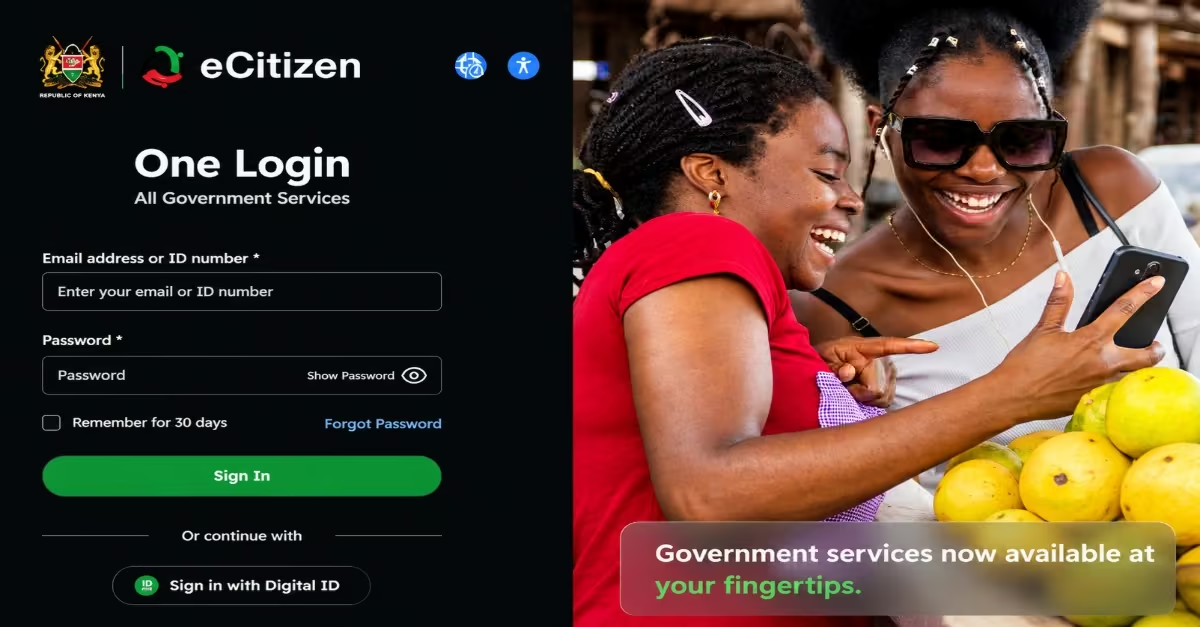
- Visit NTSA Service Portal or eCitizen Portal and sign in using your eCitizen credentials, which include your ID number and password.
- If you do not already have an account, click “Register” and create one using your National ID, phone number, and email address.
- First-time users accessing NTSA services may also be required to update their password before continuing.
Step 2: Access the NTSA Service Portal
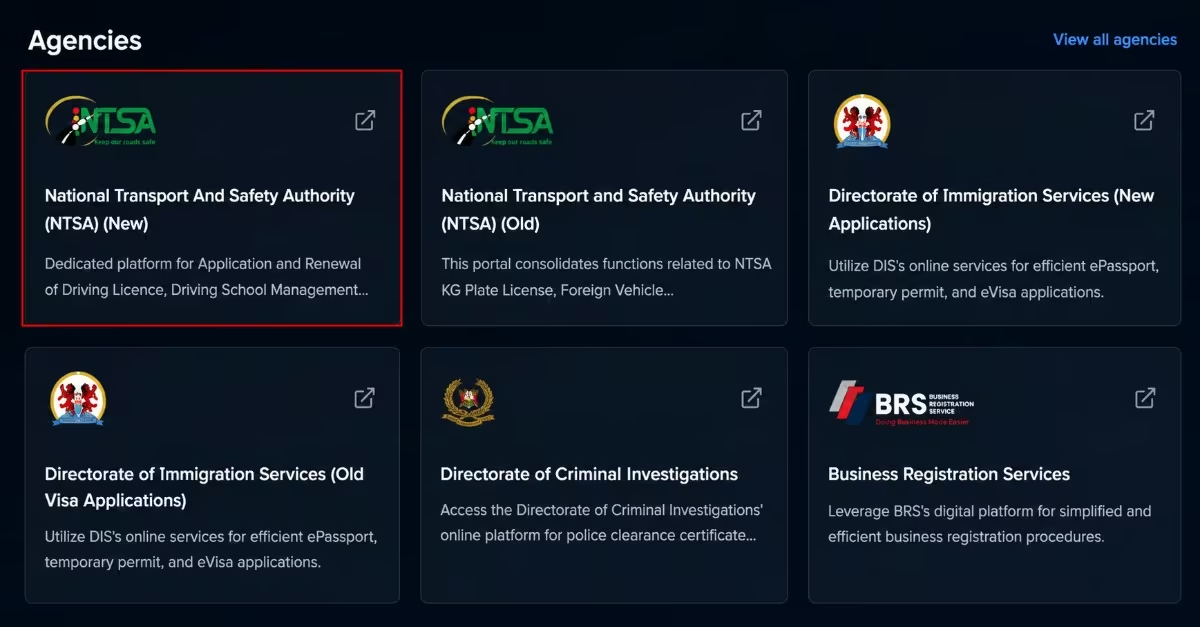
- After logging in to your eCitizen dashboard, scroll to the Agencies section and select “National Transport and Safety Authority (NTSA) (NEW).” This will direct you to the NTSA online service portal.
Step 3: Navigate to the Services Tab
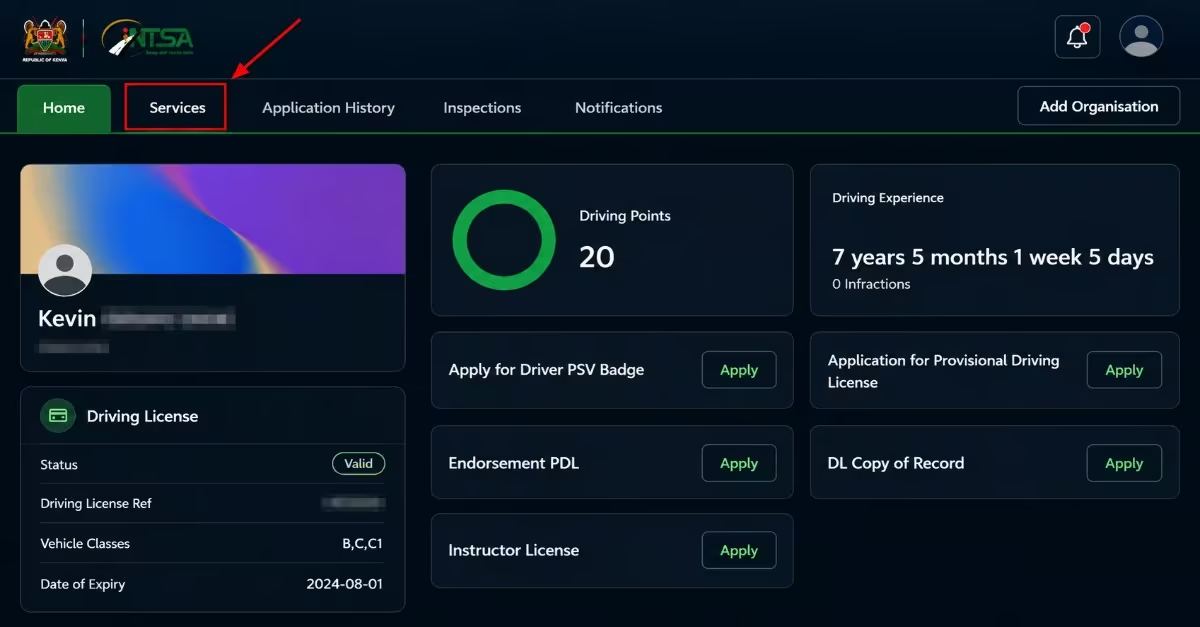
- Once you are on the NTSA dashboard, click on the “Services” tab to view the list of available NTSA services.
Step 4: Apply for Motor Vehicle Copy of Records
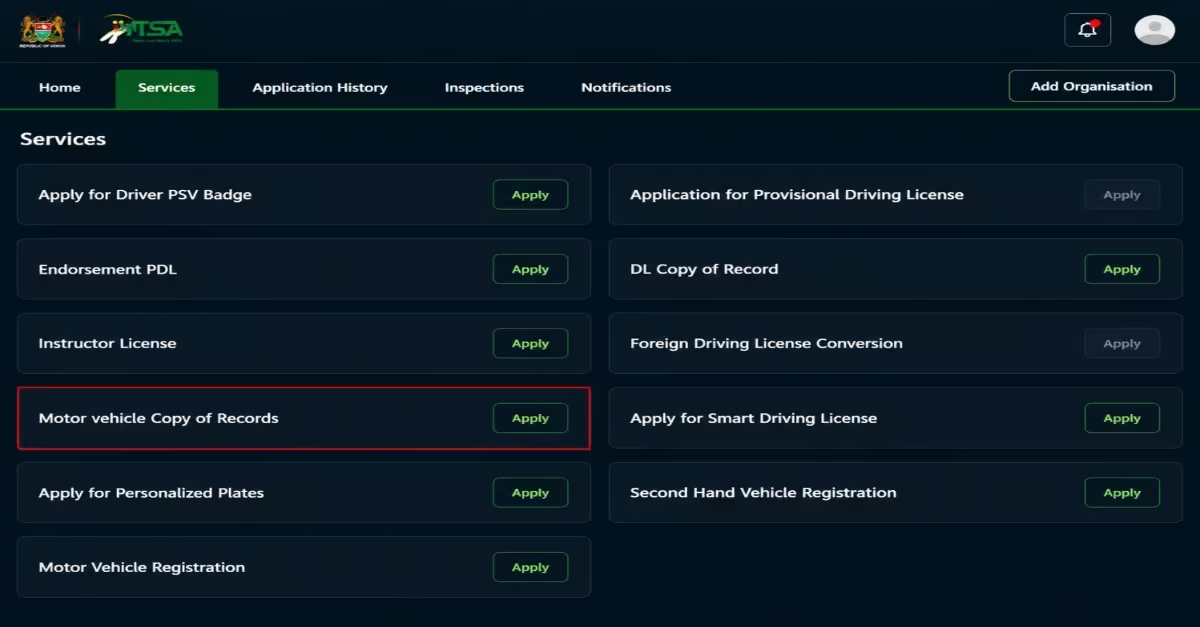
- From the available services, locate “Motor Vehicle Copy of Records” and click the “Apply” button next to the service to begin the application process.
Step 5: Enter the Vehicle Details
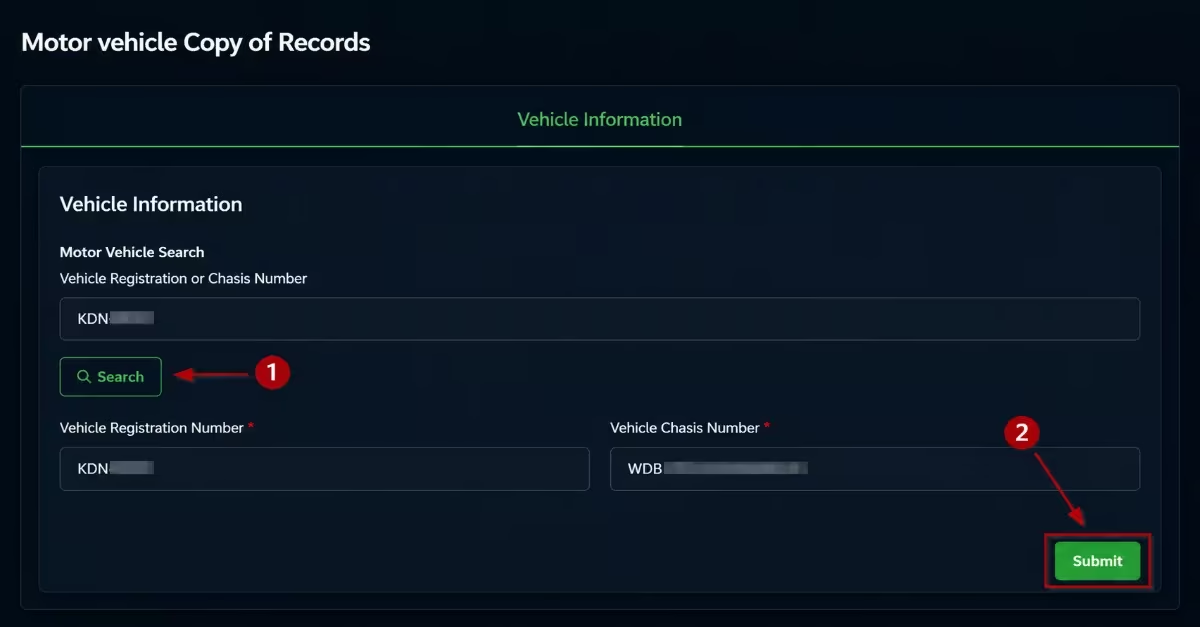
- In the search field provided, enter the vehicle registration number (number plate) or the chassis/frame number and click “Search.”
- The system will automatically retrieve the vehicle details from the NTSA database.
- Carefully review the information displayed to confirm that it matches the correct vehicle, then click “Submit” to continue.
Step 6: Pay the KES 550 NTSA Search Fee
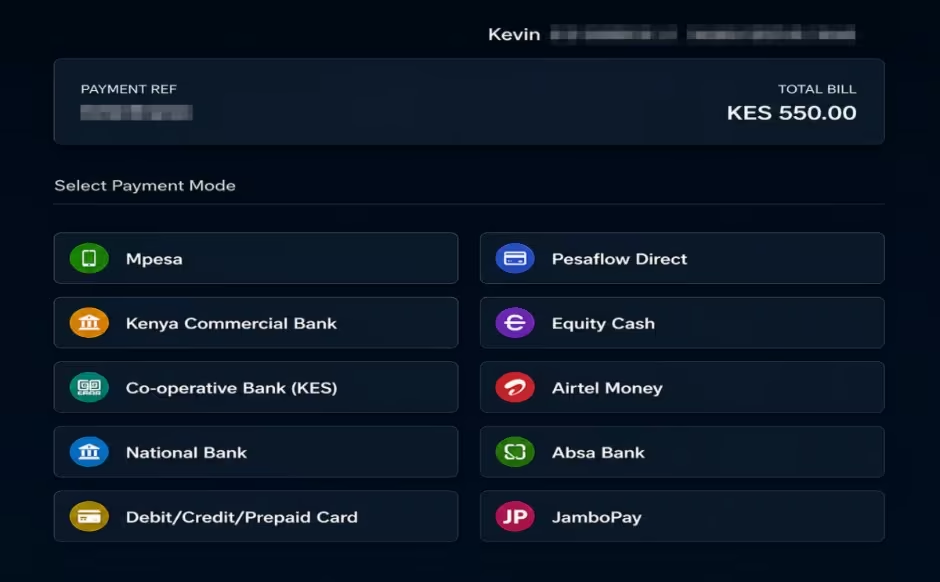
You will then be directed to the payment section. The official fee for the NTSA Copy of Records is KES 550.
Choose your preferred payment option, such as M-Pesa, debit or credit card, prepaid card, or bank transfer, and complete the payment process. If using M-Pesa, follow the STK push notification sent to your phone and confirm the transaction. Pay the exact amount indicated on the platform.
Step 7: Download the Copy of Records
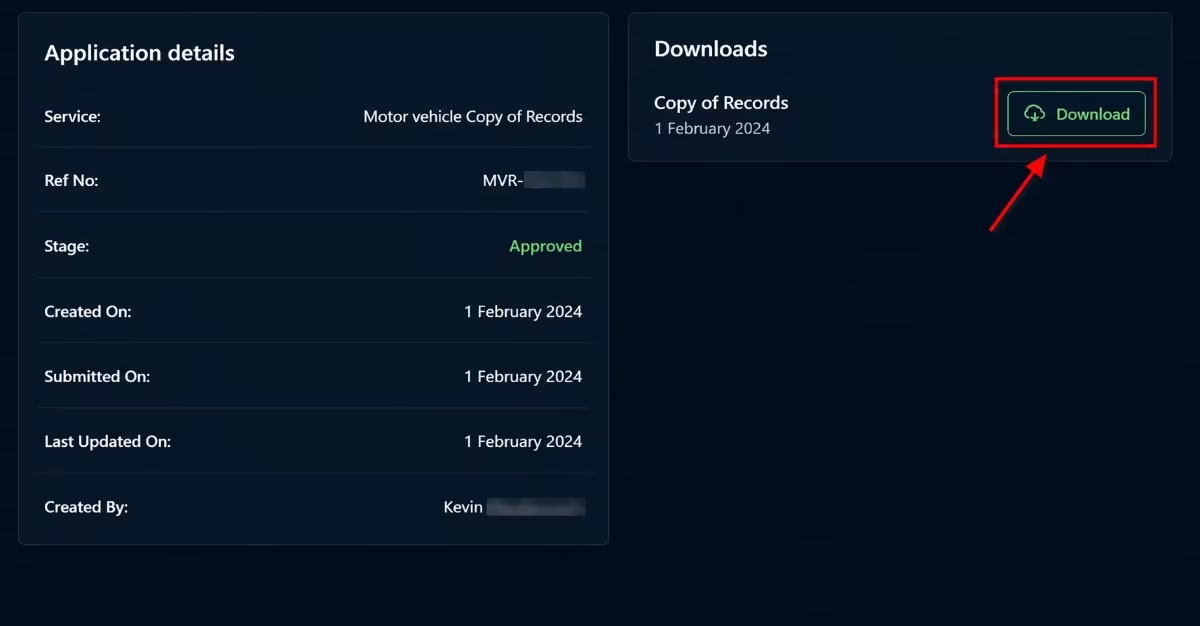
- After the payment is successfully confirmed, go to the “Application History” section on your NTSA dashboard. Click “View” to open your Copy of Records and download it as a PDF document.
- This serves as the official NTSA motor vehicle record and can be saved, printed, or shared whenever needed.
What Information Is Included in an NTSA Copy of Records?
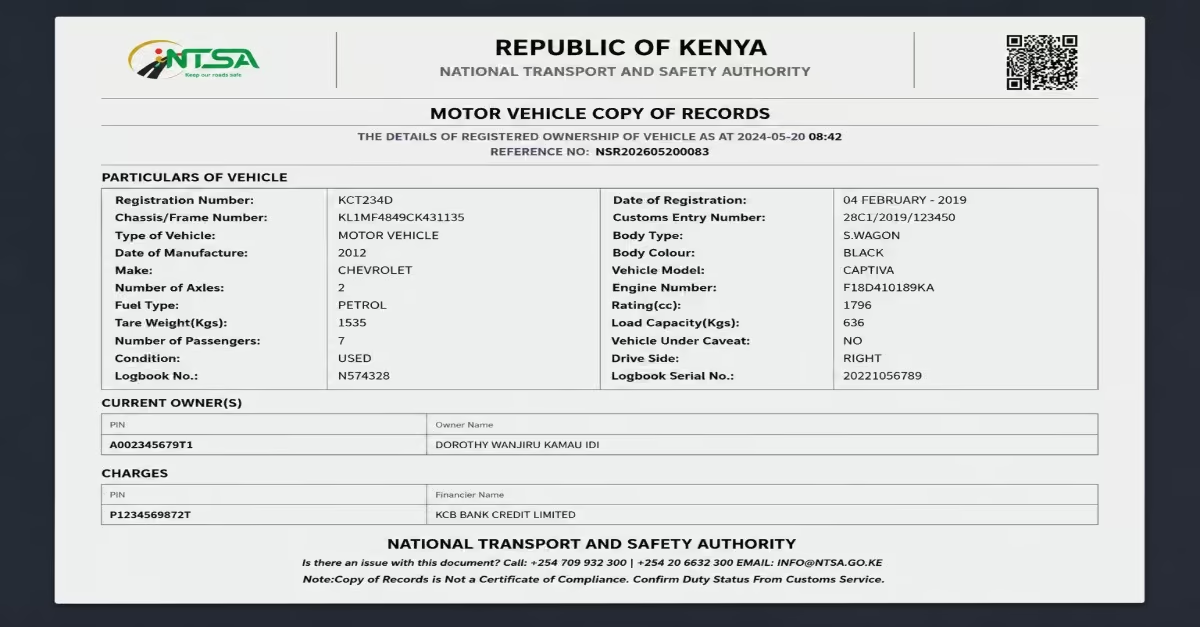
The NTSA Copy of Records contains important information about a vehicle and its legal ownership status in Kenya. This information helps vehicle buyers, banks, insurance companies, and legal authorities confirm whether a vehicle’s records are genuine and whether any restrictions apply. A study by MyCyber highlights the following main details included in the NTSA Copy of Records:
- Owner Details – Shows the full name of the registered owner, KRA PIN, and any financial institution listed under charges or liens attached to the vehicle.
- Vehicle Identity – Includes the vehicle registration number, chassis or frame number, and engine number used to identify the vehicle uniquely.
- Vehicle Details – Provides information such as the make, model, year of manufacture, body type, fuel type, entry number, and logbook number.
- Registration Information – Displays the date when the vehicle was first registered in Kenya and its registration category.
- Encumbrances and Restrictions – Indicates whether the vehicle has a caveat, bank loan, financial lien, or court restriction that may affect the transfer of ownership.
- Transfer History – Shows previous ownership records and transfer dates, helping buyers understand the ownership history of the vehicle.
- Inspection Records – Includes the vehicle’s inspection history and inspection status where available, especially for commercial or public service vehicles.
NTSA Vehicle Search Fees & Charges in Kenya (2026)
The official fee for conducting an NTSA motor vehicle search in Kenya is KES 550. This amount includes the standard NTSA vehicle search fee of KES 500 and an additional KES 50 eCitizen convenience charge introduced after NTSA services moved to the eCitizen platform, according to Monolith Africa. After successful payment, users can access important vehicle details such as the registered owner’s information, chassis number, engine number, caveat status, and other registration records.
Payments can be made using M-Pesa, debit or credit card, or bank transfer, and applicants are advised to pay the exact amount indicated to avoid payment processing delays or errors.
Common Motor Vehicle Search Problems And How to Avoid Them
Although conducting an NTSA motor vehicle search in Kenya is generally simple, users may sometimes experience errors during the process. These issues can delay access to vehicle records or affect payment and verification. Below are some of the most common NTSA vehicle search problems and how to resolve them.
- Wrong Vehicle Registration Number – Entering the wrong vehicle registration number is one of the most common mistakes made during an NTSA search. Even a small mistake in the letters, numbers, or spacing can result in no records appearing or the wrong vehicle details being displayed. Carefully confirm the vehicle registration number before submitting the search request. Make sure the format matches the number plate exactly as it appears on the vehicle and the logbook.
- Failed NTSA Search Payment – In some cases, the NTSA payment may fail because of insufficient M-Pesa balance, delayed Safaricom confirmation, internet interruptions, or incomplete payment processing. Ensure you have enough money in your M-Pesa account before making payment.
- Account Login Problems – Some users may have difficulties logging into their eCitizen or TIMS accounts because of forgotten passwords, incorrect login details, or temporary system downtime. Use the “Forgot Password” option to reset your account credentials. Confirm that you are using the correct ID number, email address, or phone number linked to the account. If the system is temporarily unavailable, try accessing the portal again later during less busy hours.
- Missing or Incomplete Search Results – Sometimes the NTSA search may fail to display vehicle details or may return incomplete information. This can happen when the wrong details are entered, the vehicle records have not yet been updated, or the system is experiencing delays. Repeat the search using the correct registration number and confirm the details with the vehicle seller. If the issue persists, visit an NTSA office or a Huduma Center for further assistance and manual verification.
- System Delays or Portal Downtime – At times, the NTSA TIMS or eCitizen portal may become slow or temporarily unavailable because of system maintenance or high traffic on the platform. Wait a while and try again later. Using the portal during off-peak hours, such as early morning or late evening, may help reduce delays and improve system performance.
Common Motor Vehicle Fraud in Kenya
Motor vehicle fraud is a serious challenge in Kenya’s used car market, especially when buyers fail to confirm ownership records before making payment. Fraudsters often use fake documents, forged logbooks, and illegal ownership transfers to scam unsuspecting buyers. The following are the common vehicle frauds in Kenya.
- Stolen Vehicle Resale – Some fraudsters sell stolen vehicles using fake logbooks and forged ownership documents to hide the vehicle’s true identity and ownership history.
- Double Ownership Claims – In some situations, the same vehicle is fraudulently sold to multiple buyers, leading to ownership disputes and legal complications.
- Loan-Secured Vehicles Sold Illegally – Vehicles with active bank loans or financial liens may be sold without the lender’s approval, making the ownership transfer process difficult or even impossible.
- Identity Impersonation During Transfers – Fraudsters may use fake identification documents, forged signatures, or stolen KRA PIN details to illegally transfer vehicle ownership without the consent of the actual owner.
Read Also: NTSA Motor Vehicle Inspection Booking Kenya 2026: A Step-by-Step Guide
Conclusion
Conducting an NTSA motor vehicle search is an important step for anyone buying, selling, or verifying a vehicle in Kenya, as it helps confirm the true ownership details and reveals any hidden issues, such as loans, caveats, or legal restrictions attached to the vehicle. With the required details in hand, you can run a vehicle search by logging in to the NTSA portal via eCitizen, going to the Services tab, clicking Motor Vehicle Search, entering the vehicle details, making the payment, and downloading your NTSA Copy of Records. By completing this search, you can avoid common car frauds, such as buying a stolen vehicle, buying a vehicle used to secure a loan, or buying a vehicle fraudulently sold to multiple buyers.