You are stopped on the road for a traffic offence, receive a notification about a fine, or you want to know whether your vehicle or driving record has an outstanding offence. You can check the offence online and look for ways to pay it using digital government services to access and manage certain traffic-related services. In this article, we outline the NTSA traffic offences, how to assign your vehicle a driver and how to pay fines if you have broken any of the laid down traffic rules and laws.
The National Transport and Safety Authority (NTSA) is responsible for regulating road transport and promoting road safety in Kenya. As traffic enforcement increasingly uses digital platforms and connects with services such as eCitizen. Recently, you can check your traffic fines online via eCitizen. Knowing how to check your traffic offence and understand the payment process can help you avoid unnecessary confusion. This is what we will be explaining in this guide.
- Most Common NTSA Traffic Offences in Kenya
- What Is the NTSA Driver Assignment Portal?
- How to Assign a Vehicle on the NTSA Driver Assignment Portal
- How to Check NTSA Traffic Offences Online: Step by Step
- How to Check NTSA Traffic Offences via eCitizen Portal
- What Happens If You Don’t Pay NTSA Fines?
- Where and How to Pay NTSA Instant Fines in Kenya
- Practical Tips to Avoid NTSA Traffic Fines and Penalties
- FAQs on NTSA Traffic Offences and Fines
- Conclusion
Most Common NTSA Traffic Offences in Kenya
There are many traffic offences in Kenya, ranging from minor violations that may attract prescribed fines to serious offences that can lead to court proceedings, licence disqualification or other penalties. The following are some of the traffic offences in Kenya.
a) Overloading a Vehicle
Overloading is another common traffic violation, particularly among PSVs, commercial vehicles, buses, matatus and other vehicles carrying passengers or goods. Carrying more passengers or weight than the vehicle is authorised to carry can create safety risks and expose the driver, owner or operator to enforcement action.
b) Driving Without a Valid Driving Licence
This is an offence that occurs when a driver is driving without a valid licence, using a licence that does not cover the correct vehicle class, or failing to meet other licensing requirements.
c) Driving Under the Influence of Alcohol or Drugs
Driving while under the influence of alcohol or drugs is treated more seriously than many minor traffic offences. Under the Traffic Act, a person who drives or is in charge of a motor vehicle while under the influence to an extent that they cannot properly control the vehicle commits this kind of offence.
d) Driving Without Valid Motor Vehicle Insurance
Kenyan law requires motor vehicles used on public roads to have the required third-party insurance cover. The law prohibits using or allowing a motor vehicle to be used on a road without the required policy. A violation can attract a fine of up to KES 10,000, imprisonment for up to two years, or both. A driver may also face licence disqualification in circumstances provided for by the law.
e) Over-Speeding
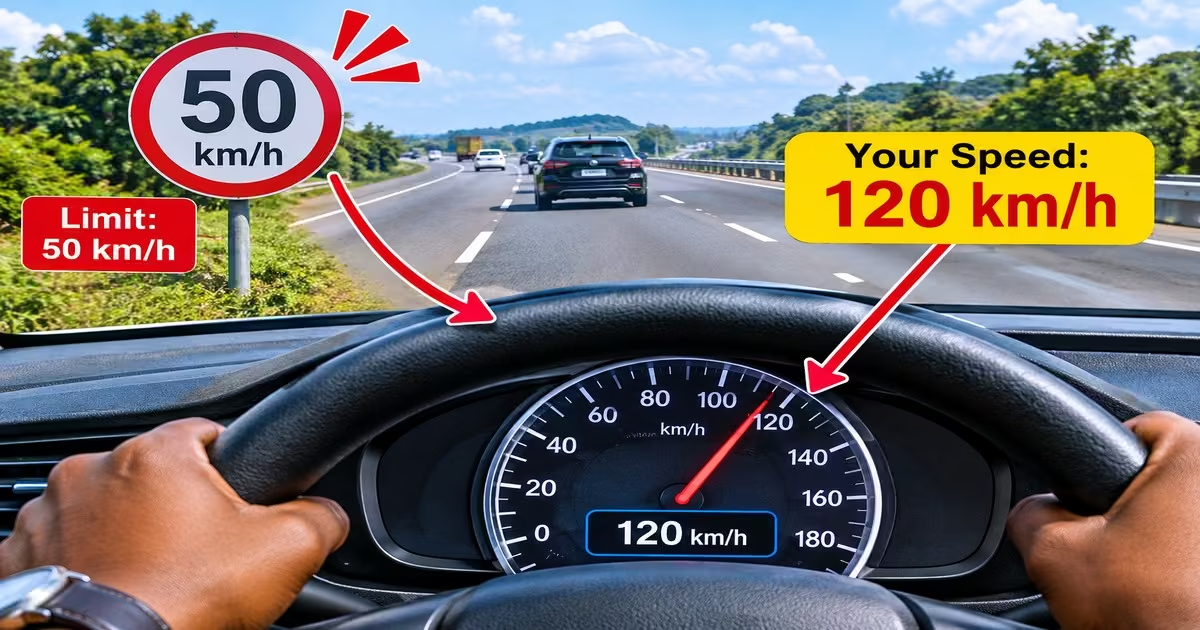
Driving above the prescribed speed limit is one of the traffic offences motorists should take seriously. The applicable speed limit depends on the road and type of vehicle, and exceeding it can lead to enforcement action.
f) Dangerous, Reckless or Careless Driving
Driving in a dangerous or reckless manner can include actions such as aggressive maneuvering, ignoring traffic controls, dangerous overtaking or driving in a way that puts other road users at risk. Unlike some minor offences with prescribed penalties, serious cases of reckless or dangerous driving can result in arrest and court proceedings.
Read Also: How to Apply for Smart Driving Licence in Kenya 2026: Cost, Renewal & NTSA e-Citizen Guide
What Is the NTSA Driver Assignment Portal?
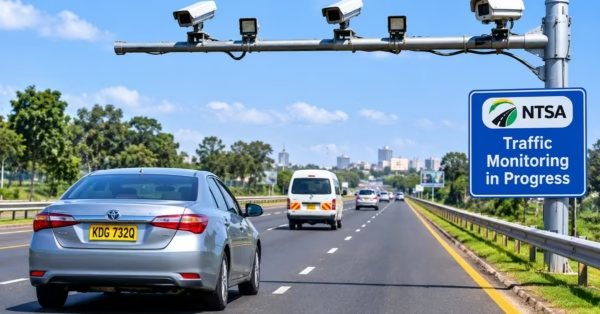
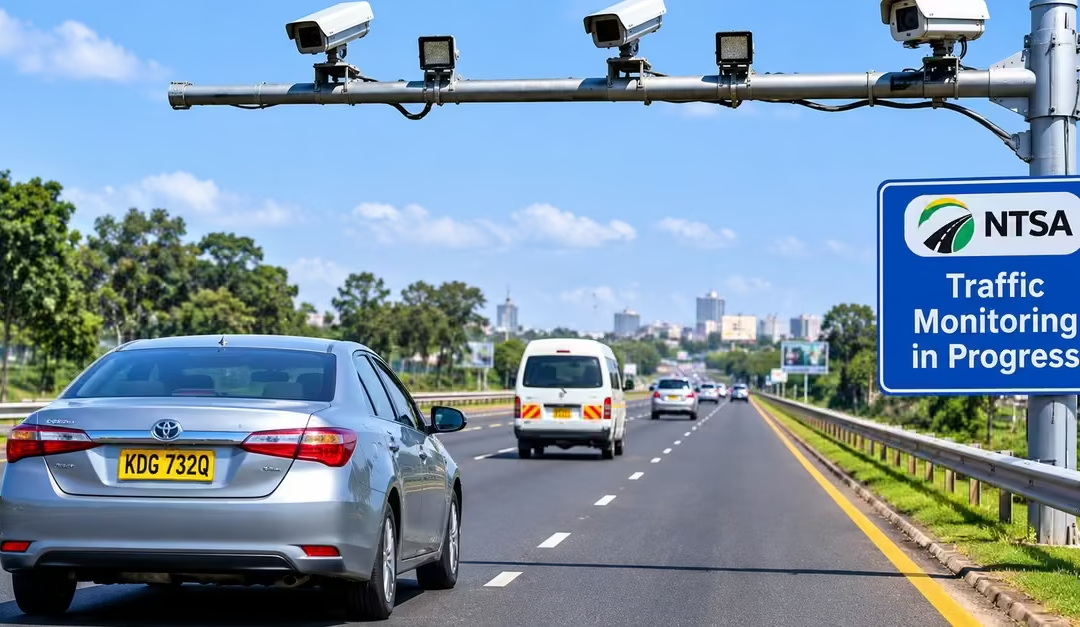
The NTSA Driver Assignment Portal is an official online system that allows a registered vehicle owner to link their vehicle to the person authorised to drive it. It is part of the NTSA Digital Enforcement and Instant Fines System. It helps the authority identify who was operating a vehicle when a traffic offence is detected by traffic cameras or other automated systems. The assigned driver must have a valid Kenyan driving licence for the relevant vehicle class and must accept the assignment before it becomes effective. Vehicle owners can make the assignment in advance or within seven days after receiving an offence notice.
Registering and assigning a driver is important because it helps NTSA establish who was driving a vehicle when a traffic offence occurred. For example, if you own a car but regularly allow another person to drive it, you should register that driver through the portal and ensure they accept the assignment.
This creates a record linking the vehicle to the person authorised to operate it. However, driver assignment does not transfer vehicle ownership or automatically remove the registered owner’s legal responsibility for traffic offences.
How to Assign a Vehicle on the NTSA Driver Assignment Portal
The process of assigning a driver to your vehicle is completed online through the official NTSA Fines Portal. Follow these steps to complete the process:
Step 1: Access the Official NTSA Portal
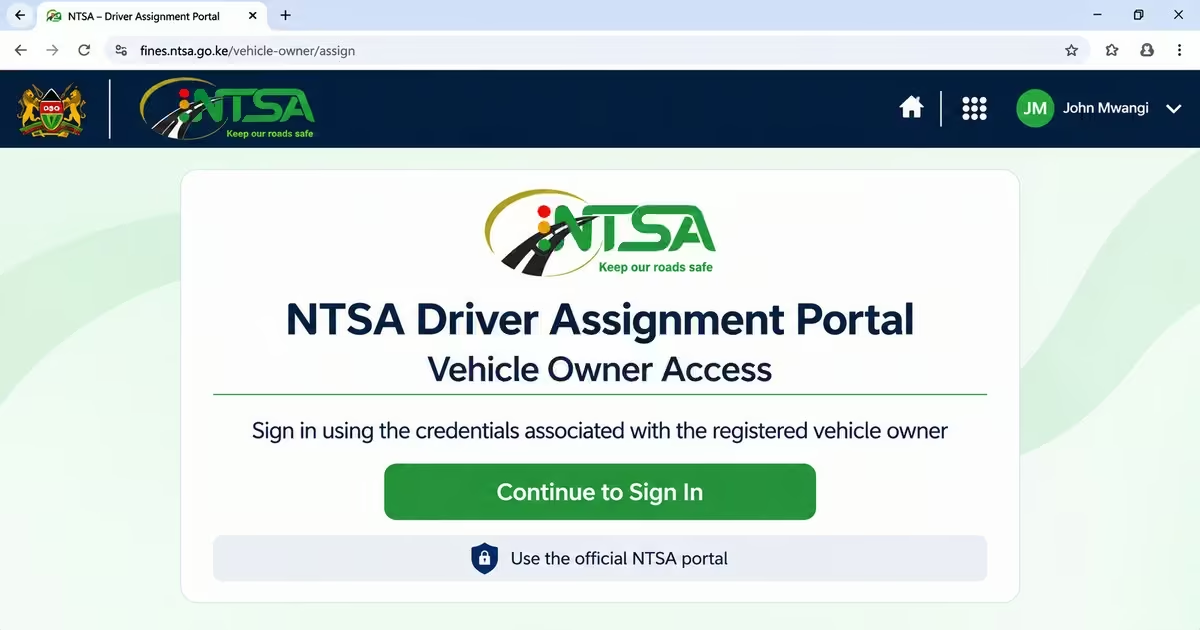
- Visit the official NTSA Driver Assignment Portal.
- Log in using the credentials associated with the registered vehicle owner, following the portal’s login instructions.
Step 2: Select Your Vehicle
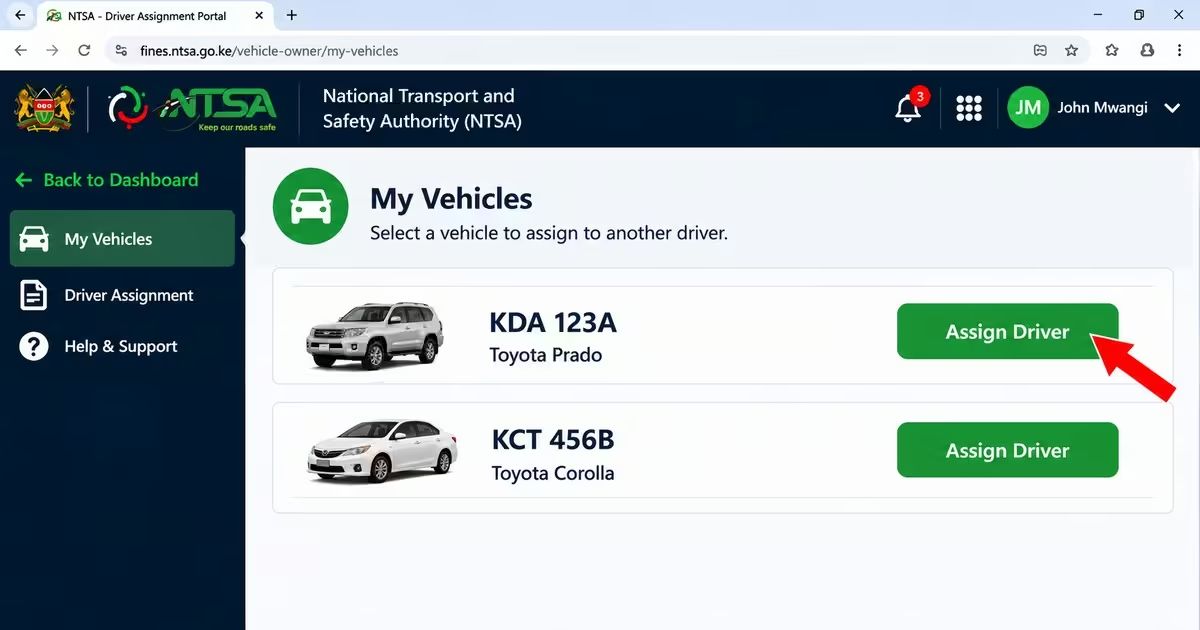
- Once logged in, view the list of vehicles registered under your name.
- Select the vehicle you want to assign to another driver.
- Confirm that the vehicle registration number and other details are correct before proceeding.
Step 3: Enter the Driver’s Details
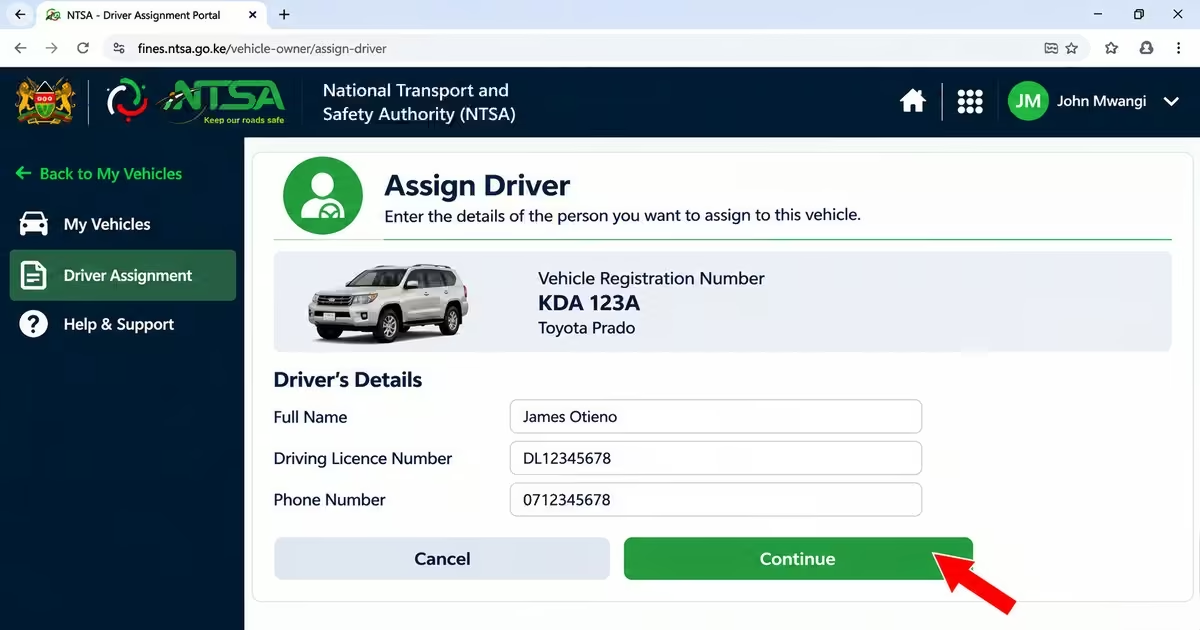
- Provide the required details of the person you want to assign to your vehicle.
- Ensure the proposed driver has a valid Kenyan driving licence covering the relevant vehicle class.
- Check that the information entered is accurate before submitting the request.
Step 4: Submit the Assignment Request
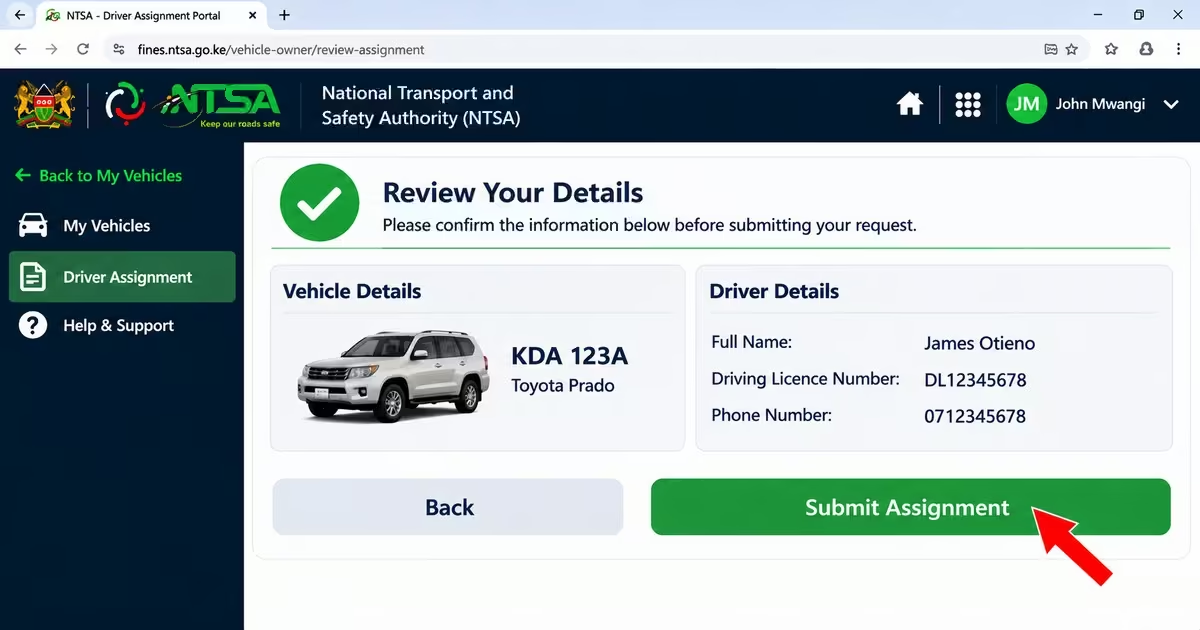
- Review the vehicle and driver’s details to ensure they are correct.
- Submit the assignment request through the portal.
- The proposed driver will be required to accept or decline the request through the prescribed NTSA process.
Step 5: Wait for the Driver to Accept the Assignment
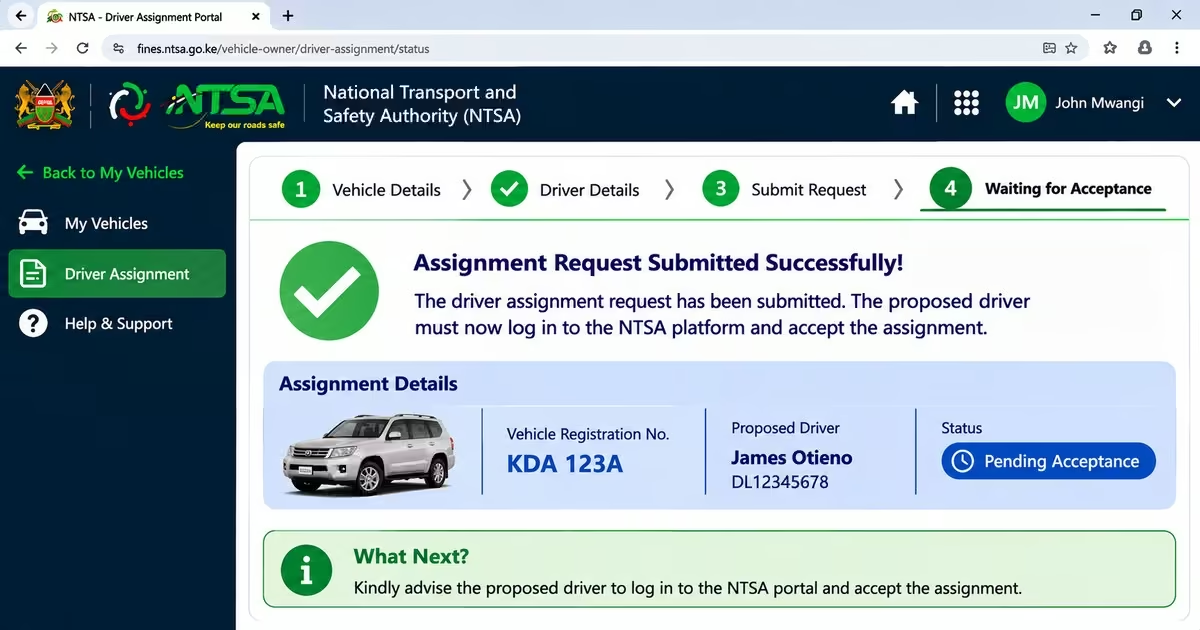
- The proposed driver must log in to the relevant NTSA platform and expressly accept the assignment.
- Submitting the request alone does not complete the process. The assignment only becomes effective after the driver accepts it.
- Check for confirmation through the portal to establish whether the assignment has been completed successfully.
How to Check NTSA Traffic Offences Online: Step by Step
There are different ways a driver in Kenya can check for a traffic offence; they include the eCitizen portal, SMS notifications, and police notifications. They are explained below:
Method 1: Checking via NTSA SMS Instant Fine Notifications
This method applies to certain offences detected through NTSA’s road-camera enforcement system. Instead of logging into a portal to search for the offence, a motorist may receive an SMS containing details of the offence, the applicable fine and a reference number.
If you receive such a message, check that it is from an official NTSA source before taking any action. Be careful with messages containing payment instructions or links, as scammers may use fake traffic-fine messages to obtain money or personal information. Always confirm the current payment procedure through official NTSA communication channels before making a payment.
Method 2: Checking via Traffic Police Notification
This method applies to minor traffic offences that are recorded directly by a traffic officer. Rather than searching for the offence online, the motorist receives a notification at the time the offence is recorded, either physically or through an approved electronic channel where applicable.
The notification provides details of the offence and explains the available options, which may include paying the prescribed fine within the stated period or contesting the charge through the appropriate legal process. More serious offences may be handled through the courts depending on the nature of the offence and the applicable law.
Method 3: Checking NTSA Traffic Offences via eCitizen Portal
This method covers NTSA records and services that are available through eCitizen, including vehicle and driving licence information and any outstanding items shown in the system. It does not necessarily cover every type of traffic offence, as some offences may be handled through separate enforcement or notification procedures.
Read Also: How to Conduct an NTSA Motor Vehicle Search in Kenya via eCitizen (2026)
How to Check NTSA Traffic Offences via eCitizen Portal
Step 1: Log In to Your eCitizen Account
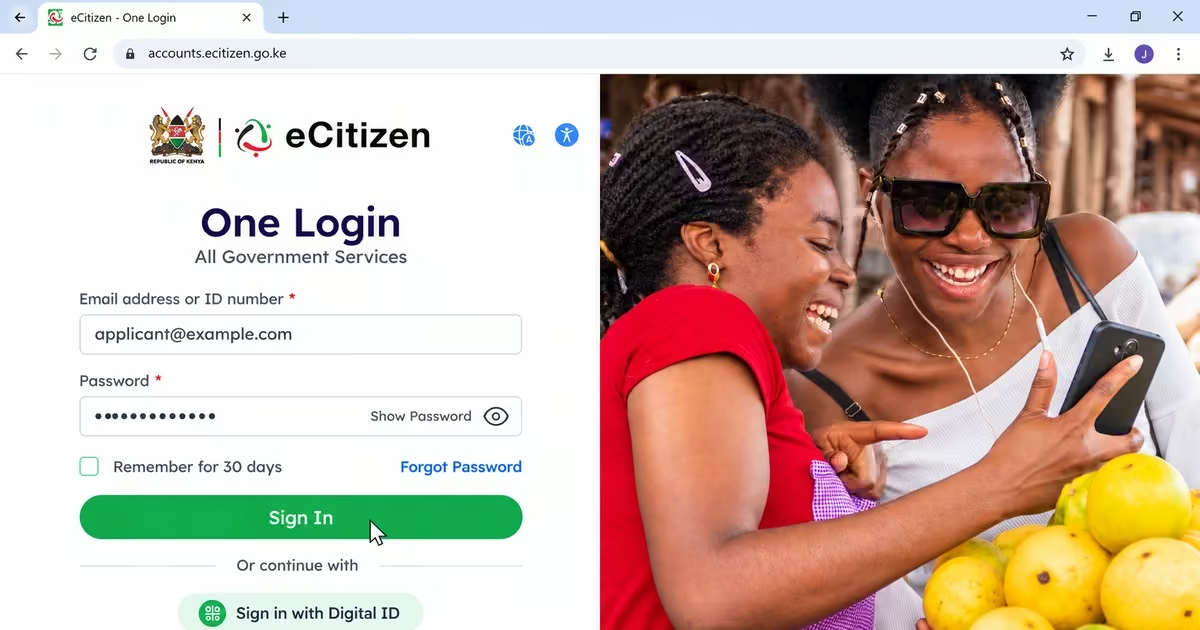
- Visit the eCitizen website and log in using your eCitizen account details.
- If you do not have an account, you can create one using the registration details required by eCitizen. Registration for an eCitizen account is free.
Step 2: Navigate to NTSA Services
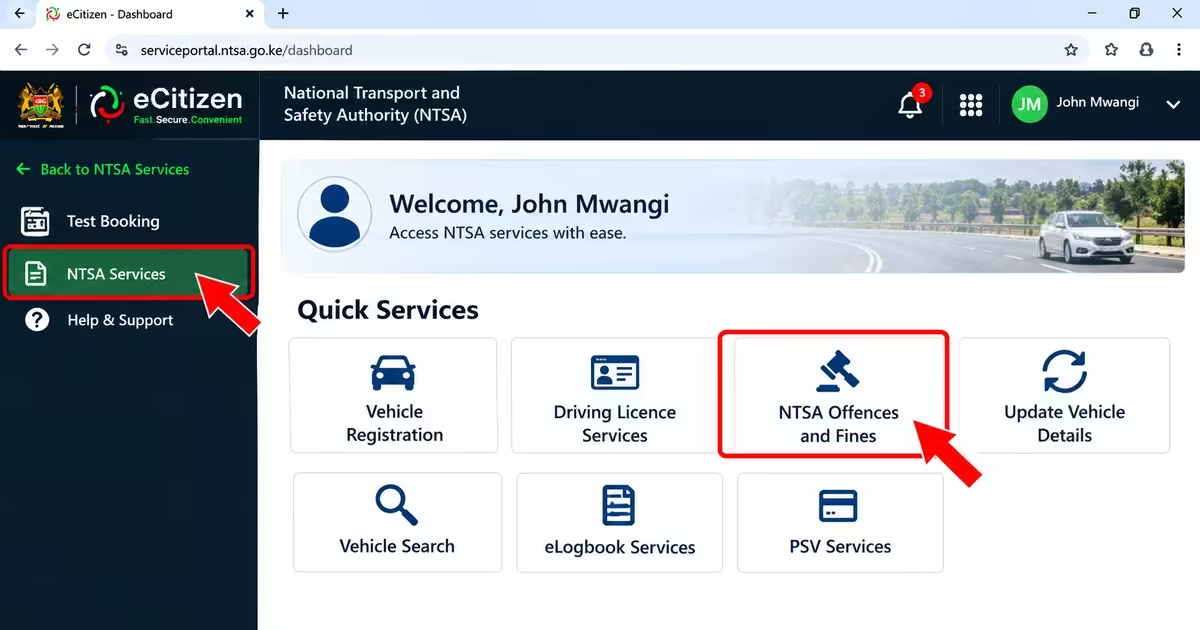
- From your eCitizen dashboard, select the NTSA services option.
- This gives you access to the NTSA services available through your profile, including services relating to vehicles and driving licences
Step 3: Open Your Vehicle or Driving Licence Records
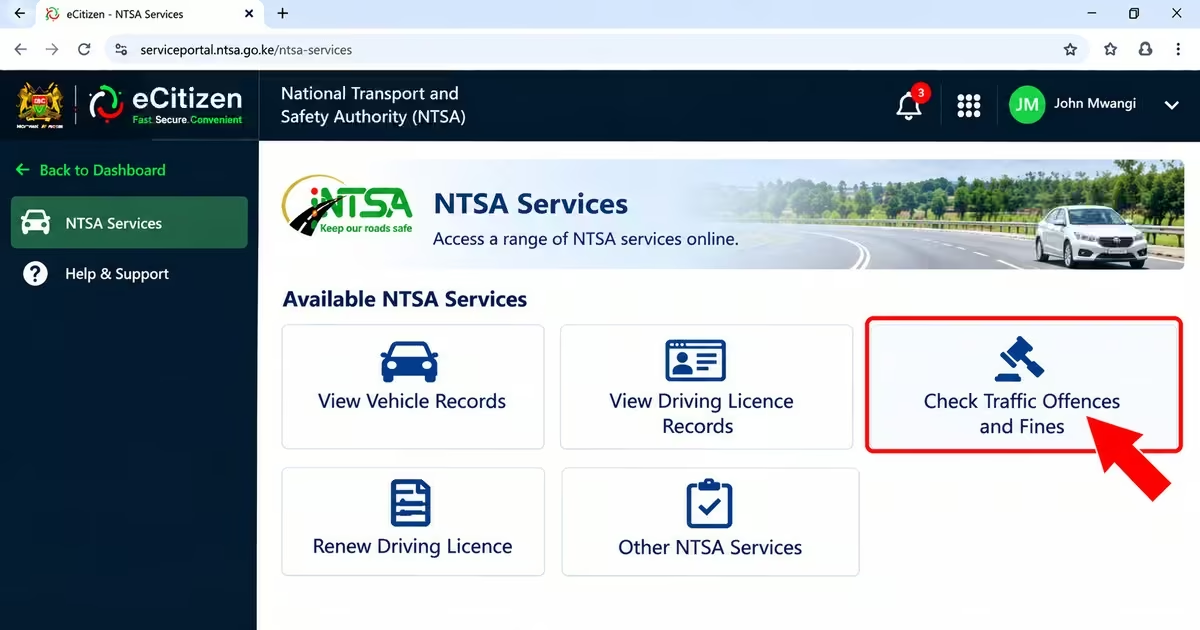
- Locate the relevant vehicle registration or driving licence service from the available NTSA services.
- Select the applicable service to view the records under your account
Step 4: Check for Available Offence Information
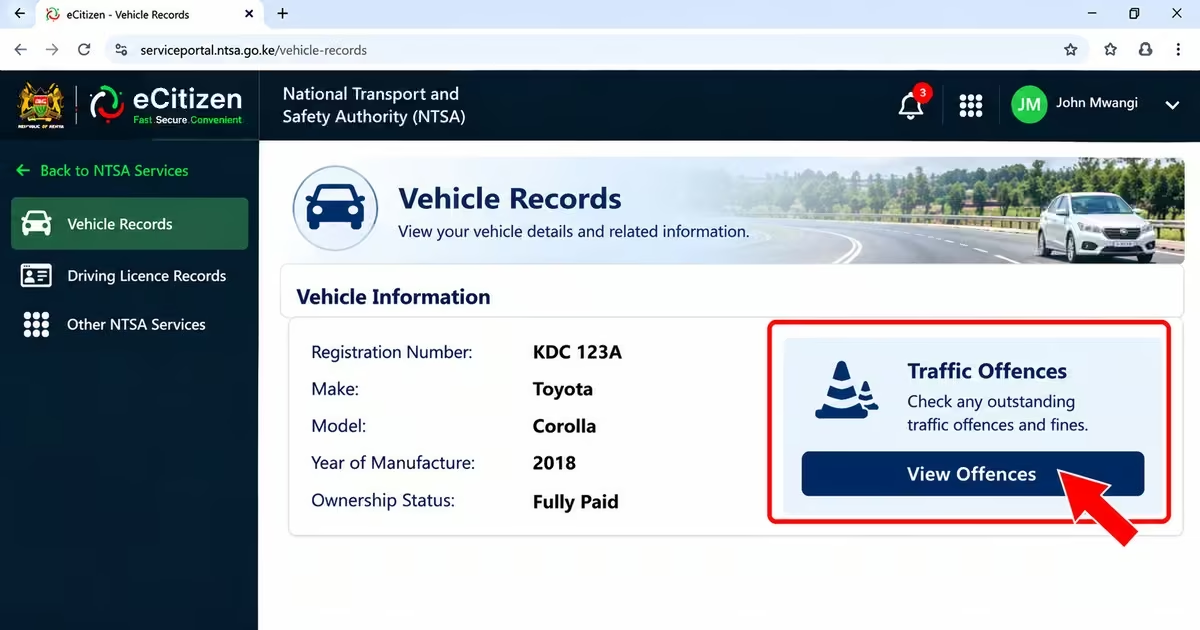
- Review the records and notifications available through the selected service.
- If the portal provides a traffic-offence or outstanding-penalty record, open it and review the offence details, reference number and amount payable, where provided.
- If you believe the offence is incorrect, follow the official dispute procedure provided by the relevant authority.
What Happens If You Don’t Pay NTSA Fines?
Leaving a traffic fine unpaid can cause problems later, especially when you need to access NTSA services or deal with further enforcement action. Depending on the offence and how the matter is handled, you may face consequences such as:
- Restrictions on Some NTSA Services – An unpaid fine may affect your ability to access certain services, depending on the type of offence and the applicable enforcement process.
- Vehicle Transfer Restrictions – Outstanding matters may affect some vehicle transactions, such as transferring ownership, where the law or NTSA system restricts the vehicle.
- Arrest or Enforcement Action – In some circumstances, failure to deal with a traffic offence can lead to further enforcement action, including action by traffic officers.
- Additional Penalties or Court Proceedings – Some offences may result in additional penalties or may be referred to court if they are not dealt with as required.
- Court Warrants for Failure to Comply With Court Orders – Where a person fails to comply with a court order, the court may issue a warrant or take other action allowed by law.
Where and How to Pay NTSA Instant Fines in Kenya
Motorists should be careful when making payments for camera-detected traffic offences (instant fines). The national transport and safety authority states that the Payment of Instant Fines, instant fines are not paid through eCitizen. Instead, motorists are required to make payments physically at Kenya Commercial Bank (KCB) branches.
Practical Tips to Avoid NTSA Traffic Fines and Penalties
Most traffic fines can be avoided by following basic road-safety rules and keeping your vehicle and documents compliant. Motorists can reduce the risk of penalties by making the following practices part of their routine, as per Rockie (2026)
- Observe speed limits on every road and follow the speed-limit signs displayed along the road.
- Renew your driving licence and motor vehicle insurance on time to avoid driving with expired or invalid documents.
- Avoid using a mobile phone while driving, unless you are using a legally permitted hands-free setup.
- Maintain your vehicle regularly and make sure important parts such as the brakes, tyres and lights are in good working condition.
- Wear the required safety gear when riding a motorcycle, including a proper helmet and reflective jacket.
- Follow traffic signs and road markings and obey instructions given by authorized traffic officers.
Read Also: How to Access, Download, and Verify NTSA eLogbook on eCitizen (2026 Guide)
FAQs on NTSA Traffic Offences and Fines
How Do I Check My NTSA Traffic Fines Or Offences Online?
Log in to the eCitizen portal using your eCitizen account details and select the NTSA services section. Enter your vehicle registration number or driving licence details, depending on the record you want to check. The system will display the standard NTSA records and outstanding items available through the service.
What Is The Official SMS Short Code for Genuine NTSA Instant-Fine Notifications?
If you receive an SMS claiming to be from NTSA about a traffic offence, check the sender and the information in the message carefully. A genuine notification should contain relevant details about the offence and, where applicable, a reference number. Do not rely on a message simply because it appears to come from NTSA. Verify the notification through the official NTSA website or other official communication channels before making any payment.
What Happens If I Don’t Pay An NTSA Fine On Time?
Failing to deal with a traffic fine may lead to further action depending on the offence and the applicable legal process. Possible consequences may include restrictions on some NTSA services, additional penalties or court proceedings. The consequences and payment deadlines can vary, so motorists should check the specific notification or official guidance for the offence.
Can I Dispute or Challenge An NTSA Traffic Fine or Notification?
If you believe an offence has been recorded incorrectly, check the notification for information on how to challenge it or contact the relevant authority for guidance. Some matters may be contested through the courts, particularly where the offence is subject to court proceedings.
Conclusion
Checking and paying NTSA traffic fines online can help motorists keep track of outstanding offences and avoid problems that may result from leaving traffic penalties unresolved. You can easily use the official channels to check for the offence, such as police notifications, SMS notifications, and eCitizen, so that you can confirm the details before making any payment. To avoid unnecessary NTSA fines, you can use tips like observing speed limits, keeping your driving and vehicle documents valid, maintaining your vehicle properly, and following traffic rules.