
Meta is discontinuing Facebook’s additional personal profiles, and affected users have until December 14, 2026, to save their information and prepare for the change. This is the concern facing some Facebook users after Meta’s announcement on November 12, 2026. The announcement states that an additional Facebook profile will be permanently deleted after December 14, 2026. This gives affected users limited time to save their information and make the necessary changes before the deadline.
The decision ends a feature introduced in September 2023 that allowed users to create up to four additional personal profiles under one Facebook account. The feature was designed to help people separate different parts of their lives, such as keeping family and friends separate from professional contacts, hobbies, and online communities. However, Meta says the additional profiles have made the Facebook experience more complicated than necessary, so it has decided to delete the feature and return to a simpler experience centered on one personal profile.
But does this mean Facebook is deleting everyone’s accounts on December 14? Not quite! The announcement has caused confusion, with many users worried about losing their Facebook accounts, business presence, photos, and connections. Your main Facebook profile and Facebook Pages will not be affected. The removal only applies to additional personal profiles created under an existing Facebook account.
- Why Is Facebook Deleting Accounts in December 2026? Understanding Meta’s Announcement
- Who Will Be Affected by Facebook’s December 14, 2026 Account Deletion?
- Who Will NOT Be Affected by Facebook’s December 14, 2026 Changes?
- What Is the Difference Between a Main Facebook Profile, Additional Profile, and Facebook Page?
- What Should You Do Before Facebook Deletes Additional Profiles on December 14, 2026?
- How to Download Facebook Additional Profile Data Before December 14
- FAQs on Deletion of Additional Facebook Profiles
- Can I Merge An Additional Profile Into My Main Facebook Account?
- What Happens To Facebook Groups If An Additional Profile Is An Admin?
- Can I Recover An Additional Profile After December 14, 2026?
- Is Facebook Deleting All Accounts On December 14, 2026?
- Is Facebook Deleting Fake Accounts On December 14, 2026?
- Will My Main Facebook Profile Or Business Page Be Deleted?
- How Do I Check If I Have An Additional Facebook Profile?
- Conclusion
Why Is Facebook Deleting Accounts in December 2026? Understanding Meta’s Announcement
Meta’s decision to remove additional Facebook profiles is part of its effort to make the platform easier to use and manage. Meta introduced the ability to add more profiles to your main account on September 21, 2023, allowing users to create up to four additional personal profiles under one Facebook account. Each profile had its own friends, News Feed, and interests, making it easier to separate different aspects of a person’s life. However, Meta has now decided to discontinue the feature and return to a simpler arrangement centered on one main personal profile.
Meta’s guide states that “The announcement is not a campaign against the fake Facebook accounts or a decision to delete everyone who operates more than one Facebook account.” Meta is specifically targeting additional profiles created using its official multiple-profile feature. These profiles differ from Facebook Pages, which businesses, organisations, and public figures use to maintain their presence on the platform. Meta has confirmed that users’ main personal profiles and Facebook Pages will remain unaffected.
Who Will Be Affected by Facebook’s December 14, 2026 Account Deletion?
The December 14, 2026, deletion will affect Facebook users who created additional personal profiles under an existing Facebook account using Meta’s multiple-profile feature. Meta introduced this feature in September 2023, allowing eligible users to create up to four additional profiles alongside their main profile.
Each additional profile could have a separate name, username, friends list, and News Feed. For example, someone could have one profile for family and personal friends, another for business networking, and a third for hobbies or participating in online communities. If you create these additional profiles, Facebook schedules them for permanent removal.
The change will also affect people who use additional profiles to manage Facebook groups, interact with customers, build online communities, or maintain separate social identities, as per Andrew (2026). If an additional profile administers a Facebook group, you will need to appoint another administrator using a main profile before the deadline. Otherwise, Facebook may pause the group until you appoint a new administrator.
Who Will NOT Be Affected by Facebook’s December 14, 2026 Changes?
Although Meta’s announcement has raised concerns about possible account deletions, the changes do not affect everyone using Facebook. Several categories of users can continue using their accounts and managing their online presence without being affected by this particular change.
a) Users With Their Normal Main Facebook Accounts
Your main Facebook profile, the first personal profile you created when you signed up for Facebook, will not be deleted under this announcement. It will remain your primary identity on the platform, allowing you to connect with friends, share updates, upload photos, join groups, and interact with other users as usual.
b) People Managing Facebook Business Pages
Facebook Pages are not included in the planned removal of additional personal profiles. Pages differ from personal profiles and are commonly used by businesses, organisations, brands, and public figures to communicate with their audiences.
c) Users Who Have Never Created Additional Facebook Profiles
If you have always used one personal Facebook profile and have never created additional profiles through Facebook’s multiple-profile feature, you do not need to take any action because of this announcement. Your existing account will continue working normally.
read Also: The Digital Influence: Impact of Social Media on Consumer Spending and Market Trends
What Is the Difference Between a Main Facebook Profile, Additional Profile, and Facebook Page?
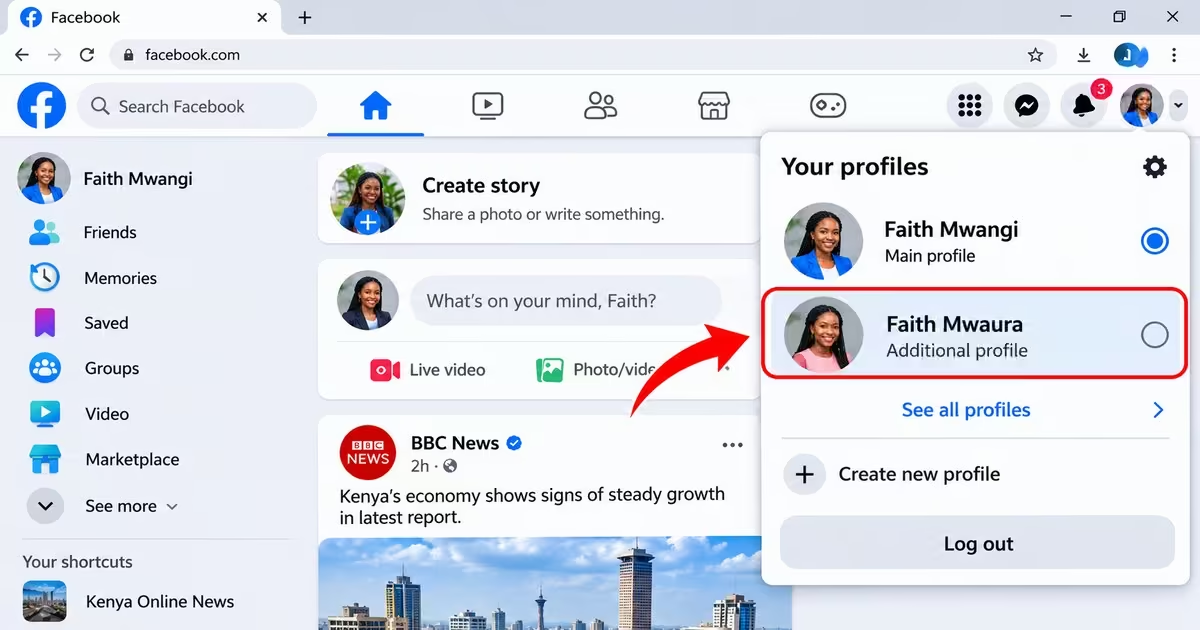
- A main Facebook profile is the primary personal profile you create when signing up for Facebook. It represents your identity on the platform and lets you connect with friends, share posts, join groups, and interact with other users.
- An additional Facebook profile is an extra personal profile created under the same Facebook account. It can have its own name, username, friends list, and News Feed, allowing you to separate different interests and social activities. Facebook allows users to create up to four additional profiles and switch between them without signing out of their main account.
- A Facebook Page is a separate platform presence designed for businesses, organisations, public figures, brands and content creators to communicate with their audiences. Unlike additional personal profiles, Pages establish a public or professional presence, promote products and services, publish updates, and interact with followers.
What Should You Do Before Facebook Deletes Additional Profiles on December 14, 2026?
Suppose you have additional Facebook profiles scheduled for removal. A TechRepublic study highlights the precautions below to take before the deadline to avoid losing important information and access to your online activities.
1. Download Your Additional Facebook Profile Information
Before the deletion takes place, consider downloading a copy of the information stored on each additional profile. This may include photos, videos, posts, and other personal information you may want to keep for future reference. Remember that each additional profile has its own information, so you should make arrangements to save the data from every profile you want to keep a record of.
2. Save Important Photos, Videos and Posts
Some of your additional profiles may contain personal memories, business-related content, important discussions, or posts you don’t want to lose. Review each profile and identify the photos, videos, and posts you want to keep. Save important files to your phone, computer, or a secure cloud storage service.
3. Review Your Facebook Groups and Other Activities
If you use an additional profile to manage Facebook groups, check whether it has administrator or moderator responsibilities. If needed, appoint another trusted administrator through your main profile to ensure the groups continue operating without interruption. You should also review important conversations, community interactions, and other activities associated with the additional profile.
4. Update Important Contacts and Connections
If you use an additional profile to communicate with customers, friends, or members of online communities, inform important contacts about the upcoming changes. Where appropriate, direct them to your main Facebook profile, Facebook Page, or another communication channel. This will help you maintain important relationships and avoid losing contact with people who mainly interact with you through the additional profile.
How to Download Facebook Additional Profile Data Before December 14
Step 1: Switch to the Additional Profile You Want to Save
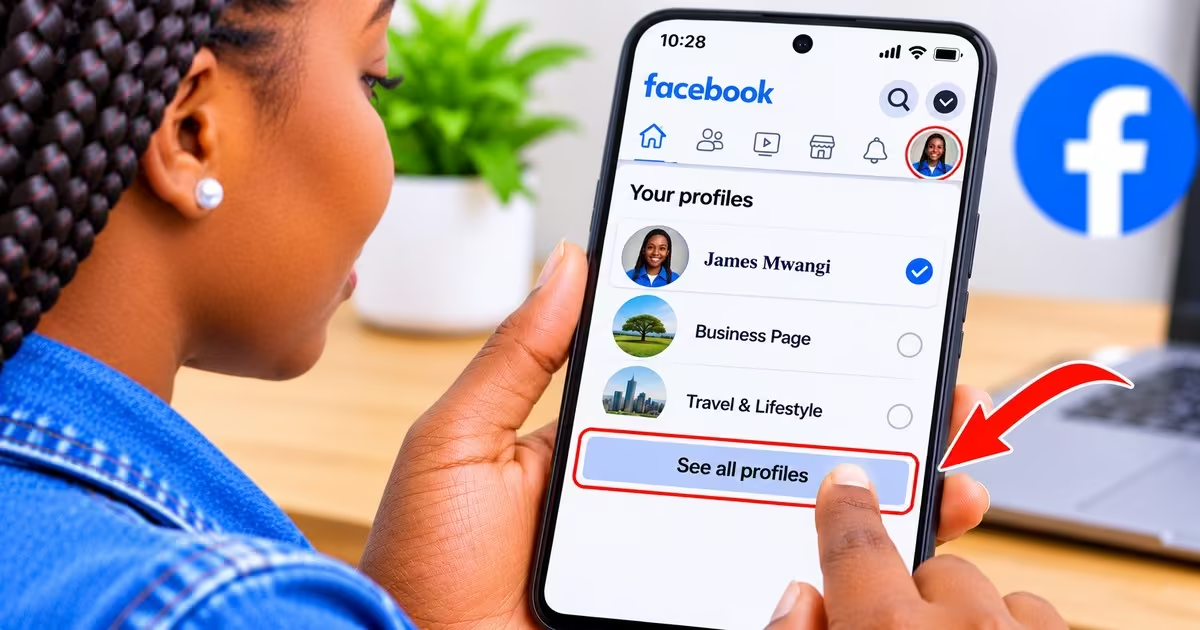
- Tap your profile picture, select “See all profiles”, and choose the additional profile whose information you want to download.
- Make sure you switch to the correct profile before proceeding because the export process should be started from within the additional profile you want to save.
Step 2: Open Settings and Privacy
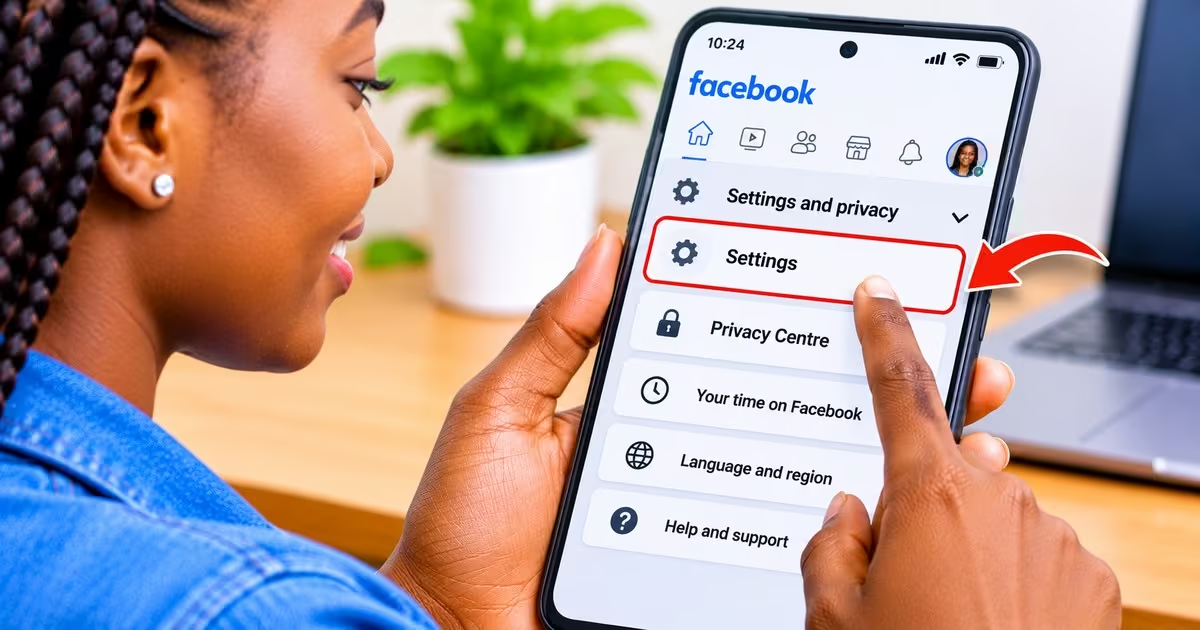
- Once you have switched to the additional profile, open “Settings and privacy”, then select “Settings”. This takes you to Account settings, where you can manage your profile and access other account options.
Step 3: Go to “Export Your Information”.
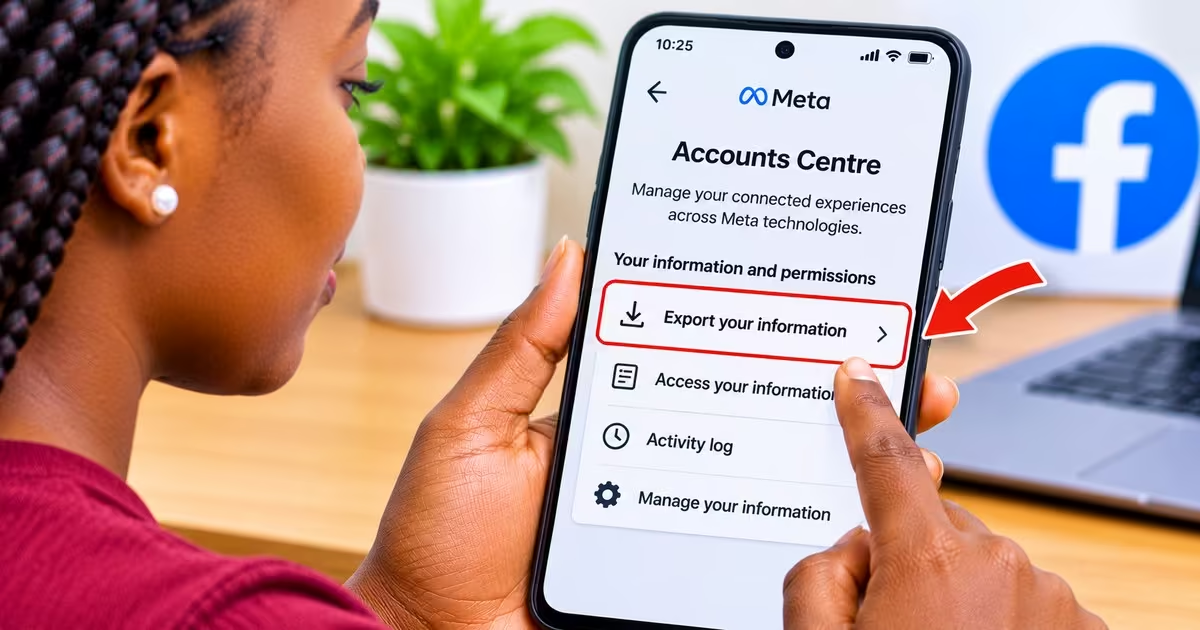
- Open the Accounts Centre and, under “Your information and permissions”, select “Export your information”.
- Depending on the Facebook version or layout you are using, you may also find this option directly through the Settings menu.
Step 4: Tap “Create Export” and Select the Profile
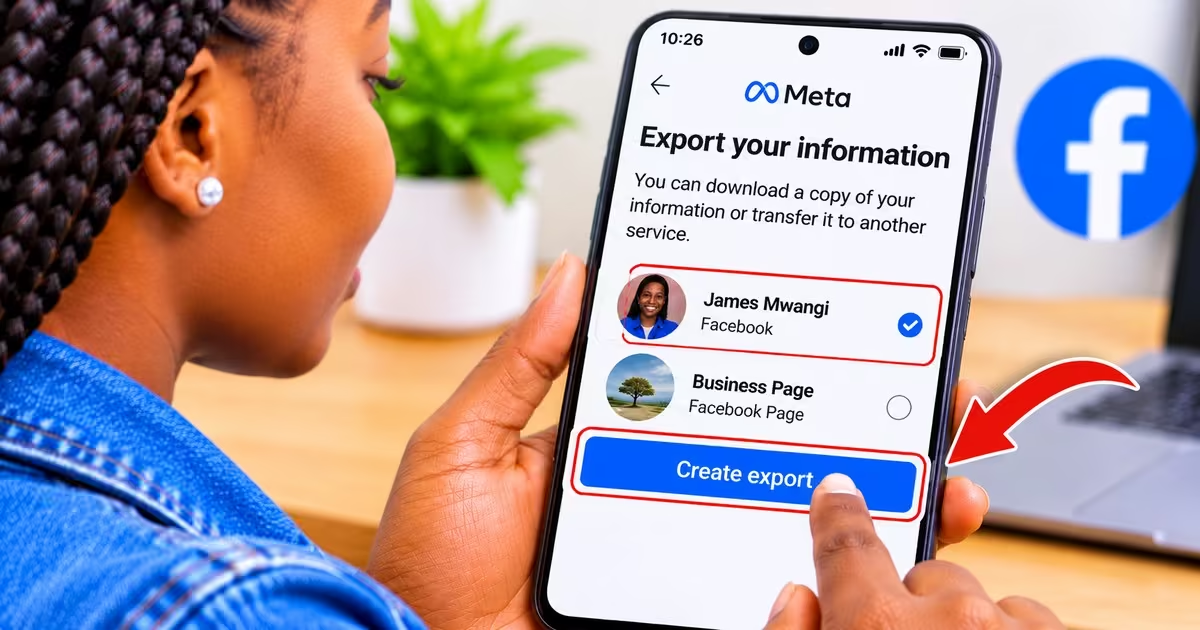
- Select “Create export” and choose the additional profile whose information you want to save.
- You will then be asked whether you want to export the information to your device or transfer it to an external service.
- If you choose an external service, you may need to connect your account to that service.
- Selecting “Export to device” allows you to choose options such as the date range, file format, notification email address, and media quality.
Step 5: Select Data, Date Range, Format, and Media Quality
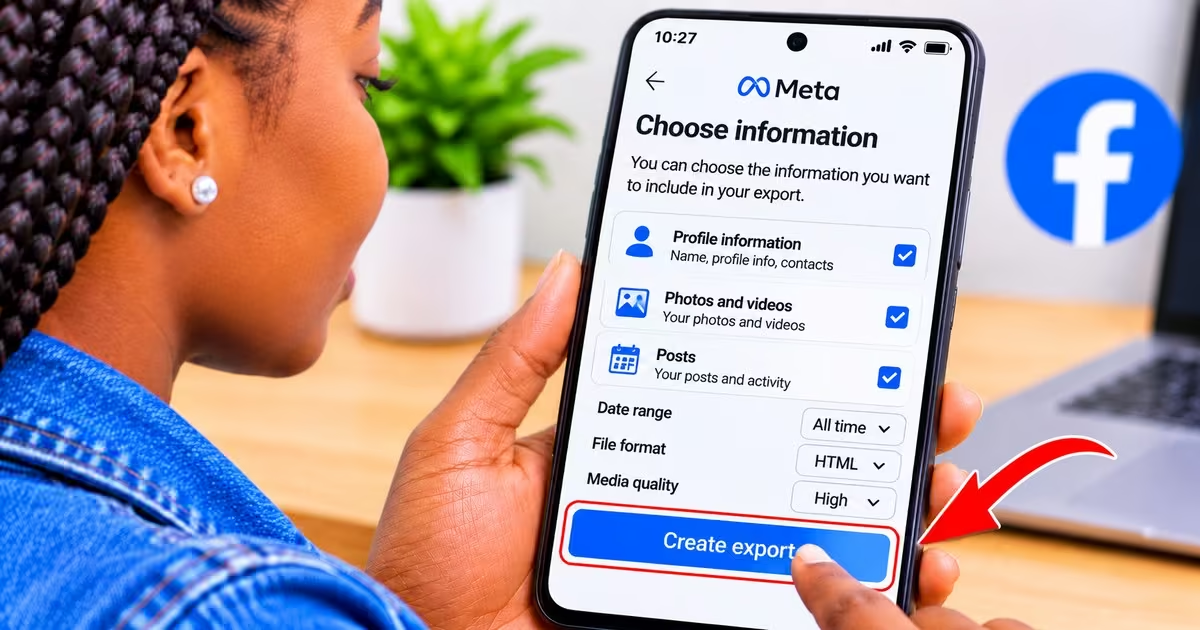
- You can select the specific information you want to export, the date range, file format, and media quality.
- Facebook provides two main file formats: HTML and JSON. HTML is generally easier to open and read in a web browser, while JSON is better for people who want to process the information with software.
- If you want to preserve your photos and videos, choose the highest available media quality. Once you have selected your preferences, start the export process.
Step 6: Download Your File Before It Expires
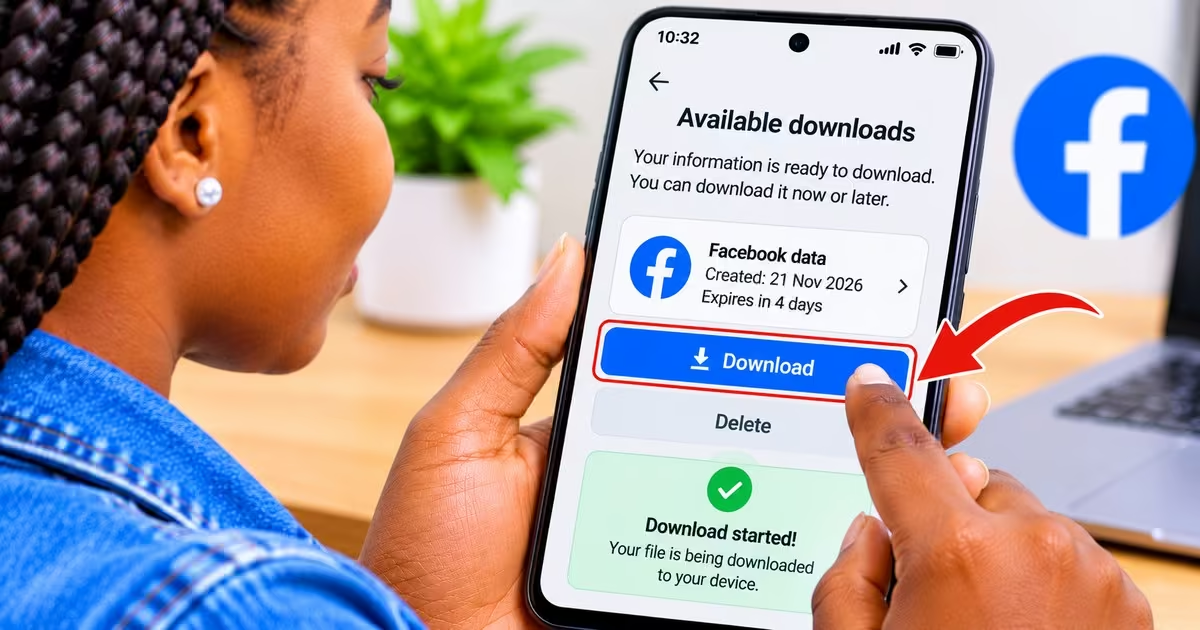
- Meta will notify you by email when your information is ready for download.
- You can then access the file through the “Available downloads” section in the export settings.
Quick Tip: You have four days to download the prepared file before it expires. You may also be required to enter your Facebook password again for security purposes.
Read Also: TikTok Marketing in Kenya: How Businesses Can Grow Online
FAQs on Deletion of Additional Facebook Profiles
Can I Merge An Additional Profile Into My Main Facebook Account?
No. Meta does not provide an option to automatically merge an additional profile with your main Facebook profile, including its friends list, group memberships, and activity history. You can manually send friend requests, rejoin Facebook Groups, and follow Pages using your main profile.
What Happens To Facebook Groups If An Additional Profile Is An Admin?
Facebook Groups will not automatically be deleted because of this announcement. However, a group may be paused if its only active administrator is an additional profile that gets removed.
To avoid interruptions, open any groups managed through an additional profile before December 14, 2026, and appoint your main profile or another trusted member’s main profile as an administrator. This will help ensure the group continues operating normally after you remove the additional profile.
Can I Recover An Additional Profile After December 14, 2026?
No. Once you permanently delete an additional profile after December 14, 2026, you will not be able to restore anything related to that account, as it will be inaccessible after deletion.
Is Facebook Deleting All Accounts On December 14, 2026?
No. Facebook is not deleting all user accounts on December 14, 2026. Facebook is discontinuing its additional personal profiles feature and permanently deleting the extra profiles created by this feature.
Is Facebook Deleting Fake Accounts On December 14, 2026?
No. The decision is to discontinue additional personal profiles, not fake profiles. However, all accounts must still follow Meta’s Community Standards and other platform rules to avoid deletion.
Will My Main Facebook Profile Or Business Page Be Deleted?
No. Your main personal profile, which is the original profile created when you first signed up for Facebook, and any Facebook Pages you manage will remain active after December 14, 2026.
How Do I Check If I Have An Additional Facebook Profile?
Open Facebook, tap your profile picture or profile switcher, and check whether any extra personal profiles appear alongside your main profile. Additional profiles share the same main login details, allowing you to switch between them directly within the Facebook app without signing out.
Conclusion
Meta’s decision to discontinue additional Facebook profiles after December 14, 2026, does not mean that all Facebook accounts are being deleted. The change affects only extra personal profiles created under the multiple-profile feature introduced in September 2023. This update will not affect your main personal profiles, independently registered accounts, or Facebook Pages. If you use an additional profile, you are advised to download your information, such as your photos, videos, posts, and other important information, before the deadline. You should also review your Facebook Groups. If you used the additional profile as admin, appoint your main account as admin, because if the additional account is deleted and it’s still the admin, your group may also be affected. Taking early action will help you avoid losing valuable information and maintain your connections after Meta implements the changes.