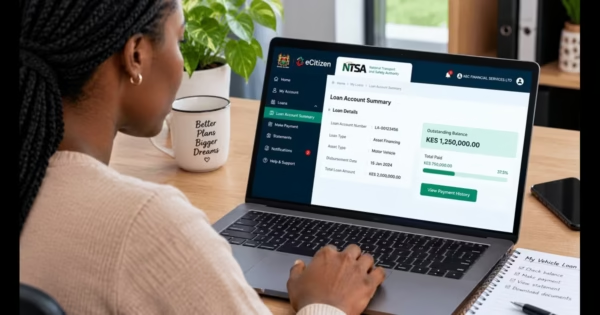
The National Social Security Fund (NSSF) is one of Kenya’s key social protection schemes, created to help workers build financial security for their retirement. Whether you are formally employed or self-employed, your monthly NSSF contributions play an important role in ensuring you have a steady income after you retire. NSSF has introduced digital services that make it easier for members to access their accounts. This allows Kenyans to check their savings, confirm payments, and make contributions without needing to visit physical offices.
It is important to regularly check your NSSF balance because it helps you confirm that all contributions are being submitted correctly and keeps you updated on the growth of your retirement savings. Monitoring your account also allows you to quickly identify any delayed or missing payments before they affect your benefits in the future.
In this guide, I will cover:
- How to check your NSSF balance online and via SMS
- How to download your contribution statements
- How to pay NSSF through M-Pesa
- How to make contributions as an employer or self-employed individual.
What is NSSF?
The National Social Security Fund (NSSF) is a Kenyan government retirement savings scheme that helps workers build financial security for the future. Both employees and employers contribute to the fund every month, while self-employed individuals can also choose to contribute voluntarily. These savings are intended to provide financial support after retirement or in other qualifying situations.
Benefits of NSSF Membership in Kenya
Joining the National Social Security Fund (NSSF) gives Kenyan workers access to important financial and social protection benefits both while working and after retirement. Through regular contributions, members build long-term savings that can support them or their families in different life situations. The following are the benefits you expect by being a member of the NSSF, as per Kennedy (2026):
a) Retirement Pension
This is the main benefit provided to members once they reach the official retirement age in Kenya. Depending on the total amount contributed and the interest earned over time, members may receive either monthly pension payments or a one-time lump sum. This helps ensure financial stability and independence after retirement.
b) Invalidity Benefits
Members who become permanently unable to work due to illness or injury may qualify for invalidity benefits. These payments are designed to offer financial support during difficult times. They may be given as a monthly pension or a lump sum, depending on eligibility and contribution history.
c) Survivors’ Benefits
If an NSSF member passes away, their dependents or next of kin are entitled to claim survivors’ benefits. This ensures that spouses, children, or other dependents receive financial support after the loss of a breadwinner. Supporting documents such as a death certificate are usually required when making a claim.
d) Withdrawal Benefits
NSSF also offers withdrawal benefits in specific situations such as permanent emigration, redundancy, or early retirement. Eligible members can access their accumulated savings, which helps ease financial pressure during major life changes.
e) Housing Scheme Eligibility
Registered NSSF members may also qualify for housing support programs under government-backed affordable housing initiatives. These may include access to housing finance, mortgage support, or structured home ownership opportunities aimed at helping members build long-term assets.
Read Also: How to Apply for an NSSF Number Online In Kenya (2026 Guide)
Requirements for Checking Your NSSF Balance
- NSSF membership number– your unique identification number used across all channels when checking your balance or accessing your account.
- National ID – required as proof of identity, especially when registering on the portal or making official account inquiries.
- Registered phone number – the mobile number linked to your NSSF account, needed when using USSD, SMS, or WhatsApp services.
- Valid email address – required when signing up for or logging into the NSSF Self-Service Portal.
How to View Your NSSF Statement Online via the Self-Service Portal
The National Social Security Fund Self-Service Portal allows members to conveniently access their NSSF accounts online without visiting a physical office. Through the portal, members can check their contribution history, monitor their savings, and download official contribution statements at any time. Follow the procedure below to view your statement.
Step 1: Visit the NSSF Self-Service Portal
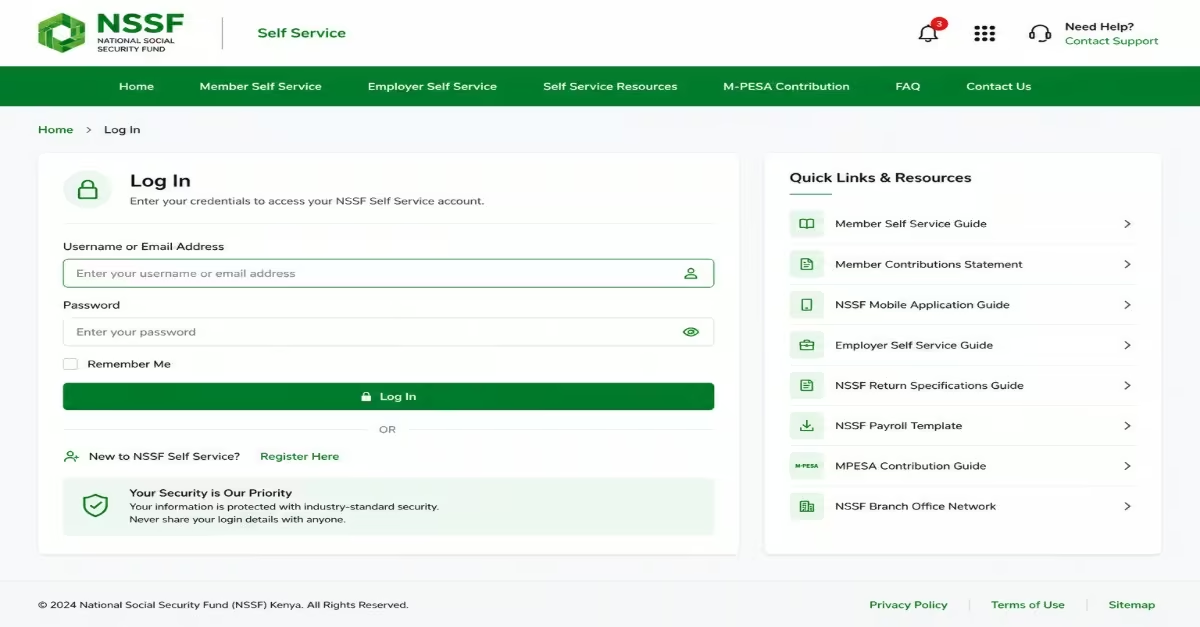
- Open your browser and visit the NSSF Self-Service Portal at NSSF Self-Service Portal.
- The portal is designed for both members and employers, so make sure you select the Member Self-Service section before proceeding.
Step 2: Log In or Register for Online Access
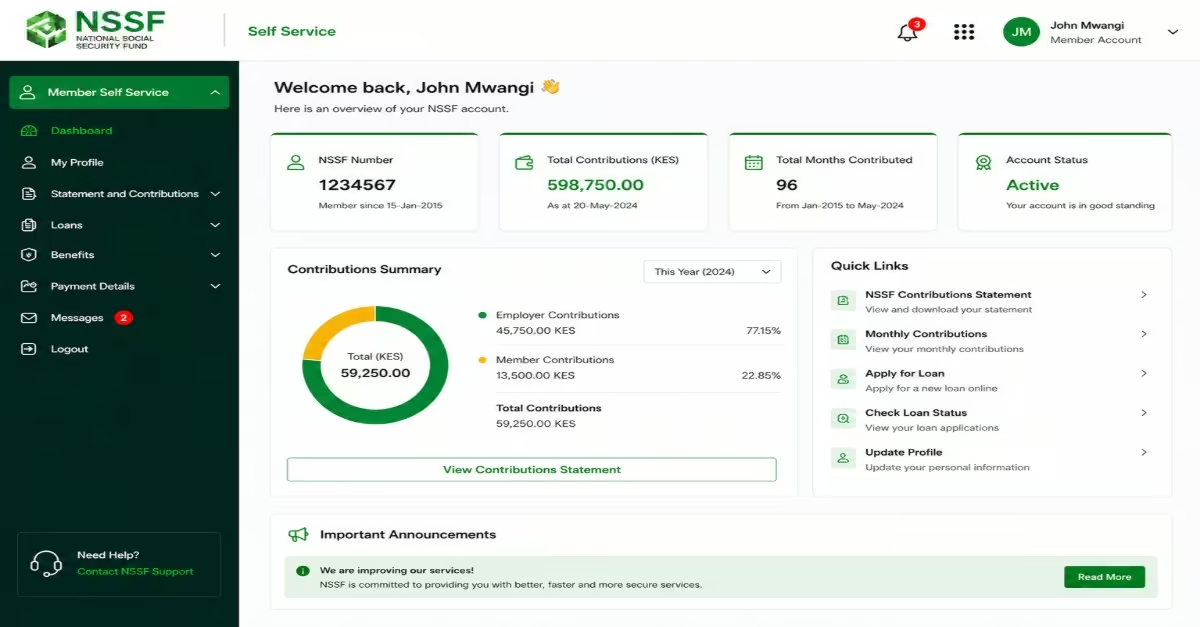
- Log in with your credentials, enter your Username or Email Address and Password on the login page, then click Log In.
- If you are already an NSSF member but have never used the portal before, click Existing Member eCertification to create your online account. You will need your NSSF membership number to continue.
Step 3: View or Download Your Contributions Statement
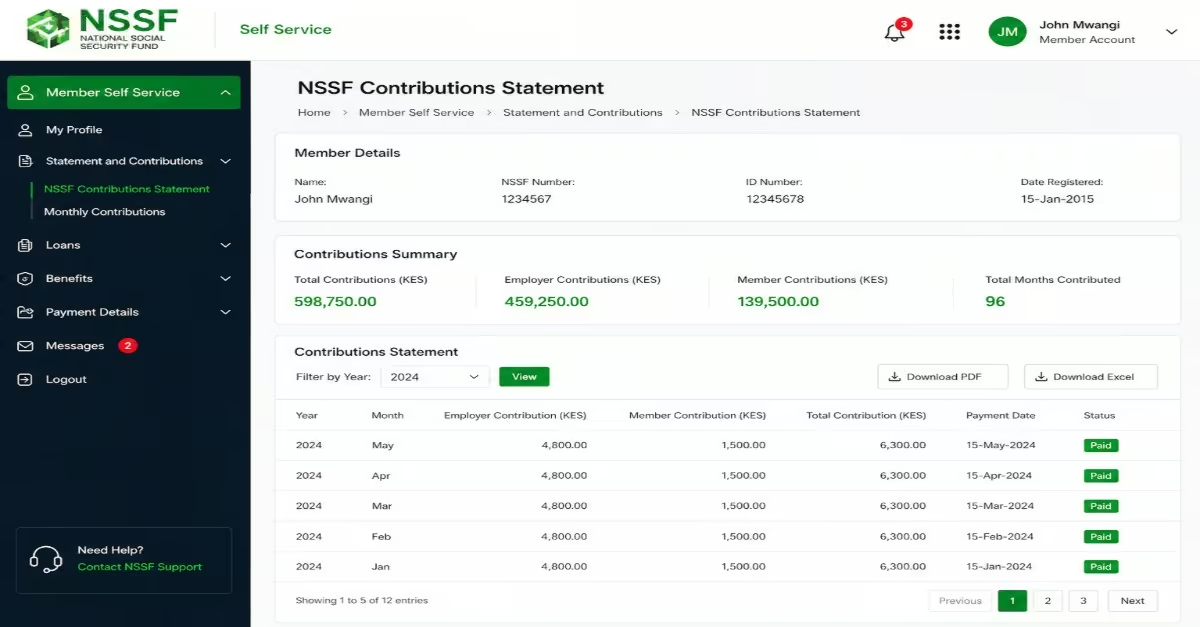
- After logging into your account, go to the Member Self Service menu.
- Click NSSF Contributions Statement to view a detailed record of all your contributions.
- You can either view the statement directly on the screen or download it for your personal records and future reference.
How to Check Your NSSF Balance Using the NSSF GO Mobile App
The National Social Security Fund GO mobile app allows members to conveniently access their NSSF accounts directly from their smartphones. Through the app, users can check their balance, view contribution statements, monitor account activity, and manage their accounts without visiting an NSSF office.
Step 1: Download and Install the NSSF GO App
- Open the Google Play Store (Android) or Apple App Store (iPhone/iOS) on your phone.
- Search for “NSSF GO” and confirm that the National Social Security Fund publishes the app.
- Download and install the app. The application is free to use.
Step 2: Open the App and Log In
- Launch the NSSF GO app after installation.
- Log in using your registered phone number or email address together with your password. The app supports a simple and fast login process without requiring separate offline credentials.
- If you are using the app for the first time, you must first be registered on the NSSF Self-Service e-Portal before accessing the app. If you are not yet registered, tap “Not Registered?” within the app to start the registration process.
Step 3: Select Your Account Type
- After logging in, the app will ask you to confirm whether you are accessing the system as a member or an Employer.
- Select Member to continue to your personal account dashboard.
Step 4: Verify Your Identity with E-Service Credentials
- Enter your NSSF e-service username, password, and NSSF membership number to verify and link your account. These are the same login credentials used on the NSSF Self-Service Portal.
Step 5: View Your Statement and Balance
- Once you access the member dashboard, tap “View Statement” to see your contribution history and current balance.
- You can also download and save the statement directly to your phone for future reference.
How to Check Your NSSF Balance via USSD Code (*303#)
The National Social Security Fund USSD service allows members to check their NSSF balance directly from their mobile phones without needing internet access. Through the USSD menu, members can check balances, request statements, and access other NSSF member services.
Step 1: Dial the USSD Code
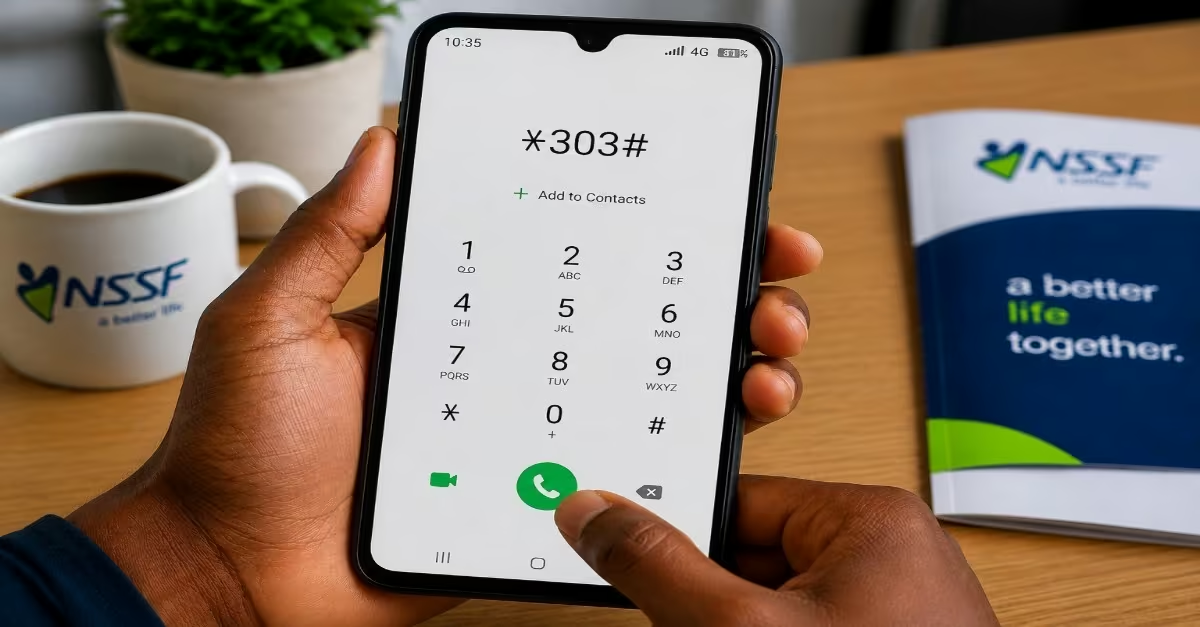
- On your mobile phone, open the dial pad and dial *303#, then press the call button. The service works on all mobile networks in Kenya and does not require an internet connection.
Step 2: Navigate the Welcome Menu
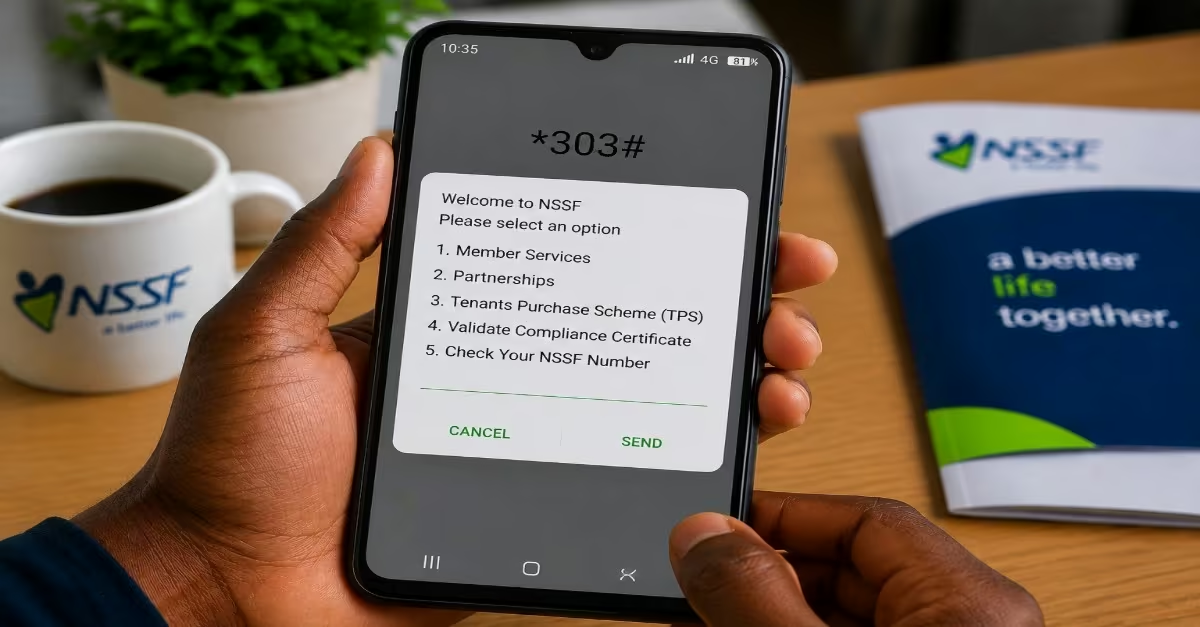
- A menu will appear on your screen with the following options: Member Services, Partnerships, Tenants Purchase Scheme (TPS), Validate Compliance Certificate, Check Your NSSF Number.
- Select Option 1 – Member Services to continue.
Step 3: Select Contribution Information
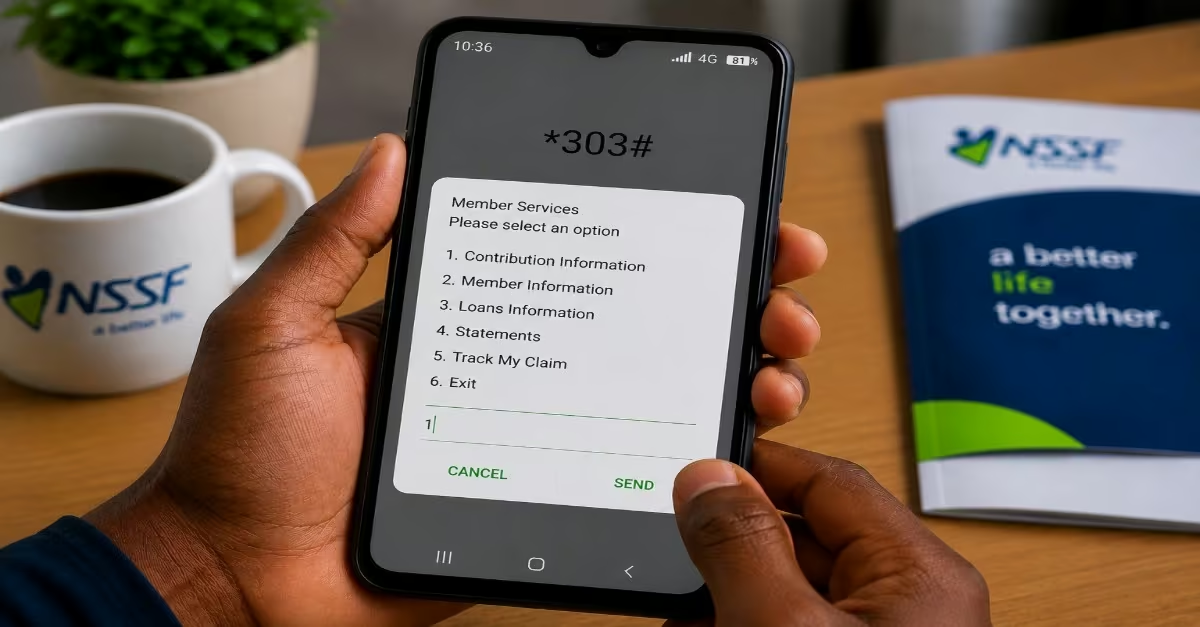
- From the Member Services menu, choose Contribution Information. You will then have the option to either check your balance or request your full contribution statement to be sent to your email address. Select the option you prefer.
Step 4: Enter Your Credentials
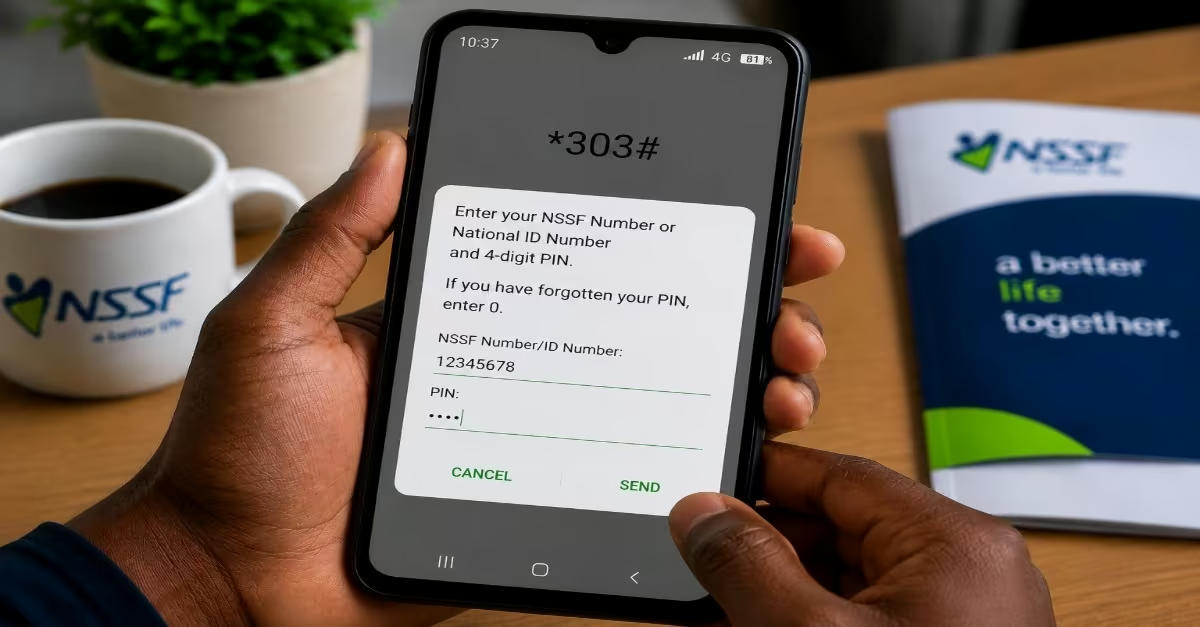
- When prompted, enter your NSSF membership number or National ID number together with your 4-digit USSD PIN to confirm your identity.
- If you have forgotten your PIN, enter 0 when asked for the PIN, then answer your security question to reset it.
Step 5: Receive Your Balance
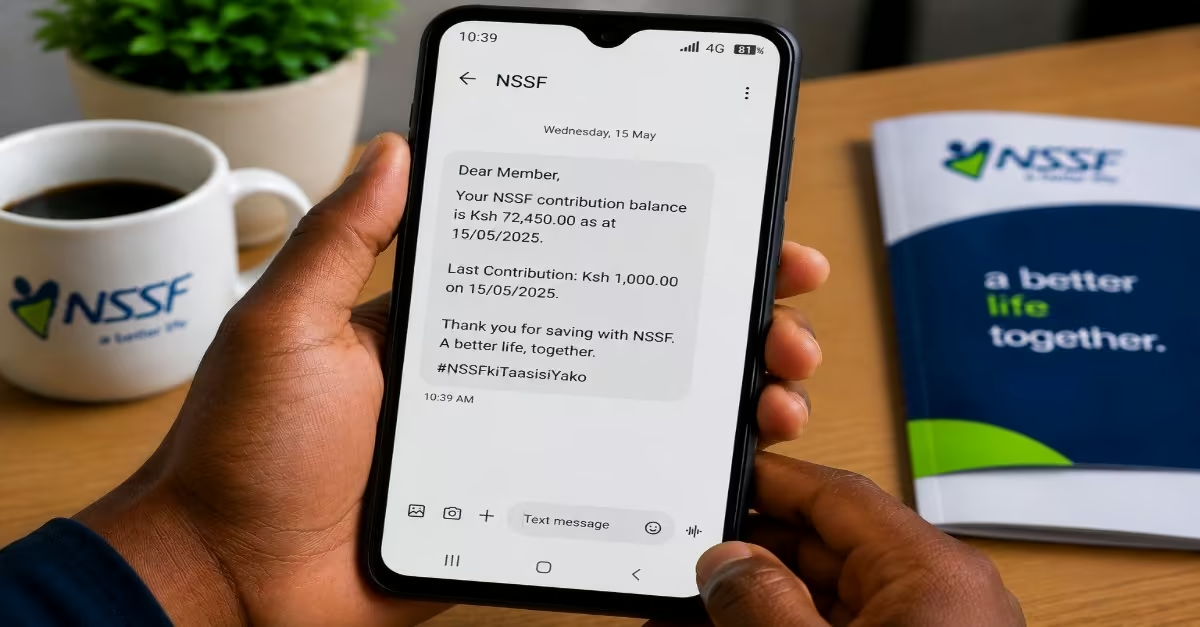
- Your contribution balance and latest transaction details will be sent to your registered phone number through SMS.
- If you selected the email option, your full contribution statement will be sent to the email address linked to your NSSF account.
How to Check Your NSSF Balance via WhatsApp
The National Social Security Fund also provides customer support services through WhatsApp, making it easier for members to access account information and assistance remotely. The WhatsApp chatbot allows members to quickly request contribution details and other services directly from their phones without visiting an NSSF office.
Step 1: Save the Official NSSF WhatsApp Number
- Save the official NSSF WhatsApp number +254 704 303 303 on your phone. You can save it as “NSSF Kenya” to make it easier to locate.
Step 2: Start a Conversation
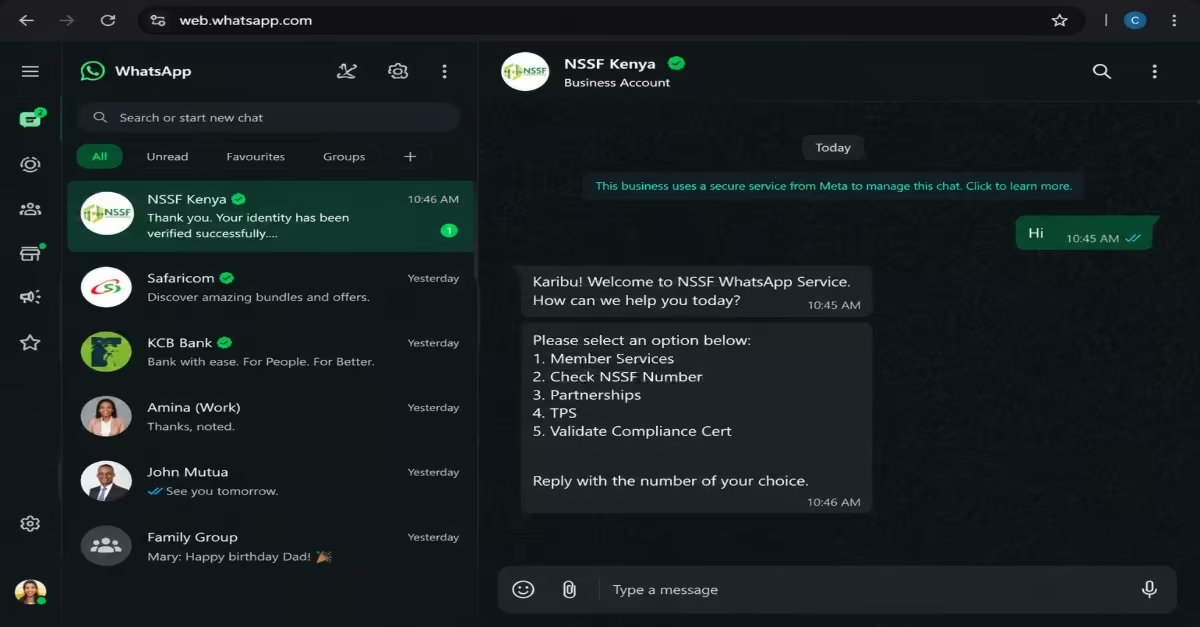
- Open WhatsApp and send a simple message such as “Hi” or “Hello” to initiate the chatbot.
Step 3: View the Welcome Menu
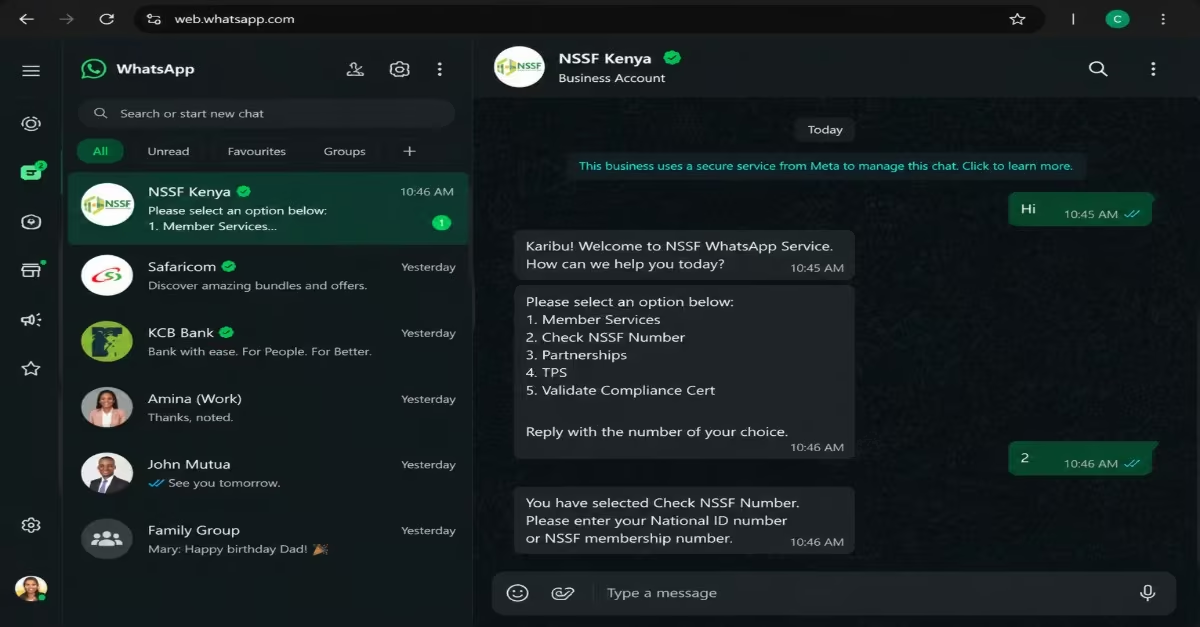
The NSSF chatbot will respond with a list of available services, which may include:
- Member Services
- Check NSSF Number
- Partnerships
- Tenant Purchase Scheme (TPS)
- Validate Compliance Certificate
Step 4: Select Member Services
- Reply with the number or text corresponding to Member Services (typically Option 1) to access member-related functions.
Step 5: Verify Your Identity
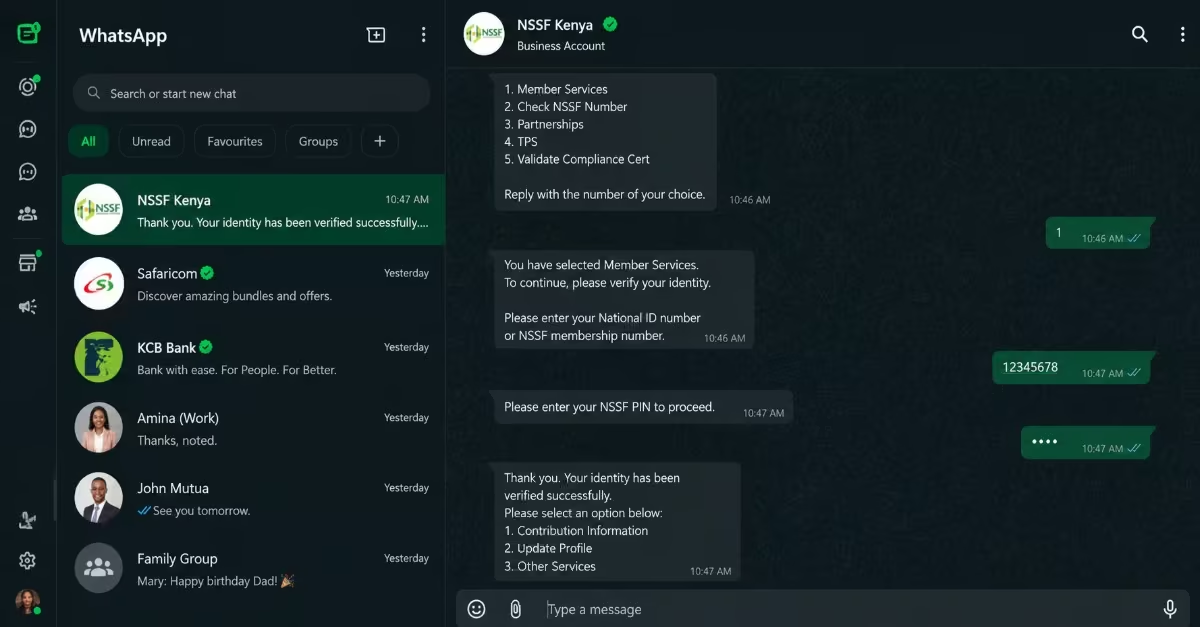
- The chatbot will ask you to confirm your identity by providing your National ID number or NSSF membership number and your NSSF PIN.
- If you have forgotten your PIN, you may be given an option to reset it via SMS.
Step 6: Choose Contribution Information
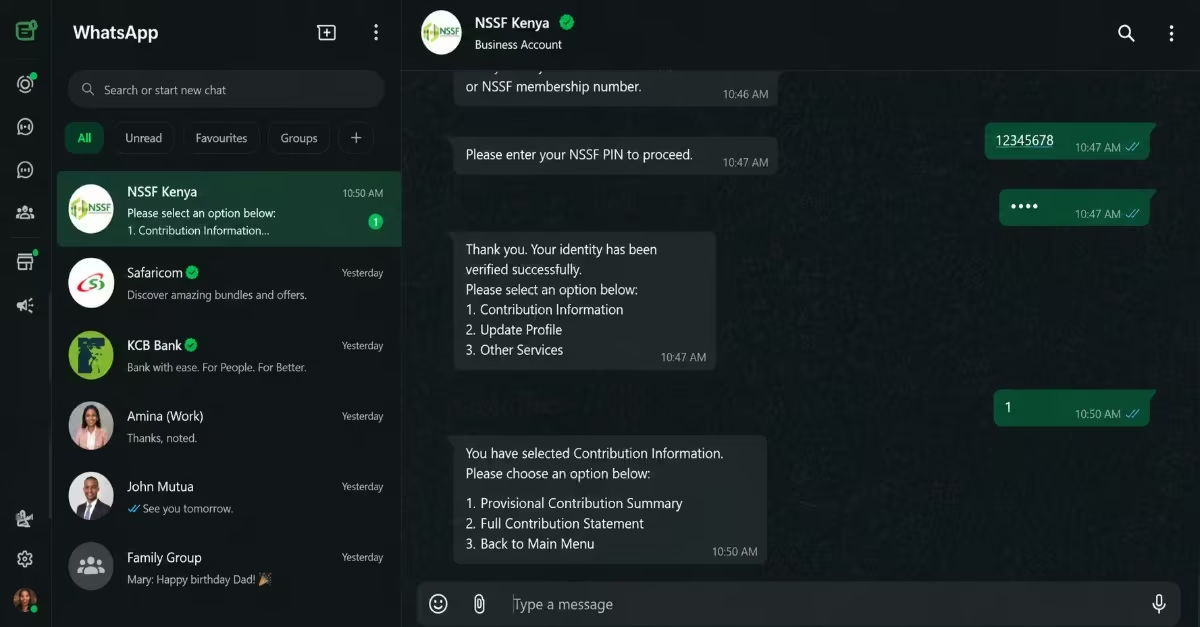
- After successful verification, select the Contribution Information option. Depending on updates to the chatbot, this may also appear as Contributions or Statement.
Step 7: View Your NSSF Balance or Statement
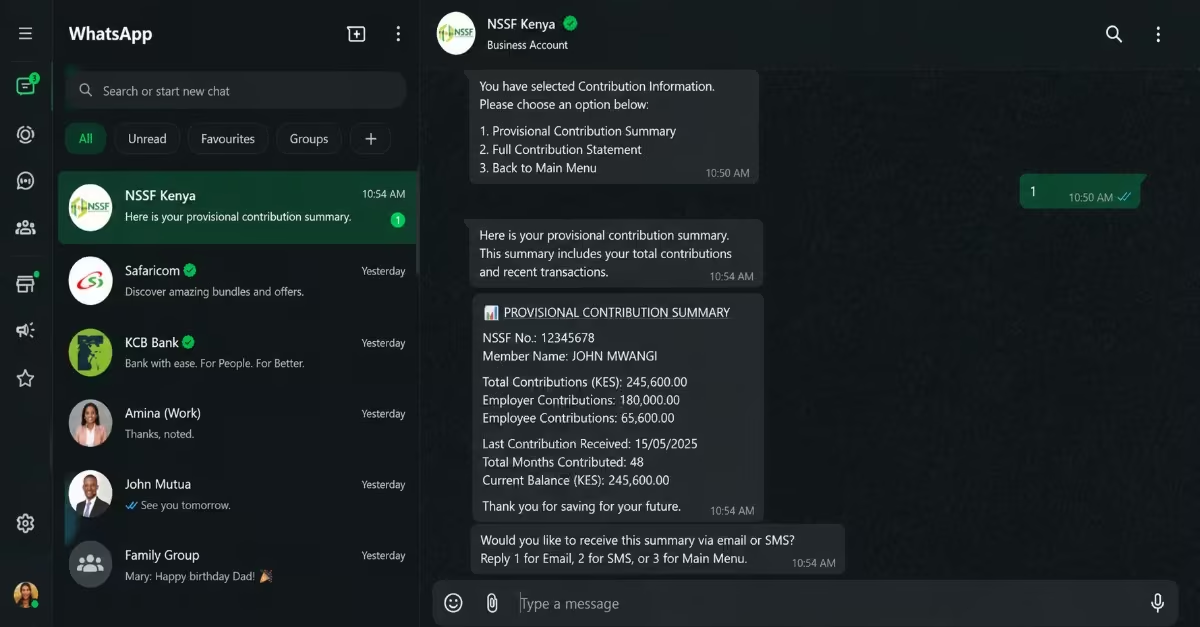
- You can then choose the type of information you want to receive, including A provisional contribution summary (showing your current balance and recent contributions) or A full contribution statement.
- The chatbot will display the requested information directly in the WhatsApp chat or send it via SMS or email, depending on the option selected.
How to Pay NSSF Contributions via M-PESA Paybill
The National Social Security Fund allows members and employers to make contributions through M-PESA Paybill conveniently. This method is fast and secure, and you can complete it directly from your mobile phone without visiting a bank or NSSF office.
Step 1: Open M-PESA
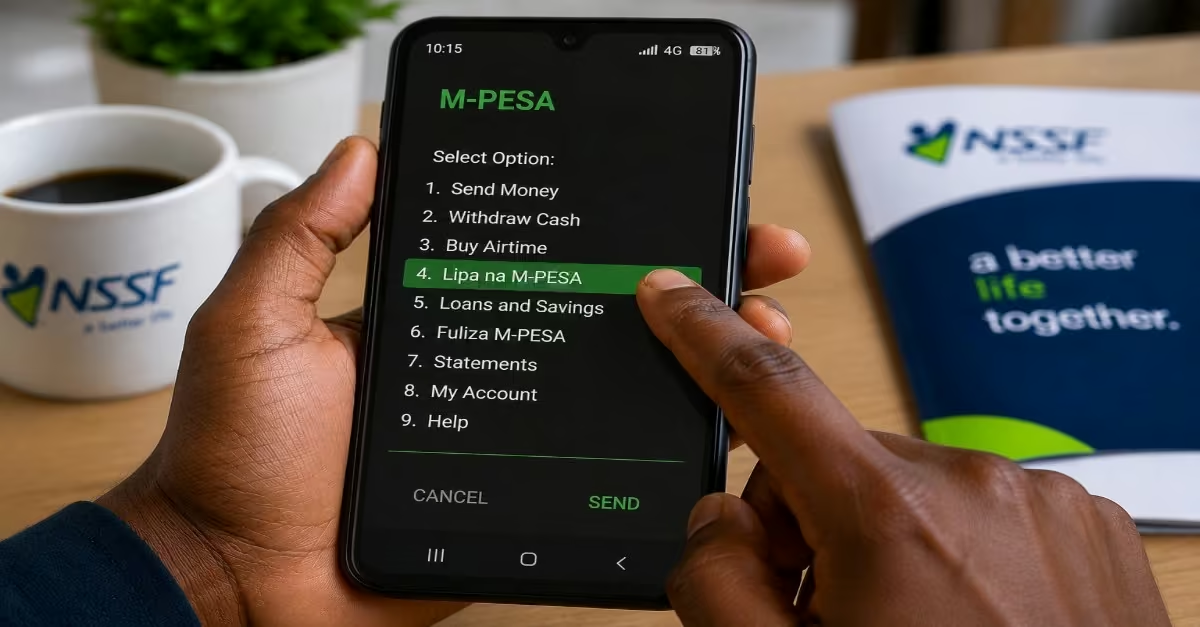
- On your phone, go to M-PESA → Lipa na M-PESA → Pay Bill.
Step 2: Enter Payment Details
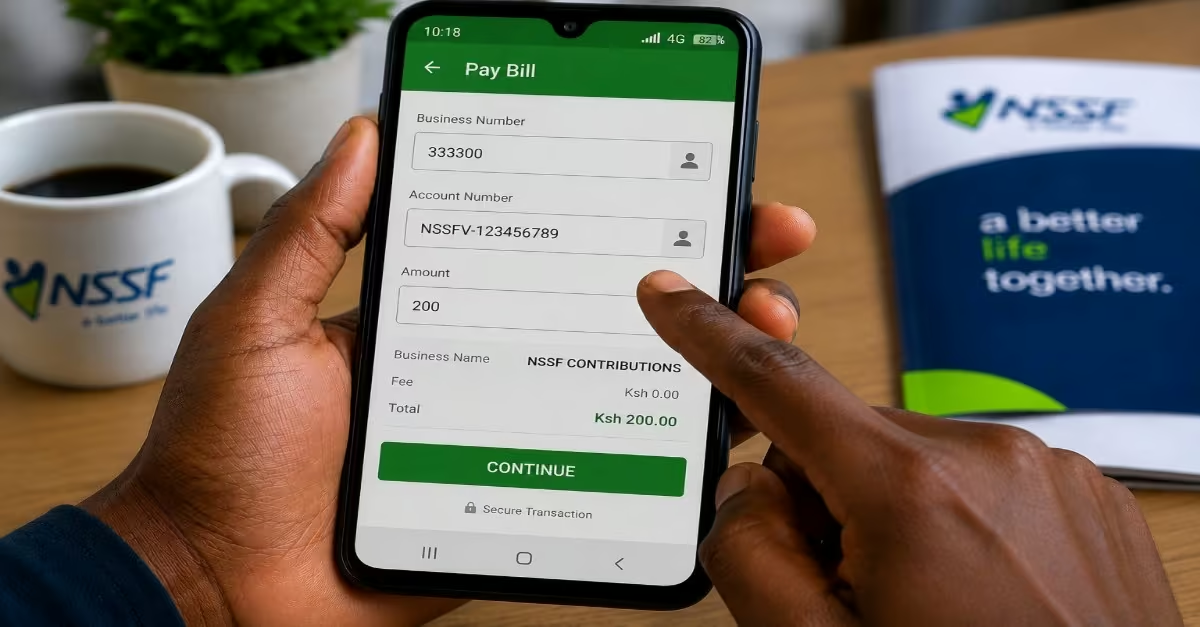
- Business Number: 333300
- Account Number: For voluntary or individual members, use the format NSSFV- [Your NSSF Number], Example: NSSFV-123456789. For employers, use the format NSSFE- [Your E-slip Number], Example: NSSFE-824001234567
- Amount: Enter the correct contribution amount. Payments should be between Ksh 200 and Ksh 140,000.
Step 3: Confirm and Complete Payment
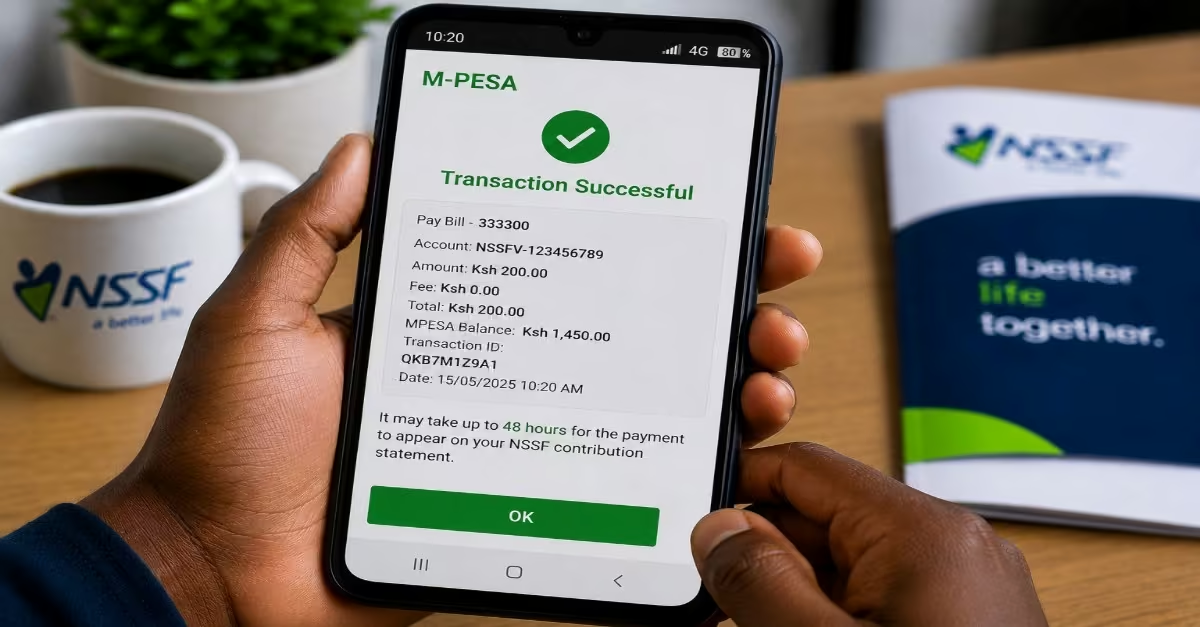
- Enter your M-PESA PIN and confirm the transaction details before submitting the payment.
- Once the transaction is successful, you will receive an SMS confirmation message from M-PESA.
- It may take up to 48 hours for the payment to appear on your NSSF contribution statement.
How to Pay NSSF Contributions via eCitizen
The National Social Security Fund has integrated its payment services with eCitizen, allowing members to make contributions online through the eCitizen platform. This is the recommended payment channel for individual and voluntary contributors because it offers a secure and straightforward process that can be completed from anywhere. For Individual or Voluntary Members, follow the procedure below.
- Visit eCitizen Kenya and sign in to your account.
- Under the Agencies section, locate and select NSSF.
- Choose “Voluntary Contribution”, then enter your NSSF membership number and click Validate.
- Enter the amount you want to contribute, click “Make Payment”, select your preferred payment method, and follow the instructions provided to complete the transaction.
Read Also: How to Pay for SHA in Kenya: A Complete Beginner’s Guide
Current NSSF Rates
A study by Elijah (2026) highlights that “as of February 2026 (Year 4 of the NSSF Act, 2013), both employees and employers are required to contribute 6% of the employee’s pensionable earnings to the National Social Security Fund (NSSF).”
Contributions are divided into two tiers:
- Tier I– Applies to the first KES 9,000 of monthly earnings. Both the employee and employer contribute up to KES 540 each.
- Tier II– Applies to earnings between KES 9,001 and KES 108,000. Both parties contribute up to KES 5,940 each.
This means the maximum monthly NSSF contribution for one employee is KES 12,960 (KES 6,480 from the employee and KES 6,480 from the employer).
Employers are responsible for deducting the employee’s share from their salary and remitting the total contribution to NSSF by the 9th day of the following month.
Conclusion
Checking your National Social Security Fund balance and making contributions in Kenya has become much easier with the use of the Self-Service Portal, NSSF GO mobile app, USSD code, WhatsApp support, M-PESA Paybill, and eCitizen. You can now regularly monitor your account and confirm that contributions are being submitted correctly, while also tracking the growth of your retirement savings over time. Whether you are formally employed, self-employed, or an employer managing staff contributions, understanding how these systems work can help you avoid delays, resolve account issues quickly, and stay financially prepared for the future.