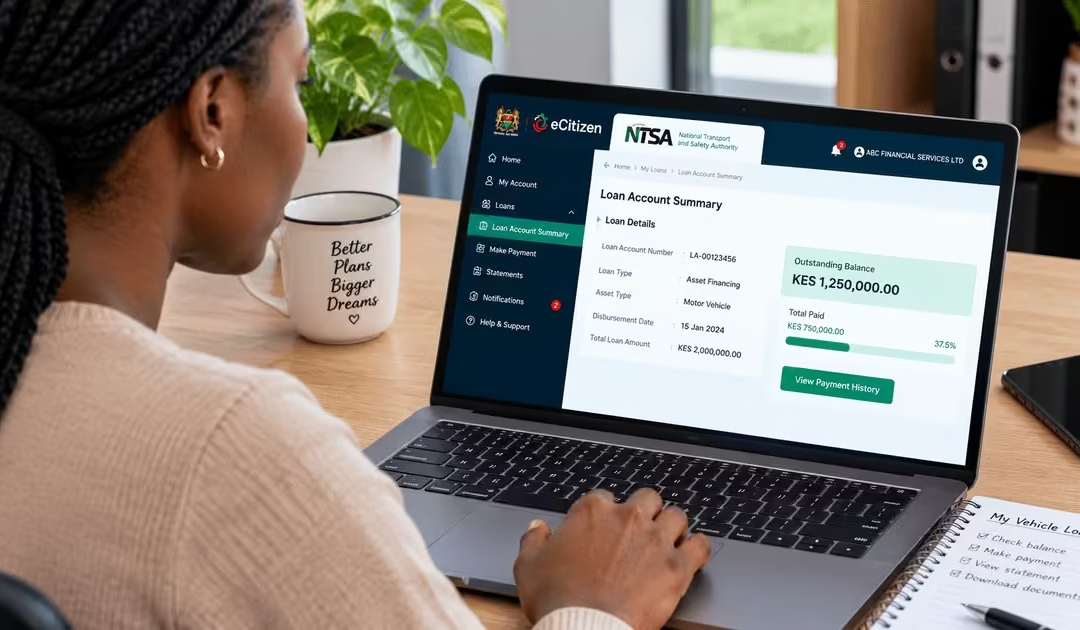
Are you planning to buy a new car or upgrade your existing vehicle? Asset financing could be the solution you are looking for. Instead of paying the full cost of a vehicle upfront, you can obtain financing from a bank, SACCO, or other financial institution and repay the amount over an agreed period. However, buying a vehicle through asset financing requires the financier’s legal interest in the vehicle to be officially recognized.
When you buy a vehicle through a bank or other financial institution, the ownership records must show that the vehicle is being used as security for the financing. This is where the NTSA asset financing charge process comes in. A charge is a legal record showing that a financier has an interest in the vehicle until the financing is fully repaid. It protects the financier while allowing the buyer to use the vehicle under the terms of the financing agreement.
In this article, I am going to explain:
- What Is Motor Vehicle Asset Financing in Kenya?
- What Is an In-Charge on a Motor Vehicle?
- Key Legal and Security Benefits of Registering an In-Charge
- Requirements to Apply for Asset Financing (In-Charge) on the NTSA Portal
- How to Apply for Asset Financing on NTSA
- A. Financier/Financial Institution Procedure
- Step 1: Log In to the eCitizen Account
- Step 2: Select the NTSA Service Portal (New)
- Step 3: Switch Account and Select In-Charge
- Step 4: Search for the Vehicle
- Step 5: Enter the Owner’s Details and Upload the Required Documents
- Step 6: Review the Application Details
- Step 7: Accept the Declaration and Preview
- Step 8: Submit the Application and Pay
- B. Vehicle Owner (Client) Procedure
- NTSA Asset-Financing Processing Time
- NTSA In-Charge Application Fees
- Conclusion
What Is Motor Vehicle Asset Financing in Kenya?
This arrangement allows a person or business to acquire an asset, such as a motor vehicle, using funds from a financial institution, such as a bank, and repay the amount over an agreed period. Monolith Africa’s guide on asset financing highlights that, in this arrangement, the buyer does not pay the full cost upfront; instead, they can use the asset while the financier retains a registered interest in it as security until the financing is fully repaid. For motor vehicles, this interest is recorded through the relevant NTSA records. Therefore, asset financing involves not only obtaining funds to purchase a vehicle but also formally recording the financier’s interest in the vehicle until the financing obligation is settled.
What Is an In-Charge on a Motor Vehicle?
An “in-charge” on a motor vehicle is a registered interest placed on a vehicle acquired through asset financing. It shows that a financial institution, such as a bank, provided money to purchase the vehicle and therefore has a financial interest in it. Although the borrower can use the vehicle, the financier’s interest remains recorded in the relevant NTSA records until the financing is fully repaid and the charge is discharged. An in-charge protects the financier by linking the vehicle to the financing agreement and ensuring its rights over the vehicle are recognised.
Read Also: Applying for New Generation Number Plates in Kenya: Step-by-Step Guide
Key Legal and Security Benefits of Registering an In-Charge
When a vehicle is purchased through asset financing, the financier needs to have its interest in the vehicle officially recorded. An in-charge serves this purpose by recording the financier’s interest in the vehicle as security for the financing. This protects the financier and provides a clear record of the vehicle’s financing status. The main reasons for registering an in-charge include:
- To Secure the Financier’s Money — The vehicle serves as security for the financing; it gives the financier an interest in it until the borrower has completed the required repayments.
- To Formally Record the Financier’s Interest — Registration creates an official record showing that the vehicle is subject to a financing arrangement and that the financier has an interest in it.
- To Protect the Financier if the Borrower Defaults — The registered interest helps the financier enforce its rights over the security if the borrower fails to meet the agreed repayment obligations.
- To Show That the Vehicle is Subject to Financing — The NTSA records show whether a vehicle has an active financing charge or whether the charge has already been discharged.
- To Support Dealings Involving Ownership of the Vehicle — Since the financier’s interest is recorded in the vehicle’s registration records, it must be considered when ownership or other transactions involving the vehicle are being handled, such as selling the vehicle.
Requirements to Apply for Asset Financing (In-Charge) on the NTSA Portal
Before starting the NTSA asset-financing charge process, have the required information and supporting documents ready to avoid delays. The process involves actions by both the financier and the vehicle owner. The following are common requirements.
- Active eCitizen Account – An active eCitizen account with access to the NTSA service portal is required to access and complete the relevant online services.
- Vehicle Registration Number – The registration number of the motor vehicle is required to identify the vehicle involved in the financing arrangement.
- Vehicle Owner’s Details – The vehicle owner’s details are required to identify the registered owner and link the financing transaction to the correct vehicle records.
- Copy of the Logbook – A clear scanned copy of the vehicle’s logbook may be required as supporting documentation during the asset-financing charge process.
- Owner’s Consent – The vehicle owner must review and accept the consent notification sent through the NTSA/eCitizen account where required. This authorises the financier’s charge to be recorded against the vehicle.
How to Apply for Asset Financing on NTSA
Asset financing, also known as an in-charge process, records a financier’s interest in a vehicle on the NTSA TIMS system. The process involves two separate procedures: one completed by the financial institution and another completed by the vehicle owner (client). Both procedures are carried out through the NTSA Service Portal on eCitizen. Each of the two procedures is explained below:
A. Financier/Financial Institution Procedure
The financier or financial institution starts the asset-financing in-charge application through its own eCitizen and NTSA account. The process allows the financier to record its interest in the vehicle, after which the vehicle owner provides the required consent before the transaction can be submitted to NTSA for approval.
Step 1: Log In to the eCitizen Account

- The financial institution should log in to its own eCitizen account using the credentials registered to the institution.
- This should be the institution’s account and not the personal eCitizen account of the vehicle owner.
Step 2: Select the NTSA Service Portal (New)
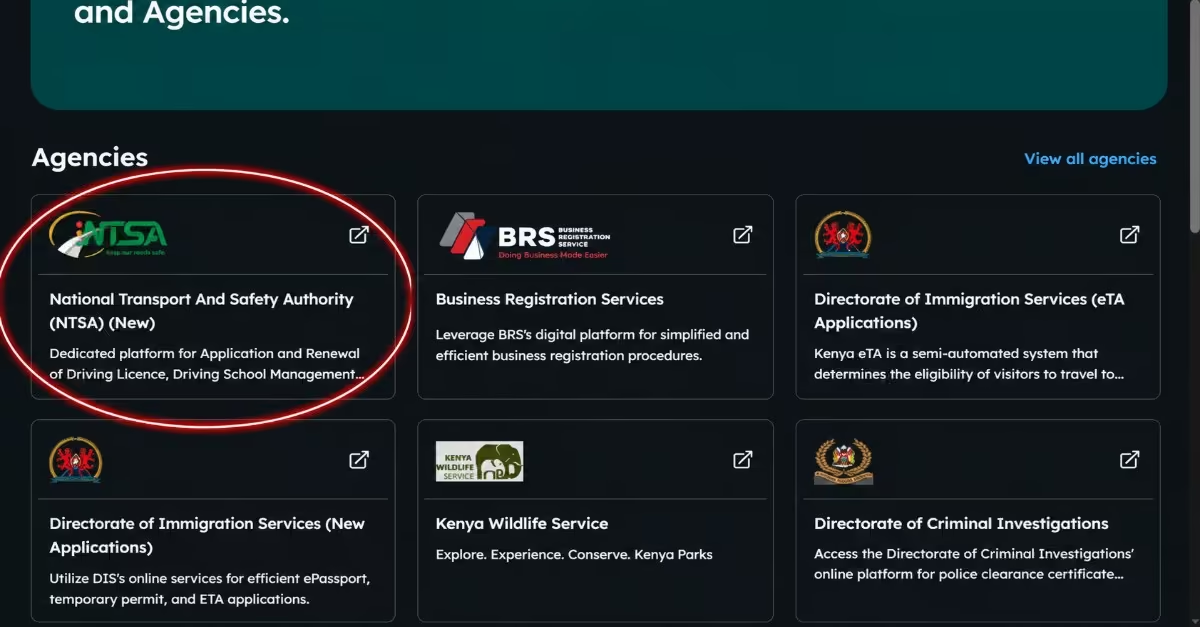
- From the eCitizen dashboard, locate the NTSA Service Portal (New) under the available government services.
- Click on the NTSA portal to open the service dashboard.
- Once the portal opens, you can access various motor vehicle services, including services related to registration, ownership, and financing.
Step 3: Switch Account and Select In-Charge
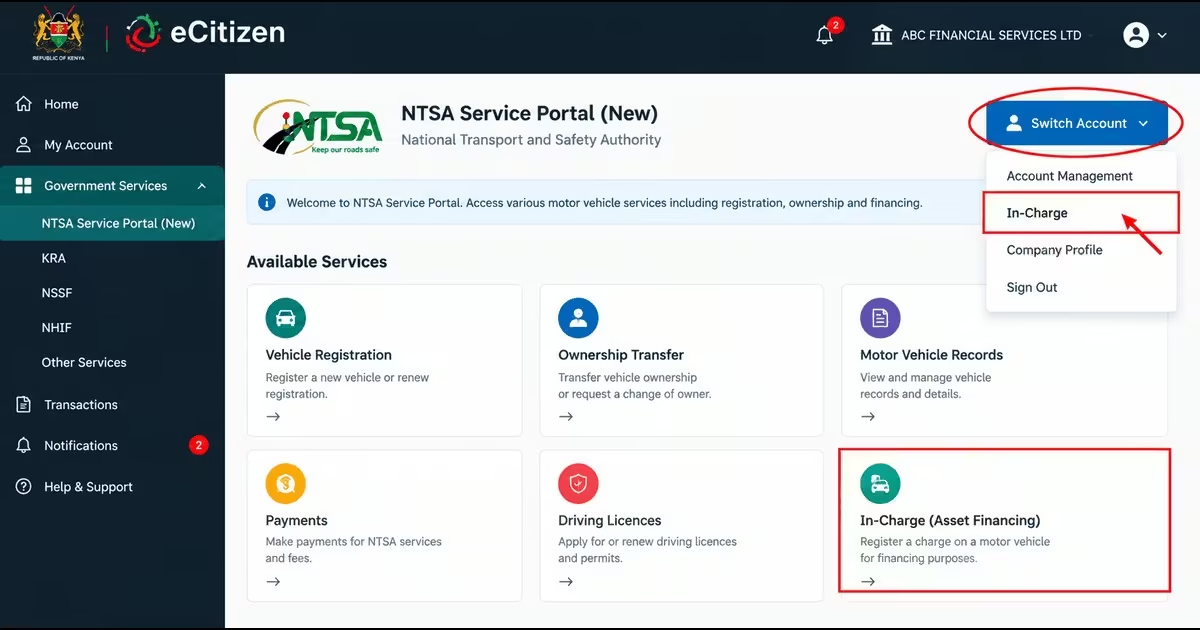
- From the NTSA Service Portal, select Switch Account to change to the profile used for asset-financing services.
- Select In-Charge from the available options to open the asset-financing application section.
- If the institution has more than one registered financier profile, confirm that the correct financier account is selected before continuing.
- Once the correct account has been selected, proceed with the in-charge application.
Step 4: Search for the Vehicle
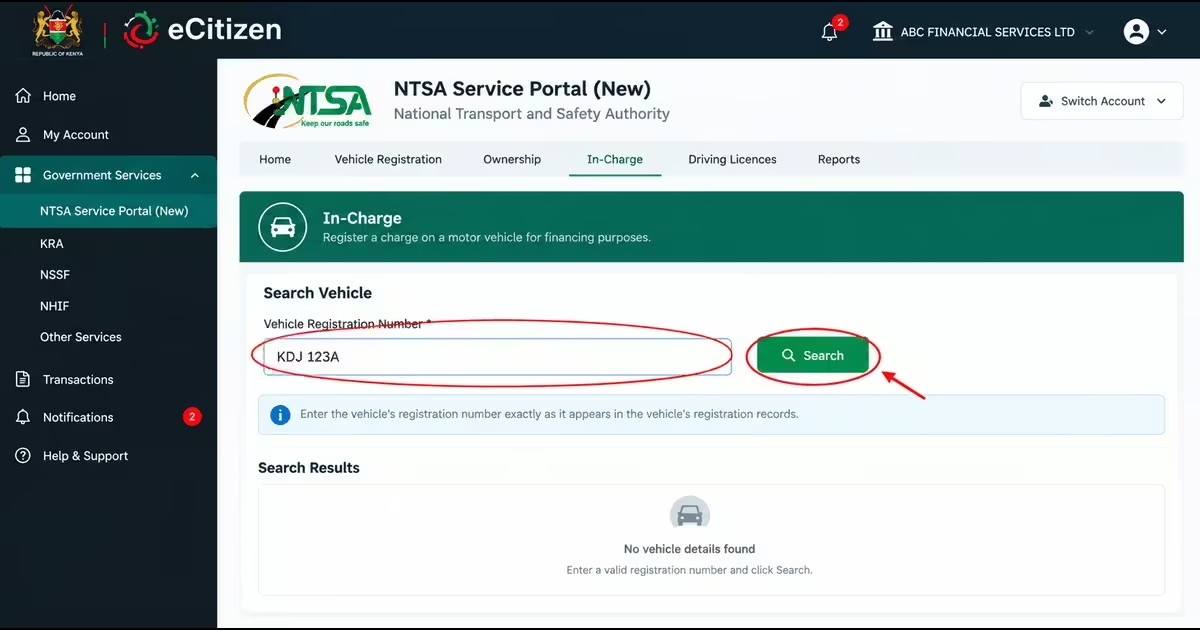
- In the In-Charge application section, locate the vehicle search field.
- Enter the vehicle’s registration number exactly as it appears in the vehicle’s registration records.
- Click Search to retrieve the vehicle’s details from the NTSA system.
- Review the information displayed to confirm that you have selected the correct vehicle before proceeding.
Step 5: Enter the Owner’s Details and Upload the Required Documents
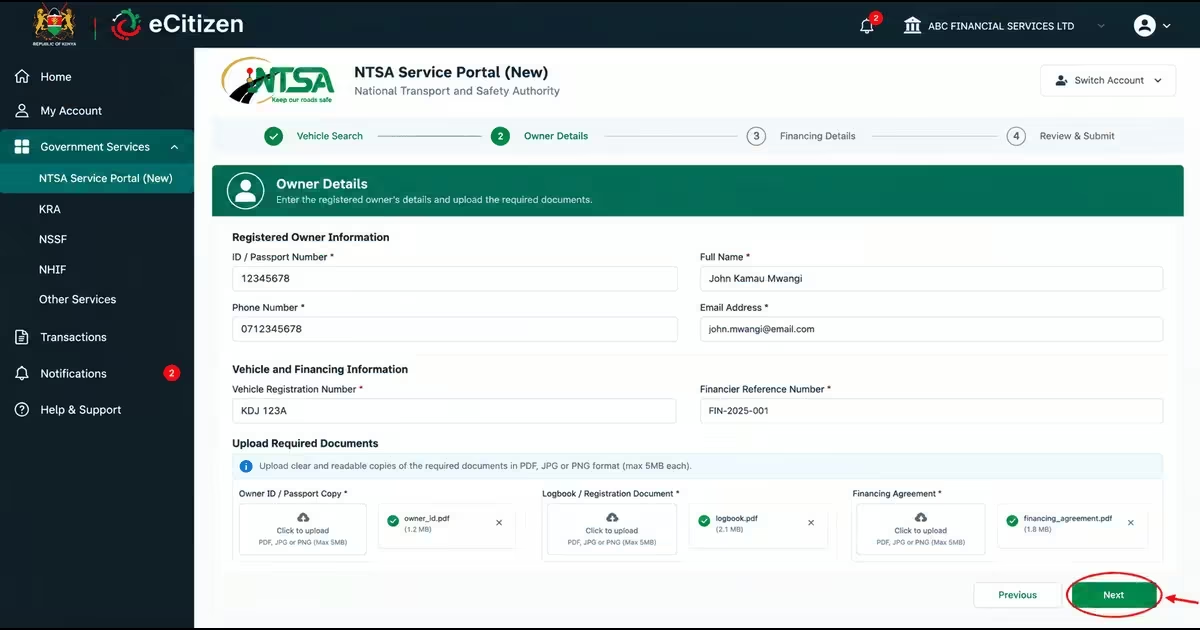
- Enter the registered owner’s details as requested in the application form.
- Provide the required vehicle and financing information in the relevant fields.
- Upload any documents requested by the portal in the specified format and ensure that they are clear and readable.
- Review the information entered before clicking Next to continue.
Step 6: Review the Application Details
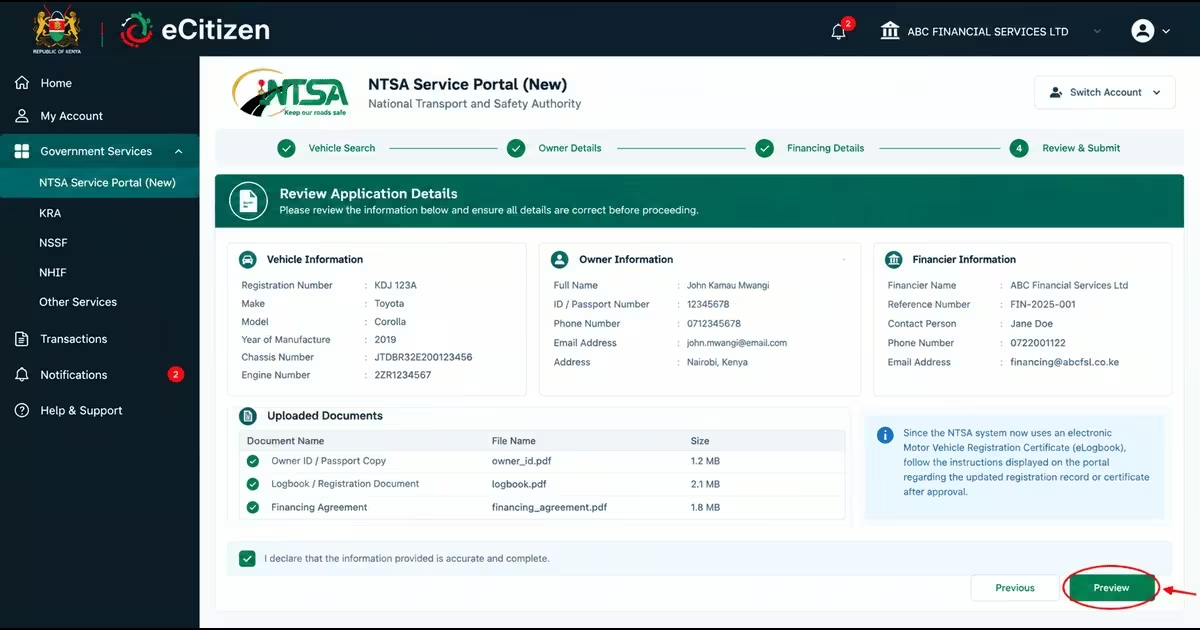
- Review the vehicle, owner and financier information displayed in the application.
- Confirm that the details are accurate and that all required information or documents have been provided.
- Since the NTSA system now uses an electronic Motor Vehicle Registration Certificate (eLogbook), follow the instructions displayed on the portal regarding the updated registration record or certificate after approval.
Step 7: Accept the Declaration and Preview
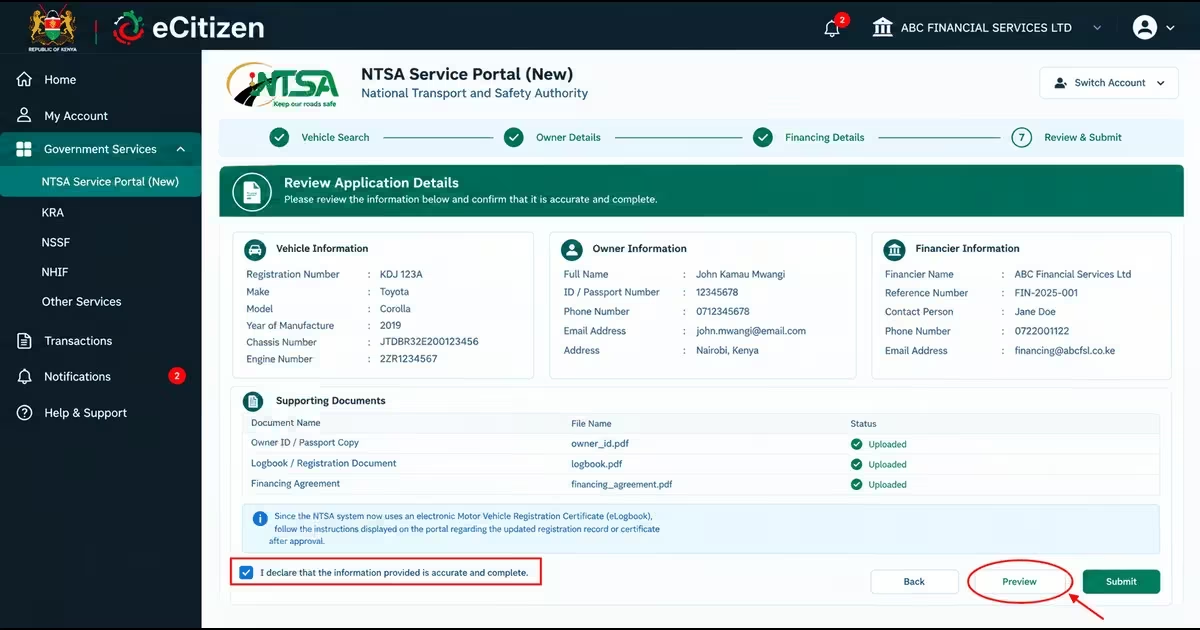
- Scroll down and tick the declaration box to confirm that the information provided is accurate and complete.
- Click Preview to view the application before submitting it.
- Carefully check the details for any errors and make any necessary corrections before proceeding.
Step 8: Submit the Application and Pay
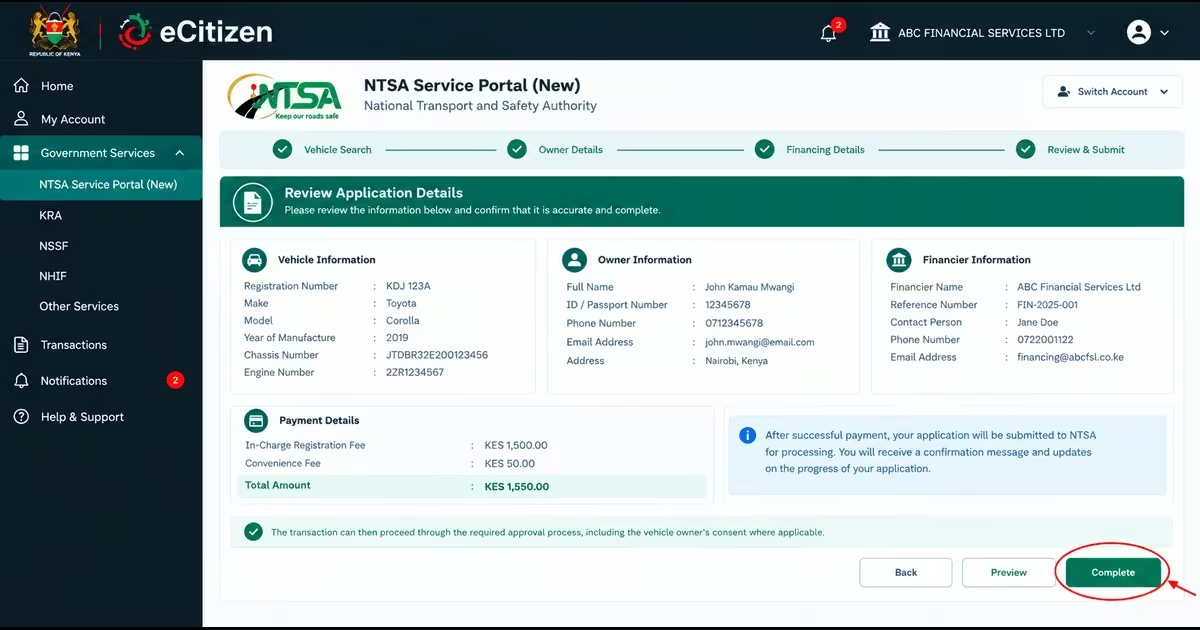
- Submit the completed application to NTSA for processing.
- Pay the applicable in-charge registration fee through the payment option provided on the portal.
- After the payment has been successfully processed, click Complete if the portal provides this option to finalise the application.
- The transaction can then proceed through the required approval process, including the vehicle owner’s consent where applicable.
B. Vehicle Owner (Client) Procedure
Once the financier has initiated the asset-financing in-charge application, the vehicle owner must log in to their eCitizen account and respond to the request. The owner’s consent is required before the transaction can proceed to NTSA for processing. The procedure is as follows:
Step 1: Log in to the eCitizen Account
- The vehicle owner should log in to their personal eCitizen account using their registered credentials.
- Make sure you are using the account belonging to the registered vehicle owner before proceeding.
Step 2: Select the NTSA Service Portal (New)
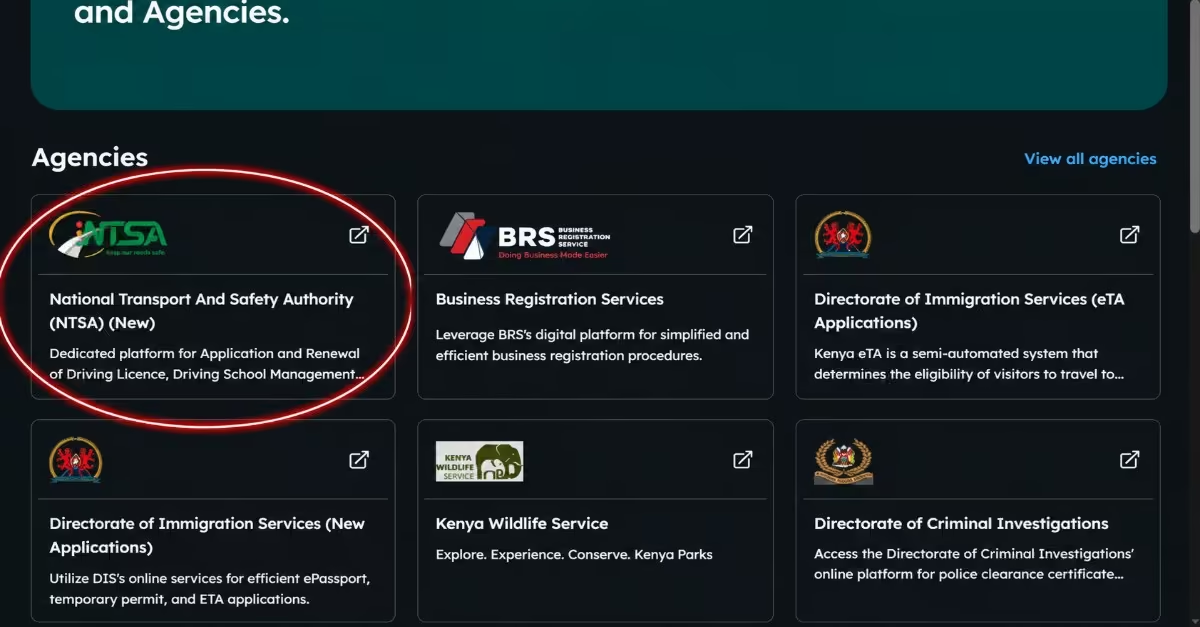
- From the eCitizen dashboard, locate and open the NTSA Service Portal (New).
- This will take you to the NTSA dashboard where you can access the relevant motor vehicle services.
Step 3: Respond to the Consent Notification
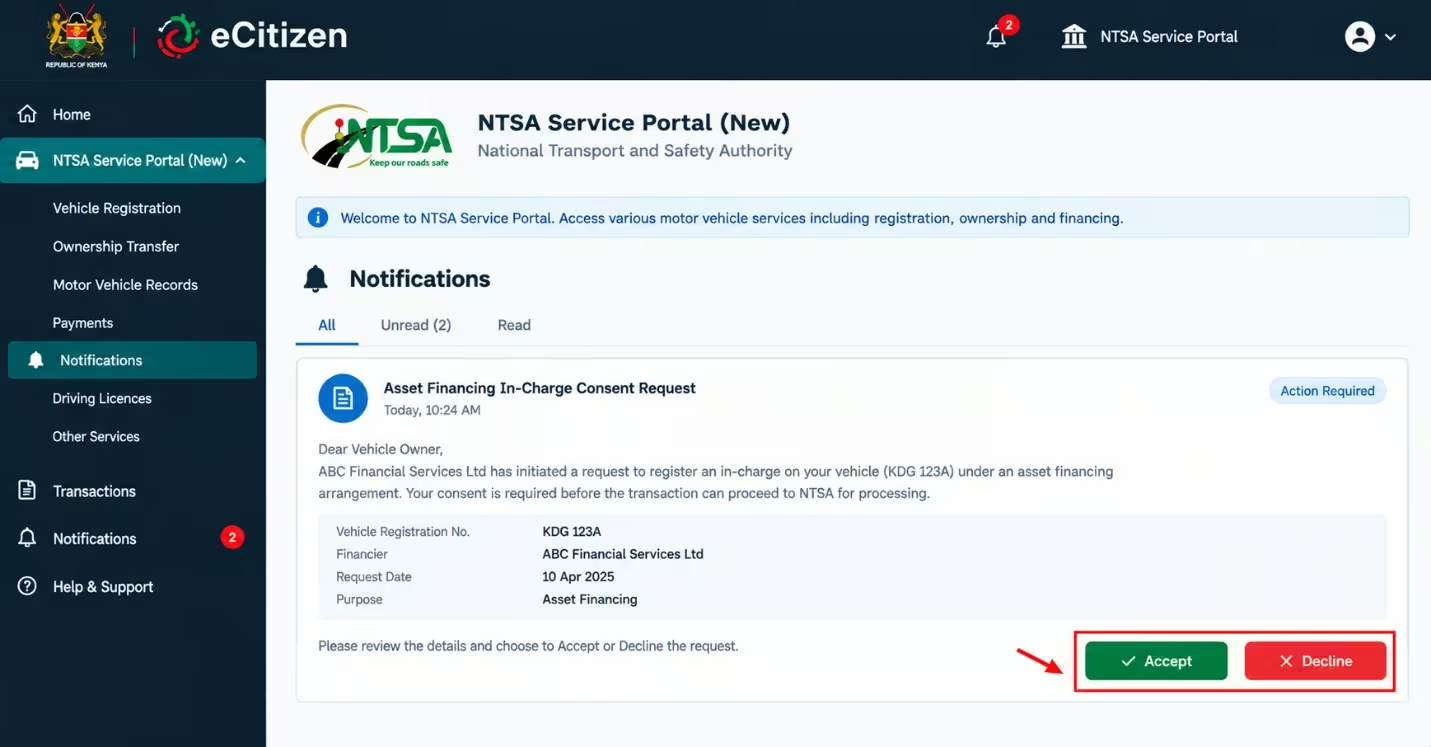
- A consent notification for the pending in-charge transaction should appear on the NTSA portal home page.
- Open the notification and review the details of the financing request.
- Select Accept if the details are correct and you agree to the registration of the financier’s interest in the vehicle. You may select Decline if you do not agree with the request.
- The owner must accept the request for the asset-financing charge to proceed.
Step 4: Submit the Request for NTSA Approval
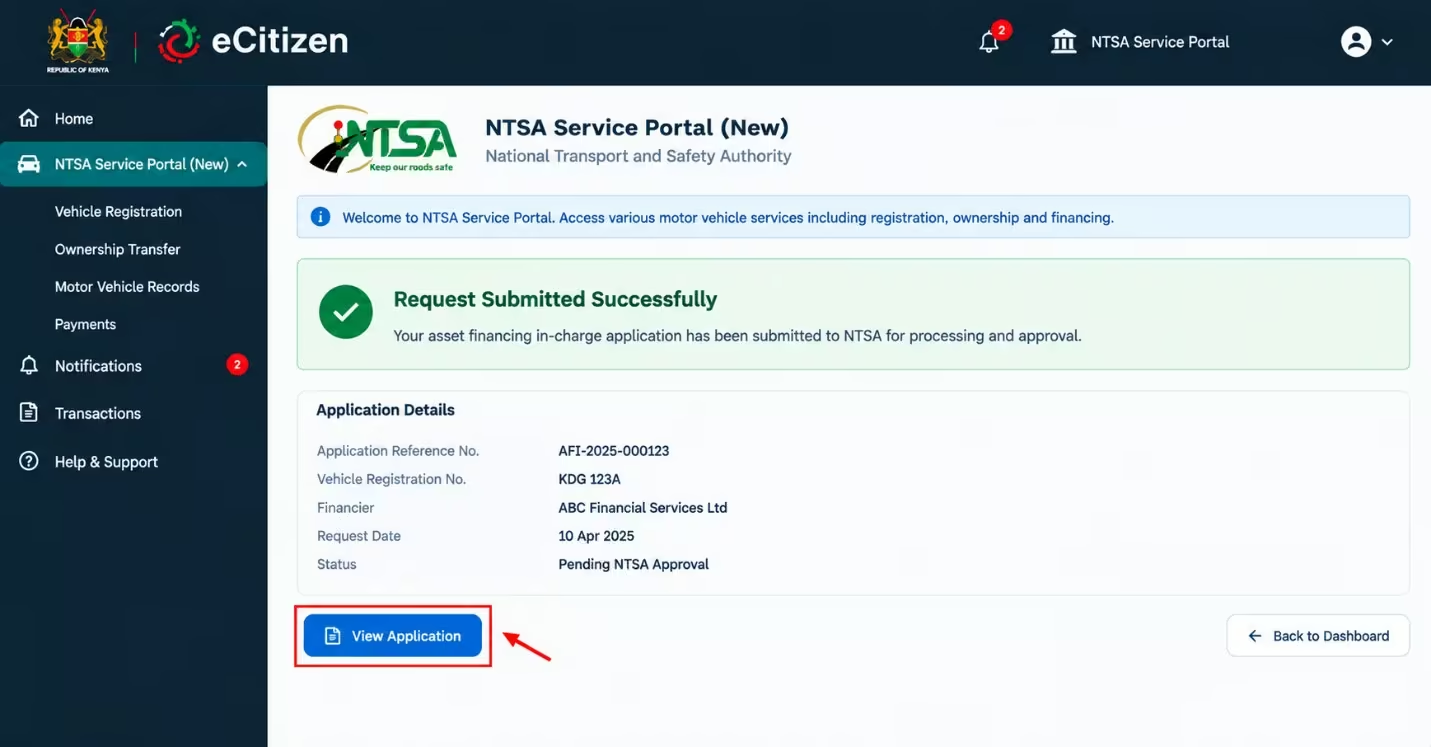
- After accepting the consent request, review the transaction details and submit the confirmed application to NTSA for processing and approval.
- Once the charge is approved and recorded, the financier’s interest will be reflected in the vehicle’s NTSA records.
Note: Once an asset-financing charge is registered, the vehicle normally cannot be transferred while the charge remains active. After the financing obligation has been fully cleared, the financier must initiate a discharge of charge to remove its recorded interest from the vehicle records.
Applicants should confirm the applicable fees and processing timelines on the live NTSA portal before submitting an application, as government charges and procedures may change.
NTSA Asset-Financing Processing Time
An asset-financing in-charge application is processed within 3 working days after the vehicle owner confirms the request through their eCitizen account, as per Joel (2025). Vehicle owners can access, view, and download their electronic motor-vehicle registration certificates through their eCitizen accounts after completion of the relevant transaction. This is because of the introduction of the e-logbook; therefore, physical logbooks are no longer used as of 10th June 2025.
NTSA In-Charge Application Fees
Understanding the costs involved in asset financing is important before starting the NTSA process. Ravasco’s guide on applying for asset financing on NTSA states that “applying for an asset-financing in-charge on the NTSA TIMS Portal costs KES. 1,175.” This fee covers the processing and administrative services involved in recording the financier’s interest in the vehicle. Applicants should also confirm the fee displayed on the portal when submitting the transaction, as government service charges may change over time.
FAQs on NTSA In-Charge Application
What is Asset Financing on NTSA?
Asset financing on NTSA refers to the process of recording a financier’s interest in a motor vehicle purchased through financing. The vehicle serves as security for the financing, while the financier’s interest is recorded through an Asset Financing, In Charge transaction in the NTSA system.
What Does In-Charge Mean on a Logbook?
An in-charge means that a financier has a registered interest in a motor vehicle because the vehicle is being used as security for an outstanding financing arrangement. The interest remains recorded until the financing is fully settled and the charge is discharged.
Can I Apply for Asset Financing Online?
Yes. NTSA vehicle services are available through the eCitizen platform, and Asset Financing – In Charge is among the transactions handled through the digital system.
How Can I Check my Asset-Financing Application?
You can check the application status through your NTSA/eCitizen account using the relevant vehicle-registration services. If the transaction is still pending, it may be waiting for an action such as consent, verification, payment, or NTSA processing.
Can I Sell a Vehicle With an In-Charge?
An active in-charge can restrict dealings with the vehicle because the financier has a registered interest in it. The financier’s interest must be addressed before the vehicle can be transferred without that financing restriction. This normally involves settling the financing or obtaining the financier’s formal release of its interest.
How Do I Remove an In-Charge After Paying a Car Loan?
After the financing is fully settled, the financial institution initiates an Asset Financing Discharge transaction through NTSA to remove its registered interest from the vehicle.
Read Also: How to Apply for a Short-Term Road Service License on eCitizen
Conclusion
Understanding how the NTSA asset-financing charge process works can make it easier to finance a motor vehicle without confusion or unnecessary delays. The process is simple: the financial institution applies to the NTSA, and the vehicle owner consents to the charge being registered on the vehicle. After the process is complete, you cannot sell the vehicle unless you settle the money and the financial institution initiates the discharge process, which removes the charge from the vehicle. By following the procedure above and ensuring all required information is accurate, you can buy a vehicle through asset financing, complete the process smoothly, and keep the vehicle records up to date.