
Getting into Kenya’s public transport business as a driver involves more than having a driving licence. If you plan to drive a matatu, taxi, bus, shuttle or another public service vehicle, you will also need to meet the relevant NTSA requirements, including obtaining a PSV badge.
Recently, drivers can apply for a PSV badge through the NTSA online service platform, linked to eCitizen, without first visiting an NTSA office. The application requires you to provide your personal details and driving licence information, upload the required supporting documents, and pay the applicable fee before NTSA processes your application. NTSA’s current online services are integrated with eCitizen, allowing you to access most of the transport-related services online.
In this guide, I will explain:
- What is an NTSA PSV Badge?
- Who Needs a PSV Driver's Badge in Kenya?
- NTSA PSV Badge Eligibility & Qualification Requirements
- Required Documents for NTSA PSV Badge Application
- How to Apply for an NTSA PSV Badge Online via eCitizen (Step-by-Step)
- How to Check NTSA PSV Badge Application Status Online
- NTSA PSV Badge Processing Time
- NTSA PSV Badge Cost and Application Fees in Kenya
- Requirements for Replacing a Lost or Damaged PSV Badge
- How to Replace a Lost or Damaged PSV Badge in Kenya
- Step 1: Report the Loss and Get a Police Abstract
- Step 2: Visit an NTSA Office to Release the Lost Badge
- Step 3: Log in to the NTSA TIMS Portal via eCitizen
- Step 4: Start the Replacement Application
- Step 5: Fill in the Details and Upload Documents
- Step 6: Pay the Fee
- Step 7: Await Approval and Collect the New Badge
- How to Renew an NTSA PSV Badge Online
- Validity Period of an NTSA PSV Badge
- Conclusion
What is an NTSA PSV Badge?
A PSV badge is an identification and authorization document issued by the National Transport and Safety Authority (NTSA) to drivers who operate public service vehicles. It shows the driver has met the requirements to operate a passenger vehicle for commercial purposes.
Read Also: How to Conduct an NTSA Motor Vehicle Search in Kenya via eCitizen (2026)
Who Needs a PSV Driver’s Badge in Kenya?
A PSV badge is required for drivers who operate vehicles used to carry passengers for hire or reward in Kenya. It applies to drivers working in different areas of the public transport sector, including:
- Matatu drivers
- Bus and minibus drivers
- Taxi and ride-hailing drivers
- Shuttle and tour vehicle drivers
- School transport vehicle drivers
- Staff transport vehicle drivers
NTSA PSV Badge Eligibility & Qualification Requirements
Before you apply for a PSV badge in Kenya, you must meet the eligibility conditions set by NTSA and other applicable transport regulations. These requirements ensure applicants are legally qualified and suitable to operate public service vehicles. Nancy’s guide on applying for a PSV badge highlights the following eligibility requirements.
- Minimum Age – the applicant must be over 24 years for PSV drivers.
- Driving Experience – the driver must have at least 4 years of holding the relevant driving licence for applicable PSV categories.
- Valid Kenyan Driving Licence – The licence must be valid and suitable for the class of vehicle you intend to drive.
- Police Clearance – Applicants may be required to undergo the necessary police background checks.
- Medical Fitness – You may need to provide proof of medical fitness where required.
- Relevant PSV Requirements – You must meet NTSA’s requirements for the specific public service vehicle category.
Required Documents for NTSA PSV Badge Application
Before starting your PSV badge application, make sure you have the necessary documents and information available. The exact documents may vary depending on your application and the PSV category. According to Monolith Africa, the following documents are commonly required.
- Valid Kenyan National ID
- Valid driving licence for the appropriate vehicle class
- Certificate of Good Conduct
- Valid medical certificate
- Recent passport-size photograph
- KRA PIN certificate
- Proof of payment for the application
How to Apply for an NTSA PSV Badge Online via eCitizen (Step-by-Step)
Applying for a PSV badge in Kenya involves meeting the required qualifications, preparing the necessary documents, and submitting your application through the NTSA online platform. The steps below explain the whole procedure.
Step 1: Confirm Eligibility and Gather Prerequisites
- Before starting the application, make sure you meet the requirements and have the necessary documents ready. The required documents are the ones we discussed above, along with the eligibility requirements.
Step 2: Log in to eCitizen

- Visit the NTSA eCitizen Portal and enter your National ID number together with your password to log in.
- If you cannot remember your password, click on “Forgot Password,” and a one-time PIN will be sent to your registered phone number to help you reset it.
Quick Tip: For a smoother experience, use Google Chrome on a desktop or laptop, as some mobile browsers may encounter loading or navigation issues on the portal.
Step 3: Open the NTSA Service Portal
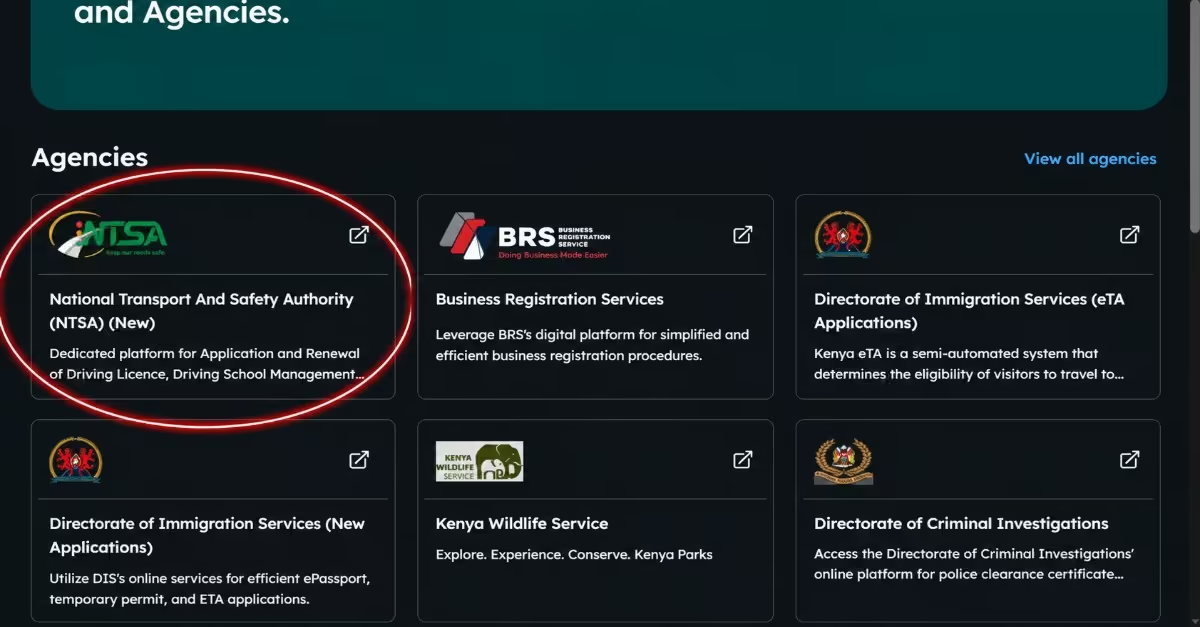
- After logging in, click on “New NTSA Portal” or choose “NTSA Services” from your eCitizen dashboard. This will redirect you to the section containing all NTSA online services.
Step 4: Start the PSV Badge Application
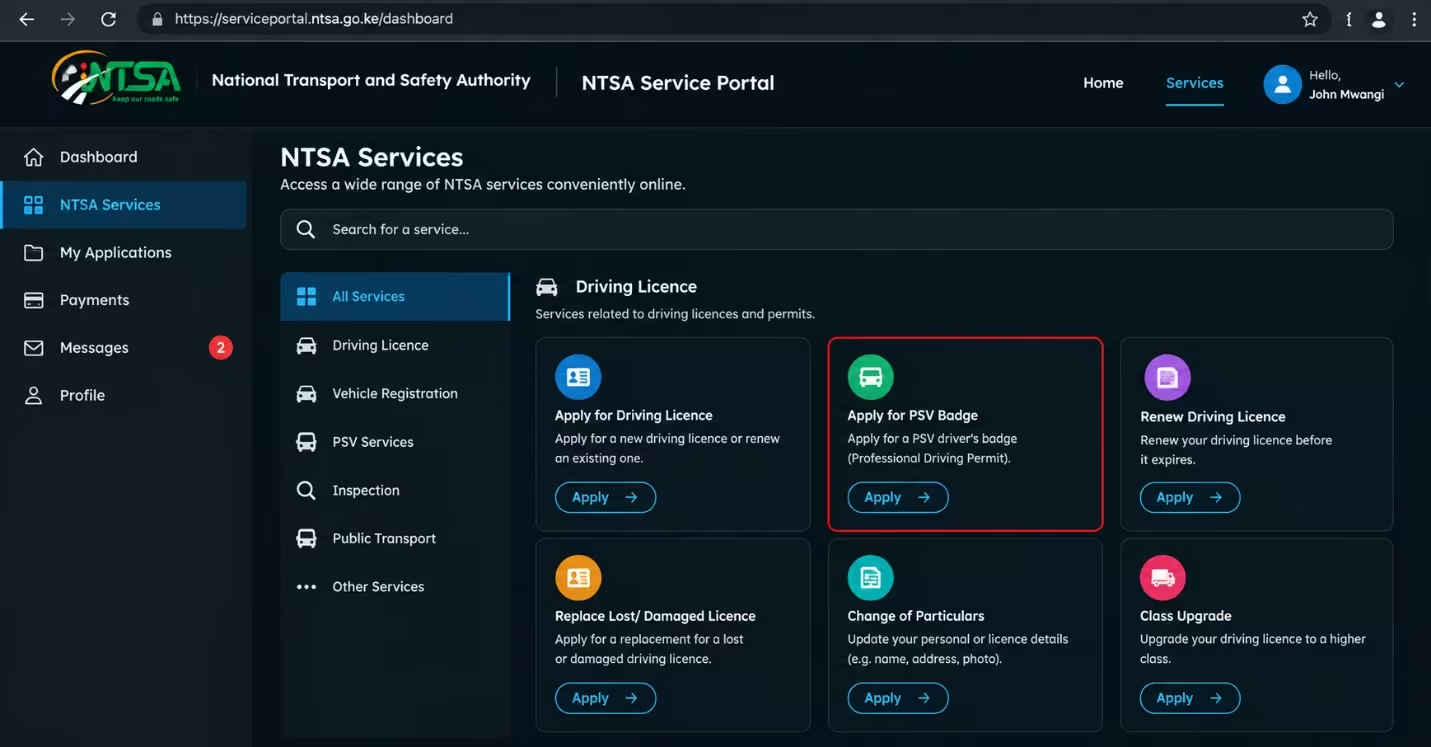
- From the main menu, select “Driving Licence.”
- Click “Apply for PSV Badge” or the equivalent option for a PSV Driver’s Badge.
- Enter all the required personal information accurately, including your National ID details, driving licence number, and contact information.
Step 5: Upload Supporting Documents
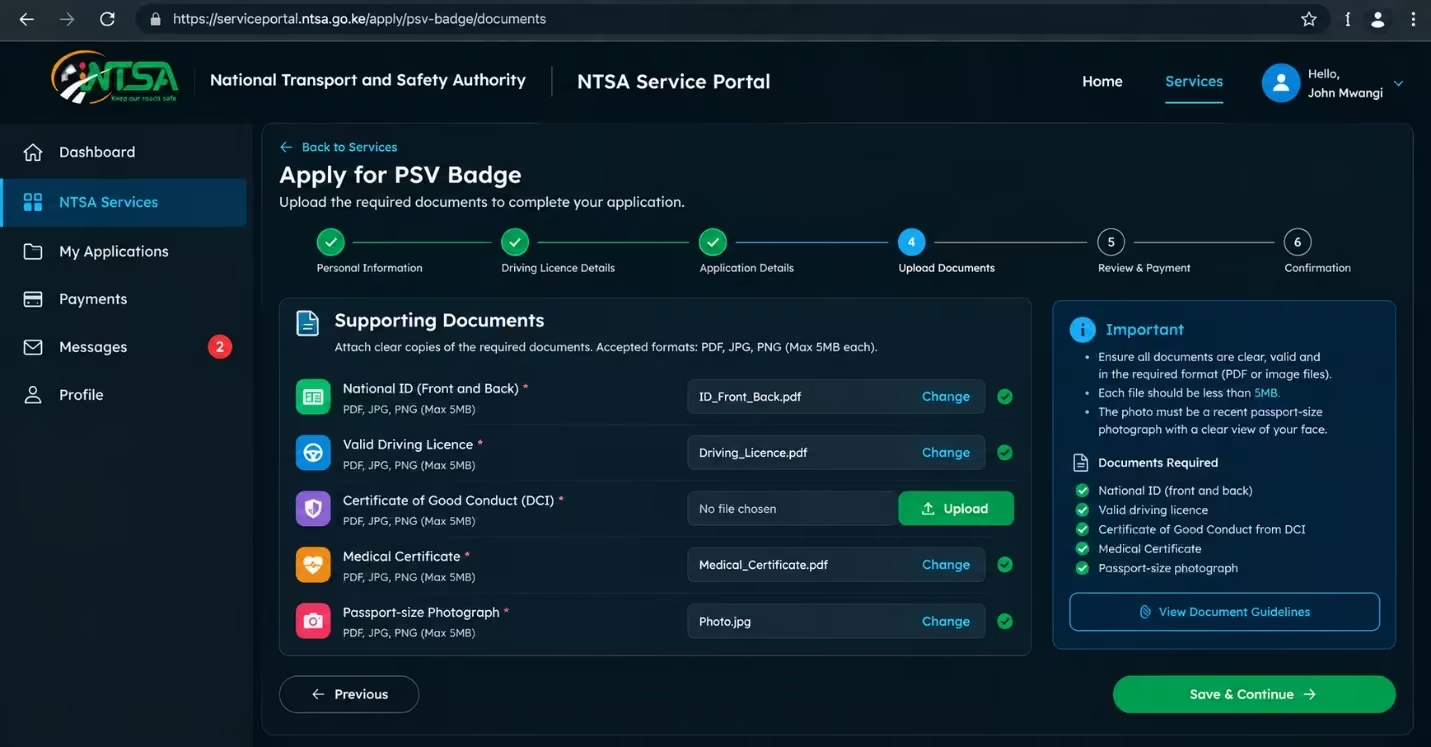
Attach clear copies of the required documents, including:
- National ID (front and back)
- Valid driving licence
- Certificate of Good Conduct from DCI
- Medical Certificate
- Passport-size photograph, if it was not already uploaded during the application
Must Read: Make sure all documents are clear, valid, and in the required format, such as PDF or image files, to reduce the risk of rejection or delays.
Step 6: Review, Submit and Pay
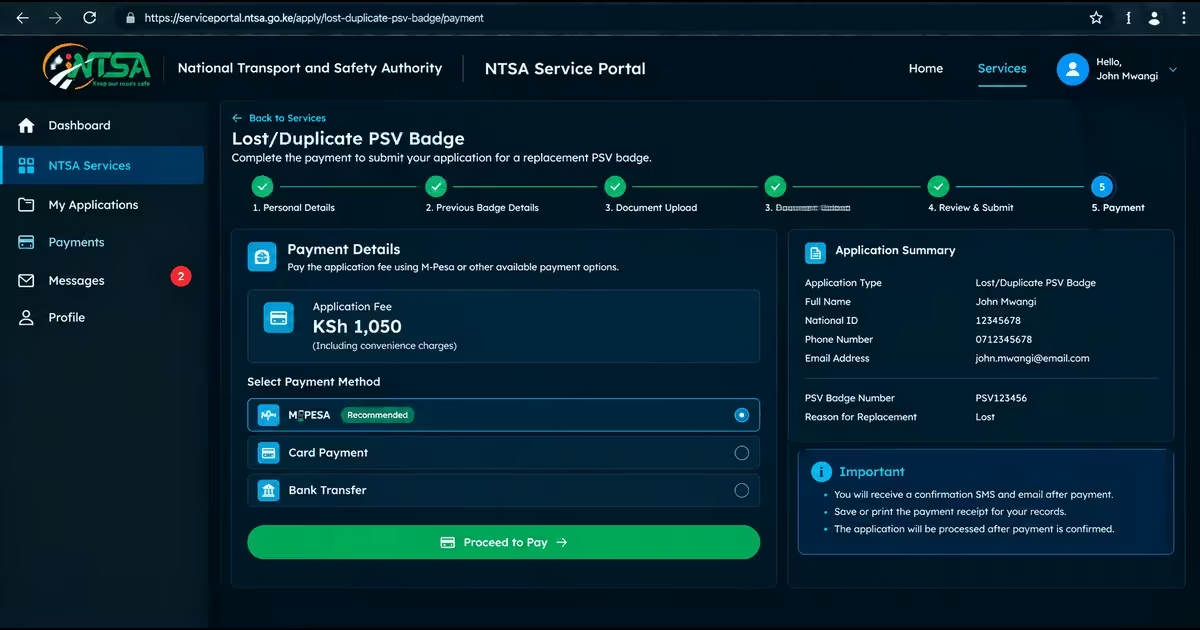
- Carefully check all the information you have entered and the documents you have uploaded before submitting the application.
- Submit the completed application through the portal.
- Pay the applicable application fee, which is KES 1,050 including convenience charges, using the available payment options, mainly M-Pesa through eCitizen/TIMS.
- Save or print the payment invoice or receipt for your records.
- Await Approval and Collect the Badge
How to Check NTSA PSV Badge Application Status Online
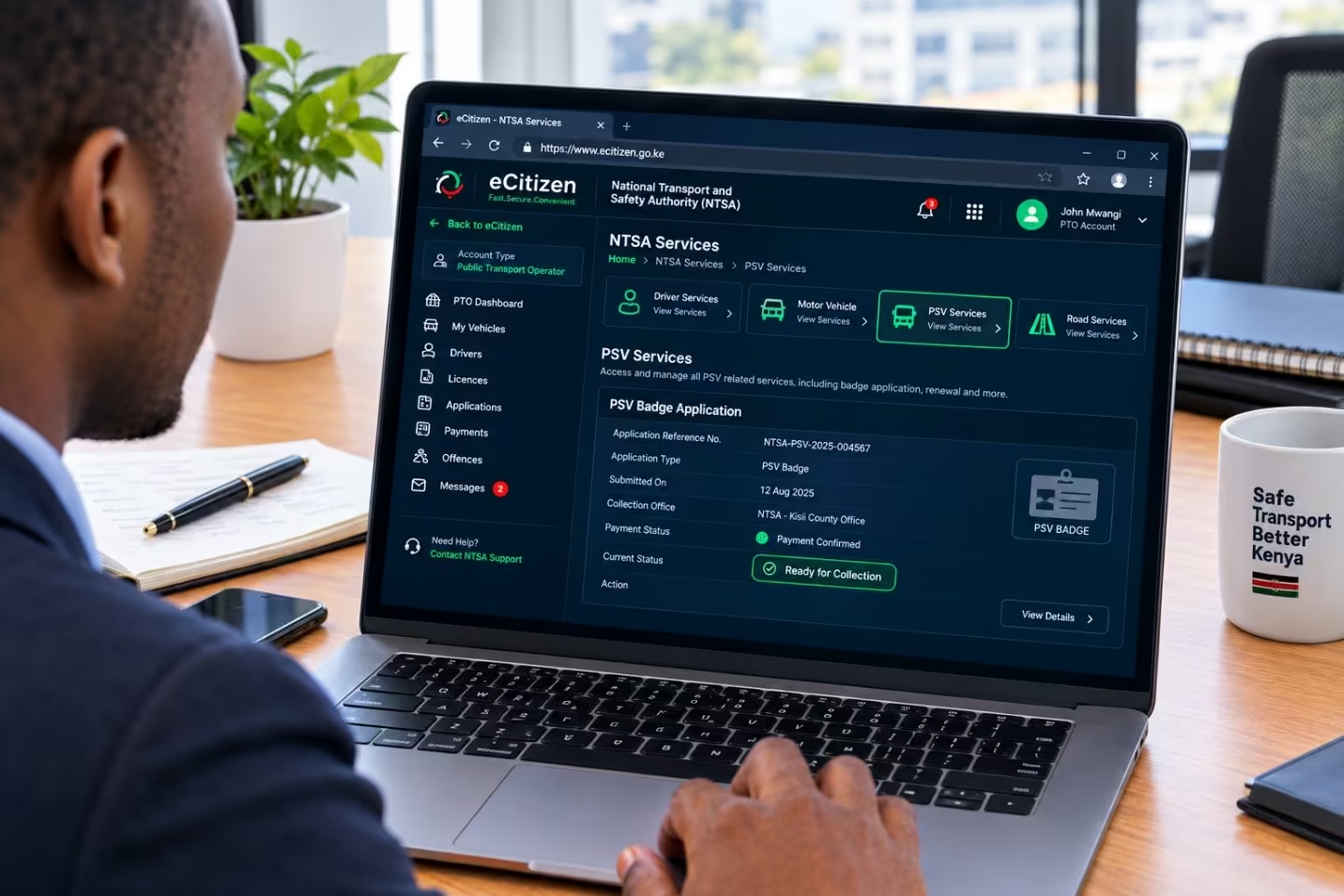
Step 1: Access the NTSA TIMS Portal
- Open your web browser and visit the official NTSA TIMS portal through eCitizen
- You may also use the NTSA Mobile App, where available, to check your application status from your phone.
Step 2: Log in to Your Account
- Enter your eCitizen credentials, National ID number, phone number, or TIMS username and password, depending on the available login option.
- Complete any security verification, such as an SMS code sent to your registered phone number, if requested.
Step 3: Navigate to Your Applications
- After logging in, open your main dashboard.
- Select “Driving Licence” from the available menu.
- Look for options such as “Application History,” “My Applications,” “PSV Badge,” or a list showing your pending and submitted applications.
- Select the specific PSV Badge application you want to check.
Step 4: View the Status
- The system will show the current status of your application. This may include Pending, Under Review, Approved, Rejected, or Ready for Collection.
- You may also see other information, such as the selected collection office, payment confirmation, or any action required, including submitting missing documents.
- In some cases, a digital or PDF copy of the approved badge may be available for download from the same section.
Must Read: Once your application is approved, you will receive a notification. Collect the physical PSV badge from the NTSA office or collection point you selected during the application, carrying your ID and proof of payment. In some cases, you may also be able to download a digital or PDF version.
NTSA PSV Badge Processing Time
Processing a new NTSA PSV badge typically takes 5 working days after you submit your online application and pay through the TIMS portal. However, the process may take longer in some cases if additional document verification is required or the system is experiencing a high volume of applications.
A Vehicle Inspection Report, which may be required when using a vehicle for commercial PSV services, is usually issued within 24 hours after the vehicle successfully passes inspection at an authorised NTSA centre.
NTSA PSV Badge Cost and Application Fees in Kenya
The official fee for applying for a new NTSA PSV Badge is KES 1,050, which usually includes the application fee and convenience charge. For the annual vehicle inspection required for commercial public service use, the fee starts at KES 1,050. However, the exact amount may vary depending on the vehicle type and applicable inspection requirements.
Requirements for Replacing a Lost or Damaged PSV Badge
If your PSV badge is lost, stolen, or damaged, you can apply for a replacement through the applicable NTSA process. Before starting the application, make sure you have the following documents and information ready:
- Police Abstract for a lost badge
- Valid Kenyan National ID.
- Valid Kenyan driving licence.
- Current Certificate of Good Conduct
- Recent passport-size photograph.
- Previous PSV badge details, if available.
- NTSA records or details of the lost or damaged badge.
- NTSA office verification or release, where required before submitting the replacement application online.
How to Replace a Lost or Damaged PSV Badge in Kenya
If you lose or damage your PSV badge, you can apply for a replacement through the NTSA process. Before starting the application, you may need to report the loss or damage, obtain the required supporting documents, and ensure your NTSA/eCitizen account is active. The steps below explain how to replace a lost or damaged PSV badge in Kenya in 2026.
Step 1: Report the Loss and Get a Police Abstract
- Visit the nearest police station as soon as possible and report that your PSV badge has been lost or damaged.
- Obtain an official Police Abstract, which is required for the replacement process.
- Make a clear scanned copy for uploading online.
Step 2: Visit an NTSA Office to Release the Lost Badge
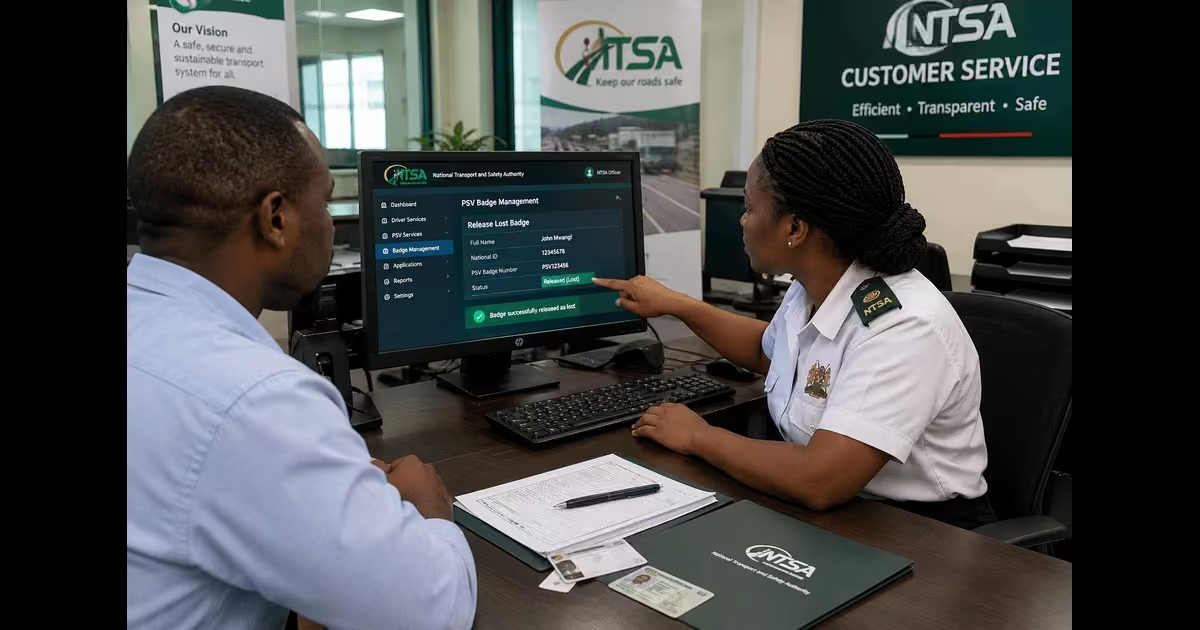
- Take your Police Abstract, National ID, and driving licence to the nearest NTSA office.
- Ask the NTSA officers to release the old badge as “lost” in the system.
- This step can help prevent the online replacement application from being rejected because the previous badge is still active in the system.
Step 3: Log in to the NTSA TIMS Portal via eCitizen
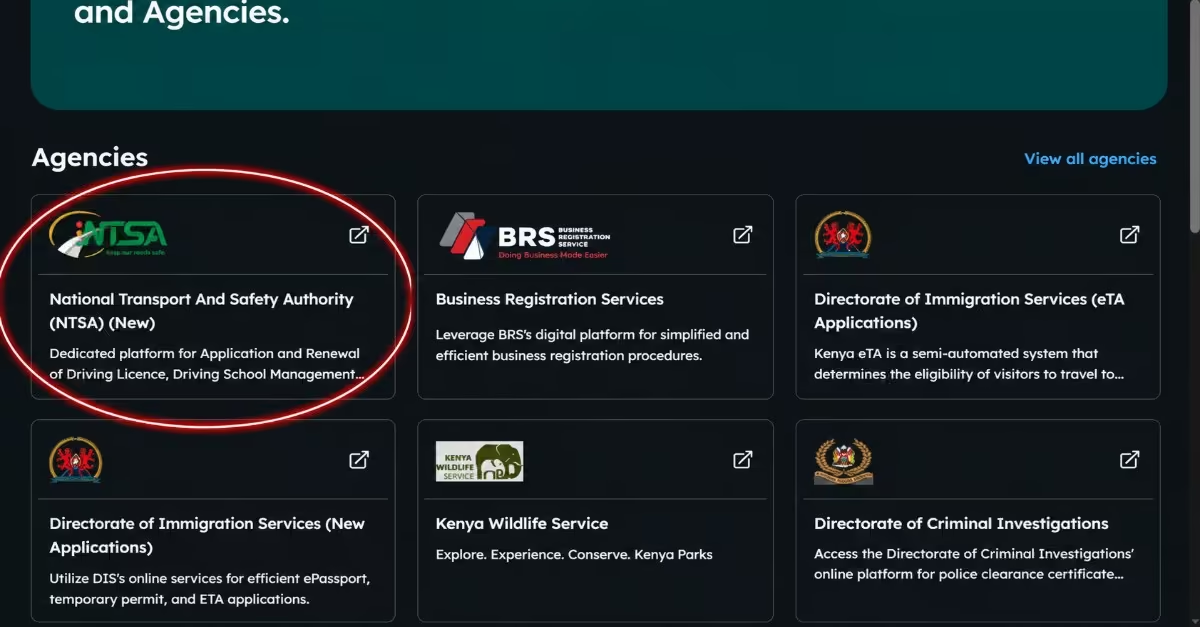
- Open your web browser and visit the eCitizen portal.
- Log in using your existing eCitizen credentials, such as your ID number, phone number, or username and password.
- Complete the SMS verification process if a verification code is requested.
- Navigate to the NTSA services
Step 4: Start the Replacement Application
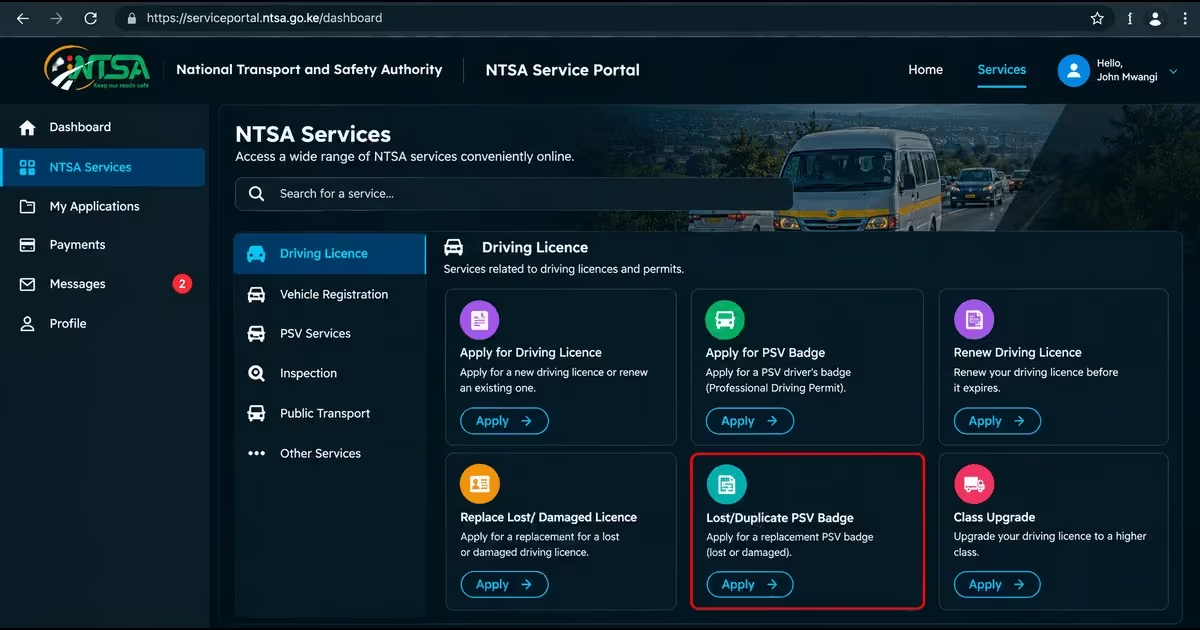
- From the main menu, select “Driving Licence.”
- Choose “Application for Renewal/Lost PSV Badge” or the closest available option, such as Lost/Duplicate PSV Badge.
- Select the type of request, such as Lost, Damaged, or Replacement.
Step 5: Fill in the Details and Upload Documents
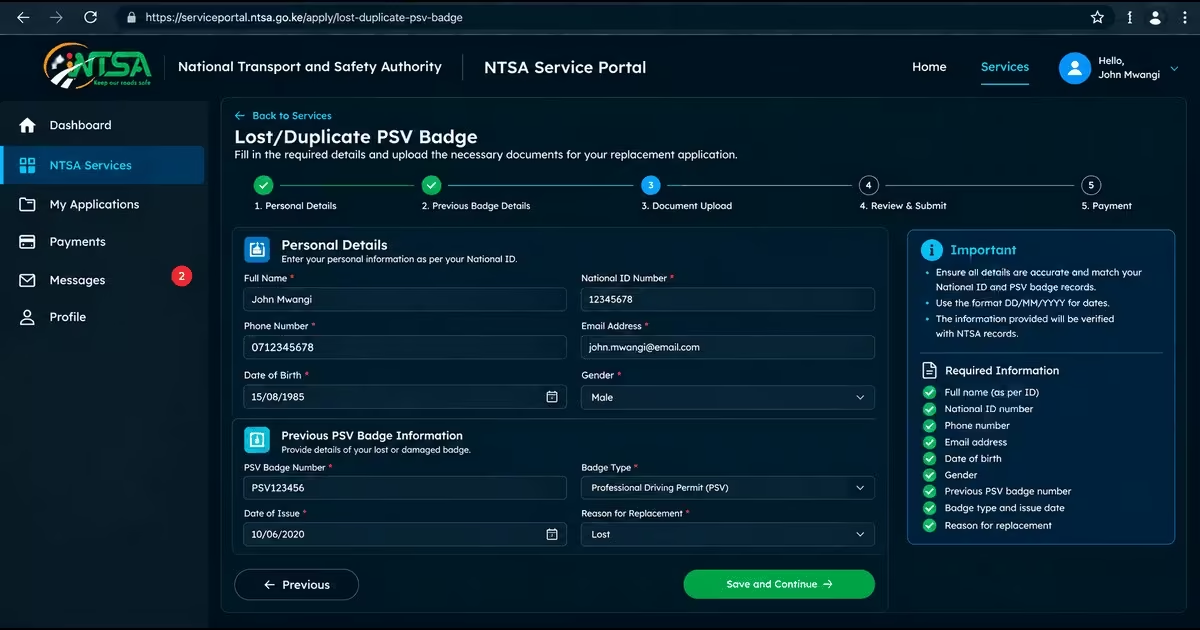
- Enter the required personal details and information about your previous PSV badge accurately.
- Upload clear scanned copies of the required documents, ie the required documents discussed above for replacing the lost PSV badge.
- Carefully review the information and documents before proceeding.
Step 6: Pay the Fee
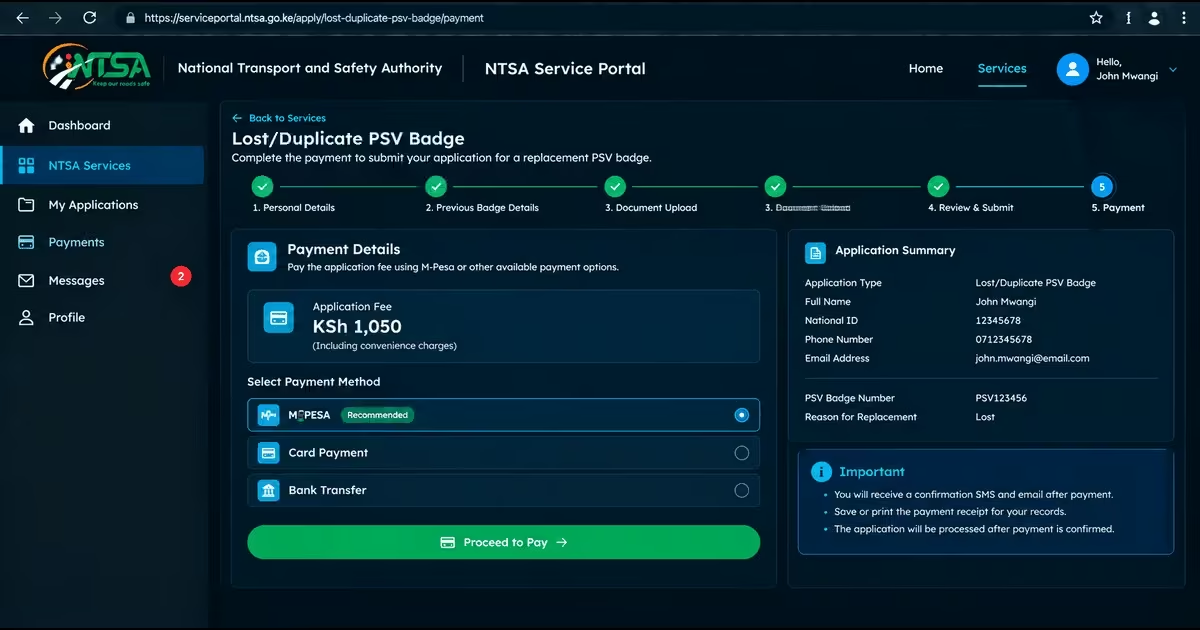
- Submit the completed replacement application.
- Pay the prescribed fee of KES 1,050 using M-Pesa or another available online payment option.
- Save or print the payment receipt for your records.
Step 7: Await Approval and Collect the New Badge
- Wait for an SMS or email notification once your replacement application has been processed. In some cases, this may be completed on the same day.
- Visit the NTSA collection office you selected during the application.
- Carry your National ID and payment receipt when collecting your replacement PSV badge.
How to Renew an NTSA PSV Badge Online
Renewing a PSV badge generally follows a similar process to applying for one for the first time. Log in to your NTSA service account through eCitizen, go to the Driving Licence section, and select the option for PSV Badge renewal or the applicable renewal service. Update your details as needed, upload the required documents, pay the applicable renewal fee, and submit your application. Once NTSA processes the application, follow the instructions provided on how and where to collect your renewed PSV badge.
Validity Period of an NTSA PSV Badge
A PSV badge in Kenya is generally valid for one year from the date it is issued, unless the relevant authority suspends or cancels it earlier. This means PSV drivers must renew their badges when they expire to continue operating legally as public service vehicle drivers.
Read Also: How to Access, Download, and Verify NTSA eLogbook on eCitizen (2026 Guide)
Conclusion
Applying for a PSV badge in Kenya is straightforward if you meet the requirements. You need documents such as a Valid Kenyan National ID, a Valid driving licence for the appropriate vehicle class, a Certificate of Good Conduct, a Valid medical certificate, a recent passport-size photograph, and a KRA PIN certificate, and you must follow the NTSA application procedure explained above correctly. Before submitting your application, ensure that your driving licence and supporting documents are valid, provide accurate information, and keep your payment receipt and application details for reference. The processing time is usually around 5 days, and the application fee is KES 1050. Remember to renew your PSV badge when it expires so that you can continue operating a public service vehicle in compliance with the applicable requirements.