
If you plan to start or run a construction business in Kenya, registering with the National Construction Authority (NCA) is an important step before starting construction work. The NCA regulates contractors and ensures construction industry standards are maintained. Under the National Construction Authority Act, a person or company cannot operate as a contractor without registration with the Authority and a valid practising licence.
The NCA registration process is done online at the NCA portal. Depending on the type and category of construction work you plan to undertake, you may need documents such as a company registration certificate, KRA Tax Compliance Certificate, business license, financial records and proof of previous experience that will accompany your application.
In this guide, we will explain:
- What is NCA Registration in Kenya?
- What Is an NCA Certificate in Kenya?
- NCA Registration Categories and Contractor Grades (NCA 1 – NCA 8)
- Requirements for NCA Contractor Registration in Kenya
- How to Create an Account on the NCA Portal
- How to Apply for an NCA Certificate Online (Step-by-Step Guide)
- Common Mistakes to Avoid During NCA Application
- How to Renew Your NCA Contractor License Online
- Penalties and Consequences of Operating Without NCA Registration
- NCA Registration Fees and Annual Renewal Charges (2026 Breakdown)
- Frequently Asked Questions (FAQs) on How to Apply for NCA Certificate
- Conclusion
What is NCA Registration in Kenya?
NCA registration is the official process through which the National Construction Authority (NCA) registers and recognizes contractors who meet the requirements to carry out construction work in Kenya.
What Is an NCA Certificate in Kenya?
An NCA certificate is a registration certificate issued by the National Construction Authority (NCA) to contractors who meet the required registration conditions, as per Magzel Consultants. It confirms that a contractor or construction company is registered to carry out construction work under a specific class of works and NCA category.
The NCA registers contractors under different classes of construction work, while the registration category determines the value of projects that a contractor is allowed to undertake.
Read Also: How to Conduct a Land Search in Kenya Using Ardhisasa: 2026 Step-by-Step Guide
NCA Registration Categories and Contractor Grades (NCA 1 – NCA 8)
The NCA contractor grades are grouped into four broad categories based on the size, capacity and value of construction projects a contractor is allowed to undertake. A study by Doreen (2026) highlights the following categories.
1. NCA 1: Large Contractors
NCA 1 contractors are large and well-established construction firms. These firms can undertake major construction and infrastructure projects, including large commercial developments, highways and other high-value work, with no upper project value limit.
2. NCA 2 to NCA 3: Medium-Large Contractors
This category includes firms with strong technical and financial capacity but operate below NCA 1 contractors. They can undertake projects such as commercial buildings, apartments, institutional developments and medium-to-large infrastructure works within the applicable project value limits.
3. NCA 4 to NCA 6: Medium-Small Contractors
This category covers contractors undertaking small and medium-sized construction projects. These may include residential developments, small commercial buildings, renovations and other projects that fall within their approved NCA project value limits. This range may suit construction businesses with moderate technical and financial capacity.
4. NCA 7 to NCA 8: Small Contractors
This category includes the lower contractor grades and is generally suitable for smaller construction businesses and individual contractors undertaking minor works. Depending on the applicable class and project value limit, these contractors may handle projects such as individual residential houses, repairs, extensions and other small-scale construction works. NCA 8 is the lowest contractor grade.
Requirements for NCA Contractor Registration in Kenya
Applicants should prepare the required business, tax, technical and capacity documents before applying for NCA contractor registration. The exact requirements may differ depending on the contractor’s registration category and class of works, but the general checklist includes:
- Certificate of Incorporation and CR12, where applicable.
- Valid KRA PIN and Tax Compliance Certificate (TCC) for the applicant entity.
- Directors’ or partners’ identification documents, contact details and a valid business address.
- Technical staff credentials, CVs and relevant professional qualifications.
- Business permit and other applicable statutory licenses.
- Financial statements, equipment details, previous works and staffing information to show the contractor’s capacity to undertake construction projects.
How to Create an Account on the NCA Portal
You need an account on the National Construction Authority (NCA) portal before you can apply for contractor registration, renew your license, or track an application; you can create the account online by following the steps below.
Step 1: Open the NCA Website

- Visit the official NCA website, using a phone or computer with an internet connection.
- Enter the website address yourself or use a trusted link, and enter your ID and password only on the official NCA website.
Step 2: Go to the Local Contractor Registration Page
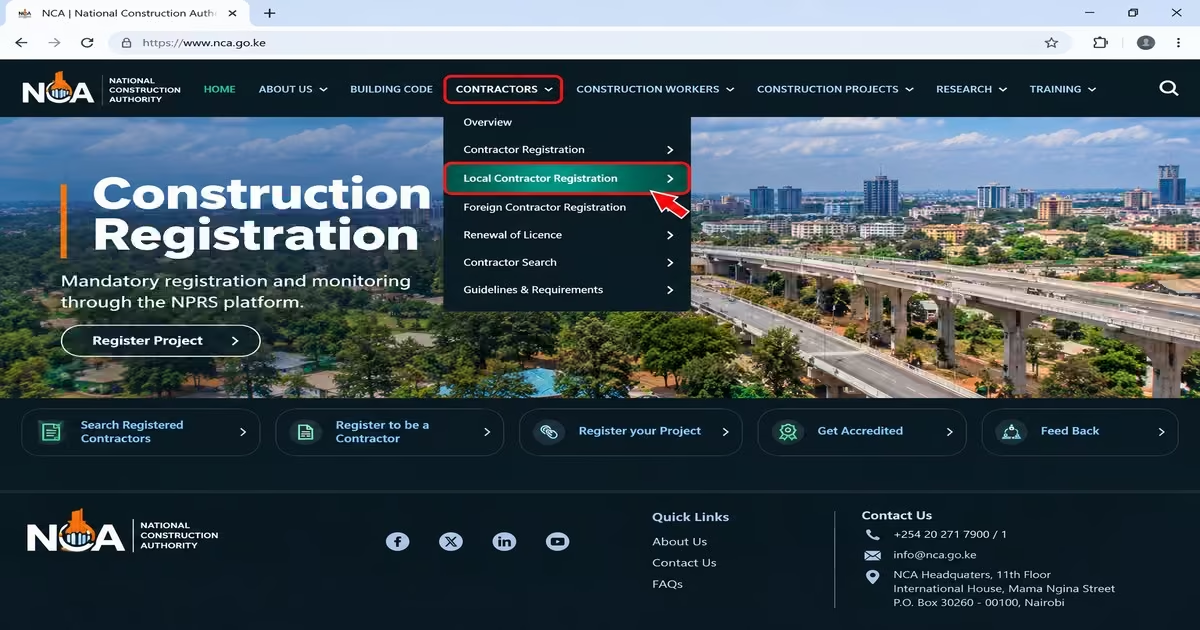
- Click the Contractors tab on the main menu, then choose whether you want to register as a local or foreign contractor.
- Read the guidelines and requirements on the page before proceeding so that you know which documents you will need later.
Step 3: Click “Register as a Local Contractor”
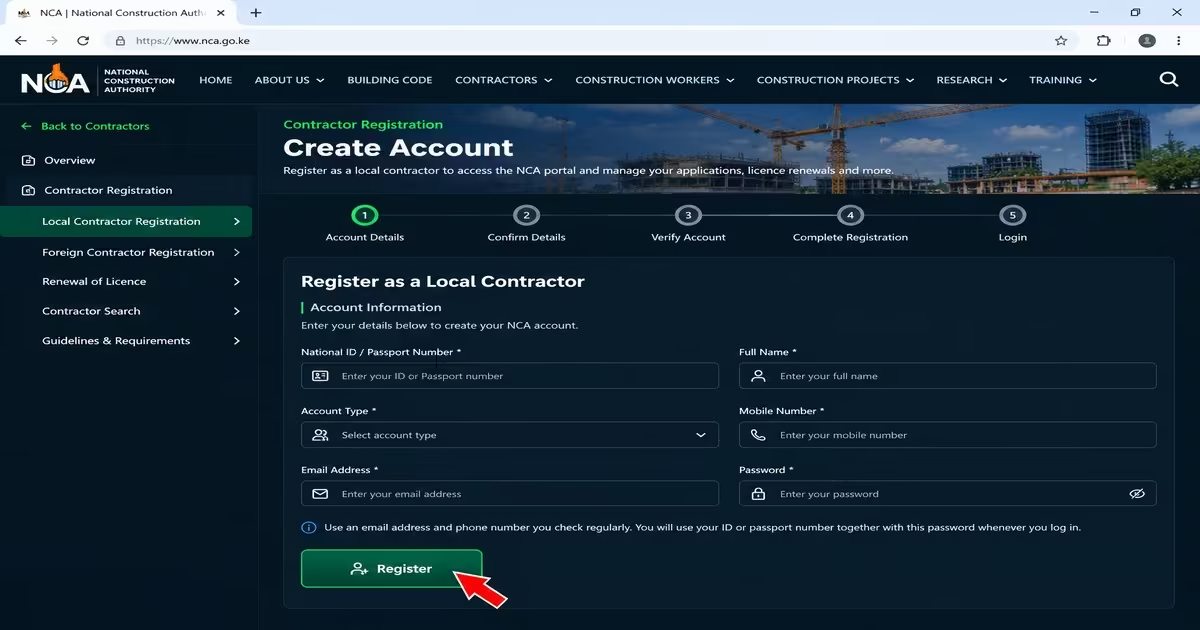
- This will take you to the NCA portal, where you can create your account.
- On the portal, click the Register button.
Step 4: Enter Your Details
- Enter your national ID or passport number, full name, account type, mobile number, email address and password.
- Use an email address and phone number you check regularly, as the portal may send activation messages and other notices to these contacts.
- Choose a password that you can remember. You will use your ID or passport number together with this password whenever you log in.
- Click Register to submit your details.
Step 5: Activate Your Account
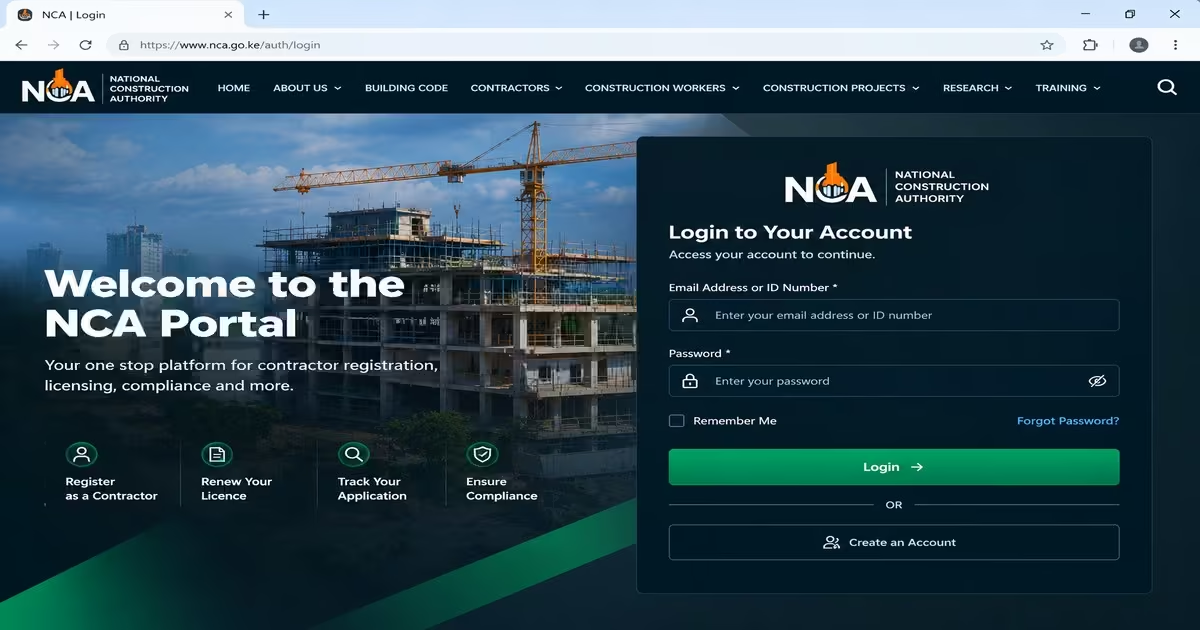
- After registering, you should receive an activation message by email or SMS.
- Follow the instructions provided in the message to activate your account.
- If you do not receive the message, check your spam or junk folder before trying again.
- After activating, you can easily log in.
How to Apply for an NCA Certificate Online (Step-by-Step Guide)
The National Construction Authority (NCA) registers contractors under the NCA Act, and a person cannot carry on the business of a contractor without registration and a valid practising licence. Before applying, you should choose the appropriate NCA category and class of works based on the projects you intend to undertake and prepare the documents that we have discussed above. Follow the procedure below to apply for an NCA certificate as a local contractor.
Step 1: Log In and Start the Application
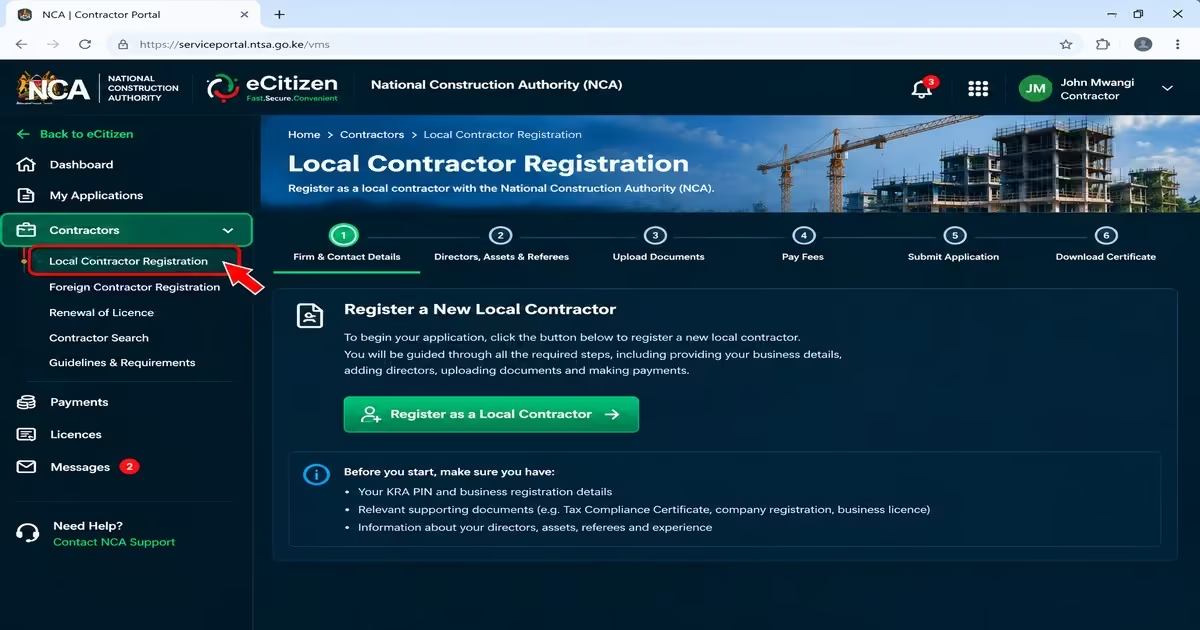
- Log in to the NCA contractor portal using your ID or passport number and password.
- From the services available on your account, select Local Contractor Registration
- and start a new contractor application.
- The NCA confirms that contractor applications are submitted through its contractor application portal.
Step 2: Fill in the Firm and Contact Details
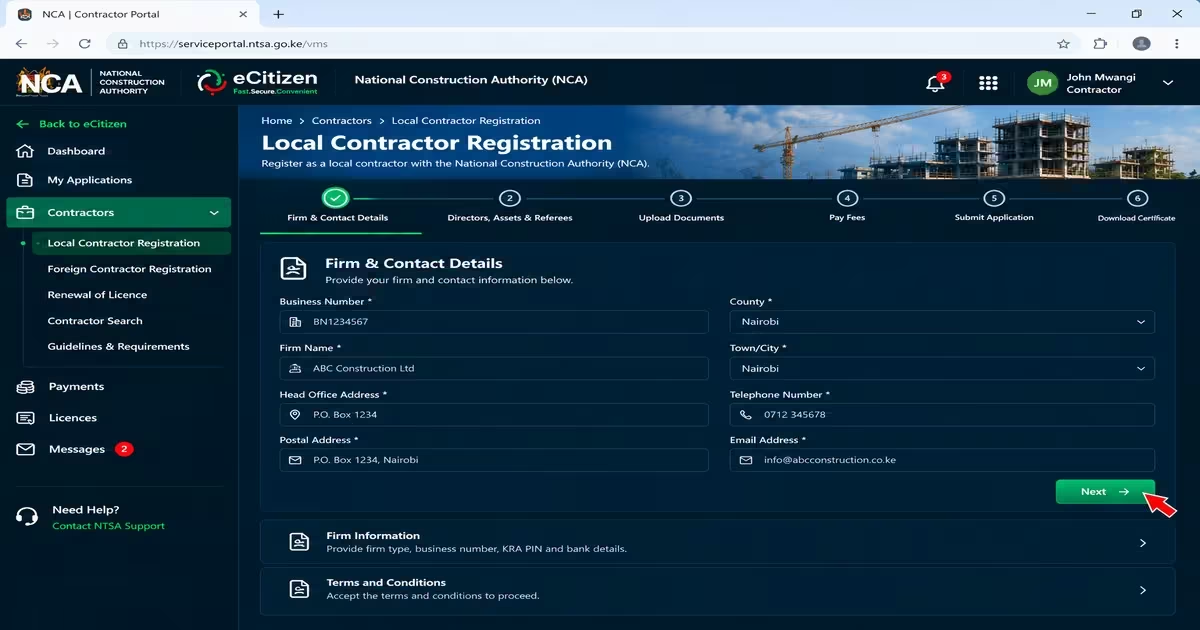
- Enter the business number, firm name, head office, postal address, county, town, telephone number and email address, then click Next.
- Provide the required firm information, including the firm type, business number, KRA PIN, and bank details.
- Accept the terms and conditions, then click Save and Continue.
- Check that the information matches your KRA and company records before continuing to reduce the risk of delays caused by incorrect or inconsistent information.
Step 3: Add Directors, Assets, Referees and Experience
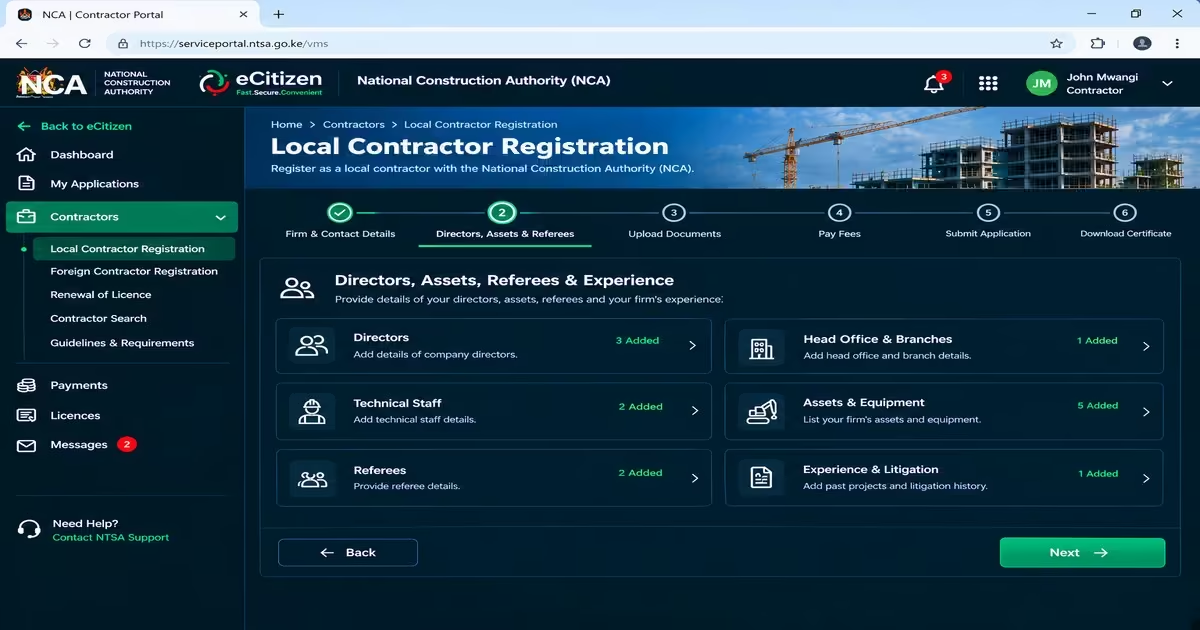
- Enter the required details of the directors, head office, branches and technical staff.
- List the assets and equipment owned by the firm.
- Provide the required referee details, followed by information about the firm’s previous or ongoing projects and litigation history.
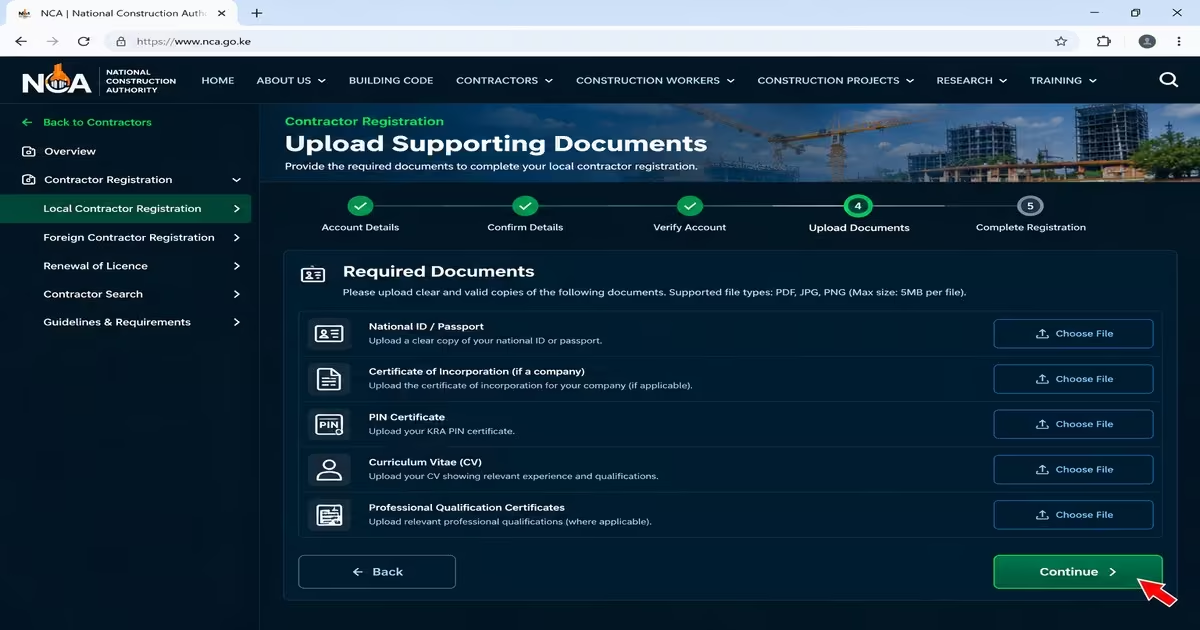
Step 4: Upload Your Documents and Select Your Class
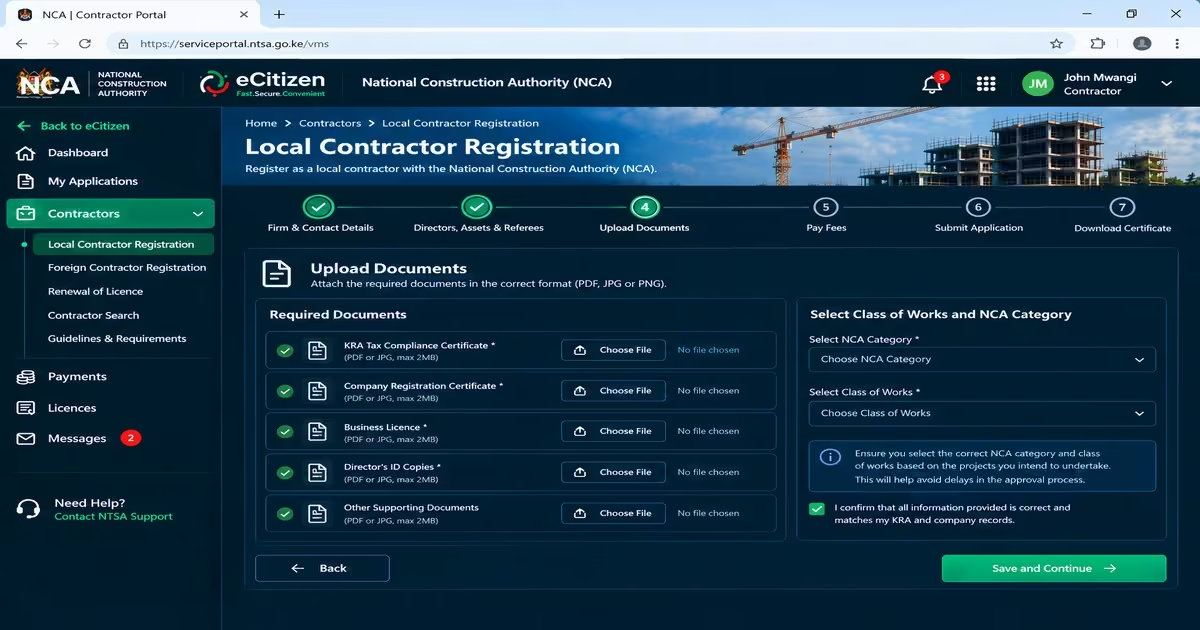
- Upload the required documents, including your KRA Tax Compliance Certificate, company registration documents and current business license, together with the other supporting documents applicable to your application.
- Select the class of works and NCA category for which you are applying.
Step 5: Pay the Fees
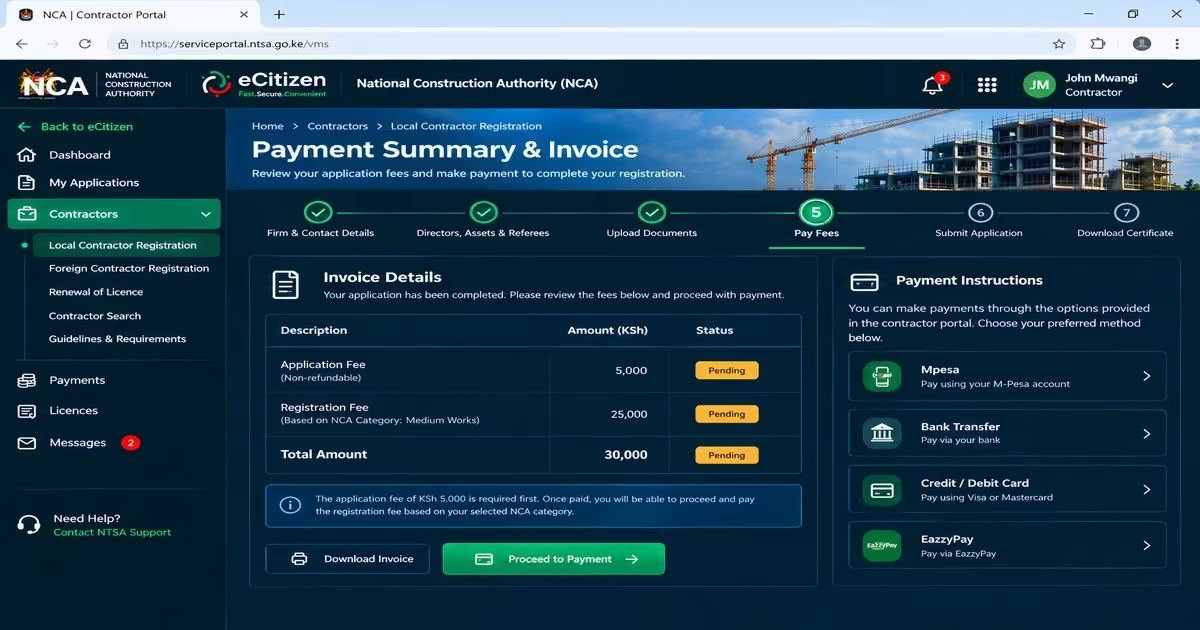
- After completing the application, the portal generates an invoice showing the applicable fees and payment instructions.
- First, pay the application fee of KSh 5,000, then pay the registration fee, which depends on the NCA category you chose earlier.
- The NCA states that you can make payments through the options provided in the contractor portal.
Step 6: Submit Your Application
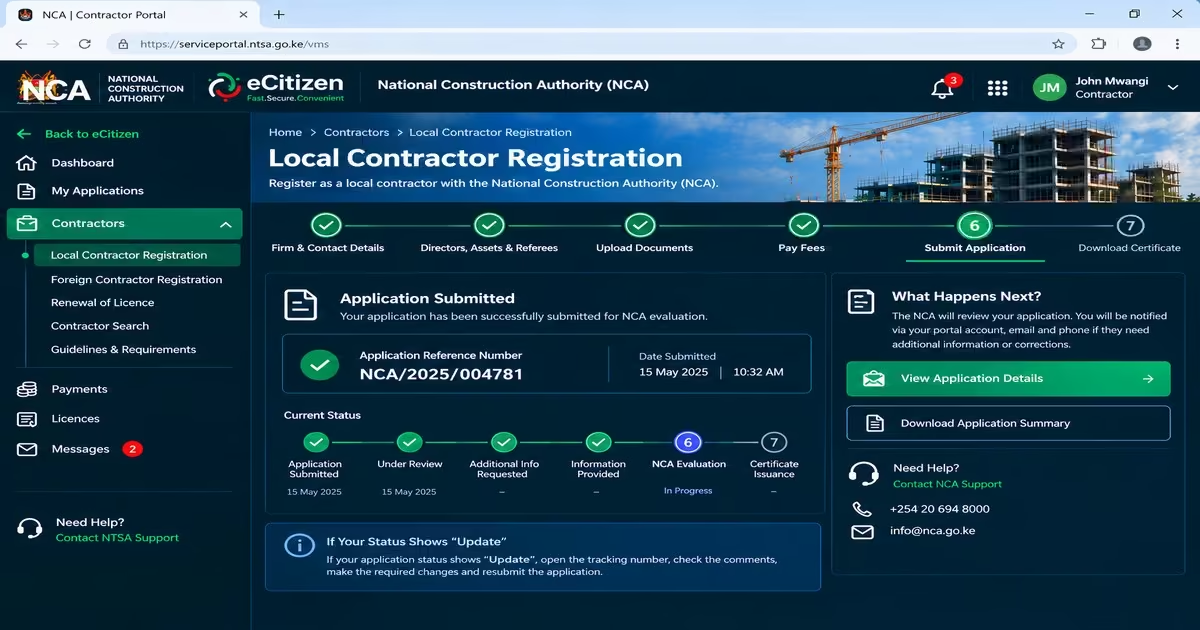
- Submit your completed application for NCA evaluation.
- Regularly check your portal account, email, and phone for requests for additional information or corrected documents.
- If your application status shows “update,” the NCA says to open the tracking number, check the comments, make the required changes, and resubmit the application.
Step 7: Download Your Certificate and Practising License
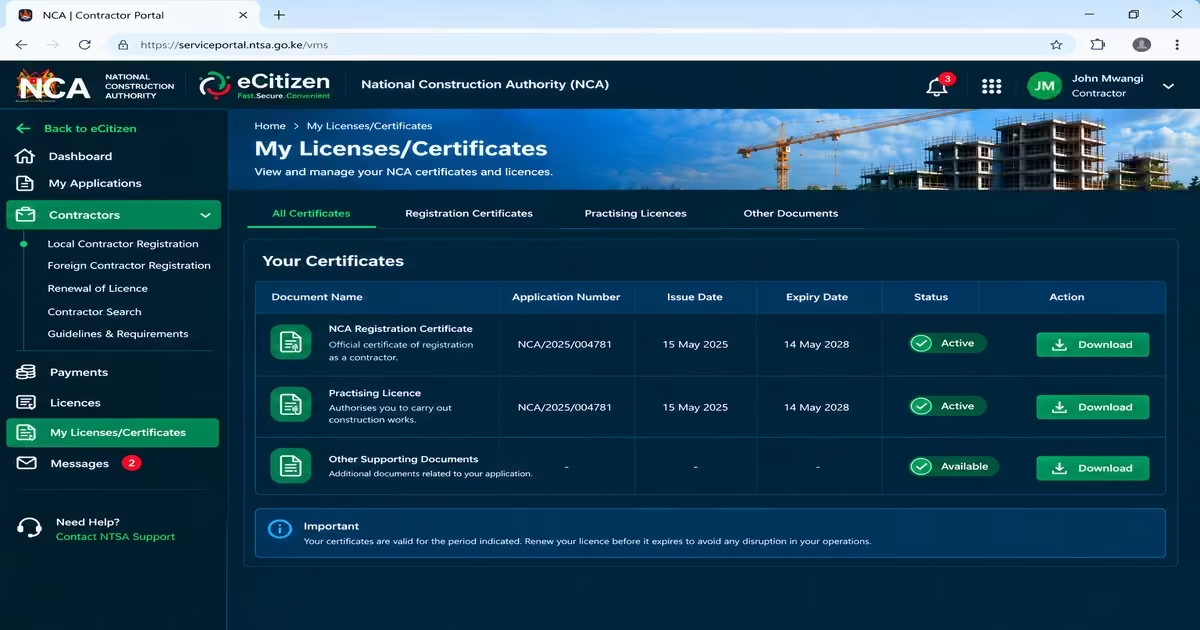
- Log in to the NCA contractor portal.
- Open your application status page and confirm it shows approved and paid.
- Click Generate to create your NCA registration certificate and practising license.
- Go to My Licenses/Certificates in your account.
- Download the registration certificate and the practising license as separate files.
Common Mistakes to Avoid During NCA Application
Small errors during the NCA registration application can cause delays or prevent the application from being processed. Before submitting your application, check that you have provided all required information, documents, and payments correctly.
- Submitting incomplete documents.
- Using an expired Tax Compliance Certificate (TCC).
- Entering incorrect company details.
- Forgetting to upload CR12 where required for companies.
- Failing to confirm payment on the NCA portal.
How to Renew Your NCA Contractor License Online

NCA practising licenses are valid for one year, so registered contractors must renew them annually to continue operating legally. Renewal is completed online. The renewal window runs from July 1 to July 31 every year. The next renewal period is expected in July the following year.
Step 1: Log In to the NCA Portal
- Go to the official NCA website and select Contractors, then choose Renewal of Practising License and open the License Renewal Portal.
- On the renewal portal, enter your ID or passport number and password to log in.
Step 2: Load Your License and Submit the Renewal Application
- Click the Renewals tab, select Renewal of Practising license.
- Enter your NCA registration number, then click Load Licenses, followed by Proceed.
- Fill in the required information, upload the necessary documents and submit your renewal application.
Step 3: Wait for Approval and Payment
- After the NCA approves your renewal application, it will generate an invoice on your application status page.
- Click Proceed to make the payment, select your preferred payment method and complete the payment. The system verifies payments made through eCitizen.
Step 4: Download Your Certificate and License
- After your payment is complete, click Generate to view your certificate and annual practising license.
- You can then access My Licenses/Certificates and download the documents.
Important Tips: Before starting the NCA practising license renewal process, make sure you have met the required CPD requirement and prepared the necessary documents. The technically qualified director or partner should attend at least one NCA-recognized Continuous Professional Development (CPD) event during the financial year, which earns the firm 10 CPD points. You should also have the required supporting documents ready and ensure they are clear, valid, and up to date.
Penalties and Consequences of Operating Without NCA Registration
Operating as a contractor without the required NCA registration and valid practising license means you are not meeting the legal requirements that apply to contractors in Kenya. The following are some of the consequences you may face.
- You may be stopped from carrying out construction work.
- You may face regulatory enforcement or legal consequences under the National Construction Authority Act.
- You may be unable to meet tender requirements that require a valid NCA registration and practising licence.
- Your construction projects may face compliance problems, as NCA project registration requires contractors and subcontractors to have valid NCA registration and practising licenses.
- You may lose your eligibility to operate as a registered contractor if you fail to maintain the required registration and licensing status.
NCA Registration Fees and Annual Renewal Charges (2026 Breakdown)
The cost of registering as an NCA contractor depends on the NCA category (NCA 1–NCA 8). The National Construction Authority currently lists the following registration fees for Kenyan contractors:
| NCA Category | Application fees | Registration Fee (KSh) | Annual Renewal Fees |
| NCA 1 | 5000 | 100,000 | 30,000 |
| NCA 2 | 5,000 | 75,000 | 25,000 |
| NCA 3 | 5,000 | 50,000 | 20,000 |
| NCA 4 | 5,000 | 25,000 | 15,000 |
| NCA 5 | 5,000 | 20,000 | 12,000 |
| NCA 6 | 5,000 | 15,000 | 10,000 |
| NCA 7 | 5,000 | 10,000 | 5,000 |
| NCA 8 | 5,000 | 5,000 | 2,500 |
Frequently Asked Questions (FAQs) on How to Apply for NCA Certificate
Can I Upgrade my NCA Category Later?
Yes. A registered contractor can apply to move to a higher NCA category if they meet the required conditions. The NCA may consider factors such as completed projects, equipment and assets, financial capacity, turnover, audited accounts and qualified technical staff when assessing the application.
When and How do I Renew my NCA Practising License?
The NCA practising license is renewed annually, with the renewal period generally taking place in July. Contractors should log into the NCA portal, access the renewals section, provide the required information and documents, and pay the applicable renewal fee.
Is NCA Project Registration the Same as Contractor Registration?
No. NCA contractor registration and project registration are separate processes. Contractor registration applies to the contractor and determines the applicable NCA category and class of works. Project registration applies to a specific construction project and is completed separately after a project has been awarded.
Can Foreign Contractors Register With the NCA?
Yes. Foreign contractors can apply for NCA registration, subject to the applicable requirements. Foreign contractors are generally registered under higher contractor categories and pay different registration and licensing fees than local contractors.
Read Also: How to Access, Download, and Verify NTSA eLogbook on eCitizen (2026 Guide)
Conclusion
Registering for an NCA certificate in Kenya is an important step for contractors who want to operate legally and undertake construction projects within their approved category and class of works. To acquire one, create an account, ensure you have the required documents, choose the right category that aligns with your firm, and then log in to the NCA portal and submit an application. After registration, contractors must maintain a valid practising license and complete annual renewal to remain compliant with Kenya’s construction regulations.